
AVATTO SDL-S1-B60
AVATTO Smart Door Lock Instruction Manual
Model: SDL-S1-B60
1. Introduction
Thank you for choosing the AVATTO Smart Door Lock. This intelligent lock cylinder offers multiple unlocking methods including fingerprint, RFID card, mobile application, and traditional physical keys, providing enhanced security and convenience for your home or office. This manual provides detailed instructions for installation, operation, and maintenance to ensure optimal performance and longevity of your device.
2. Safety Information
- Read all instructions carefully before installation and use.
- Do not attempt to disassemble or repair the lock yourself. Refer to qualified personnel for service.
- Keep the lock away from water and excessive humidity.
- Use only recommended battery types (CR123A 1.5V Alkaline Batteries). Do not mix old and new batteries or different types of batteries.
- Ensure the door is properly aligned and the lock operates smoothly before relying solely on the smart lock features.
- Store physical keys in a secure location away from the property.
3. Package Contents
Please verify that all items listed below are present in your package:
- AVATTO Smart Door Lock Cylinder (60mm)
- Physical Keys (2x)
- IC Cards (RFID Cards)
- Screwdriver
- Hex Wrenches
- User Manual
- Mounting Screws
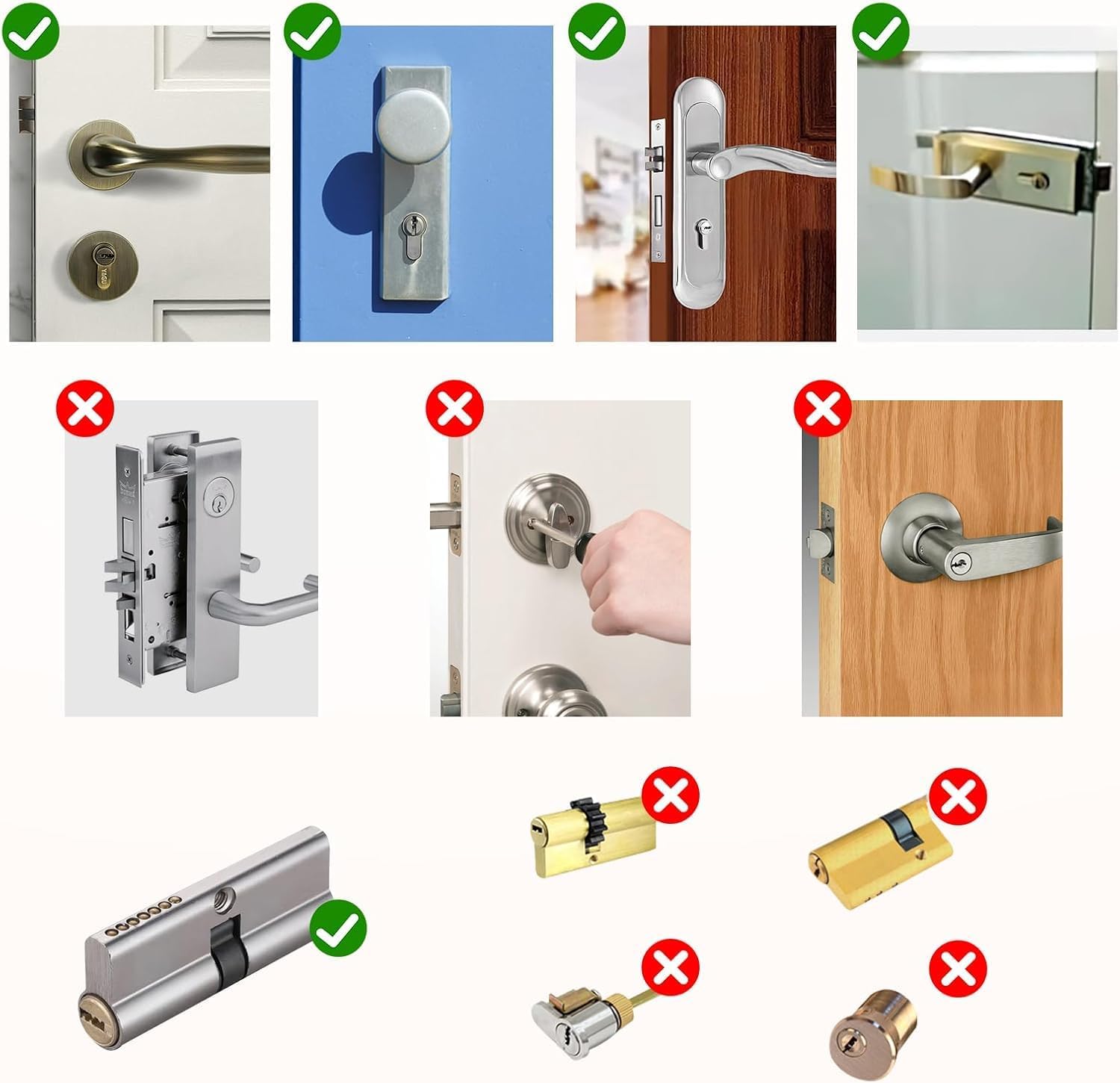
Image: Contents of the AVATTO Smart Door Lock package, including the lock cylinder, physical keys, IC cards, screwdriver, and hex wrenches.
4. Installation Guide
The AVATTO Smart Door Lock is designed for easy replacement and installation, typically taking around 10 minutes without needing to break or change the door body. It is suitable for doors with a thickness of 60mm to 85mm.
4.1 Door Compatibility
Ensure your door and existing lock cylinder are compatible with the AVATTO Smart Door Lock. This lock is designed to replace standard European profile cylinders. Verify the dimensions of your existing cylinder and the lock hole.

Image: Visual guide showing compatible and incompatible door lock types and handles for the AVATTO Smart Door Lock.
Image: Diagram illustrating the required dimensions for the lock cylinder hole: Diameter 20mm, Height 35mm, Width 10mm.

Image: Detailed view of the AVATTO Smart Door Lock, highlighting its extendable inner cylinder (up to 25mm), the fingerprint sensor, and the location for CR123A 1.5V Alkaline Batteries.
4.2 Installation Steps
- Remove Old Cylinder: Unscrew the retaining screw on the side of your door that holds the existing cylinder in place. Insert your key and turn it slightly (about 15-20 degrees) while pulling the cylinder out.
- Adjust New Cylinder: The inner cylinder of the AVATTO lock is adjustable. Extend or retract it to match the thickness of your door. The outer cylinder is fixed at 30mm.
- Insert Batteries: Open the battery compartment on the inner side of the lock and insert CR123A 1.5V Alkaline Batteries (not included).
- Insert New Cylinder: Insert the AVATTO Smart Door Lock cylinder into the door, ensuring it is flush with both sides.
- Secure Cylinder: Re-insert and tighten the retaining screw on the side of the door to secure the new cylinder.
- Test Operation: Test the lock with a physical key to ensure smooth operation before proceeding with smart features setup.

Image: Visual comparison of original and replaced door locks, demonstrating the simple replacement process using a hex screwdriver.
5. Operation
The AVATTO Smart Door Lock offers multiple convenient ways to unlock your door:
5.1 Unlocking Methods
- Fingerprint Unlock: Place your registered fingerprint on the sensor. The lock will verify and unlock.
- RFID Card Unlock: Tap a registered RFID card against the designated area on the lock.
- Smart Life App Unlock: Use the Smart Life or Tuya app on your smartphone. Ensure Bluetooth is enabled and you are within range, or connect via a compatible Wi-Fi hub for remote access.
- Physical Key Unlock: For traditional access or in case of battery depletion, use one of the provided physical keys.

Image: Illustration of the four unlocking methods: Fingerprint, RFID Card, Smart Life App, and Physical Key.
5.2 App Connection (Smart Life / Tuya)
To utilize the smart features, download the Smart Life or Tuya app from your app store. Follow the in-app instructions to pair your lock via Bluetooth. For Wi-Fi connectivity and remote control, a compatible smart home hub (e.g., Tuya Zigbee Gateway) is required.
6. Maintenance
- Battery Replacement: When the battery indicator shows low power, replace all CR123A 1.5V Alkaline Batteries promptly. Do not wait for complete depletion to avoid being locked out.
- Cleaning: Wipe the lock surface with a soft, dry cloth. Avoid using abrasive cleaners or solvents that may damage the finish or electronic components.
- Fingerprint Sensor: Keep the fingerprint sensor clean and dry for optimal performance.
- Mechanical Check: Periodically check the mechanical operation of the lock to ensure it turns smoothly. If resistance is felt, consult a professional.
7. Troubleshooting
- Lock not responding: Check battery levels and replace if necessary. Ensure the lock is properly installed and not obstructed.
- Fingerprint not recognized: Ensure your finger is clean and dry. Re-register your fingerprint if issues persist.
- App connection issues: Ensure Bluetooth is enabled on your phone. If using Wi-Fi, verify your smart home hub is online and properly configured. Try restarting the app or the lock.
- Motor sounds but lock doesn't move: This may indicate a mechanical obstruction or misalignment. Ensure the cylinder is correctly installed and the door mechanism is free of debris. If the issue persists, contact customer support.
- Lock becomes inoperative after rain/humidity: This product is designed for indoor use. Exposure to excessive moisture can cause malfunction. Ensure the lock is protected from direct weather exposure. If damage occurs, contact customer support.
8. Specifications
| Feature | Specification |
|---|---|
| Brand | AVATTO |
| Model Number | SDL-S1-B60 |
| Dimensions (Package) | 25.1 x 10.3 x 7.2 cm |
| Weight | 550 grams |
| Material | Metal |
| Color | Black |
| Connectivity Protocol | Bluetooth, Wi-Fi (via hub) |
| Cylinder Size | 60mm (Inner adjustable 30-55mm, Outer fixed 30mm) |
| Door Thickness Compatibility | 60mm to 85mm |
| Unlock Methods | Fingerprint, RFID, Smart Life App, Physical Key |
| Batteries Required | CR123A 1.5V Alkaline Batteries (Not Included) |
Image: Diagram showing the 60mm cylinder size with inner (adjustable 25mm) and outer (30mm) dimensions, and the overall structure.
9. Warranty and Support
AVATTO products come with a standard manufacturer's warranty. For specific warranty details, please refer to the warranty card included in your package or visit the official AVATTO website. If you encounter any issues or have questions regarding your smart door lock, please contact AVATTO customer support through the contact information provided on the official website or your purchase platform. Please have your model number (SDL-S1-B60) and purchase details ready when contacting support.
Related documentsSDL-S1-B60


Ask a question about this manual
Ask about setup, troubleshooting, compatibility, parts, safety, or missing instructions. Manuals+ will review the question and use this page’s manual context to help answer it.