
Accutime LTY4040AZ
Accutime Disney Toy Story Lightyear Kids Digital Watch User Manual
Model: LTY4040AZ
Introduction
This manual provides essential information for the setup, operation, and maintenance of your Accutime Disney Toy Story Lightyear Kids Digital Watch. Please read this manual thoroughly before using the watch to ensure proper function and longevity.
Product Overview
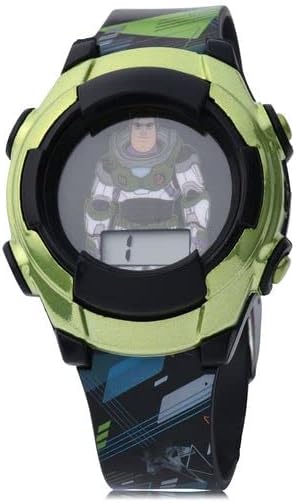

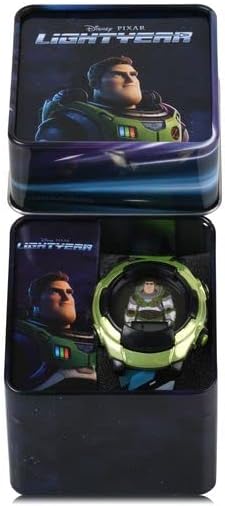

Setup
Unboxing and Initial Inspection
- Carefully remove the watch from its packaging. The watch comes in a kid-friendly, easy-to-open box.
- Inspect the watch for any visible damage.
- Confirm that the watch battery is installed. The watch comes with a pre-installed battery.
Setting the Time
The Accutime Disney Toy Story Lightyear Kids Digital Watch features an easy-to-read LCD digital display. Specific instructions for setting the time are typically found on a small insert within the watch packaging or can be determined by experimenting with the side buttons.
Generally, digital watches have one or more buttons for setting time:
- Mode Button: Often used to cycle through display modes (time, date, alarm).
- Set Button: Used to enter time-setting mode.
- Adjust/Light Button: Used to change values (hours, minutes) or activate the LED flashing lights.
Hint: Pressing and holding the "Mode" or "Set" button for a few seconds usually initiates the time-setting sequence. Then use another button to adjust the flashing digits (hours, then minutes).
Operating Instructions
Reading the Time
The watch features a clear LCD digital display. The time is shown in a standard digital format (e.g., HH:MM).
Activating LED Flashing Lights
This watch includes LED flashing lights for a fun effect. Locate the button on the side of the watch typically labeled "Light" or indicated by a light bulb icon. Press this button to activate the flashing lights. The lights will typically flash for a few seconds and then turn off automatically.
Maintenance
Cleaning
To clean the watch, gently wipe it with a soft, dry cloth. For stubborn dirt, a slightly damp cloth can be used, but ensure no water enters the watch casing. Do not use harsh chemicals or abrasive cleaners.
Battery Replacement
The watch comes with a pre-installed battery. When the display dims or the lights stop flashing, the battery may need replacement. Battery replacement should be performed by a qualified service center to avoid damaging the watch or compromising its integrity. Do not attempt to replace the battery yourself, as this may void the warranty.
Storage
When not in use, store the watch in a cool, dry place away from direct sunlight and extreme temperatures.
Water Resistance
IMPORTANT: This watch is NOT water resistant. Avoid all contact with water, including showering, swimming, or submersion. Discontinue use if immersed in water.
Troubleshooting
| Problem | Possible Cause | Solution |
|---|---|---|
| Display is dim or blank. | Low or dead battery. | Contact a service center for battery replacement. |
| LED lights do not flash. | Low battery or button malfunction. | Ensure battery is not low. If problem persists, contact support. |
| Time is incorrect. | Time needs to be reset. | Refer to "Setting the Time" in the Setup section. |
Specifications
- Model: LTY4040AZ
- Display Type: LCD Digital
- Movement: Quartz
- Features: LED Flashing Lights
- Manufacturer: Accutime Watch Corp.
- Minimum Age: 3+ years
- Water Resistance: Not Water Resistant
- Package Dimensions: 3.82 x 3.27 x 3.07 inches
- Weight: 4.06 ounces
Warranty and Support
This Accutime Disney Toy Story Lightyear Kids Digital Watch comes with a One Year Warranty from Accutime Watch. For warranty claims, technical support, or service inquiries, please contact Accutime Watch Corp. directly.
Manufacturer: Accutime Watch Corp.
Address: 1001 Ave of the Americas, New York, NY 10018
For further assistance, please visit the official Accutime website or refer to the contact information provided with your purchase.
Ask a question about this manual
Ask about setup, troubleshooting, compatibility, parts, safety, or missing instructions. Manuals+ will review the question and use this page’s manual context to help answer it.