
Introduction
Thank you for choosing the FMIIFMS Premium Pro Bluetooth 5.3 Transmitter Receiver. This 2-in-1 wireless audio adapter is designed to enhance your audio experience by enabling Bluetooth connectivity for a wide range of devices. Whether you need to transmit audio from a non-Bluetooth device to Bluetooth headphones or receive audio from a Bluetooth-enabled device to a traditional stereo system, this adapter provides a seamless solution.

Image: The FMIIFMS Bluetooth 5.3 Transmitter Receiver, showcasing its compact design and key features like Wireless 5.3, high fidelity, and plug-and-play functionality.
Product Features
- Bluetooth 5.3 Technology: Equipped with the latest Bluetooth 5.3 for optimized transmission, reduced delay, and improved connection stability compared to older Bluetooth versions.
- 2-in-1 Functionality: Operates as both a Bluetooth transmitter (TX mode) and a Bluetooth receiver (RX mode).
- Compact and Portable Design: Small form factor (3"L x 2"W x 0.5"H, 1.76oz) for easy portability and minimal space occupation.
- Enhanced Call Quality: Features enhanced microphones and CVC8.0 technology to effectively filter out ambient noise for clearer hands-free calls.
- Long Battery Life: Provides up to 10 hours of working time for calls or music playback.
- Fast Charging: Fully charges in approximately 2 hours using the included Type-C cable.
- Universal Compatibility: Standard 3.5mm AUX jack works with a wide range of AUX-enabled devices including TVs, car stereos, home audio systems, headphones, and gym equipment.
Package Contents
Please check the package for the following items:
- FMIIFMS Premium Pro Bluetooth 5.3 Transmitter Receiver
- USB Type-C Charging Cable
- 3.5mm Male-to-Male Audio Adapter
- User Manual

Image: The Bluetooth adapter highlighting its LED indicator lights and a diagram illustrating its 10-meter obstacle-free transmission range.
Device Layout and Controls

Image: A detailed diagram of the FMIIFMS Bluetooth adapter, labeling its AUX port, microphone, RX-TX mode switching switch, TX/RX mode indicator light, Phone/Play button, Previous/Volume Down, Next/Volume Up buttons, and Type-C 5V charging interface.
- AUX Port: 3.5mm audio input/output.
- MIC: Built-in microphone for hands-free calling.
- RX-TX Mode Switching Switch: Slide to select Receiver (RX) or Transmitter (TX) mode.
- TX/RX Mode Indicator Light: Indicates the current operating mode.
- Phone/Play Button: Multi-function button for power, play/pause, and call management.
- Previous Track/Volume Decrease Button: Short press for previous track, long press to decrease volume.
- Next Track/Volume Increase Button: Short press for next track, long press to increase volume.
- Type-C 5V Charging Interface: For charging the device.
Setup
1. Charging the Device
Before initial use, fully charge the adapter. Connect the included Type-C charging cable to the device's charging port and plug the other end into a 5V USB power source. The indicator light will show charging status and turn off when fully charged (approx. 2 hours).
2. Power On/Off
- Power On: Long press the Phone/Play button until the indicator light flashes.
- Power Off: Long press the Phone/Play button until the indicator light turns off.
3. Mode Selection (RX/TX)
Slide the RX-TX mode switching switch to select your desired operating mode:
- RX (Receiver) Mode: For receiving Bluetooth audio from your phone/tablet and playing it through non-Bluetooth speakers/car stereos.
- TX (Transmitter) Mode: For transmitting audio from non-Bluetooth devices (TV, PC) to Bluetooth headphones/speakers.

Image: An illustration demonstrating the two modes of operation: Receiver (RX) for connecting to audio systems and Transmitter (TX) for connecting to headphones or wireless audio devices.
4. Pairing
After selecting the mode, the device will automatically enter pairing mode (indicator light will flash rapidly). Enable Bluetooth on your target device and select "T67" (or similar device name) from the list of available devices to connect.
Video: A demonstration of the wireless audio transmitter and receiver, showing how to connect it to a speaker and pair it with a phone for music playback and call management.
Operating Instructions
1. Receiver (RX) Mode
In RX mode, the adapter receives audio from your Bluetooth-enabled device (e.g., smartphone, tablet) and outputs it to a non-Bluetooth audio system (e.g., car stereo, home amplifier, wired headphones).
- Switch the adapter to RX mode.
- Connect the adapter to your audio system's 3.5mm AUX input using the provided adapter or an AUX cable.
- Pair your Bluetooth-enabled device with the adapter.
- Play audio on your device; it will now stream wirelessly to your connected audio system.
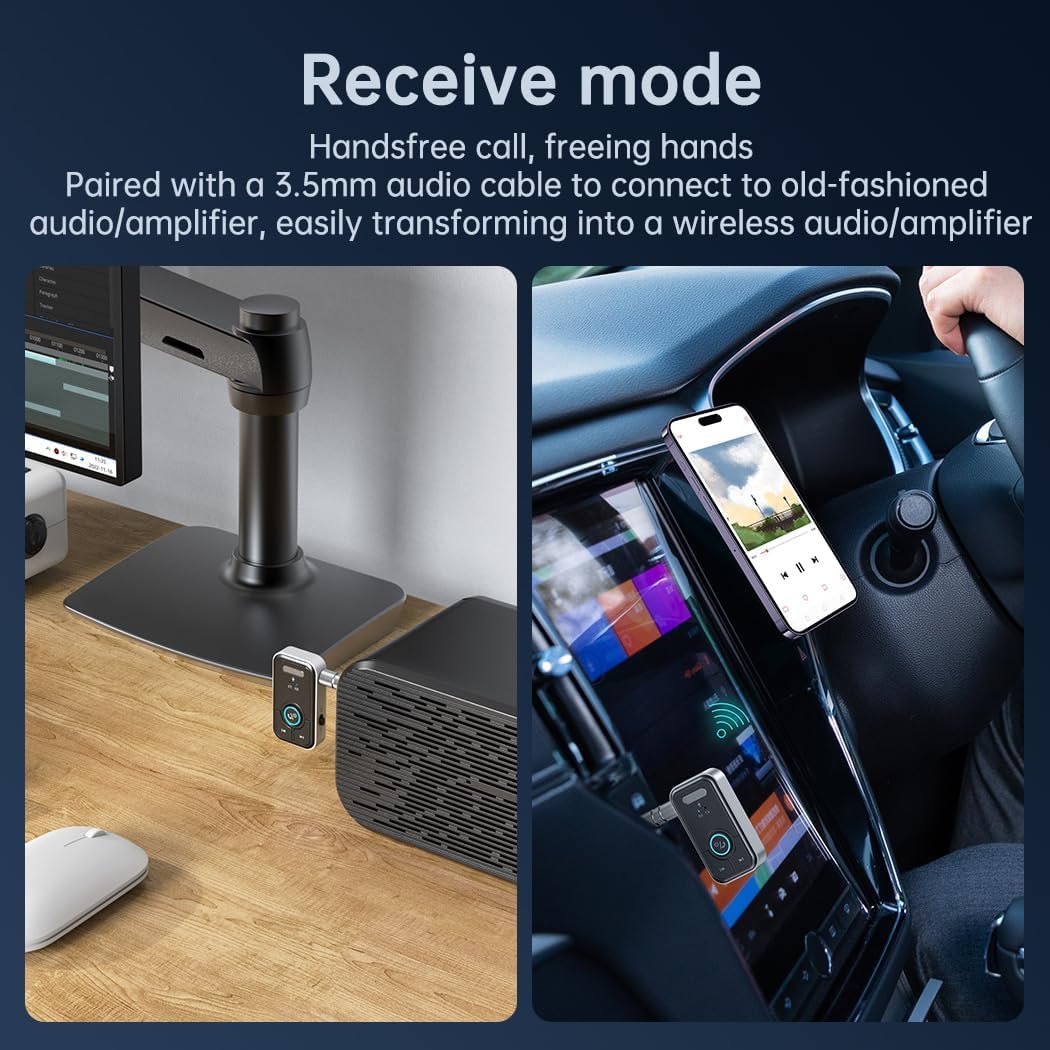
Image: The Bluetooth adapter in Receiver (RX) mode, demonstrating its use for hands-free calls in a car and connecting to a desktop speaker to enable wireless audio reception.
2. Transmitter (TX) Mode
In TX mode, the adapter takes audio from a non-Bluetooth device (e.g., TV, PC, MP3 player) and transmits it wirelessly to your Bluetooth headphones or speakers.
- Switch the adapter to TX mode.
- Connect the adapter to your audio source's 3.5mm AUX output.
- Ensure your Bluetooth headphones/speakers are in pairing mode.
- The adapter will automatically search and connect to your Bluetooth audio device.

Image: The Bluetooth adapter in Transmitter (TX) mode, illustrating its use to connect a TV to wireless headphones, allowing for private listening without disturbing others.
3. Hands-Free Calling (RX Mode Only)
When in RX mode and connected to your smartphone:
- Answer Call: Short press the Phone/Play button.
- End Call: Short press the Phone/Play button during a call.
- Reject Call: Long press the Phone/Play button.
4. Music Control
- Play/Pause: Short press the Phone/Play button.
- Next Track: Short press the 'Next Track' button.
- Previous Track: Short press the 'Previous Track' button.
- Volume Up: Long press the 'Next Track' button.
- Volume Down: Long press the 'Previous Track' button.
Video: A demonstration of the Bluetooth 5.3 AUX Adapter for Car, showing its connection to a car stereo and how to control music playback and answer calls using the device's buttons.
Maintenance
To ensure the longevity and optimal performance of your FMIIFMS Bluetooth adapter, please follow these maintenance guidelines:
- Cleaning: Use a soft, dry cloth to clean the device. Avoid using harsh chemicals, cleaning solvents, or strong detergents.
- Storage: Store the device in a cool, dry place away from direct sunlight and extreme temperatures.
- Avoid Moisture: Do not expose the device to water or excessive moisture.
- Handle with Care: Avoid dropping or subjecting the device to strong impacts.
- Charging: Use only the provided Type-C cable for charging. Do not overcharge the device.
Troubleshooting
| Problem | Possible Cause | Solution |
|---|---|---|
| Device does not power on. | Low battery. | Charge the device fully using the Type-C cable. |
| Cannot pair with a Bluetooth device. | Incorrect mode selected; device not in pairing mode; target device too far or Bluetooth off. | Ensure correct RX/TX mode is selected. Confirm device is flashing rapidly (pairing mode). Bring devices closer. Ensure Bluetooth is enabled on the target device. |
| No audio output/input. | Incorrect cable connection; volume too low; wrong audio source selected on connected device. | Check 3.5mm AUX cable connection. Adjust volume on both the adapter and the connected audio device. Ensure the correct audio input/output is selected on your stereo/TV. |
| Poor audio quality or static. | Interference; device too far from connected device. | Reduce distance between the adapter and the connected Bluetooth device. Move away from potential sources of interference (e.g., Wi-Fi routers, other wireless devices). |
Specifications
| Feature | Detail |
|---|---|
| Brand | FMIIFMS |
| Model | B0C53Z3QBY |
| Bluetooth Standard | Bluetooth 5.3 |
| Connectivity Technology | 3.5 mm, AUX, Bluetooth |
| Operating Modes | Transmitter (TX), Receiver (RX) |
| Power Source | Battery Powered (Rechargeable Lithium Polymer) |
| Battery Capacity | 300 mAh (approx.) |
| Charging Time | Approx. 2 hours (via Type-C) |
| Working Time | Up to 10 hours (calls/music) |
| Product Dimensions (L x W x H) | 3" x 2" x 0.5" (7.62 cm x 5.08 cm x 1.27 cm) |
| Item Weight | 0.05 Kilograms (1.76 oz) |
| Audio Input | 3.5mm audio jack |
| Audio Output Mode | Stereo (2 Channels) |
| Control Method | Touch buttons |
| Supported Media Type | MP3, WAV |
Safety Information
Please read and adhere to the following safety precautions to prevent damage to the device or personal injury:
- Battery Handling: Improper battery handling may result in fire, explosion, or other hazards. Do not disassemble, crush, or expose the battery to extreme heat or fire.
- Interference: This device may cause interference with other wireless devices. Maintain a reasonable distance from other electronics to ensure optimal performance.
- Environmental Conditions: Avoid using the device near water or in environments with extreme temperatures (hot or cold).
- Disposal: Dispose of the device and its battery according to local regulations. Do not dispose of in household waste.
Warranty and Support
For warranty information and customer support, please refer to the documentation included with your purchase or contact the seller directly. Keep your purchase receipt as proof of purchase for any warranty claims.