
1. Introduction
This manual provides comprehensive instructions for the proper use and maintenance of your KSADBOSSBO 870B Body Camera. Please read this manual thoroughly before operating the device to ensure optimal performance and longevity.
2. Product Overview and Package Contents
The KSADBOSSBO 870B is a compact body camera designed for video and audio recording. It features 1080P resolution, 64GB built-in storage, motion detection, and IP64 waterproofing, making it suitable for various outdoor and security applications.
Package Contents:
- KSADBOSSBO Body Camera (built-in 64GB card) x 1
- Removable clips x 1
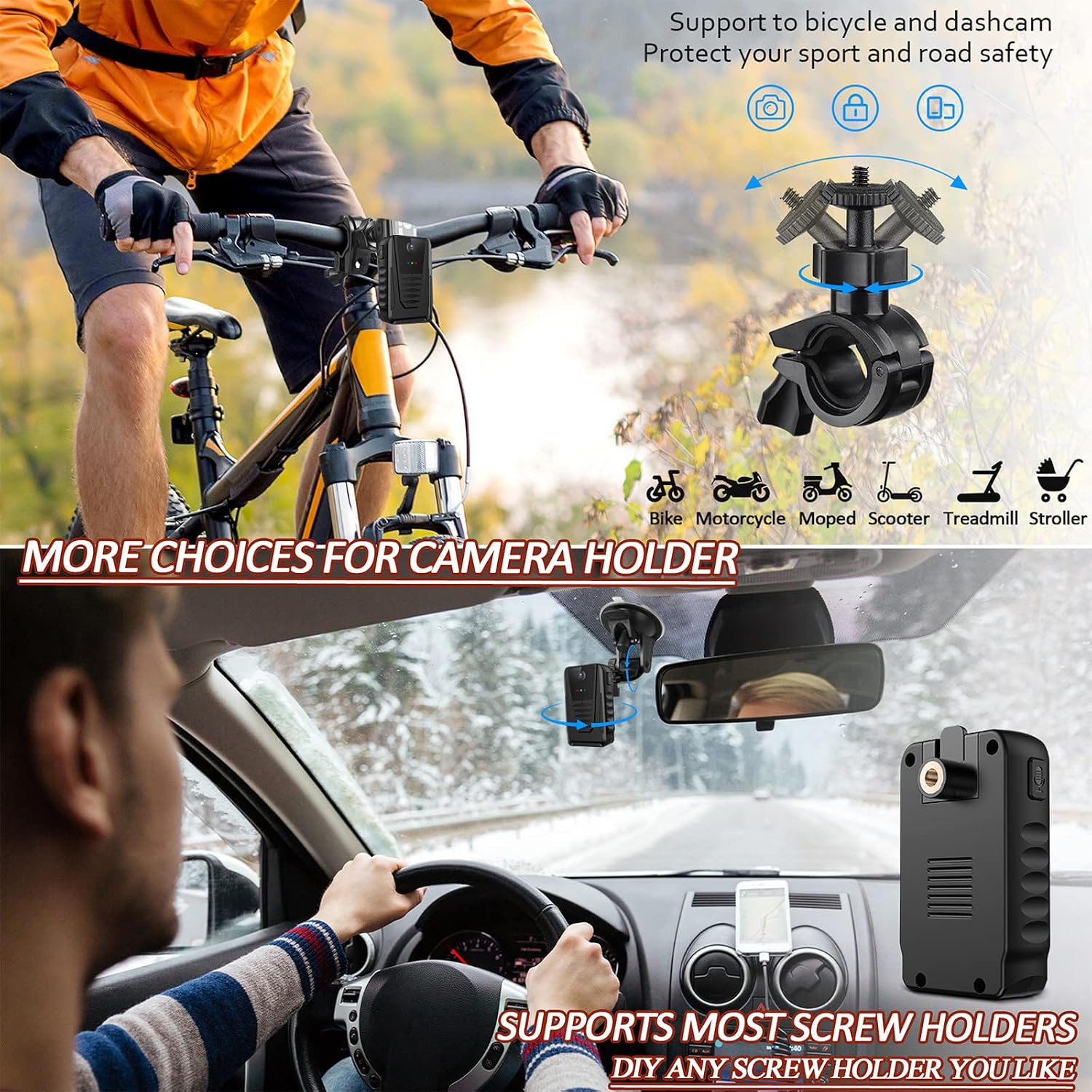
- 1/4 Screw clamp suit for car / bike holder x 1
- User manual x 1
- USB card reader & Card pin x 1

Component Identification:
Refer to the diagram below for key component identification:

3. Setup
3.1 Charging the Battery
The camera is equipped with a built-in 1050mAh rechargeable battery. Before first use, fully charge the camera.
- Connect the camera to a power source using the provided USB-C cable.
- The charging indicator LED will illuminate during charging.
- A full charge provides approximately 5 hours of recording time and up to 6-7 hours of standby time.
- The camera supports 24/7 recording when continuously connected to a power source or power bank.
3.2 Memory Card
The camera comes with a built-in 64GB memory card. It supports up to a 128GB SD card (not included) for extended storage.
- The camera features loop recording, which creates 5-minute footage segments. When the memory limit is reached, the oldest recordings are automatically overwritten to make space for new footage.
3.3 Attaching Mounts
The KSADBOSSBO 870B includes two types of changeable clips for versatile mounting options:
- Standard Clip: For attaching the camera to clothing, pockets, or straps.
- 1/4 Screw Clamp: Designed for compatibility with most car and bike holders, utilizing a standard 1/4-inch screw hole.

To replace the mounts:
- To remove: Push backward and pull up the existing clip simultaneously.
- To attach: Push down and push backward the new clip simultaneously until it clicks into place.
4. Operating Instructions
4.1 Power On/Off
- To power on: Press and hold the Video Rec Button (Power ON/OFF) until the indicator light illuminates.
- To power off: Press and hold the Video Rec Button (Power ON/OFF) until the indicator light turns off.
4.2 Video Recording
- To start recording: Briefly press the Video Rec Button. The blue Video Rec Indicator LED will flash.
- To stop recording: Briefly press the Video Rec Button again. The blue LED will stop flashing.
4.3 Motion Detection Recording
The camera features a motion detection mode, effective up to 13 feet.
- To activate motion detection: Press the left button on the camera. The green Motion Rec Indicator LED will illuminate.
- In this mode, the camera will automatically begin recording when motion is detected and stop when motion ceases.
- To deactivate motion detection: Press the left button again. The green LED will turn off.
4.4 No LED Recording Mode
For discreet recording, you can disable the indicator LEDs.
- To activate No LED Recording Mode: Press two specific buttons on the camera simultaneously (refer to the product diagram for exact button locations).
- To deactivate: Repeat the same action.
4.5 Accessing Recordings
Recordings can be accessed directly from the camera or via the included card reader.

- Direct Connection: Connect the camera to a computer using the USB-C cable. The camera will be recognized as a removable storage device (compatible with most operating systems except iOS).
- Using Card Reader: For iOS users or for direct access to the SD card, insert the camera's SD card into the provided USB card reader, then connect the reader to your computer or compatible device.
5. Maintenance
5.1 Waterproofing
The KSADBOSSBO 870B Body Camera is rated IP64 waterproof, meaning it is protected from dust ingress and splashing water from any direction. This makes it suitable for outdoor use and riding in light rain.
- Important: The camera is not designed for submersion. Avoid using it in heavy rain or while swimming, as it is not fully waterproof.

5.2 Cleaning
- Wipe the camera body with a soft, dry cloth.
- For stubborn dirt, slightly dampen the cloth with water. Avoid using harsh chemicals or abrasive cleaners.
- Gently clean the lens with a microfiber cloth designed for optics.
6. Troubleshooting
6.1 Camera Not Turning On
- Ensure the battery is charged. Connect the camera to a power source and allow it to charge for at least 30 minutes before attempting to power on again.
- If the camera still does not turn on, try performing a reset using the reset pin in the reset hole (refer to the Component Identification diagram).
6.2 Recording Issues
- No recording: Check if the memory card is properly inserted and has sufficient space. The loop recording feature will overwrite old files when full.
- Poor video quality: Ensure the lens is clean and free from smudges or dirt.
6.3 Playback Issues on Computer
- Ensure your computer has a compatible media player installed (e.g., VLC Media Player, which is widely recommended for various video formats).
- If using VLC, and it prompts to build an index or stops playback, try updating VLC to the latest version or using a different media player.
- Ensure the camera is properly connected via USB or the SD card is correctly inserted into the card reader.
7. Specifications
| Feature | Specification |
|---|---|
| Model Name | 870B Body Camera |
| Video Capture Resolution | 1080p |
| Viewing Angle | 130 Degrees |
| Frame Rate | 30 fps |
| Built-in Storage | 64GB Micro SD card (included) |
| Max SD Card Support | 128GB |
| Battery Life | 6-7 hours (standby), approx. 5 hours (recording) |
| Water Resistance Level | IP64 Waterproof |
| Motion Detection | Yes (up to 13 ft) |
| Night Vision | No |
| Connectivity Technology | Wireless (No Bluetooth & Wi-Fi) |
| Video Encoding | H.264 |
| Material | Plastic |
| Item Weight | 4.2 ounces |
8. Warranty and Support
KSADBOSSBO is committed to providing quality products and customer service.
8.1 Warranty Information
- Your KSADBOSSBO 870B Body Camera comes with a 1-year limited guarantee.
- This warranty includes replacement service for manufacturing defects.
8.2 Customer Support
For any questions or assistance with your product, please contact our customer service team:
- Online: Visit the product page on Amazon and use the "Customer questions & answers" section.
- Email: Refer to the contact information provided in your physical user manual for direct email support.
Our professional after-sales service team is available 24/7 and aims to respond to all inquiries within 24 hours.


