1. Introduction
Thank you for choosing the ZAFRO 13000 BTU Portable Air Conditioner. This appliance is designed to provide efficient cooling, dehumidification, and fan functions for rooms up to 600 sq. ft. This manual provides important information for the proper installation, operation, and maintenance of your unit. Please read it thoroughly before use and retain it for future reference.
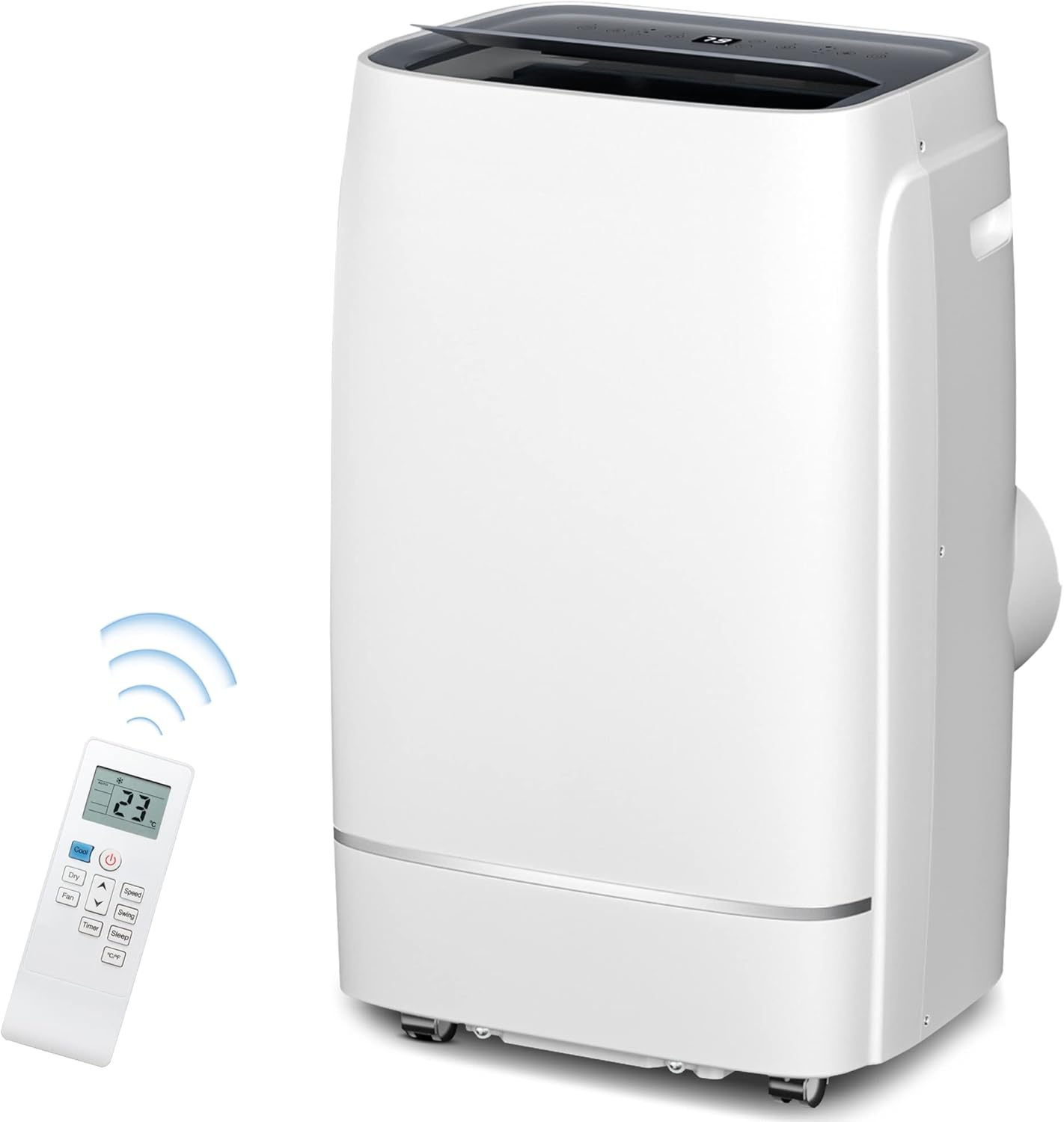
Image: ZAFRO Portable Air Conditioner unit with its remote control.
2. Safety Information
Always follow basic safety precautions when using electrical appliances to reduce the risk of fire, electric shock, and injury.
- Ensure the power supply matches the voltage specified on the unit's rating label (240 Volts).
- Do not operate the unit with a damaged cord or plug.
- Do not block air inlets or outlets. Maintain at least 20 inches of clearance around the unit.
- Do not insert fingers or foreign objects into the air inlets or outlets.
- Always unplug the unit before cleaning or servicing.
- Keep the unit on a flat, stable surface to prevent tipping.
- This appliance uses R410A refrigerant. Servicing should only be performed by qualified personnel.
3. Package Contents
Verify that all components are present in the package:
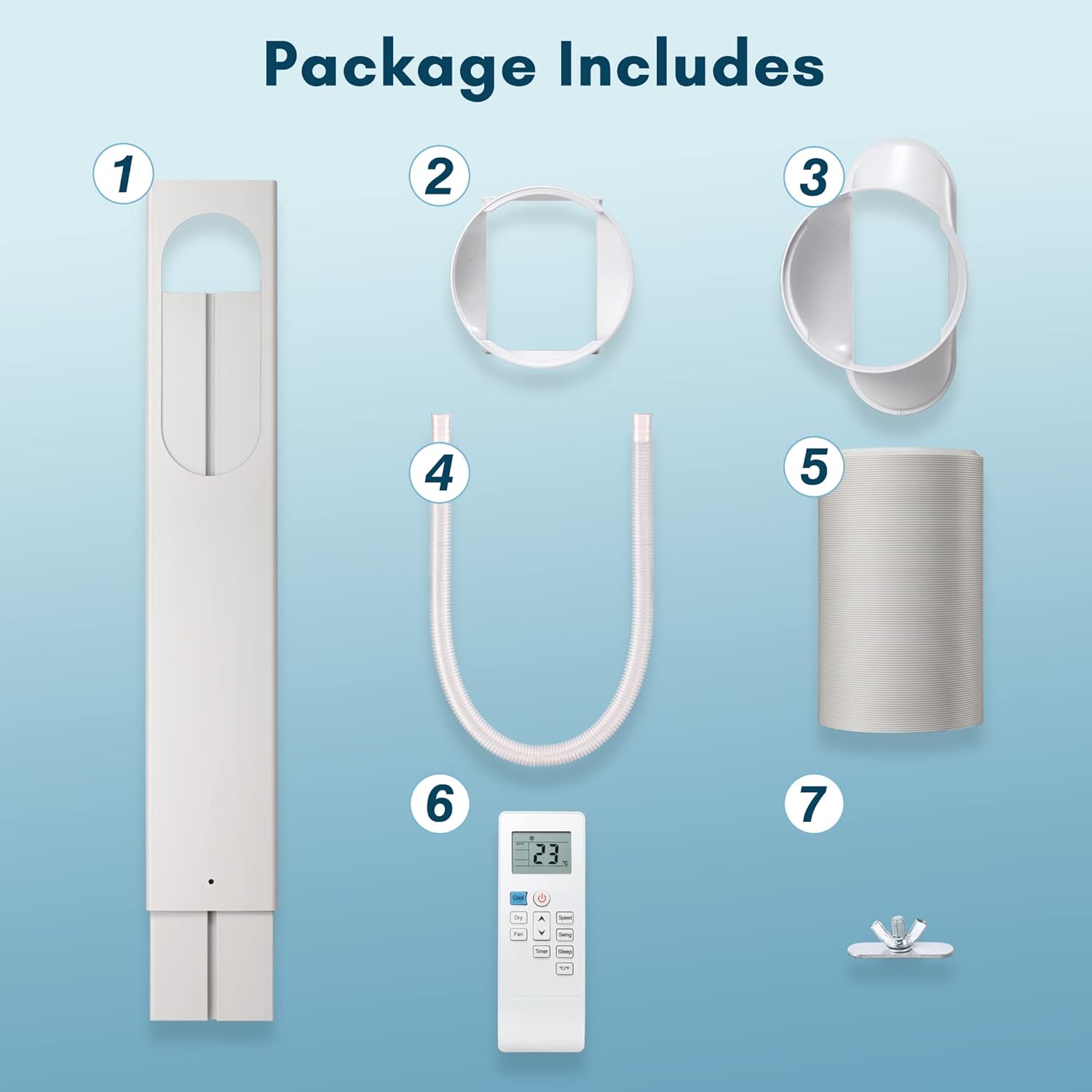
Image: All components included in the ZAFRO Portable Air Conditioner package.
- Window Sealing Plate
- Exhaust Hose Adapter (Unit Side)
- Exhaust Hose Adapter (Window Side)
- Drain Hose
- Exhaust Hose
- Remote Control
- Screw for Window Kit
4. Setup and Installation
4.1 Unit Placement
Place the portable air conditioner on a flat, stable surface in the room you wish to cool. Ensure there is at least 20 inches of space around the unit for proper airflow.
4.2 Window Kit Installation
The window kit is designed for easy installation in both double/single-hung windows and sliding slash windows, accommodating widths from 26 to 50 inches.
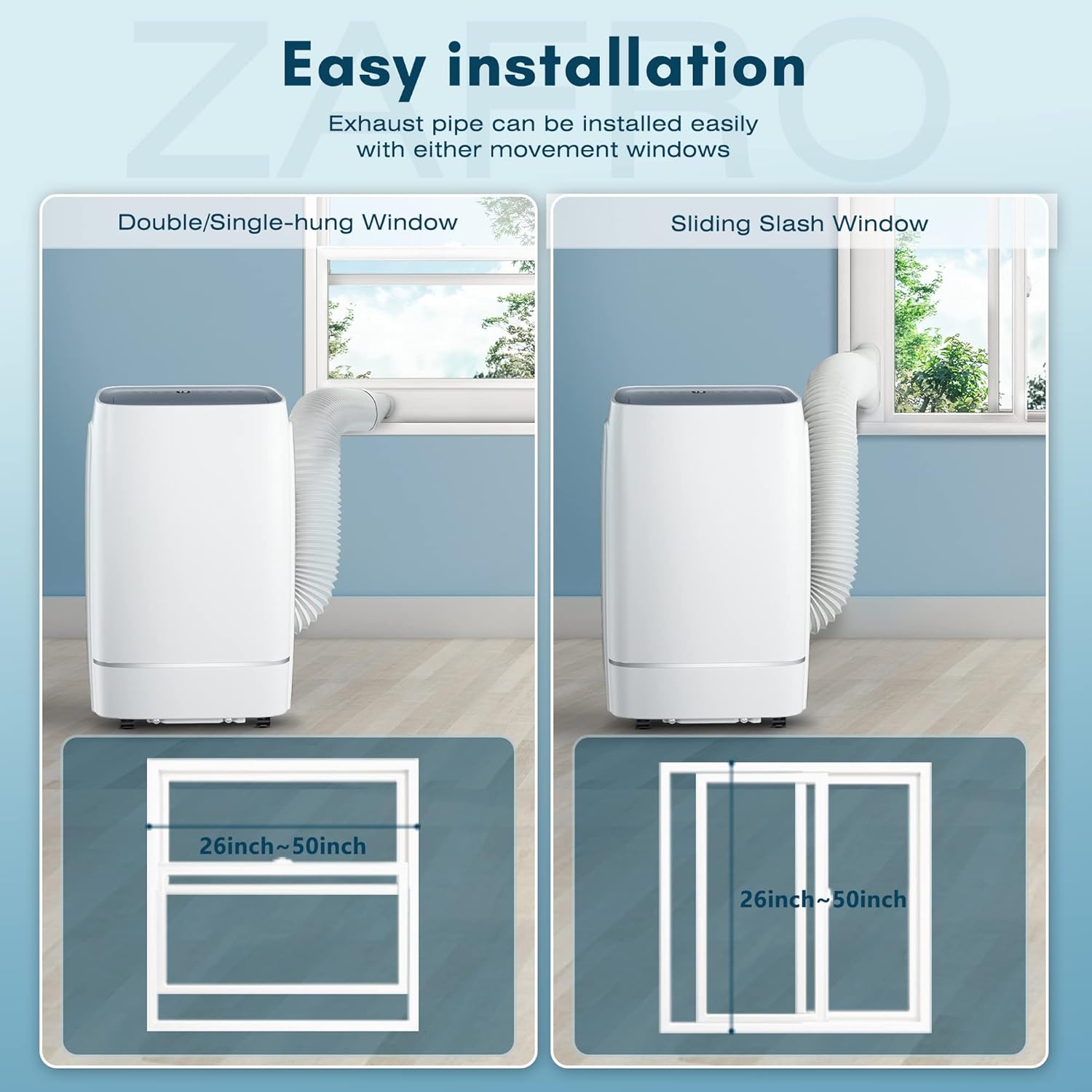
Image: Easy installation of the exhaust pipe for various window types.
- Assemble the window sealing plate to fit your window opening.
- Attach the exhaust hose adapter (window side) to the window sealing plate.
- Connect the exhaust hose to the adapter on the window sealing plate.
- Connect the other end of the exhaust hose to the exhaust hose adapter (unit side), then attach it to the air outlet on the back of the portable AC unit.
- Secure the window kit in place, ensuring a tight seal to prevent air leakage.
4.3 Drainage Setup
For continuous dehumidification or in high humidity environments, connect the drain hose to the appropriate drain outlet. The unit has both upper and lower drain plugs. Note that the lower drain plug is very close to the floor, and you may need to elevate the unit or use a shallow pan for effective drainage.
5. Operating Instructions
The ZAFRO Portable Air Conditioner offers three functional modes: Cool, Dehumidifier, and Fan. Control the unit using either the control panel on top of the unit or the included remote control.
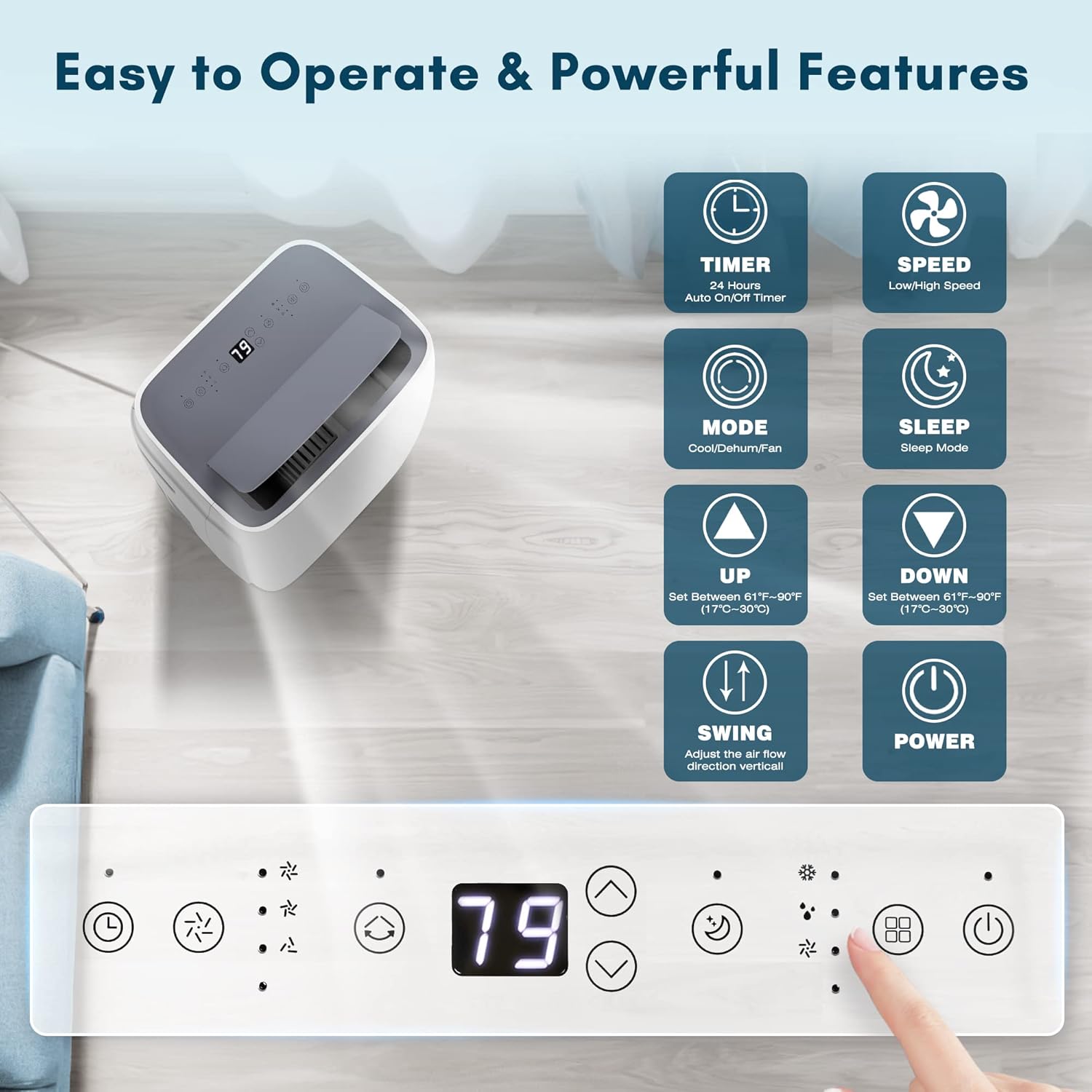
Image: Control panel and remote functions.

Image: Three operational modes: Cool, Fan, and Dry.
5.1 Power On/Off
Press the POWER button to turn the unit on or off.
5.2 Mode Selection
Press the MODE button to cycle through the available modes:
- Cool Mode: Provides 13000 BTU cooling for rooms up to 600 sq. ft. Set desired temperature using the UP and DOWN buttons (61°F-95°F).
- Dehumidifier Mode (Dry): Removes moisture from the air at a rate of 1.2-1.3 L/H.
- Fan Mode: Circulates air without cooling. Choose between Low and High fan speeds using the SPEED button.
5.3 Timer Function
Use the TIMER button to set an auto ON/OFF timer within a 24-hour range.
5.4 Sleep Mode
Activate SLEEP mode for quiet operation (≤ 52dB) during the night. In this mode, the set temperature will increase by 2°F per hour to ensure comfortable sleep.

Image: Sleep mode features for quiet operation.
5.5 Auto Swing Function
Press the SWING button to activate the automatic vertical swing of the air outlet baffle (15-80°). This helps distribute cool air evenly throughout the room.

Image: Auto Swing Function for even air distribution.
6. Maintenance
Regular maintenance ensures optimal performance and extends the lifespan of your portable air conditioner.
6.1 Air Filter Cleaning
The unit is equipped with a detachable and reusable air filter. It is recommended to clean the filter once a week during operation to protect your living space from dust and pet hair and maintain efficiency.
- Unplug the unit from the power outlet.
- Remove the air filter from its housing.
- Clean the filter with a vacuum cleaner or wash it gently with warm, soapy water.
- Rinse thoroughly and allow the filter to air dry completely before reinserting it.
6.2 Water Drainage
The unit is designed to recycle moisture to improve cooling efficiency, which reduces the amount of water needing drainage. However, in dehumidifier mode or high humidity, water will accumulate. Periodically check and drain the water from the unit using the drain hose. Ensure the unit is elevated if using the lower drain plug to allow for proper drainage into a container.
6.3 Storage
Before long-term storage, ensure the unit is completely drained of water and the filter is clean and dry. Store the unit in a cool, dry place, preferably covered to protect it from dust.
7. Troubleshooting
Refer to this section for common issues and their solutions. If the problem persists, contact customer support.
| Problem | Possible Cause | Solution |
|---|---|---|
| Unit does not turn on. | No power supply; Power cord not plugged in; Circuit breaker tripped. | Check power outlet; Ensure plug is fully inserted; Reset circuit breaker. |
| Unit does not cool effectively. | Air filter is dirty; Room size too large; Doors/windows open; Exhaust hose not properly installed. | Clean air filter; Ensure room size is within 600 sq. ft.; Close all doors and windows; Check exhaust hose for proper connection and no kinks. |
| Excessive noise. | Unit not on a level surface; Internal component issue (e.g., fan blade). | Place unit on a flat, stable surface. If noise persists or sounds like grinding/shredding, contact customer support. |
| Water leakage. | Drain plug not securely closed; Drain hose clogged or improperly connected. | Ensure drain plugs are tightly sealed. Check drain hose for clogs or proper connection. |
| Remote control not working. | Batteries are dead or incorrectly inserted. | Replace batteries; Ensure correct polarity. |
8. Specifications
| Feature | Detail |
|---|---|
| Model Number | A4215-13K |
| Cooling Capacity | 13000 BTU |
| Coverage Area | Up to 600 Sq. Ft. |
| Functions | Cool, Dehumidifier, Fan |
| Dehumidification Capacity | 1.2-1.3 L/H (50 Pints) |
| Power Source | Corded Electric |
| Voltage | 240 Volts |
| Wattage | 3809 watts |
| Noise Level | ≤ 52 dB |
| Refrigerant | R 410A |
| Item Weight | 62.9 pounds |
| Product Dimensions | 13.2 x 17.7 x 27.7 inches |
| Filter Type | Detachable and Reusable Air Filter |
9. Warranty and Support
ZAFRO is committed to providing high-quality appliances and customer satisfaction. For any questions, issues, or warranty claims, please contact ZAFRO customer support. Please have your model number (A4215-13K) and purchase information ready when contacting support.
You can typically find support contact information on the ZAFRO official website or through your retailer's customer service portal.


