
1. Important Safety Information
Please read all safety warnings and instructions carefully before using the Creliver Electronic Muscle Stimulator AST-300A. Failure to follow these instructions may result in injury or device malfunction.
- Do not use if you have a pacemaker, implantable defibrillators, or other implanted electronic devices.
- Do not use in patients being treated for, or who have symptoms of, an existing Deep Vein Thrombosis (DVT).
- Do not use on pregnant women or children.
- Do not use in patients with heart disease, heart failure, or arrhythmia.
- Do not use TENS pads on open wounds or at sites of rash or inflammation.
- Always consult your physician before use, especially if you have any pre-existing medical conditions.

Figure 1: Important safety warnings and contraindications.
2. Product Overview
The Creliver Electronic Muscle Stimulator AST-300A is a portable, adapter-powered device designed for muscle stimulation and pain relief. It combines Transcutaneous Electronic Nerve Stimulation (TENS) and Powered Muscle Stimulation (PMS) technologies. The device features an ON/OFF switch, a clear display screen, mode selection keys, and intensity modification keys for easy operation.
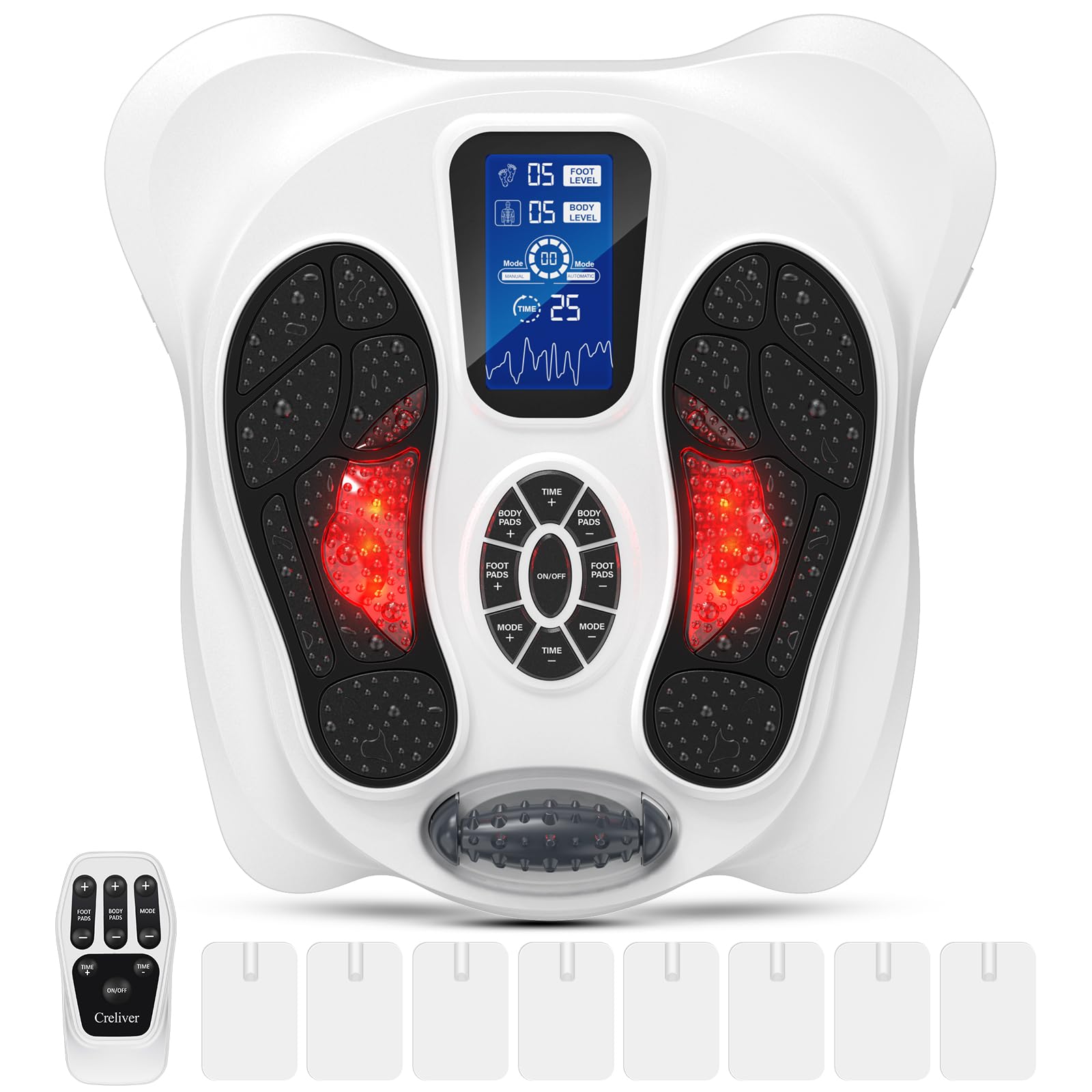
Figure 2: Creliver Electronic Muscle Stimulator AST-300A with remote and body pads.
Video 1: Demonstration of the Creliver Electronic Muscle Stimulator AST-300A's features and usage, including foot stimulation and body pad application for pain relief.
3. Setup
- Unpack the Device: Carefully remove the AST-300A stimulator, power adapter, remote control, and body pads from the packaging.
- Connect Power: Plug the power adapter into the device's power input port, then connect it to a standard electrical outlet.
- Position the Device: Place the device on a flat, stable surface where you can comfortably sit and place your feet on the foot pads.
- Prepare for Use: Ensure your feet are clean and dry before placing them on the foot pads.

Figure 3: Examples of comfortable usage positions for the device.
4. Operating Instructions
The AST-300A can be operated using the control panel on the device or the included remote control.
4.1 Power On/Off
- Press the ON/OFF button on the device or remote to turn the unit on or off.
4.2 Mode Selection
- Press the MODE + or MODE - buttons to cycle through the available stimulation modes. The selected mode number will be displayed on the screen.
4.3 Intensity Adjustment
- For foot stimulation, use the FOOT PADS + or FOOT PADS - buttons to increase or decrease the intensity.
- For body pad stimulation, use the BODY PADS + or BODY PADS - buttons to adjust intensity.
- Start with the lowest intensity and gradually increase until you feel a comfortable, yet effective, sensation.
4.4 Timer Setting
- Press the TIME + or TIME - buttons to set the desired treatment duration. The default session length is 25 minutes.

Figure 4: User's feet on the device, illustrating the display and controls.
5. Modes and Intensity Levels
The AST-300A offers a variety of stimulation options to suit individual needs:
- 25 Stimulation Modes: These modes provide different pulse patterns and frequencies for varied therapeutic effects.
- 99 Intensity Levels: Allows for precise adjustment of stimulation strength, from gentle to strong.
- 25-Minute Timer: Sessions are typically set for 25 minutes, after which the device will automatically power off.
The Creliver Medic Program combines clinical testing with realistic massage simulation to provide effective relief for conditions such as plantar fasciitis, neuropathy, poor circulation, and swelling.

Figure 5: Target users and conditions addressed by the device.
6. Using Body Pads
In addition to foot stimulation, the AST-300A includes body pads for targeted relief on other areas of the body.
- Connect Body Pads: Plug the body pad cables into the designated ports on the side of the main unit.
- Apply Pads: Attach the adhesive body pads to clean, dry skin on areas such as the shoulder, waist, back, neck, arm, or leg. Ensure good skin contact.
- Adjust Intensity: Use the BODY PADS + or BODY PADS - buttons to adjust the stimulation intensity for the body pads independently from the foot pads.
- Remove Pads: After use, gently peel the body pads off your skin. Store them on their protective film to maintain adhesiveness.

Figure 6: Close-up of the device's foot pads and a graph illustrating stable performance.
7. Maintenance and Care
- Cleaning: Wipe the device and foot pads with a soft, damp cloth. Do not use abrasive cleaners or immerse the device in water.
- Body Pads: Clean the adhesive side of the body pads with a small amount of water if they lose stickiness. Replace pads when they no longer adhere properly.
- Storage: Store the device in a cool, dry place away from direct sunlight and extreme temperatures. Keep out of reach of children.
- Power Adapter: Always use the original power adapter provided with the device.
8. Troubleshooting
If you encounter any issues with your Creliver Electronic Muscle Stimulator AST-300A, please refer to the following common problems and solutions:
| Problem | Possible Cause | Solution |
|---|---|---|
| Device does not power on. | No power connection or faulty adapter. | Ensure the power adapter is securely plugged into the device and a working electrical outlet. Try a different outlet. |
| No sensation during use. | Intensity too low, poor skin contact, or dry skin. | Increase intensity gradually. Ensure feet are firmly on the pads or body pads have good contact. Lightly moisten skin if it's too dry. |
| Body pads not sticking. | Pads are dirty or worn out. | Clean the adhesive surface with a damp cloth. If stickiness does not return, replace the body pads. |
| Remote control not working. | Battery depleted or obstruction. | Replace the remote control battery. Ensure no objects are blocking the signal path to the device. |
9. Specifications
| Feature | Detail |
|---|---|
| Model Number | AST-300A |
| Brand Name | Creliver |
| Power Source | Adapter Powered |
| Massager Form | Foot Massager Machine |
| Product Benefits | Pain Relief, Circulation Improvement |
| Target Use Body Part | Foot, Shoulder, Waist, Back, Neck, Arm, Leg |
| Stimulation Modes | 25 |
| Intensity Levels | 99 |
| Timer | Up to 25 minutes |
| Water Resistance Level | Not Water Resistant |
| Color | White |
| UPC | 658099568774 |
10. Warranty and Support
Creliver is committed to providing quality products and customer satisfaction.
- Lifetime Limited Service: The product comes with a lifetime limited service. Please refer to the official Creliver website or contact customer support for details.
- Technical Support: 24-hour technical support is available to assist with any product inquiries or issues.
- Returns: A 30-day free return policy is offered.
For further assistance, please visit the Creliver Store on Amazon.

Figure 7: Creliver customer support team.