1. Introduction
This manual provides instructions for the VINABTY RM-SDR044U replacement remote control. This remote is designed to function as a direct replacement for the original remote controls of various JVC DVD Recorder & VCR models, including DR-MV5, DR-MV5S, DR-MV5BEU, DR-MV5SAA, DR-MV5SAX, DR-MV5SER, DR-MV5SEU, DR-MV5SUC, DR-MV5SUS, DR-MV5SE, DR-MV5BE, DRMV5SUS2, and DRMV5SUS3. No programming is required for operation.
2. Setup
2.1 Battery Installation
To begin using your remote control, install two AAA batteries into the battery compartment. Ensure the batteries are inserted with the correct polarity (+ and -) as indicated inside the compartment.
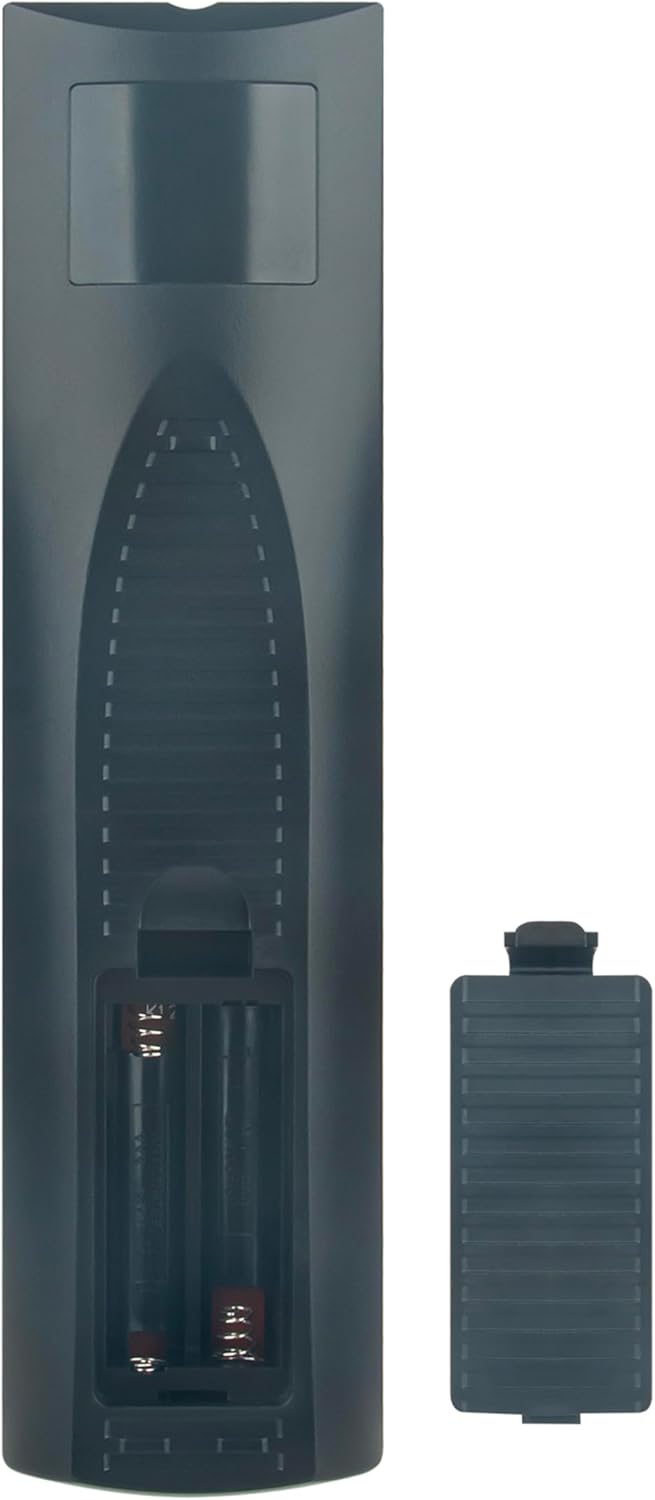
Image: Back view of the remote control with the battery compartment open, ready for AAA battery insertion.
2.2 Initial Use
This replacement remote control requires no programming. Once batteries are correctly installed, it is ready for immediate use with compatible JVC DVD Recorder & VCR models.
3. Operating Instructions
Point the remote control directly at your JVC DVD Recorder & VCR. Ensure there are no obstructions between the remote and the device's infrared receiver. Press the desired function buttons to control your device.

Image: Front view of the RM-SDR044U remote control, highlighting its button layout and design.
Refer to your JVC DVD Recorder & VCR's original user manual for specific functions of each button, as this remote replicates the functionality of the original unit.
4. Maintenance
4.1 Cleaning
To clean the remote control, use a soft, dry cloth. Do not use liquid cleaners or abrasive materials, as these can damage the surface or internal components.
4.2 Battery Replacement
Replace batteries when the remote control's response becomes sluggish or stops working. Always replace both batteries simultaneously with new AAA batteries. Remove batteries if the remote will not be used for an extended period to prevent leakage.

Image: Back view of the remote control, illustrating the battery cover.
5. Troubleshooting
5.1 Remote Not Responding
- Check Batteries: Ensure batteries are correctly inserted with the proper polarity and are not depleted. Replace with new AAA batteries if necessary.
- Line of Sight: Verify there are no objects blocking the path between the remote control and the JVC device's infrared sensor.
- Distance: Ensure you are within the effective operating range of the remote control.
5.2 Intermittent Operation
- This often indicates low battery power. Replace batteries.
- Ensure the remote's infrared emitter is clean and free from dust or debris.
6. Specifications
| Feature | Detail |
|---|---|
| Model Number | RM-SDR044U |
| Brand | VINABTY |
| Compatible Devices | JVC DVD Recorder & VCR (DR-MV5 series) |
| Connectivity Technology | Infrared |
| Special Feature | No Programming Required |
| Battery Type | 2 x AAA Batteries (not included) |
| Product Dimensions | 8.1 x 2 x 0.7 inches |
| Item Weight | 2.6 ounces |
7. Warranty and Support
For any issues or support inquiries regarding your VINABTY RM-SDR044U remote control, please contact the seller or retailer from whom you purchased the product. They can provide assistance with troubleshooting or warranty claims according to their policies.


