
1. Introduction and Product Overview
This manual provides essential information for the safe and efficient operation of your Mistral MAC2300R Air Cooler. Please read it thoroughly before use and retain it for future reference.
The Mistral MAC2300R is a 25-liter detachable air cooler designed to provide effective cooling and air purification. Key features include plasma sterilisation for improved air quality, a convenient 9-hour timer, and remote control operation for ease of use. It also incorporates a built-in ionizer and humidifying function to enhance your indoor comfort.
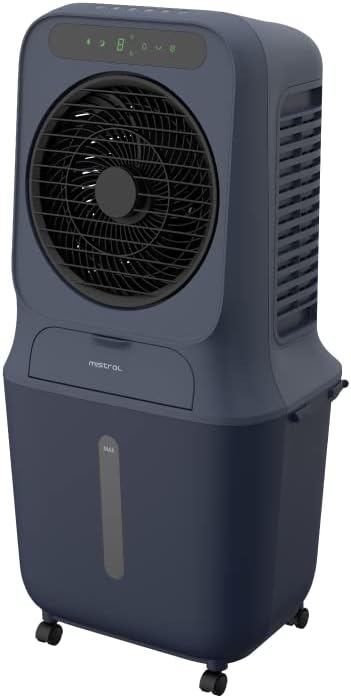
Figure 1: Front view of the Mistral MAC2300R Air Cooler.
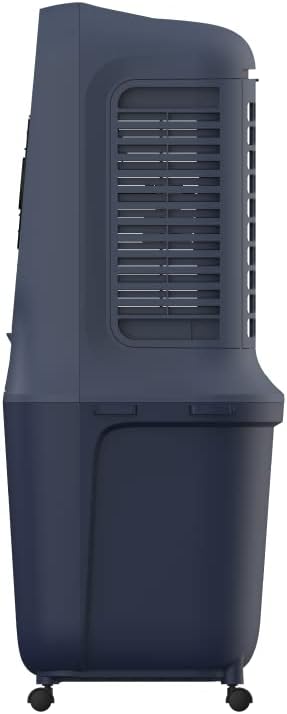
Figure 2: Side view of the Mistral MAC2300R Air Cooler, showing the air intake grille.

Figure 3: Back view of the Mistral MAC2300R Air Cooler, highlighting the cooling pad area.
2. Setup Instructions
- Unpacking: Carefully remove the air cooler and all accessories from the packaging. Ensure all components, including the remote control, dustproof filter, and washable cooling pad, are present.
- Placement: Place the air cooler on a flat, stable, and dry surface. The unit is freestanding and designed to cool areas up to 30 square meters. Ensure there is adequate space around the unit for proper airflow.
- Fill Water Reservoir: The air cooler features a 25-liter detachable water reservoir. Locate the water tank cap, open it, and pour clean, cool water into the reservoir. Do not exceed the 'MAX' fill line indicated on the tank. For enhanced cooling, you may add ice packs or ice cubes to the water.
- Install Cooling Pad and Filter: Ensure the washable cooling pad and dustproof filter are correctly installed in their designated slots. Refer to the product diagrams for precise placement.
- Connect Power: Plug the power cord into a standard electrical outlet. The unit is now ready for operation.
3. Operating Instructions
Your Mistral MAC2300R Air Cooler can be operated using the integrated LED control panel or the provided remote control.
3.1 Control Panel and Remote Control
The control panel on top of the unit features various buttons for different functions. The remote control duplicates these functions for convenient operation from a distance. Ensure the remote control has working batteries.
3.2 Basic Functions
- Power ON/OFF: Press the Power button to turn the unit on or off.
- Fan Speed: Select from 3 fan speeds (Low, Medium, High) by pressing the Speed button.
- Modes: Cycle through different operating modes (e.g., Normal, Natural, Sleep) using the Mode button.
- Timer: Set the auto-off timer for up to 9 hours by pressing the Timer button repeatedly to select the desired duration.
3.3 Advanced Functions
- Plasma Sterilization: Activate the plasma sterilisation function by pressing the dedicated Plasma button. This feature helps to eliminate airborne bacteria and viruses, improving air quality with up to 99.99% efficiency.
- Humidifying Function: Press the Humidify button to enable the humidifying function, which adds moisture to the air for increased comfort, especially in dry climates.
- Ionizer: The built-in ionizer can be activated to release negative ions, which help to purify the air by attracting dust and allergens.
- Low Water Alarm: The unit is equipped with a low water alarm that will alert you when the water reservoir needs refilling to ensure continuous operation of the cooling and humidifying functions.
4. Maintenance
Regular maintenance ensures the longevity and optimal performance of your Mistral MAC2300R Air Cooler.
- Water Reservoir Cleaning: To prevent the growth of mold, mildew, and bacteria, regularly drain and clean the 25-liter water reservoir. Unplug the unit, detach the reservoir, and wash it with mild soap and water. Rinse thoroughly and dry before reattaching.
- Filter and Cooling Pad Cleaning: The dustproof filter and washable cooling pad should be cleaned periodically. Carefully remove these components as per the product diagram. Wash them under running water to remove dust and debris. Allow them to air dry completely before reinstallation.
- Exterior Cleaning: Wipe the exterior surfaces of the air cooler with a soft, damp cloth. Do not use harsh chemicals, abrasive cleaners, or solvents, as these can damage the unit's finish.
- Storage: If storing the unit for an extended period, ensure the water reservoir is empty and clean, and all filters and pads are dry. Store the air cooler in a cool, dry place, away from direct sunlight.
5. Troubleshooting
If you encounter any issues with your Mistral MAC2300R Air Cooler, please refer to the following common troubleshooting steps:
- Unit does not power on:
- Ensure the power cord is securely plugged into a functional electrical outlet.
- Check if the power button on the control panel or remote control has been pressed.
- No or weak cooling effect:
- Verify that the water reservoir is filled to an adequate level.
- Check if the cooling pad is wet. If dry, ensure the water pump is operating correctly.
- Clean the dustproof filter and washable cooling pad, as blockages can reduce efficiency.
- Unusual noise:
- Ensure the unit is placed on a stable, level surface.
- Check for any foreign objects inside the unit or around the fan blades.
- Verify that the water pump is not obstructed.
- Water leakage:
- Ensure the water reservoir is correctly seated and sealed.
- Do not overfill the water reservoir beyond the 'MAX' line.
If the problem persists after attempting these steps, please contact customer support.
6. Specifications
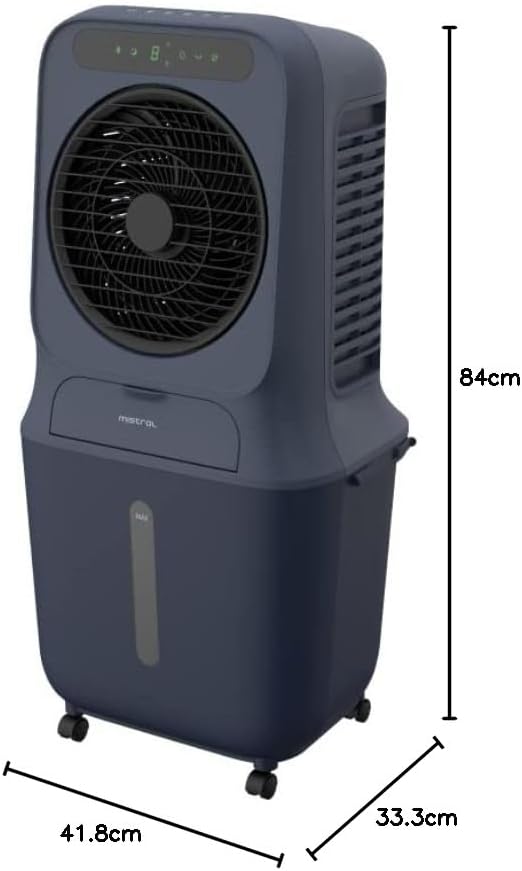
Figure 4: Dimensions of the Mistral MAC2300R Air Cooler.
| Feature | Description |
|---|---|
| Brand | MISTRAL |
| Model Name | MAC2300R |
| Material | Plastic |
| Mounting Type | Freestanding |
| Special Features | Remote Control, Timer, Plasma Sterilization |
| Colour | Blue |
| Controls Type | Remote |
| Reservoir Capacity | 25 Liters |
| Floor Area | 30 Square Meters |
| Item Weight | 8.5 Kilograms |
| Item Dimensions (D x W x H) | 41.8D x 33.3W x 84H centimetres |
| Included Components | Dustproof filter, washable cooling pad |
7. Warranty and Support
The Mistral MAC2300R Air Cooler is covered by a 2-year local seller warranty. This warranty covers manufacturing defects and ensures your product functions as intended under normal use.
For warranty claims, technical assistance, or any product-related inquiries, please contact the local seller from whom you purchased the unit. You can find their contact information in your purchase documentation or on the product detail page where you made your purchase.
Information regarding replacement policies and additional support resources can also be obtained by contacting customer service or visiting the official Mistral website.


