
1. Important Safety Instructions
Please read all instructions carefully before using this appliance and retain them for future reference. Failure to follow these instructions may result in electric shock, fire, or serious injury.
- Ensure the voltage indicated on the rating label matches your mains voltage.
- Do not immerse the fan, plug, or cord in water or other liquids.
- Unplug the fan from the outlet when not in use, before cleaning, or before moving.
- Keep fingers, pencils, or any other objects away from the fan blades when the fan is operating.
- Do not operate the fan with a damaged cord or plug. Contact qualified service personnel for repair.
- This appliance is not intended for use by persons (including children) with reduced physical, sensory or mental capabilities, or lack of experience and knowledge, unless they have been given supervision or instruction concerning use of the appliance by a person responsible for their safety.
- Children should be supervised to ensure that they do not play with the appliance.
- Place the fan on a stable, flat surface to prevent it from tipping over.
- Do not use the fan near windows, where rain may come into contact with it.
2. Product Overview
The Mistral MLF1200R is a 12-inch DC Living Fan designed for efficient air circulation with convenient remote control operation.
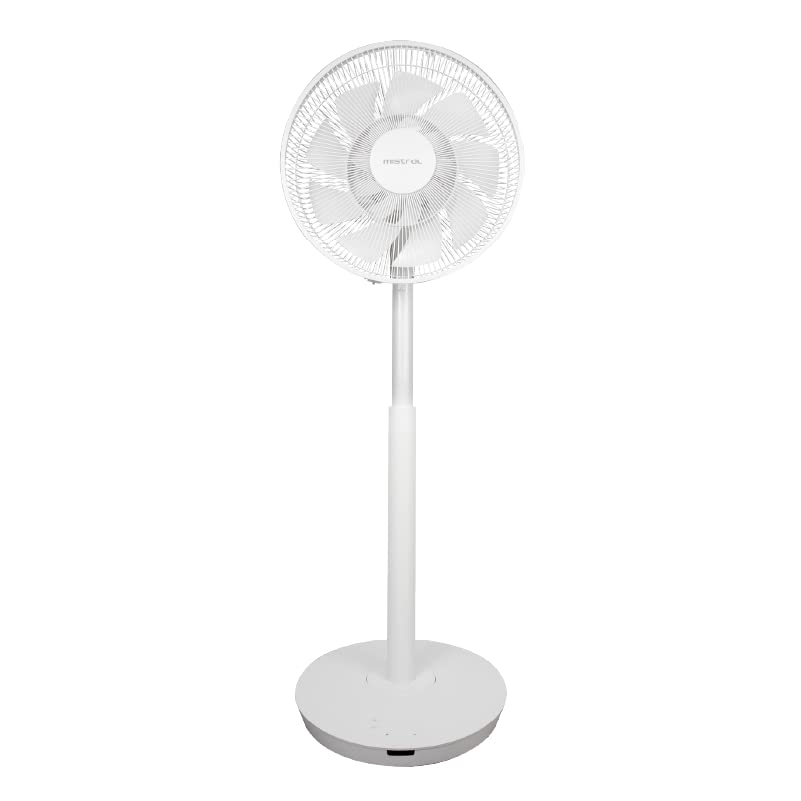
Image 1: Mistral MLF1200R 12-inch DC Living Fan. This image shows the complete fan assembly, including the base, adjustable stand, and fan head with protective grille.
Components:
- Fan Head (Front and Rear Grille, Fan Blades)
- Motor Housing
- Adjustable Stand/Pole
- Base
- Control Panel (on base)
- Power Cord
- Remote Control
3. Setup and Assembly
Follow these steps to assemble your Mistral MLF1200R fan:
- Base Assembly: Place the main pole onto the fan base. Secure it firmly using the provided screw or locking mechanism from underneath the base.
- Adjustable Pole: Extend the adjustable pole to your desired height. Ensure it clicks into place or is tightened securely.
- Fan Head Attachment: Carefully attach the fan head assembly (motor housing, blades, grilles) to the top of the adjustable pole. Ensure it is securely fastened and aligned.
- Grille Installation: If the grilles are separate, attach the rear grille to the motor housing, then place the fan blades onto the motor shaft. Secure the front grille over the blades and rear grille, ensuring all clips or screws are tightened.
- Placement: Position the fan on a stable, level surface, away from curtains or other objects that could obstruct airflow.
- Power Connection: Plug the power cord into a standard electrical outlet.

Image 2: Side view of the Mistral MLF1200R fan. This image illustrates the fan's profile, showing the adjustable height and tilt mechanism, which is relevant for assembly and positioning.
4. Operating Instructions
Your Mistral MLF1200R fan can be operated using the control panel on the base or the included remote control.
4.1 Control Panel
The control panel on the fan base typically includes buttons for Power, Speed, Mode, Oscillation, and Timer.
- Power Button: Press to turn the fan ON or OFF.
- Speed Button: Press repeatedly to cycle through different fan speeds (e.g., Low, Medium, High, or numerical settings).
- Mode Button: Select different fan modes (e.g., Normal, Natural, Sleep).
- Oscillation Button: Press to start or stop the fan head oscillating (swinging from side to side).
- Timer Button: Press to set the fan to turn off automatically after a set period (e.g., 1 hour, 2 hours, up to 8 hours).
4.2 Remote Control
The remote control provides convenient access to all fan functions from a distance. Ensure batteries are correctly inserted.
- Power (ON/OFF): Turns the fan on or off.
- Speed (+/-): Adjusts the fan speed.
- Mode: Cycles through fan modes (Normal, Natural, Sleep).
- Swing/Oscillation: Activates or deactivates the oscillation function.
- Timer: Sets the automatic shut-off timer.
4.3 Special Features
- Adjustable Height: The fan pole can be adjusted to various heights to suit your needs. Loosen the locking mechanism, adjust, and re-tighten.
- Adjustable Tilt: The fan head can be tilted up or down to direct airflow. Gently push or pull the fan head to the desired angle.
- DC Motor: The DC motor provides energy-efficient operation and quieter performance compared to traditional AC motors.
5. Maintenance and Cleaning
Regular cleaning will help maintain your fan's performance and extend its lifespan.
- Before Cleaning: Always unplug the fan from the power outlet before cleaning.
- Exterior Cleaning: Wipe the exterior surfaces of the fan with a soft, damp cloth. Do not use abrasive cleaners or solvents.
- Grille and Blades: Dust can accumulate on the grilles and blades. To clean thoroughly, you may need to remove the front grille. Refer to the assembly instructions in reverse for safe removal. Use a soft brush or vacuum cleaner to remove dust from the blades and grilles. Ensure all parts are dry before reassembling and operating the fan.
- Storage: When not in use for extended periods, store the fan in a cool, dry place, preferably in its original packaging to protect it from dust.
6. Troubleshooting
If you encounter issues with your fan, please refer to the following common problems and solutions:
| Problem | Possible Cause | Solution |
|---|---|---|
| Fan does not turn on. | No power supply. Power button not pressed. Remote control batteries are dead. | Check if the power cord is securely plugged into a working outlet. Press the power button on the control panel or remote. Replace remote control batteries. |
| Weak airflow. | Fan speed is too low. Grilles or blades are dusty. | Increase the fan speed setting. Clean the fan grilles and blades as per maintenance instructions. |
| Fan is noisy. | Loose parts. Fan not on a stable surface. | Check if all parts are securely assembled. Ensure the fan is placed on a flat, stable surface. |
| Oscillation not working. | Oscillation function not activated. | Press the oscillation button on the control panel or remote. |
If the problem persists after trying these solutions, please contact customer support.
7. Specifications
| Feature | Detail |
|---|---|
| Model | MLF1200R |
| Brand | MISTRAL |
| Fan Type | DC Living Fan / Pedestal Fan |
| Fan Size | 12 inches |
| Power Source | Corded Electric |
| Voltage | 25 Volts (DC) |
| Material | Plastic |
| Special Features | Adjustable Height, Adjustable Tilt, Oscillating, Remote Controlled, Timer |
| Product Dimensions | 36D x 38W x 116H centimetres |
| Mounting Type | Floor Mount |
8. Warranty and Support
For warranty information and customer support, please refer to the warranty card included with your product or visit the official MISTRAL website. Keep your purchase receipt as proof of purchase.
Manufacturer: Mistral
Brand Store: Visit the MISTRAL Store on Amazon.sg


