
Important Safety Instructions
Please read all instructions carefully before using this appliance and retain them for future reference. Failure to follow these instructions may result in electric shock, fire, or serious injury.
- Always ensure the voltage indicated on the rating label corresponds to the mains voltage in your home.
- Do not immerse the fan, plug, or cord in water or other liquids.
- Unplug the fan from the power outlet when not in use, when moving it, and before cleaning.
- Do not operate any appliance with a damaged cord or plug, or after the appliance malfunctions or has been damaged in any manner.
- Keep the fan out of reach of children and pets.
- Do not insert fingers or any objects through the grille when the fan is operating.
- Place the fan on a stable, flat surface to prevent it from tipping over.
- Do not use the fan near windows, where rain may come into contact with it.
- This appliance is intended for indoor use only.
- Do not cover the fan or restrict airflow during operation.
Product Overview
The Mistral MHV700 is a compact 7-inch high velocity fan designed for efficient air circulation in home office or personal spaces. It features adjustable tilt and oscillation for directed airflow.
Key Features:
- 7-inch fan head for focused airflow.
- High velocity air circulation.
- Adjustable tilt for directing airflow vertically.
- Oscillation function for wider air distribution.
- Compact and modern design.
- Button control for ease of use.
Component Identification:
Refer to the images below to identify the main components of your Mistral MHV700 fan.
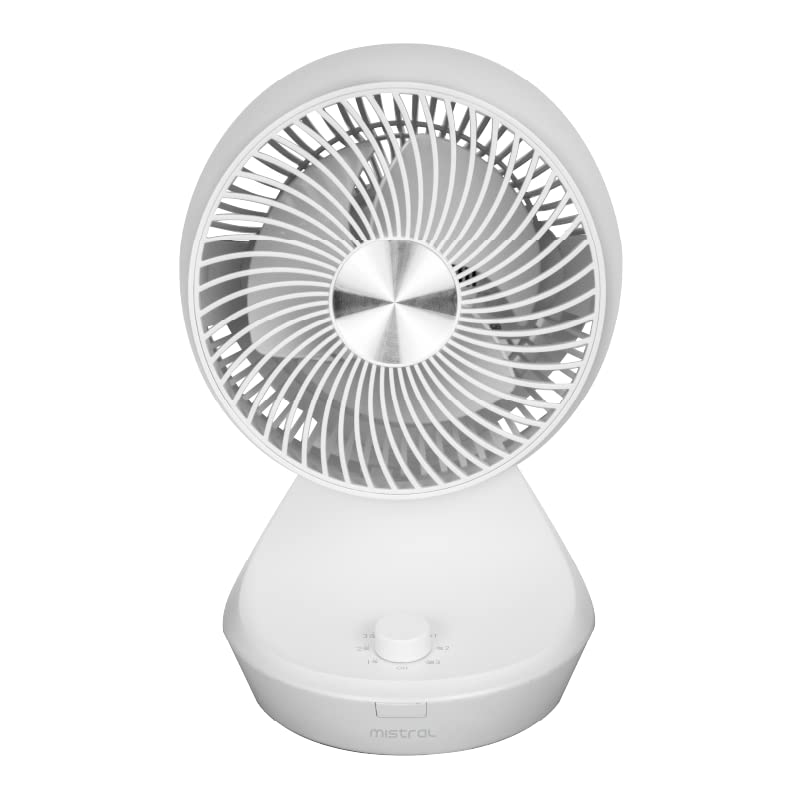
Figure 1: Front-side view of the Mistral MHV700 fan, showing the fan grille and control knob at the base.

Figure 2: Side view of the Mistral MHV700 fan, illustrating its compact profile and the adjustable head mechanism.
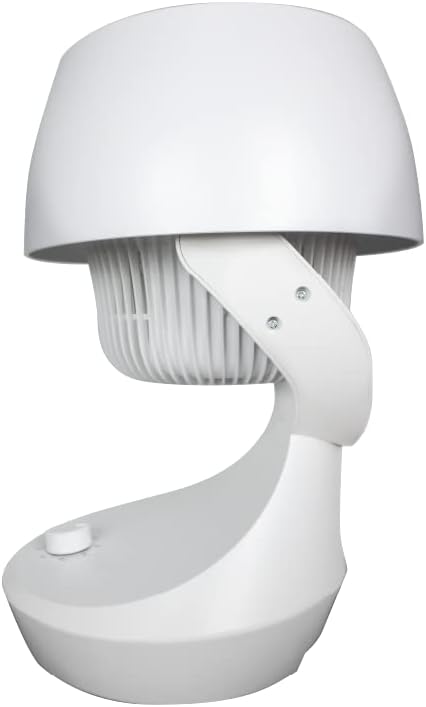
Figure 3: Rear-side view of the Mistral MHV700 fan, highlighting the fan's housing and base.
Setup
- Unpack the Fan: Carefully remove the fan and all packaging materials from the box. Retain packaging for future storage or transport if needed.
- Placement: Place the fan on a firm, level surface. Ensure there is adequate space around the fan for proper air circulation and to prevent obstruction of the air intake/outlet. Avoid placing it near curtains or other objects that could be drawn into the fan.
- Power Connection: Ensure the fan is in the "OFF" position (or lowest setting). Plug the power cord into a standard electrical outlet (Type G connector, 35 Volts as per specifications).
Operating Instructions
The Mistral MHV700 fan features simple button controls for operation.
- Power On/Off and Speed Control:
Locate the control knob on the base of the fan. Turn the knob clockwise to switch the fan ON and select your desired speed setting. The fan typically offers multiple speed settings. To turn off, turn the knob counter-clockwise to the "OFF" position.
- Adjusting Tilt:
To adjust the vertical angle of the airflow, gently tilt the fan head up or down to the desired position. The fan head is designed to hold its position once adjusted.
- Oscillation Function:
To activate the oscillation feature, press the oscillation button (if present, often integrated with the speed knob or a separate button). The fan head will then sweep from side to side, distributing air over a wider area. To stop oscillation, press the button again.
- Power Off:
To turn off the fan, turn the control knob to the "OFF" position. Unplug the fan from the power outlet when not in use for extended periods.
Maintenance
Regular cleaning and proper storage will help maintain the performance and longevity of your fan.
- Cleaning:
- Always unplug the fan before cleaning.
- Use a soft, damp cloth to wipe the exterior surfaces of the fan. Do not use abrasive cleaners or solvents.
- For dust accumulation on the fan blades or inside the grille, use a vacuum cleaner with a brush attachment or compressed air to gently remove dust. Do not attempt to disassemble the fan for cleaning unless specifically instructed by the manufacturer.
- Ensure the fan is completely dry before plugging it back in and operating.
- Storage:
When not in use for extended periods, store the fan in its original packaging or cover it to protect it from dust. Store in a cool, dry place.
Troubleshooting
If you encounter issues with your fan, refer to the following common problems and solutions:
| Problem | Possible Cause | Solution |
|---|---|---|
| Fan does not turn on. | Not plugged in; power outlet not working; fan switch is off. | Ensure the power cord is securely plugged into a working outlet. Check the fan's power switch/knob is in an ON position. Test the outlet with another appliance. |
| Weak airflow. | Fan speed set too low; air intake/outlet blocked; dust accumulation. | Increase the fan speed. Ensure nothing is obstructing the front or back grilles. Clean the fan blades and grilles as per maintenance instructions. |
| Fan makes unusual noise. | Loose parts; fan not on a level surface; foreign object inside. | Ensure all parts are secure. Place the fan on a stable, level surface. Unplug the fan and carefully check for any foreign objects caught in the blades or grille. |
| Oscillation not working. | Oscillation function not activated. | Ensure the oscillation button is pressed or the control knob is set to the oscillation mode. |
If the problem persists after trying these solutions, please contact customer support.
Specifications
| Feature | Detail |
|---|---|
| Brand | MISTRAL |
| Model Name | MHV700 |
| Electric Fan Design | Table Fan |
| Colour | White |
| Power Source | Corded Electric |
| Voltage | 35 Volts |
| Product Dimensions (D x W x H) | 22D x 21.7W x 36H centimetres |
| Room Type | Home Office |
| Special Features | Adjustable Tilt, Oscillating |
| Recommended Uses | Air Circulation |
| Mounting Type | Floor Mount |
| Controller Type | Button Control |
| Indoor/Outdoor Usage | Indoor |
| Connector Type | AC power plug |
| Main Power Connector Type | Type G |
| Material | Plastic |
| Blade Material | Plastic |
Note: Specifications are subject to change without notice.
Warranty and Support
This Mistral MHV700 fan comes with a standard manufacturer's warranty. Please refer to the warranty card included with your purchase for specific terms and conditions, including the warranty period and coverage details.
For technical support, service inquiries, or to purchase replacement parts, please contact Mistral customer service through their official website or the contact information provided in your product packaging. When contacting support, please have your model number (MHV700) and proof of purchase readily available.
You can visit the official MISTRAL store for more information: MISTRAL Store on Amazon.sg


