
Introduction
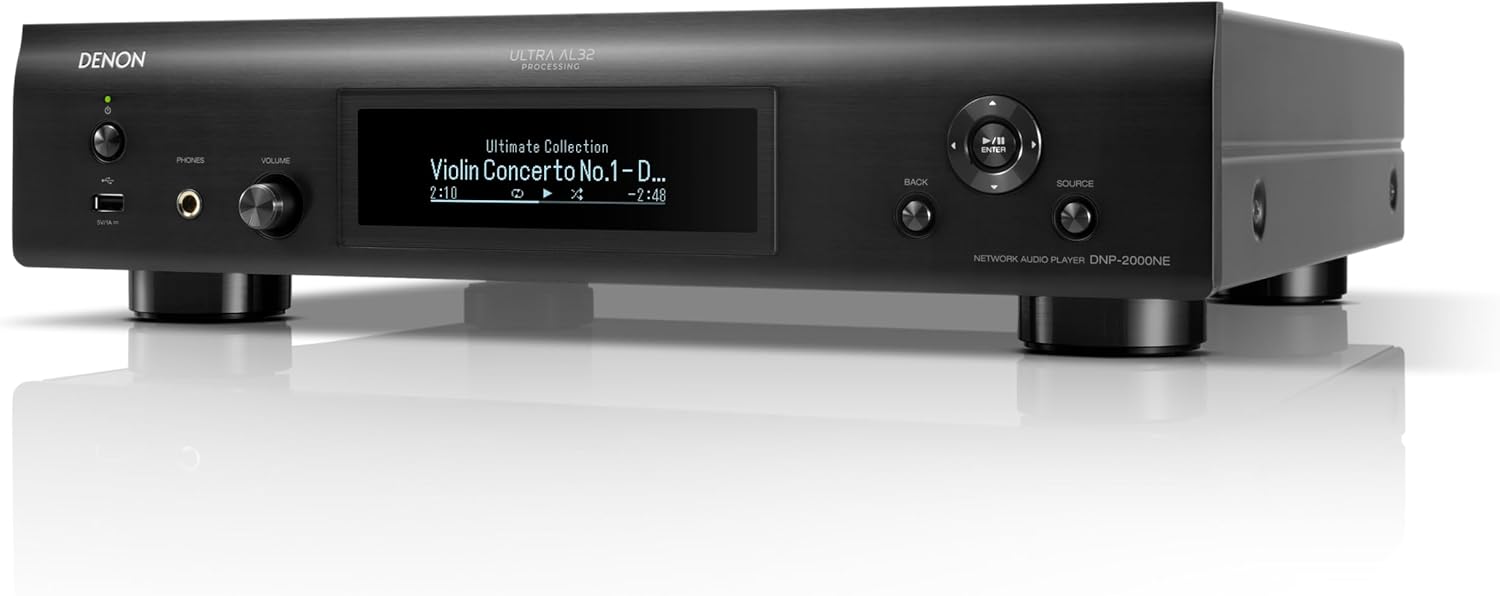
The Denon DNP-2000NE is a high-resolution network audio player designed to elevate your audio experience. Featuring Ultra AL32 Processing, HEOS Built-in for multi-room audio, and a quad DAC configuration, it delivers exceptional sound quality and versatile connectivity. This manual provides essential information for setting up, operating, and maintaining your DNP-2000NE.
Package Contents
Before you begin, please ensure all items listed below are present in the package:
- Quick Start Guide
- Batteries for remote (2 AAA)
- Power Cord
- Stereo RCA Cable
- IR Control Cable
Setup
1. Physical Placement
Place the DNP-2000NE on a stable, level surface with adequate ventilation. Avoid placing it near heat sources or in direct sunlight.
2. Connecting to Power
Connect the supplied power cord to the AC IN terminal on the rear panel of the DNP-2000NE and then to a wall outlet.
3. Audio Connections
The DNP-2000NE offers various audio output options:
- Analog Audio Output (RCA): Use the supplied Stereo RCA Cable to connect the DNP-2000NE's FIXED or VARIABLE AUDIO OUT terminals to the analog input terminals of your amplifier or receiver.
- Digital Audio Output (Optical/Coaxial): For digital connections, use an optical or coaxial digital cable to connect the DIGITAL AUDIO OUT terminals to your amplifier or DAC.
- HDMI ARC: Connect an HDMI cable from the HDMI ARC output on the DNP-2000NE to the HDMI ARC input on your television for improved audio quality from your TV.
- USB-DAC Input: Connect a USB cable from your computer to the USB-DAC input on the rear panel to access high-resolution audio files.

4. Network Connection
Connect the DNP-2000NE to your home network for streaming services and multi-room audio:
- Wired (Ethernet): Connect an Ethernet cable from the NETWORK port on the rear panel to your router.
- Wireless (Wi-Fi): Attach the supplied Bluetooth/Wi-Fi antennas to the rear panel. Follow the on-screen instructions or use the HEOS app for Wi-Fi setup.

Operating Instructions
1. Powering On/Off
Press the power button on the front panel or the remote control to turn the unit on or off.
2. Source Selection
Use the SOURCE knob on the front panel or the input selector buttons on the remote to choose your desired audio source (e.g., Network, USB-DAC, Optical, Coaxial, HDMI ARC).
3. Volume Control
Adjust the volume using the VOLUME knob on the front panel or the volume buttons on the remote control.
4. Music Playback
- Streaming Services: Utilize the HEOS app on your smartphone or tablet to access and control music from various streaming services like Spotify, Tidal, Pandora, and Amazon Music.
- Local Files: Connect a USB drive to the front USB-A port or access network-attached storage (NAS) via the HEOS app to play local high-resolution audio files.
- AirPlay 2 & Bluetooth: Stream audio directly from Apple devices via AirPlay 2 or pair your Bluetooth-enabled device for wireless playback.
5. Voice Control
The DNP-2000NE supports voice control through Amazon Alexa, Google Assistant, and Apple Siri. Use voice commands to play/pause music, adjust volume, or select tracks.
6. Multi-Room Audio with HEOS
With HEOS Built-in, you can connect multiple HEOS-enabled devices to create a whole-home audio experience. Play the same song in every room or different songs in different rooms, all controlled via the HEOS app.


Maintenance
1. Cleaning
Wipe the unit with a soft, dry cloth. Do not use abrasive cleaners or solvents. Ensure the unit is powered off and unplugged before cleaning.
2. Firmware Updates
Periodically check for firmware updates via the HEOS app or Denon's official website to ensure optimal performance and access to new features.
Troubleshooting
- No Power: Ensure the power cord is securely connected and the wall outlet is functioning.
- No Sound: Verify all audio cables are correctly connected. Check the selected input source and volume levels on both the DNP-2000NE and your connected amplifier/receiver.
- Network Connectivity Issues: Ensure your Wi-Fi router is on and functioning. For wireless connections, check antenna placement. For wired connections, ensure the Ethernet cable is securely plugged in. Try restarting your router and the DNP-2000NE.
- Poor Audio Quality: Check the quality of your audio source. Ensure cables are not damaged. For digital sources, verify the sample rate and bit depth are supported.
Specifications
| Feature | Specification |
|---|---|
| Product Dimensions | 15.5 x 17.1 x 4.2 inches |
| Item Weight | 26.7 pounds |
| Model Number | DNP2000NE |
| Connectivity Technology | Wi-Fi, Bluetooth, Ethernet |
| Controller Type | Amazon Alexa, Google Assistant, Apple Siri |
| Special Features | Ultra AL32 Processing, HEOS Built-in, Quad DAC Configuration, HDMI ARC |
| Total HDMI Ports | 1 (ARC) |
| Connector Type | USB, Optical, Coaxial, RCA |
Official Product Videos
DENON Heos Sizzle
This video provides a brief overview of the HEOS multi-room audio system, highlighting its capabilities for seamless music streaming throughout your home.
DNP-2000NE Product Overview
This video offers a concise product overview of the Denon DNP-2000NE, detailing its key features and design.
Warranty & Support
For warranty information and technical support, please refer to the official Denon website or contact their customer service. Keep your purchase receipt for warranty claims.


