
1. Introduction
Thank you for purchasing the Panasonic VIERA TH-55MX950 55V 4K LCD TV. This manual provides essential information for the safe and efficient use of your television. Please read it thoroughly before operating the unit and retain it for future reference.

Figure 1.1: Front view of the Panasonic VIERA TH-55MX950 TV.
2. Safety Information
Observe the following safety precautions to prevent electric shock, fire, or damage to the unit.
- Power Supply: Use only the specified power voltage. Do not overload power outlets.
- Ventilation: Ensure adequate ventilation. Do not block ventilation openings.
- Liquids: Keep the TV away from water and moisture. Do not place objects filled with liquids on the TV.
- Children: Supervise children to prevent them from climbing on or playing with the TV. The TV is equipped with an anti-tip stand for enhanced safety.
- Placement: Place the TV on a stable, level surface. Avoid direct sunlight or heat sources.

Figure 2.1: Illustration of the anti-tip stand feature, designed to enhance stability and prevent accidental falls.
3. Setup
3.1 Unpacking
Carefully remove the TV and all accessories from the packaging. Keep packaging materials for potential future transport.
3.2 Stand Assembly
Attach the included stand to the television following the instructions in the separate assembly guide. Ensure all screws are tightened securely. The anti-tip stand mechanism should be engaged after placement.

Figure 3.1: TV dimensions including the stand (Width: 122.8cm, Height: 76.1cm, Depth: 30.3cm).
3.3 Connections
Connect your devices to the TV using the appropriate ports:
- HDMI: Connect up to 4 HDMI devices (e.g., Blu-ray player, game console).
- USB: Connect USB storage devices to the USB 3.0 port for media playback.
- Antenna: Connect your antenna cable for broadcast TV reception.
- Power: Connect the power cord to the TV and a wall outlet.
- Network: Connect to your home network via Wi-Fi or an Ethernet cable for smart TV features. Bluetooth connectivity is also available for audio devices.
3.4 Initial Setup
Upon first power-on, the TV will guide you through the initial setup process, including language selection, network connection, and channel scanning. This model incorporates an ACAS chip for broadcast reception, replacing traditional B-CAS cards.
4. Operating Instructions
4.1 Remote Control
The included remote control allows you to access all TV functions. Insert the two AAA batteries (included) into the remote control.
4.2 Basic TV Operation
- Power: Press the power button to turn the TV on or off.
- Channel: Use the CH +/- buttons to change channels.
- Volume: Use the VOL +/- buttons to adjust the volume.
- Input: Press the Input button to select connected devices (HDMI 1-4, USB).
4.3 Smart TV Features
Access various streaming services and apps by pressing the 'Home' or 'Apps' button on your remote. Ensure your TV is connected to the internet.
5. Features
5.1 Picture Quality
- Mini LED Backlight & Quantum Dot: The TH-55MX950 utilizes Mini LED backlighting combined with Quantum Dot technology to deliver bright, vivid images with enhanced color accuracy and contrast.

Figure 5.1: Exploded view illustrating the Mini LED backlight and Quantum Dot sheet for superior image quality.
- W-Area Control: This technology precisely controls local dimming zones, achieving deeper blacks and brighter highlights for a high-contrast picture.

Figure 5.2: Visual representation of W-Area Control enhancing contrast in dark scenes.
- Smooth Motion (Object Detection, Double Speed Display): Advanced processing detects moving objects and interpolates frames to reduce blur and judder, providing smooth and clear motion, especially for fast-paced content like sports.

Figure 5.3: Example of smooth motion technology in action, ideal for sports viewing.
- Auto AI Picture Quality: The TV uses AI technology with an environmental light sensor to automatically adjust picture settings (brightness, color temperature) for optimal viewing conditions in your room.

Figure 5.4: Auto AI Picture adjusting brightness and color temperature based on ambient light.
- Hexa Chroma Drive: This technology enhances color reproduction, ensuring that even in low-luminance scenes, color shifts are minimized, and colors are faithfully reproduced.

Figure 5.5: Hexa Chroma Drive improves color accuracy, especially in darker areas.
5.2 Sound Quality
- Dynamic Sound System (50W): The integrated Dynamic Sound System delivers powerful and clear audio with a total output of 50W, providing an immersive listening experience.

Figure 5.6: The 50W Dynamic Sound System for powerful audio.
- Auto AI Sound Quality: AI technology analyzes the scene and automatically adjusts sound settings for optimal audio, ensuring clear dialogue and immersive soundscapes.

Figure 5.7: Auto AI Sound adjusts audio for clear voices and immersive sound.
- Dolby Atmos Support: Experience multi-dimensional sound that moves around you, bringing a new level of immersion to your entertainment.
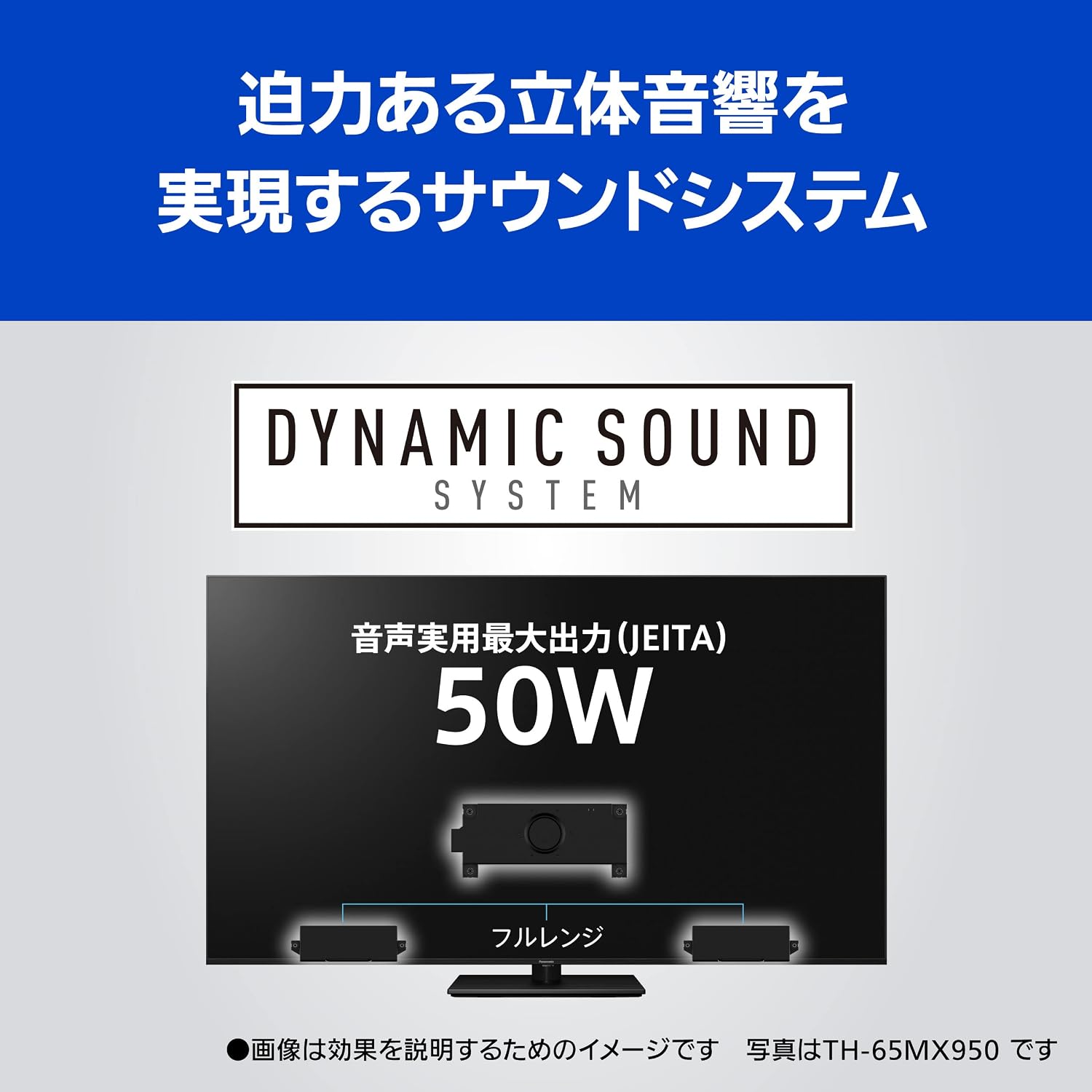
Figure 5.8: Dolby Atmos creates an immersive, three-dimensional audio experience.
5.3 Smart Features
- Recommended Network Services: Enjoy a wide range of streaming content from popular services such as Amazon Prime Video, Netflix, and YouTube, all in high picture and sound quality.

Figure 5.9: Supported streaming services for endless entertainment.
5.4 Design & Safety
- Anti-Tip Stand: The TV is equipped with a robust anti-tip stand designed to prevent accidental falls, providing peace of mind, especially in households with children.
- Recommended Viewing Distance: For optimal viewing experience on a 55V type TV, a viewing distance of approximately 1.0 meter is recommended.

Figure 5.10: Recommended viewing distance for the 55-inch screen.
6. Maintenance
6.1 Cleaning
- Screen: Gently wipe the screen with a soft, dry microfiber cloth. For stubborn marks, slightly dampen the cloth with water or a screen-specific cleaner. Do not spray liquid directly onto the screen.
- Cabinet: Wipe the TV cabinet with a soft, dry cloth. Avoid using abrasive cleaners or solvents.
6.2 Software Updates
Ensure your TV's software is up to date for optimal performance and security. The TV can automatically check for and install updates when connected to the internet. You can also manually check for updates in the settings menu.
7. Troubleshooting
If you encounter issues with your TV, refer to the following common solutions:
| Problem | Possible Cause | Solution |
|---|---|---|
| No power | Power cord disconnected, power outlet issue | Check power cord connection, try a different outlet. |
| No picture, but sound is present | Incorrect input source, external device issue | Press 'Input' button to select correct source. Check external device connections. |
| No sound, but picture is present | Volume muted, external audio system issue | Unmute volume or increase. Check connections to external audio system. |
| Remote control not working | Dead batteries, obstruction | Replace batteries. Remove any obstructions between remote and TV. |
| Cannot connect to Wi-Fi | Incorrect password, router issue, signal interference | Verify Wi-Fi password. Restart router. Move TV closer to router or reduce interference. |
If the problem persists after trying these solutions, please contact customer support.
8. Specifications
| Feature | Specification |
|---|---|
| Model Number | TH-55MX950 |
| Screen Size | 55 inches |
| Display Technology | LCD with Mini LED Backlight and Quantum Dot |
| Resolution | 4K (3840 x 2160) |
| Refresh Rate | 120 Hz |
| Aspect Ratio | 16:9 |
| HDMI Ports | 4 |
| USB 3.0 Ports | 1 |
| Wireless Connectivity | Wi-Fi, Bluetooth |
| Audio Output | 50W Dynamic Sound System, Dolby Atmos Support |
| Product Dimensions (W x H x D) | 122.8 cm x 76.1 cm x 30.3 cm (with stand) |
| Product Weight | 27 kg |
| VESA Mount Standard | 200x200mm |
| Included Components | Remote control (1), Remote control batteries (2), Instruction manual (1), Power cord (1), Assembly parts (set), Anti-tip/fall prevention parts (set) |
9. Warranty and Support
9.1 Warranty Information
This Panasonic VIERA TH-55MX950 TV comes with a manufacturer's warranty of 12 months from the date of purchase. Please retain your proof of purchase for warranty claims. The warranty covers defects in materials and workmanship under normal use.
9.2 Customer Support
For technical assistance, troubleshooting beyond this manual, or warranty service, please contact Panasonic customer support. Refer to the official Panasonic website or the contact information provided with your product for the most up-to-date support details.