
SRNE MS-W-09
SRNE Hybrid Inverter WiFi Module
User Manual
Model: MS-W-09
1. Introduction
This manual provides essential information for the installation, operation, and maintenance of the SRNE MS-W-09 WiFi Module. This module is designed to connect your SRNE hybrid inverter to the internet via WiFi, allowing for remote monitoring and management of your power system. To utilize this product, a constant WiFi internet connection and a compatible iPhone or Android mobile device with the dedicated monitoring application are required.
2. Features
2.1. Ease of Use
- Simple Installation: Plug and Play functionality.
- Easy Replacement: External connection type allows for safe and quick installation and removal without disassembling the main device.
- Easy Configuration: Supports local setup via the mobile APP and remote configuration.
- Simple Maintenance: Features remote debugging and remote firmware upgrade capabilities (including for the inverter).
- User-Friendly Setup: Configuration is completed in simple steps: Power On, Network Configuration, and Device Registration.
- Convenient Power: Direct power supply from the device side, eliminating the need for an external power source.
- Simple Structure: Operation status can be directly confirmed via an LED indicator.
2.2. General Characteristics
- Robust Device: Industrial-grade components ensure long-term operation in environments ranging from -30 to +85℃.
- Protection Measures: Includes low voltage protection, lightning protection design, and both software and hardware watchdogs for enhanced reliability.
- Stability Mechanism: Features heartbeat detection, network retry, and automatic repair for device disconnections.
- Data Security: Utilizes a private protocol and data verification, ensuring continuous transmission without network disconnection.
- Wide Voltage Design: Supports DC5~12V wide voltage input with a built-in power reverse connection function.
- Outdoor Waterproof: IP65 waterproof protection suitable for outdoor environments.
2.3. Flexibility
- Protocol Adaptation: Supports automatic recognition and switching of various communication protocols.
- Remote and Local Monitoring: The mobile APP enables simultaneous remote and local monitoring.
3. Setup Guide
The SRNE MS-W-09 WiFi Module is designed for straightforward installation. Follow these steps to set up your device:
- Physical Connection: Connect the MS-W-09 module to your SRNE hybrid inverter. As an external connection type, no disassembly of the inverter is required. Ensure a secure connection.
- Power On: Once connected, power on your hybrid inverter. The module will receive direct power from the inverter.
- Network Configuration:
- Download APP: Download the official SRNE monitoring application to your iPhone or Android mobile device.
- Local Setup: Open the APP and follow the on-screen instructions for local setup. This typically involves connecting your mobile device to the module's temporary WiFi hotspot (if applicable) and then configuring it to connect to your home or facility's WiFi network.
- Device Registration: Register your MS-W-09 module within the APP. This step links your device to your monitoring account.
- Verify Status: Check the LED indicator on the module to confirm its operational status. Refer to the APP for connection status.

Figure 3.1: The SRNE MS-W-09 WiFi Module. This image shows the compact black module with an external antenna and an Ethernet-style connector. A QR code with the text 'PN: QA521213668390' is visible on the label, which can be used for product identification or registration.
4. Operating Instructions
Once the SRNE MS-W-09 WiFi Module is successfully set up and connected to your network, you can monitor your hybrid inverter's performance using the dedicated mobile application. The application provides real-time data and historical records of your power system.
4.1. Real-time Monitoring
The app's main screen typically displays a visual representation of your power flow, including solar PV generation, battery status, load consumption, and grid interaction. Key metrics such as daily power generation, cumulative power generation, active load, and charge power are shown.
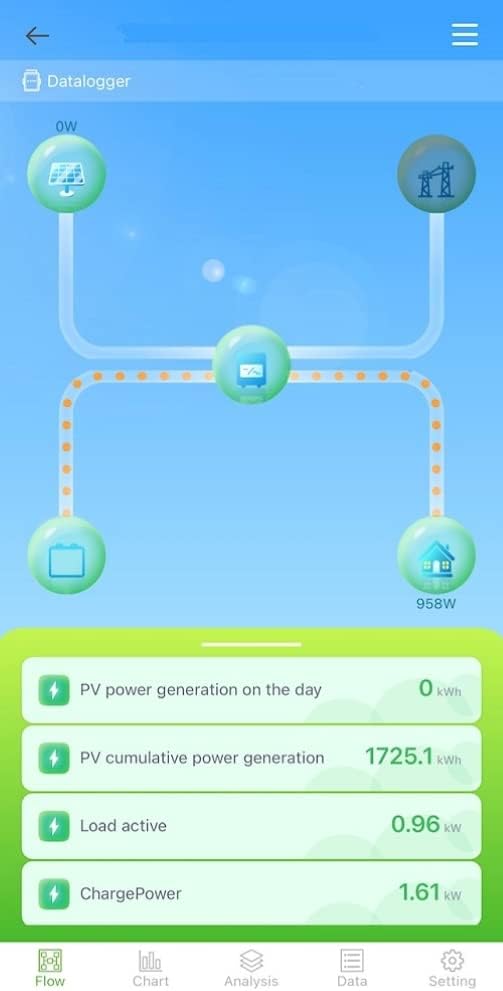
Figure 4.1: Screenshot of the SRNE monitoring application's Datalogger screen. It displays a graphical representation of power flow between solar panels, inverter, battery, and home load, along with real-time data such as PV power generation, cumulative generation, load active power, and charge power.
4.2. Data Charts and History
The application allows you to view historical data through various charts, including daily, monthly, and yearly summaries. This helps in analyzing performance trends and optimizing your energy usage.

Figure 4.2: Screenshot of the SRNE monitoring application's Data Chart for a specific day (April 13, 2022). It shows a line graph illustrating power generation (green) and load power (red) over a 24-hour period.
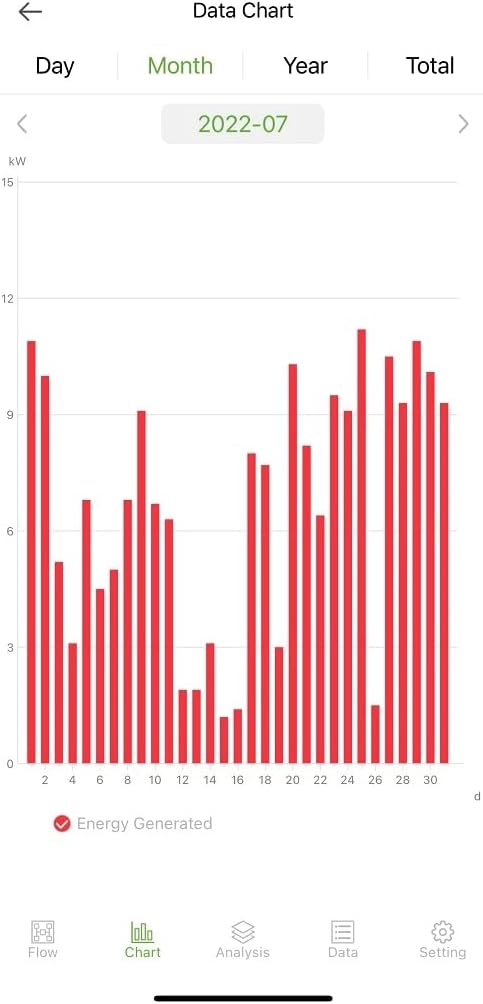
Figure 4.3: Screenshot of the SRNE monitoring application's Data Chart for a specific month (July 2022). It displays a bar chart showing daily energy generated throughout the month.
5. Maintenance
The SRNE MS-W-09 WiFi Module is designed for minimal maintenance. Key maintenance features include:
- Remote Debugging: Issues can often be diagnosed and resolved remotely through the monitoring platform.
- Firmware Upgrades: The module supports remote firmware upgrades, ensuring your device always has the latest features and security enhancements. This can also include firmware upgrades for the connected inverter.
- Physical Inspection: Periodically check the physical connections of the module to the inverter and ensure the antenna is securely attached.
6. Troubleshooting
If you encounter issues with your SRNE MS-W-09 WiFi Module, consider the following:
- No Data in APP:
- Ensure the module is properly connected to the inverter and the inverter is powered on.
- Verify your WiFi network is active and the module is connected to it. Check the module's LED indicator for network status.
- Confirm your mobile device has an active internet connection and the monitoring APP is up to date.
- Module Disconnection: The module features an automatic repair mechanism for device disconnections and network retries. If disconnections persist, check your WiFi signal strength near the module.
- Protection Features: The module is equipped with low voltage protection and lightning protection. If the system experiences abnormal voltage or a lightning strike, the module may temporarily cease operation to protect itself and the inverter.
- Firmware Issues: If you suspect a software issue, a remote firmware upgrade may resolve it. Contact support if you are unable to perform this yourself.
For persistent issues, please refer to the support section or contact SRNE customer service.
7. Specifications
| Category | Parameter | Value |
|---|---|---|
| General Information | Model | MS-W-09 |
| Rated Voltage | DC5V~12V | |
| Max Current | 800mA (DC5V) | |
| Waterproof Rating | IP65 | |
| Wi-Fi Frequency Band | 2.4GHz | |
| Antenna Gain | 2.5dBi | |
| Antenna Type | External | |
| RS-485 Baud Rate | 9600bps (Default) | |
| Data Output Mode | Wi-Fi | |
| Encryption Method | WEP, WPA/WPA2 | |
| Software | Supported Device Protocols | Modbus-RTU (main current), Non Modbus-RTU |
| Parameter Setting Mode | APP or Built-in server | |
| Software Watchdog | Supported | |
| Data Upload Interval | 5 minutes (Default) | |
| Cloud Platform | Eybond Value Clouds |
8. Warranty and Support
This product is provided with a user manual created by the seller to assist with setup and operation. For any technical support, troubleshooting assistance beyond this manual, or warranty inquiries, please contact the seller directly through your purchase platform. Ensure you have your product model number (MS-W-09) and purchase details ready when contacting support.
Related documentsMS-W-09


Ask a question about this manual
Ask about setup, troubleshooting, compatibility, parts, safety, or missing instructions. Manuals+ will review the question and use this page’s manual context to help answer it.