
1. Introduction
Thank you for purchasing the Phomemo E975 Embossing Label Maker. This manual provides detailed instructions for the proper use and maintenance of your device. Please read it thoroughly before use to ensure optimal performance and longevity of the product.
Key Features:
- No Batteries or Ink Required: The Phomemo E975 operates without external power, eliminating the need for batteries or ink cartridges. This allows for immediate label creation after setup.
- Easy Operation with 48-Character Word Wheel: Equipped with a durable 48-character word wheel, covering alphanumeric characters and basic symbols (-/@,.). The ergonomic, flat handle design allows for smooth pressing without excessive force, making it user-friendly for all ages.
- Includes 6 Rolls of Embossing Tape: The package includes 6 rolls of colored tape (3 black, 1 pink, 1 blue, 1 green). This provides immediate usability and allows for creative color-coding. The 9mm tape width is suitable for most daily labeling needs.
- Durable and Residue-Free Tape: The embossing tape is waterproof, abrasion-resistant, and temperature-resistant, making it suitable for various environments, including refrigerators and kitchens. Its adhesive strength ensures firm attachment to surfaces like paper, plastic, and glass, and it can be peeled off cleanly without leaving residue.
- Versatile Applications: Ideal for organizing food expiration dates, refrigerator storage, document classification, gift decoration, and labeling small items in home, office, and DIY projects.
2. Product Overview
The Phomemo E975 is a compact and portable embossing label maker designed for ease of use. It features a character selection dial, an embossing mechanism, and a tape cutting function.
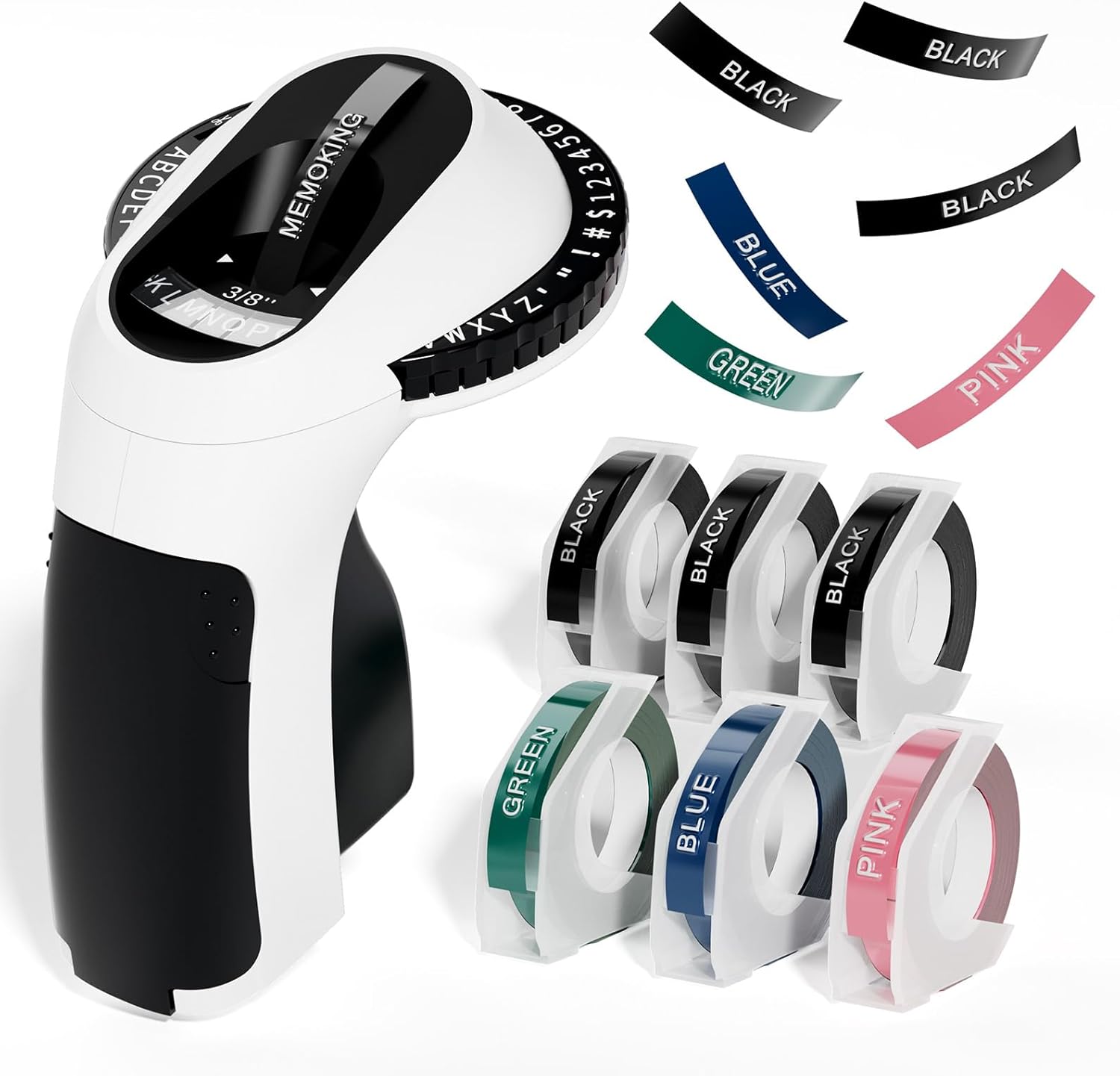
Image: The Phomemo E975 Embossing Label Maker, shown with its ergonomic design and a selection of included colored tape rolls.

Image: The Phomemo E975 label maker displayed alongside several rolls of 9mm embossing tape in different colors, highlighting the variety available.
3. Setup
Loading the Tape:
- Open the tape compartment by gently pulling the front cover of the label maker.
- Insert a 9mm embossing tape roll into the compartment, ensuring the tape feeds through the guide slot. The tape should be positioned so that the adhesive side faces down when exiting the device.
- Close the front cover until it clicks into place.
- Before printing, align the '|||' symbol on the character dial with the indicator mark on the device. This ensures proper tape feeding and character alignment.

Image: A visual guide demonstrating the three steps for loading the embossing tape into the Phomemo E975 label maker, from opening the compartment to securing the tape.
4. Operating Instructions
Creating a Label:
- Select a Character: Rotate the character dial slowly to select the desired letter, number, or symbol. Ensure the chosen character is centered under the indicator mark.
- Emboss the Character: Firmly press the handle to emboss the selected character onto the tape. Release the handle after each character.
- Advance Tape (Optional): To add a space or advance the tape without embossing, press the handle lightly without selecting a character.
- Cut the Label: Once your label is complete, press the handle fully and quickly to activate the built-in cutter and separate the label from the tape roll.

Image: A visual guide illustrating the three main steps of operating the Phomemo E975: selecting a character on the dial, pressing the handle to emboss, and applying the finished label.

Image: A person using the Phomemo E975 label maker to create and apply labels to various food storage containers, demonstrating its practical use in organizing.
5. Maintenance
Regular maintenance ensures the smooth operation and longevity of your label maker.
- Cleaning: Periodically wipe the exterior of the device with a soft, dry cloth. Avoid using abrasive cleaners or solvents.
- Tape Path: Ensure the tape path is free from dust or tape residue. If necessary, use a soft brush or compressed air to clear any obstructions.
- Storage: Store the label maker in a cool, dry place away from direct sunlight and extreme temperatures.
6. Troubleshooting
If you encounter any issues with your Phomemo E975, refer to the following common problems and solutions:
| Problem | Possible Cause | Solution |
|---|---|---|
| Characters are misaligned or unclear. | Dial rotated too quickly; insufficient pressure on handle. | Rotate the character dial slowly and deliberately. Ensure you apply firm, consistent pressure to the handle when embossing each character. |
| Tape jams or does not feed properly. | Incorrect tape loading; tape twisted; debris in tape path. | Open the tape compartment and re-load the tape, ensuring it is flat and correctly aligned. Check for and remove any debris. |
| Cutter is not working or tape is not cut cleanly. | Cutter mechanism obstructed; insufficient force when cutting. | Check the cutter area for any tape residue or obstructions and carefully remove them. Ensure you press the handle fully and quickly to activate the cutter. |
| No character is embossed when pressing the handle. | No character selected; tape not loaded correctly. | Ensure a character is clearly selected and centered under the indicator. Verify that the tape is loaded correctly and feeding through the mechanism. |
7. Specifications
| Feature | Detail |
|---|---|
| Model Number | E975 |
| Brand | Phomemo |
| Max Tape Width | 9mm |
| Print Method | Embossing (Manual) |
| Form Factor | Portable |
| Dimensions (D x W x H) | 12.3 cm x 13.4 cm x 9.5 cm |
| Weight | 280 g |
| Device Color | Black |
| Included Components | Label Maker, 6 Label Tapes (Black, Pink, Blue, Green) |
8. Warranty and Support
For warranty information, technical support, or any inquiries regarding your Phomemo E975 Embossing Label Maker, please refer to the contact information provided with your product packaging or visit the official Phomemo website. Please retain your proof of purchase for warranty claims.