
Introduction
Thank you for choosing the Easy@Home Portable White Noise Machine GM05. This device is designed to create a peaceful environment for improved sleep and relaxation for both babies and adults. It features a variety of soothing sounds, adjustable night light modes, and convenient timer functions. Please read this manual carefully to ensure proper use and maintenance of your device.
Product Overview
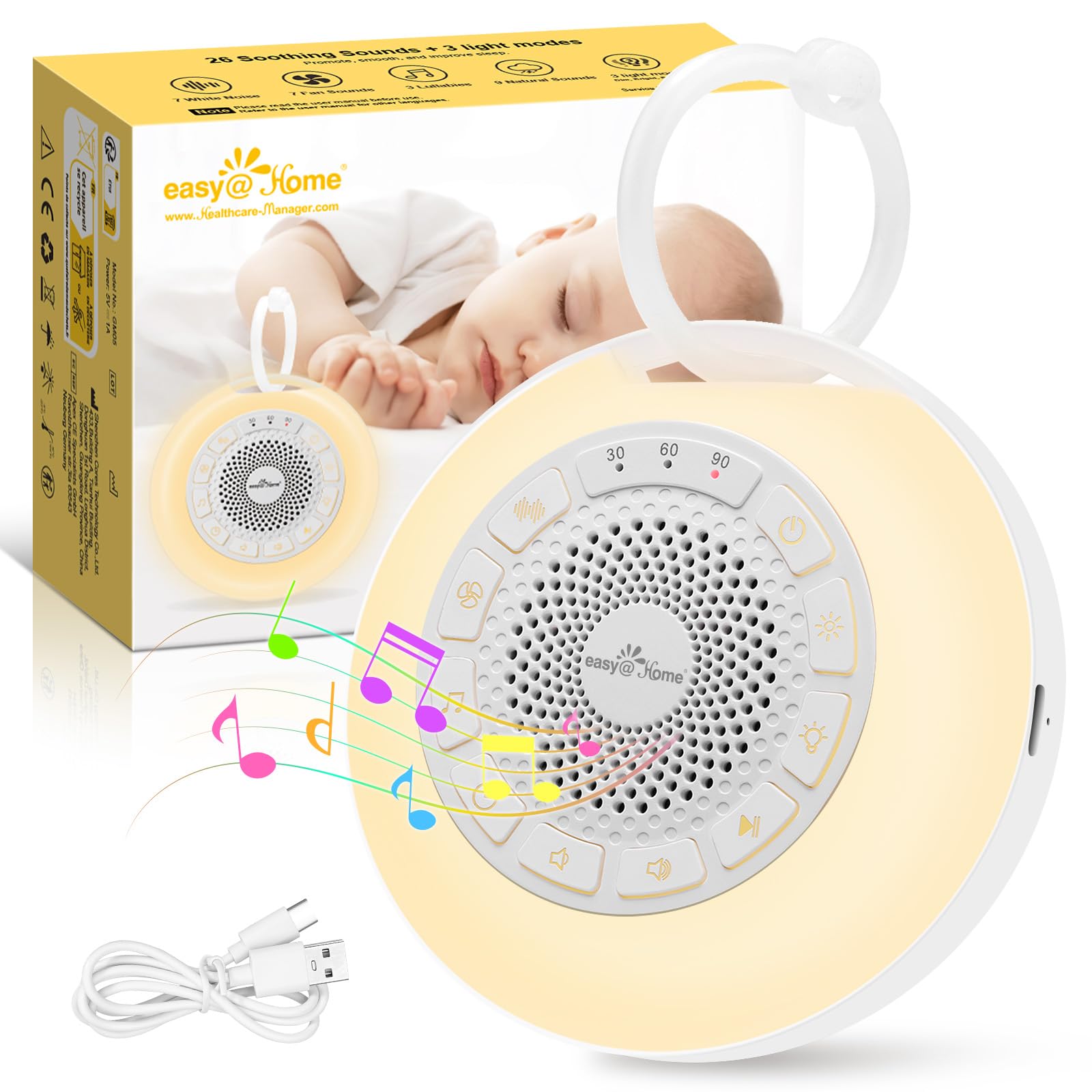
Image: The Easy@Home Portable White Noise Machine GM05, a compact white circular device with control buttons and a speaker grille on top, and a loop for hanging.
The Easy@Home GM05 is a compact and lightweight device, weighing approximately 170 grams and measuring 9.7 x 9.7 x 4 cm. It is designed for portability and ease of use, making it suitable for home or travel.

Image: A visual representation of the Easy@Home White Noise Machine's dimensions (9.7cm diameter, 4cm height) and weight (170g).
Setup
Charging the Device
Before first use, fully charge the device. The Easy@Home GM05 features a durable battery that can operate for up to 20 hours on a single charge. It is equipped with a USB Type-C port for convenient charging.
- Locate the USB Type-C charging port on the side of the device.
- Connect the provided USB Type-C cable to the device and a compatible USB power adapter (not included).
- The charging indicator light will illuminate. Once fully charged, the indicator light may change or turn off.

Image: The Easy@Home White Noise Machine connected to a USB-C charging cable on a bedside table.
Operating Instructions
Power On/Off
- To power on, press and hold the Power button ( ⓘ ) for a few seconds until the device activates.
- To power off, press and hold the Power button again.
Sound Selection
The device offers 26 soothing sounds, including 7 white noise types, 7 fan sounds, 9 nature sounds, and 3 lullabies.
- Press the Sound Type button ( ♫ ) to cycle through the different sound categories (White Noise, Fan, Nature, Lullabies).
- Within each category, use the Next/Previous track buttons ( ⏭ / ⏮ ) to select a specific sound.

Image: A visual showing the 26 soothing sounds categorized into white noise, fan sounds, nature sounds, and lullabies, with a baby sleeping peacefully in the background.
Volume Control
- Press the Volume Up button ( 🔊 ) to increase the volume.
- Press the Volume Down button ( 🔉 ) to decrease the volume.
- The device provides a volume limit reminder with beeps at the lowest and highest settings.

Image: A hand adjusting the volume on the Easy@Home White Noise Machine, with an icon indicating a volume limit reminder.
Night Light Modes
The device features three adjustable night light modes: dim, bright, and breathing. The warm light is ideal for nighttime feedings, diaper changes, or comforting your baby.
- Press the Night Light button ( 💡 ) to cycle through the dim, bright, and breathing light modes.
- Press again to turn off the night light.

Image: The Easy@Home White Noise Machine displaying its three light modes: dim, bright, and breathing, with a hand reaching for the light button.
Colored Lights
The device also offers 7 colorful lights to attract attention and provide comfort.
- Press the Color Light button ( 🌞 ) to cycle through the 7 available colors.
- The last mode automatically cycles through all colors.

Image: The Easy@Home White Noise Machine illuminated with a pink light, surrounded by smaller icons of the device in various colors, demonstrating the 7 colored light options.
Timer Function
You can set a timer for the device to automatically turn off, conserving energy. Timer options are 30, 60, and 90 minutes.
- Press the Timer button ( ⏱ ) to select the desired auto-off duration (30, 60, or 90 minutes).
- If the timer is deactivated, the machine will continue to play until the battery is depleted.

Image: The Easy@Home White Noise Machine with illuminated timer settings for 30, 60, and 90 minutes, indicating its automatic shut-off feature.
Memory Function
The device is equipped with a memory function that automatically recalls the previous sound and volume settings upon restart, eliminating the need to reset them each time.
Child Lock
To prevent accidental changes by children, the device includes a child lock feature.
- Locate the child lock switch on the back of the device.
- Slide the switch to the locked position (indicated by a lock icon). This will disable all buttons except the Power button.
- Slide the switch back to the unlocked position to resume normal button functionality.

Image: A baby playing near the Easy@Home White Noise Machine, with a close-up inset showing the child lock switch on the back of the device.
Video Demonstration
Video: A woman demonstrates the features of the Easy@Home White Noise Machine, including power, sound selection, light modes, volume, timer, and child lock. The video highlights its portability and ease of use for babies.
Video: An animated demonstration of the Easy@Home White Noise Machine's features, including 7 colored lights, 3 light modes, and 26 soothing sounds.
Maintenance
- Wipe the device with a soft, dry cloth. Do not use abrasive cleaners or immerse in water.
- Store the device in a cool, dry place when not in use.
Troubleshooting
| Problem | Solution |
|---|---|
| Device does not turn on. | Ensure the device is charged. Connect to a power source using the USB Type-C cable. |
| Buttons are unresponsive. | Check if the child lock is activated. Slide the child lock switch to the unlocked position. |
| No sound or distorted sound. | Adjust the volume. Ensure the device is not muted. |
Specifications
- Model Number: GM05
- Brand: Easy@Home
- Dimensions (L x W x H): 9.7 x 9.7 x 4 cm
- Weight: 170 grams
- Power Source: Battery Powered
- Battery: 1 C - included
- Charging Port: USB Type-C
- Sound Options: 26 (7 White Noise, 7 Fan, 9 Nature, 3 Lullabies)
- Night Light Modes: 3 (Dim, Bright, Breathing)
- Colored Lights: 7 colors
- Timer Options: 30, 60, 90 minutes
- Special Features: Memory Function, Child Lock
- Material Composition: 68% ABS and 32% PP
- Country of Origin: China
- UPC: 810038634968
Warranty and Support
For warranty information or technical support, please refer to the contact details provided with your purchase or visit the official Easy@Home website. Keep your purchase receipt for warranty claims.


