Introduction
This manual provides detailed instructions for the installation, operation, and maintenance of your DiO Connected Home Set. This set allows you to remotely control your lighting fixtures, such as chandeliers and ceiling lights, without the need for complex wiring. It includes On/Off light modules and remote controls, offering a convenient solution for smart home lighting.

Image: The complete DiO Connected Home Set, featuring four white On/Off light modules and two black remote controls, designed for wireless lighting control.
Package Contents
- 4 x DiO On/Off Light Modules (1000 W)
- 2 x DiO Remote Controls (3 channels + 1 group function)
- CR2032 Batteries (pre-installed or included for remotes)

Image: A closer look at two DiO On/Off light modules and one remote control, illustrating the compact design of the components.
Safety Information
Always ensure the main power supply is disconnected before performing any electrical installation or maintenance. Installation should only be carried out by a qualified electrician or in strict accordance with local electrical codes. Do not exceed the maximum load capacity of 1000W per module. Keep devices away from water and extreme temperatures.
Setup
1. Module Installation (Wiring)
The DiO On/Off light modules are designed for integration into your existing electrical system, typically behind a light switch or directly at the light fixture. Ensure the power is off before beginning.
- Disconnect Power: Turn off the main power supply at your circuit breaker before starting any wiring.
- Identify Wires: Locate the live (L) and neutral (N) wires, and the wire leading to your light fixture.
- Connect Module: Connect the module according to the wiring diagram. The module typically has terminals for input power (L, N) and output to the light fixture (L', N').
- Secure Module: Place the module securely within the electrical box or fixture housing.
- Restore Power: Once all connections are secure and the module is safely housed, restore power.

Image: A diagram illustrating the wiring connections for the DiO light module, showing how it integrates with a 230V power supply and a light fixture. This module supports up to 1000W and operates on RF 433.92MHz.
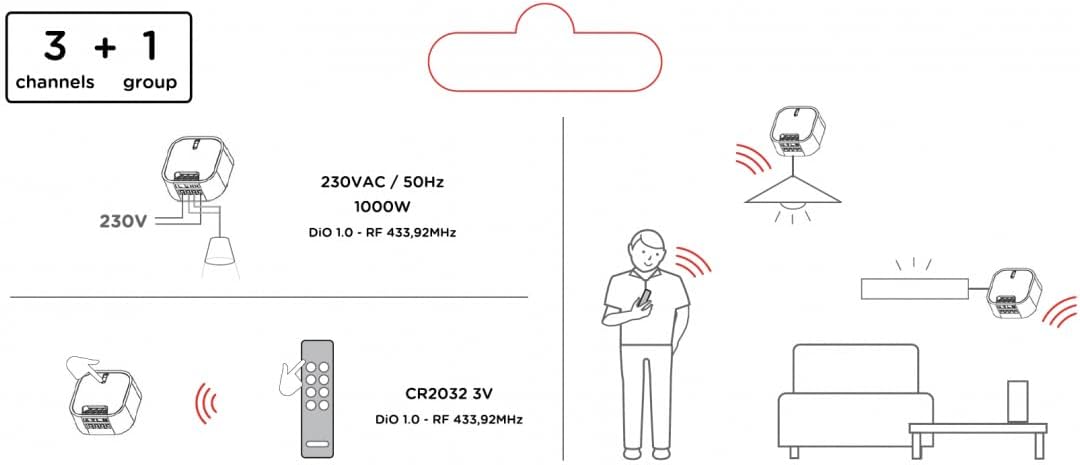
Image: An illustrative diagram demonstrating the wireless communication between the DiO remote control and the light module, highlighting the 3+1 channel functionality and the RF 433.92MHz frequency.
2. Remote Control Battery Installation
The remote controls use a CR2032 battery. If not pre-installed, open the battery compartment on the back of the remote and insert the CR2032 battery with the positive (+) side facing up. Close the compartment securely.
3. Pairing Devices (Linking)
To link a module with a remote control:
- Activate Learning Mode on Module: Briefly press the learning button on the DiO module (refer to the module's specific location for this button, usually a small push button). The indicator light on the module will start blinking.
- Send Pairing Signal from Remote: Within 10 seconds of the module's light blinking, press the ON button for the desired channel (1, 2, or 3) on your DiO remote control.
- Confirmation: The module's indicator light will stop blinking and remain solid for a moment, then turn off, indicating successful pairing.
- Repeat: Repeat this process for each module and desired remote control channel. Each module can be linked to up to 32 different commands (e.g., multiple remote buttons, or a central unit).
Operating Instructions
Using the Remote Control
- Channel Buttons (1, 2, 3): Each channel button controls a specific linked module or group of modules.
- Press the ON button for a channel to turn the linked light(s) on.
- Press the OFF button for a channel to turn the linked light(s) off.
- Group Function (G Button): The 'G' button allows you to control all linked modules simultaneously.
- Press the ON (G) button to turn all linked lights on.
- Press the OFF (G) button to turn all linked lights off.
Using the Smartphone App (Optional)
For advanced control and smart home integration, you can use the free DiO smartphone app. Please note that using the app requires a DiO central unit or a LiteBox gateway (sold separately). Once connected to a central unit, the app allows for scheduling, scene creation, and control from anywhere.
Specifications
| Feature | Detail |
|---|---|
| Model Number | 54859 |
| Brand | DiO Connected home |
| Module Type | On/Off Light Module |
| Maximum Load per Module | 1000 W |
| Operating Voltage | 230 VAC / 50 Hz |
| Radio Frequency | DiO 1.0 - RF 433.92 MHz |
| Remote Control Channels | 3 individual channels + 1 group function |
| Remote Control Battery | CR2032 3V |
| Max. Transmitters per Module | Up to 32 commands |
| Compatibility | 100% compatible with DiO 1.0 series |
Maintenance
The DiO Connected Home Set requires minimal maintenance. Keep the devices clean and dry. Use a soft, dry cloth for cleaning. Do not use abrasive cleaners or solvents. Replace remote control batteries (CR2032) when the control range decreases or the remote stops responding.
Troubleshooting
- Light does not turn ON/OFF:
- Check if the module is correctly wired and receiving power.
- Ensure the remote control battery is not depleted.
- Re-pair the module with the remote control (refer to "Pairing Devices" section).
- Ensure the module is within the remote control's operating range and there are no significant obstructions.
- Remote control range is poor:
- Replace the CR2032 battery in the remote control.
- Ensure there are no large metal objects or other strong radio frequency sources interfering with the signal.
- Module indicator light not blinking during pairing:
- Ensure the module is powered.
- Press the learning button firmly and briefly. If it still doesn't respond, try resetting the module (refer to product documentation for specific reset procedures, if available).
Warranty and Support
For warranty information and technical support, please refer to the official DiO Connected Home website or contact their customer service. Keep your proof of purchase for warranty claims. DiO products are designed for reliability and ease of use, and support is available for any questions or issues you may encounter.
You can find more information and support resources on the DiO Connected Home official website.


