
FAO Schwarz Thunderbolt Jet X2
FAO Schwarz Thunderbolt Jet X2 Drone User Manual
Model: Thunderbolt Jet X2 | Brand: FAO Schwarz
Introduction
Welcome to the user manual for your new FAO Schwarz Thunderbolt Jet X2 Drone. This manual provides essential information for safe operation, setup, maintenance, and troubleshooting. Please read it thoroughly before operating your drone to ensure a safe and enjoyable experience.
Safety Information
- Always operate the drone in open, clear areas, away from people, animals, and obstacles.
- Do not fly near airports, power lines, or restricted airspace.
- Ensure the drone's battery and remote control batteries are fully charged before each flight.
- Keep fingers, hair, and loose clothing away from rotating propellers.
- Do not operate in strong winds or adverse weather conditions.
- Adult supervision is recommended for younger users.
What's in the Box
Verify that all components are present:
- FAO Schwarz Thunderbolt Jet X2 Drone
- Remote Control
- Rechargeable Drone Battery
- USB Charging Cable
- Spare Propellers (if included)
- User Manual (this document)
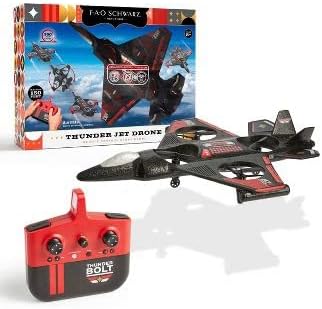
Image: The Thunderbolt Jet X2 Drone, its remote control, and the product packaging, showing the main components included.
Setup
1. Charging the Drone Battery
- Locate the rechargeable drone battery.
- Connect the battery to the provided USB charging cable.
- Plug the USB cable into a standard USB power source (e.g., computer USB port, USB wall adapter).
- The indicator light on the USB cable will show charging status (e.g., red for charging, off for fully charged).
- Charging typically takes approximately 60-90 minutes. Do not overcharge.
2. Installing Remote Control Batteries
- Open the battery compartment on the back of the remote control.
- Insert 3x AAA batteries (not included) into the compartment, ensuring correct polarity (+/-).
- Close the battery compartment securely.

Image: A detailed view of the remote control for the Thunderbolt Jet X2 Drone, highlighting its buttons and joysticks.
3. Pairing the Drone and Remote
- Place the drone on a flat, level surface.
- Turn on the drone by pressing its power button. The drone's lights will flash.
- Turn on the remote control.
- Push the left joystick (throttle) all the way up, then all the way down.
- The drone's lights will become solid, indicating successful pairing.
Operating the Drone
Basic Controls
- Left Joystick (Throttle): Up to ascend, down to descend.
- Right Joystick (Directional): Forward to move forward, backward to move backward, left to move left, right to move right.
- Trim Buttons: Used to fine-tune the drone's stability if it drifts in any direction.
- One-Key Take-off/Landing Button: Press to automatically take off or land.
- 360° Flip Button: Press this button, then push the right joystick in any direction to perform a flip.

Image: The Thunderbolt Jet X2 Drone flying in the air, with a hand holding the remote control in the foreground, illustrating active operation.
First Flight
- Ensure you are in a safe, open area.
- Place the drone on a flat surface.
- Press the One-Key Take-off button, or slowly push the left joystick up to ascend.
- Practice hovering at a low altitude first.
- Use the right joystick for directional control.
- To land, press the One-Key Landing button or slowly pull the left joystick down until the drone lands.

Image: Three Thunderbolt Jet X2 Drones shown in different aerial maneuvers, demonstrating its agility and flight capabilities.
Maintenance
- Cleaning: Use a soft, dry cloth to clean the drone and remote control. Do not use water or harsh chemicals.
- Propeller Inspection: Regularly check propellers for damage (bends, cracks). Replace damaged propellers immediately using the provided spares.
- Battery Care: Store batteries in a cool, dry place. Do not leave batteries fully discharged for extended periods.
- Storage: When not in use, store the drone and remote in a safe place, away from direct sunlight and extreme temperatures.
Troubleshooting
| Problem | Possible Cause | Solution |
|---|---|---|
| Drone does not respond to remote. | Not paired; low battery; out of range. | Re-pair drone and remote; charge drone battery; replace remote batteries; ensure within 300 feet range. |
| Drone drifts during flight. | Needs trimming; uneven take-off surface. | Use trim buttons to adjust; ensure drone is on a flat surface before take-off. |
| Propellers not spinning. | Obstruction; damaged propeller; motor issue. | Check for obstructions; replace damaged propellers; contact support if motor issue suspected. |
Specifications
| Feature | Detail |
|---|---|
| Brand | FAO Schwarz |
| Model Name | Thunderbolt Jet X2 |
| Color | Black |
| Video Capture Resolution | 480p |
| Connectivity Technology | USB |
| Skill Level | Beginner |
| Battery Capacity | 850 Milliamp Hours |
| Video Capture Format | MP4 |
| Maximum Range | 300 Feet |
| Material | Plastic |
| Item Weight | 1.61 pounds |
| Package Dimensions | 17.48 x 12.68 x 4.37 inches |
Warranty and Support
For warranty information or technical support, please refer to the contact details provided on the product packaging or visit the official FAO Schwarz website. Keep your purchase receipt as proof of purchase.
Related documentsThunderbolt Jet X2


Ask a question about this manual
Ask about setup, troubleshooting, compatibility, parts, safety, or missing instructions. Manuals+ will review the question and use this page’s manual context to help answer it.