
Introduction
Thank you for choosing the BONTEC Dual Monitor Stand Riser. This product is designed to enhance your workspace ergonomics and organization. By elevating your monitors to an optimal viewing height, it helps reduce neck, back, and shoulder strain. Its adjustable design and integrated features provide a tidy and efficient desktop environment.
Product Overview
The BONTEC Dual Monitor Stand Riser features a modular design, allowing for adjustable length and angle to suit various desk sizes and user preferences. It includes dedicated storage compartments, a smartphone holder, and cable management solutions to keep your workspace clutter-free.

Figure 1: BONTEC Dual Monitor Stand Riser in White, demonstrating its adjustable design and organizational features.
Assembly Instructions
- Unpack Components: Carefully remove all parts from the packaging. Verify that all components listed in the parts checklist are present.
- Assemble Base Units: Attach the side panels to the main top panels using the provided screws and tools. Ensure all connections are secure.
- Connect Modular Sections: The stand consists of three modular sections. These sections can be connected in a straight line or angled to form a V-shape, depending on your desk configuration and preference. The connecting pins allow for flexible arrangement.
- Install Non-Slip Pads: Apply the included non-slip pads to the bottom of each stand leg to ensure stability and protect your desk surface.
- Place Monitors: Position your monitors on the elevated surfaces.

Figure 2: Visual representation of desktop organization before and after using the monitor stand.

Figure 3: Detailed diagram illustrating the simple assembly process.
Video 1: Official product video demonstrating the features and assembly of the BONTEC Dual Monitor Stand Riser with Smartphone Holder.
Operating and Adjustments
- Adjustable Length & Angle: The stand's length can be adjusted from 31.5 inches to 42.5 inches. The side sections can swivel to create a straight, angled, or V-shaped configuration to best fit your workspace and viewing needs.
- Ergonomic Positioning: Place your monitors at eye level to promote a healthy posture and reduce strain on your neck, back, and shoulders during extended use.
- Smartphone Holder: Utilize the integrated slot to hold your smartphone upright, keeping it visible and accessible while you work.
- Storage Compartments: The three spacious compartments underneath the stand provide convenient storage for items such as keyboards, mice, files, laptops, or other office essentials.
- Cable Management: Use the cable management openings to route and organize your device cables, maintaining a neat and clutter-free desktop.
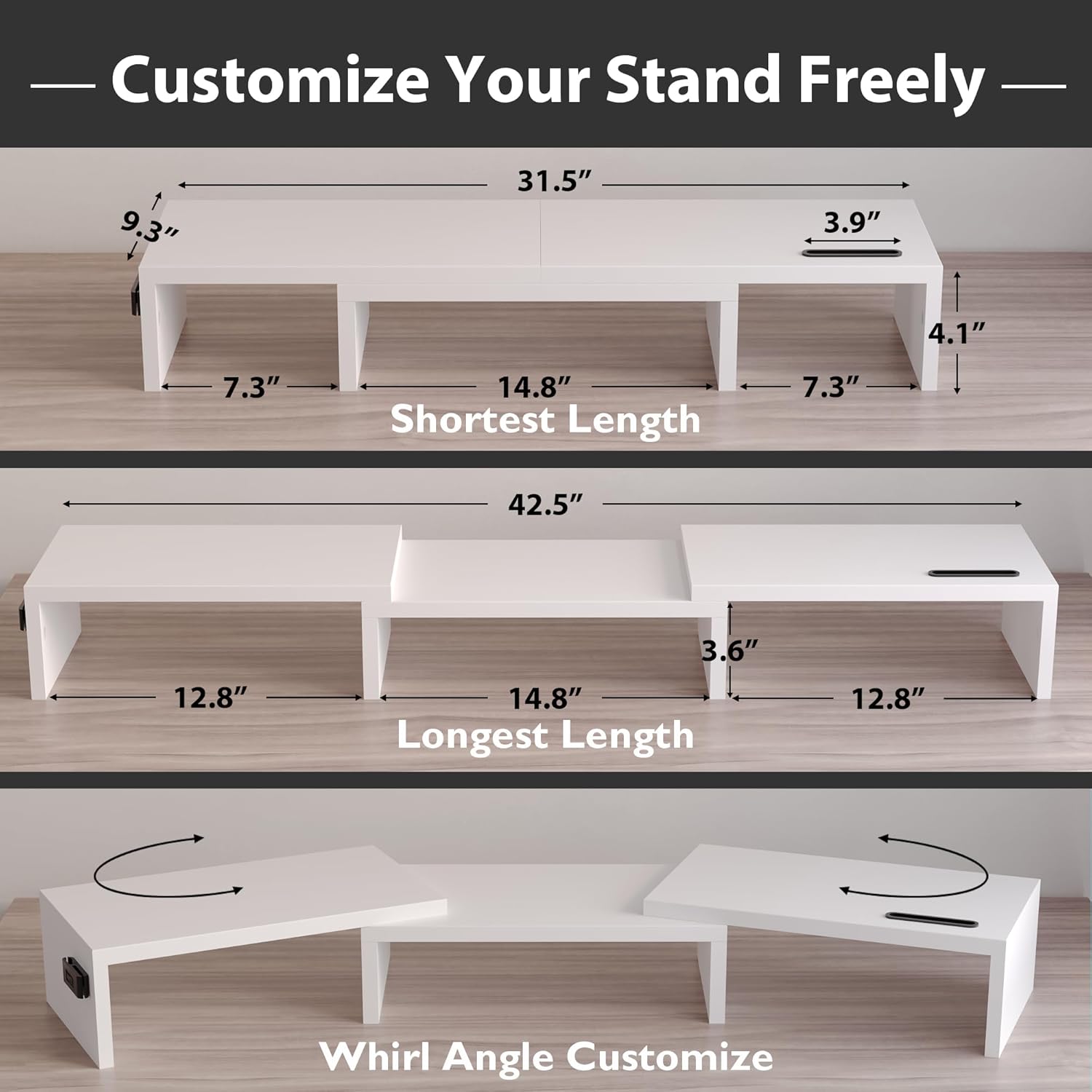
Figure 4: Illustration of the stand's adjustable length and swivel angle for customized setups.

Figure 5: Ergonomic benefits demonstrated by improved user posture with the monitor stand.

Figure 6: Key features including the smartphone holder and cable management slots.
Video 2: Official product video highlighting the adjustable and organizational aspects of the BONTEC Dual Monitor Stand.
Care and Maintenance
- Cleaning: The stand is made from a waterproof material, making it easy to clean. Wipe surfaces with a damp cloth and mild detergent if necessary. Avoid abrasive cleaners.
- Stability: Regularly check that all screws are tightened to maintain the stand's stability.
- Surface Protection: The non-slip pads not only provide stability but also protect your desk from scratches. Ensure they remain securely attached.

Figure 7: Details on non-slip pads and the waterproof, easy-to-clean surface.
Specifications
| Feature | Detail |
|---|---|
| Brand | BONTEC |
| Model | MTR-S3 |
| Material | Wood (MDF) |
| Color | White |
| Adjustable Length | 31.5 inches to 42.5 inches |
| Load Capacity | Up to 44 Pounds (20 kg) |
| Special Features | Ergonomic Design, Smartphone Holder, Cable Management, Large Storage, Non-Slip Base |
| Assembly Required | Yes (approx. 3 minutes) |
Warranty and Support
BONTEC products are manufactured to high-quality standards. For any questions, concerns, or warranty claims, please contact BONTEC customer support through the retailer's platform or the official BONTEC website. Please retain your proof of purchase for warranty purposes.


