Introduction
This manual provides comprehensive instructions for the KIMISS Replacement Remote Control, designed for seamless operation with various DVD player models, including RC-5721, DVP3670K, DVP3864K, and DVP3870K. This remote offers a straightforward, no-programming setup for immediate use.
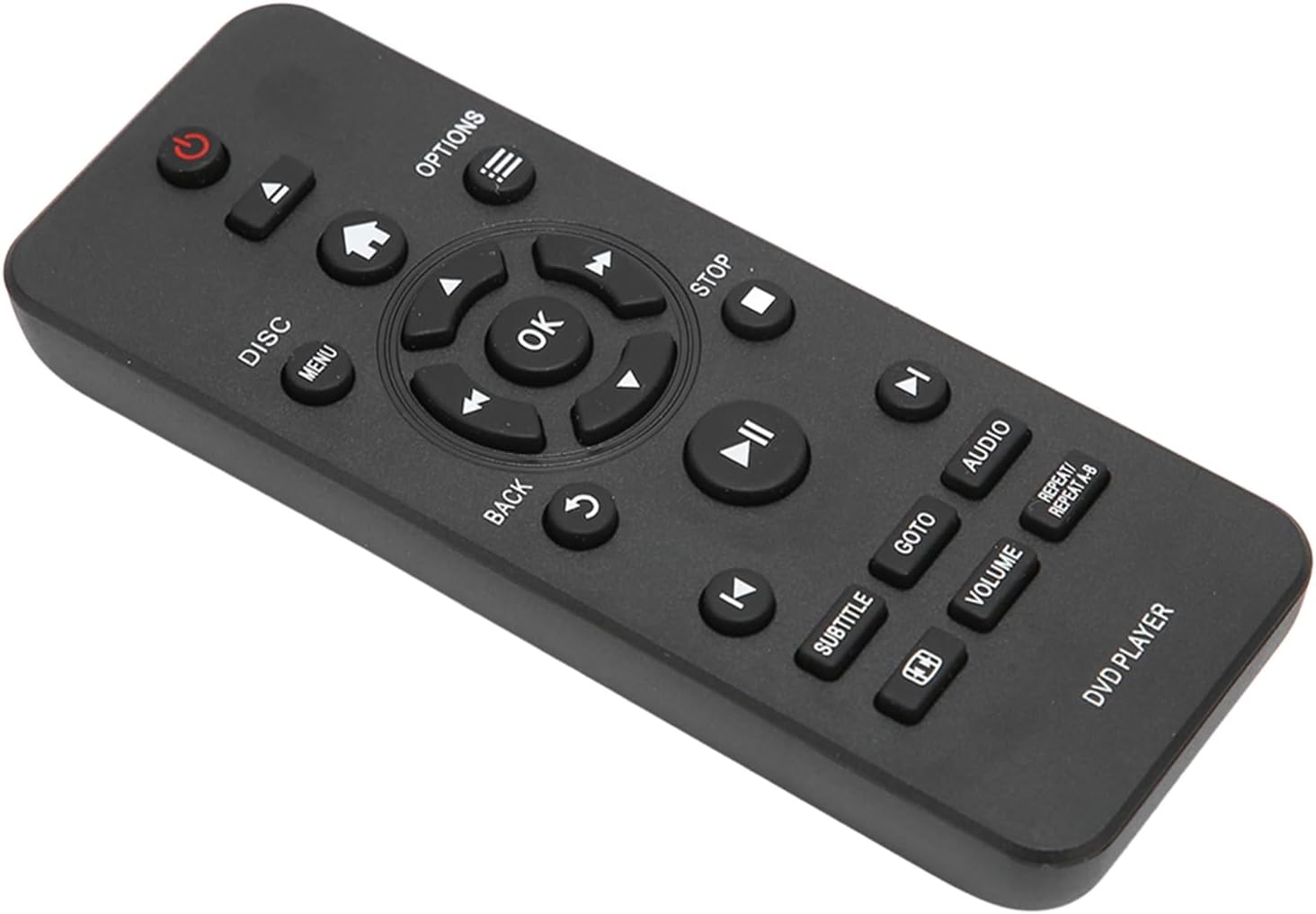
Image: Angled view of the KIMISS Replacement Remote Control, showing its ergonomic design and button layout.
1. Setup
1.1 Battery Installation
The remote control requires two AAA batteries (not included). Follow these steps to install them:
- Locate the battery compartment cover on the back of the remote control.
- Slide the cover downwards or press the latch to open it.
- Insert two AAA batteries, ensuring the positive (+) and negative (-) terminals align correctly with the markings inside the compartment.
- Replace the battery compartment cover by sliding it back into place until it clicks securely.

Image: Rear view of the remote control, highlighting the battery compartment for AAA battery installation.
1.2 Initial Use
No programming or pairing is required for this remote control. Once batteries are correctly installed, the remote is ready for immediate use with compatible DVD players.
2. Operating Instructions
This remote control is designed for intuitive operation of your DVD player. Below is a general guide to its functions.

Image: Top-down view of the remote control, showing the layout of all function buttons.
2.1 Button Functions
- Power (⏻): Turns the DVD player on or off.
- Disc: Accesses disc-related functions.
- Menu: Displays the main menu of the DVD.
- Options: Shows additional options or settings.
- Navigation Buttons (Up, Down, Left, Right): Used to navigate through menus and selections.
- OK: Confirms a selection.
- Back (↶): Returns to the previous menu or screen.
- Stop (■): Stops playback.
- Play/Pause (⏸): Starts or pauses playback.
- Previous Track (⏮): Skips to the beginning of the current track or the previous track.
- Next Track (⏭): Skips to the next track.
- Subtitle: Toggles subtitle display.
- GOTO: Allows direct access to specific chapters or time points.
- Audio: Changes audio tracks or languages.
- Volume (+/-): Adjusts the volume level.
- Repeat/Repeat A-B: Controls disc repeat functions.
- DVD Player: Label indicating the remote's primary function.
2.2 Compatibility
This remote control is compatible with the following DVD player models:
- RC-5721
- DVP3670K
- DVP3864K
- DVP3870K

Image: The remote control displayed alongside a DVD player, illustrating its compatibility with models like RC-5721, DVP3670K, DVP3864K, and DVP3870K.
3. Maintenance
3.1 Cleaning
To maintain the remote control's performance and appearance:
- Wipe the surface with a soft, dry cloth.
- For stubborn dirt, slightly dampen the cloth with water or a mild, non-abrasive cleaner.
- Avoid using harsh chemicals, solvents, or abrasive materials, as these can damage the remote's finish or internal components.
3.2 Battery Replacement
Replace batteries when the remote's responsiveness decreases or it stops functioning. Always replace both batteries at the same time with new AAA batteries. Do not mix old and new batteries or different types of batteries.
3.3 Storage
Store the remote control in a cool, dry place away from direct sunlight, extreme temperatures, and high humidity. If the remote will not be used for an extended period, remove the batteries to prevent leakage.
4. Troubleshooting
If you encounter issues with your remote control, refer to the following common problems and solutions:
| Problem | Possible Cause | Solution |
|---|---|---|
| Remote not responding. | Dead or incorrectly installed batteries. | Replace batteries with new AAA batteries, ensuring correct polarity. |
| Remote has limited range or intermittent response. | Weak batteries; obstruction between remote and DVD player; infrared sensor on DVD player is blocked. | Replace batteries. Ensure a clear line of sight between the remote and the DVD player. Clean the infrared sensor on the DVD player if necessary. |
| Specific buttons not working. | Button stuck or damaged; remote not compatible with specific function. | Gently press the button to ensure it's not stuck. Verify compatibility with your DVD player model for all functions. |
| Remote does not control the DVD player at all. | Incorrect DVD player model; remote malfunction. | Confirm your DVD player model (RC-5721, DVP3670K, DVP3864K, DVP3870K) is listed as compatible. If issues persist after checking batteries and compatibility, contact customer support. |
5. Specifications
| Feature | Detail |
|---|---|
| Brand | KIMISS |
| Item Model Number | KIMISS0z1e2kghxw |
| Connectivity Technology | Infrared |
| Special Feature | Universal (for specified models) |
| Maximum Supported Devices | 1 |
| Controller Type | Remote Control |
| Maximum Range | 10 Meters |
| Battery Description | AAA (2 required, not included) |
| Material | ABS |
| Manufacturer | KIMISS |
| Country of Origin | China |
| Date First Available | May 9, 2023 |
6. Warranty Information
This KIMISS Replacement Remote Control comes with a 1 Year Warranty Against Manufacturer Defects. Please retain your proof of purchase for warranty claims. The warranty covers defects in materials and workmanship under normal use. It does not cover damage caused by misuse, accidents, unauthorized modifications, or battery leakage.
7. Customer Support
For further assistance, troubleshooting not covered in this manual, or warranty inquiries, please contact the seller or manufacturer directly through the platform where the product was purchased. Please have your product model number (KIMISS0z1e2kghxw) and purchase details ready.