
1. Product Overview
The Auxbeam AR-600 6-Gang Bluetooth RGB Switch Panel is a multifunctional control system designed for various automotive applications, including trucks, cars, ATVs, and boats. It allows users to manage up to six different auxiliary lights or electrical devices with ease, offering multiple operating modes and customizable RGB backlighting.

Figure 1: Auxbeam AR-600 6-Gang Bluetooth RGB Switch Panel and included components.
2. What's Included
The Auxbeam AR-600 package includes all necessary components for installation and operation:
- 1 x AR-600 Switch Panel
- 1 x Circuit Control Box
- 1 x Circuit Breaker
- Mounting Brackets
- 60pcs Labels (adhesive)
- 10ft Wire Harness
- Power Harness, Fuse Wire & Adapter, Installation Kit
- Panel Waterproof Cover
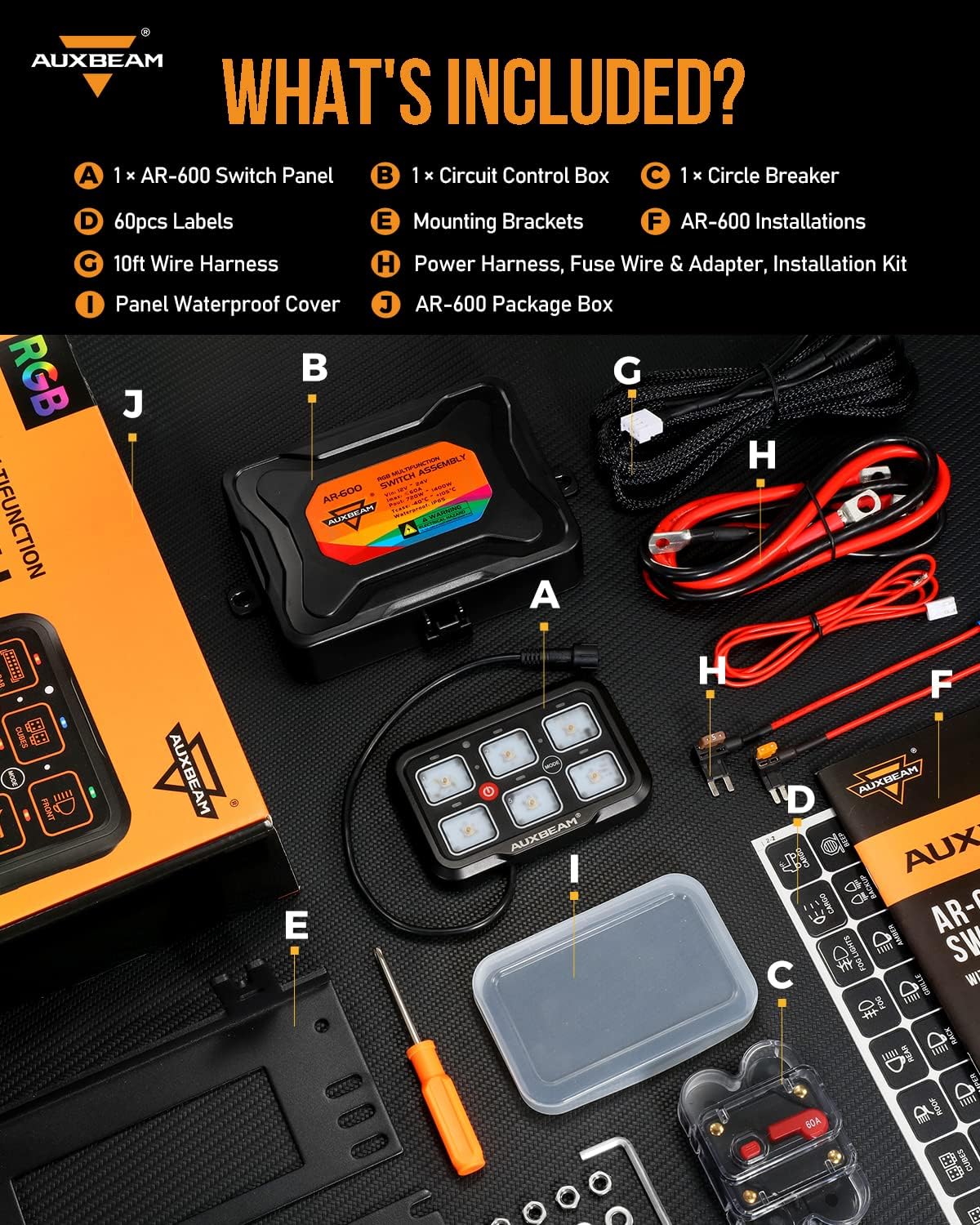
Figure 2: Detailed view of all items included in the Auxbeam AR-600 package.
3. Product Features & Specifications
3.1 Key Features
- 6-Gang Control: Manages up to six different auxiliary lights or electrical devices.
- 3 Operating Modes: Toggle (steady power), Momentary (instant activation), and Pulsed (adjustable strobe effects).
- IP65 Waterproof Rating: Ensures reliable performance in various weather conditions.
- Manual Backlight OFF: One-tap backlight shut-off for reduced glare and battery conservation.
- Bluetooth APP Control: Seamless connectivity for customizing RGB color options, assigning icons, and synchronizing panels.
- Built-in Solid State Relay: Provides enhanced safety and durability compared to traditional external relays.
- High Power Handling: Delivers 720W@12V / 1400W@24V power handling (60A max).
- Comprehensive Labeling: Includes 60 adhesive labels for clear identification of functions.
3.2 Technical Specifications
| Operation Mode | ON-OFF |
| Current Rating | 60 Amps |
| Operating Voltage | 12-24 Volts (DC) |
| Contact Type | Normally Open |
| Connector Type | Plug In |
| Material | Aluminum |
| Item Dimensions (L x W x H) | 11.81 x 7.88 x 3.4 inches |
| Circuit Type | 6-way |
| International Protection Rating | IP65 |
| Upper Temperature Rating | 221 Degrees Fahrenheit |
| Control Method | App, Touch |
| Connectivity Protocol | Bluetooth |

Figure 3: Product features and dimensions of the AR-600 switch panel and control box.
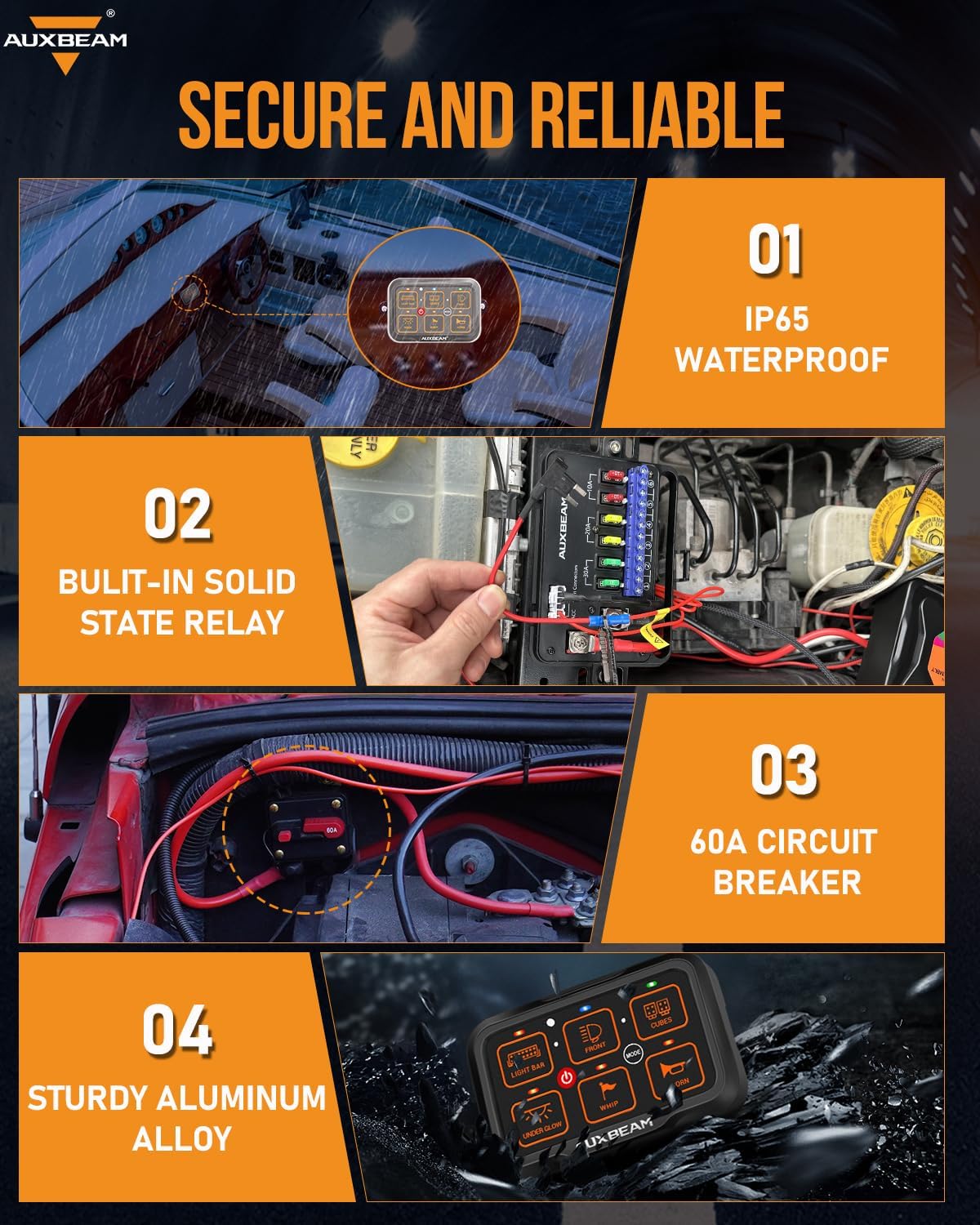
Figure 4: Secure and reliable features of the AR-600.

Figure 5: Advantages of the built-in solid state relay.
4. Setup & Installation
The Auxbeam AR-600 is designed for straightforward installation. Ensure your vehicle's battery is disconnected before beginning any wiring.
4.1 Mounting the Control Box
The circuit control box should be mounted securely in the engine bay, away from excessive heat and moisture. Use the provided mounting brackets and hardware. The 10ft wire harness allows for flexible placement.
4.2 Mounting the Switch Panel
The switch panel can be mounted in various locations within the vehicle's cabin using either the adjustable or fixed mounting brackets. Consider accessibility and visibility for optimal user experience.

Figure 6: Two common installation methods for the switch panel.

Figure 7: Examples of versatile installation locations.
4.3 Wiring Connections
Connect the main power and ground wires from the control box to your vehicle's battery. The ACC fuse connection ensures the system powers on and off with the vehicle's ignition. Connect your auxiliary devices to the numbered output terminals on the control box. The included 10ft extension wire provides ample length for most installations.

Figure 8: Improved wiring organization with the Auxbeam system.
5. Operating Instructions
5.1 Control Panel Overview
The switch panel features six large, comfortable buttons for easy operation. Each button has an indicator light to show its status. The central ON/OFF button controls the entire panel and has a memory function to restore the previous state after power cycling.

Figure 9: Large button design for improved usability.
5.2 Lighting Modes
Each gang can be programmed to one of three distinct lighting modes:
- Toggle Mode (Red Indicator): Provides steady, continuous power for devices like light bars or fog lights.
- Momentary Mode (Blue Indicator): Activates the device only while the button is pressed, ideal for horns or air compressors.
- Pulsed Mode (Green Indicator): Offers adjustable strobe effects for emergency signals or off-road use.
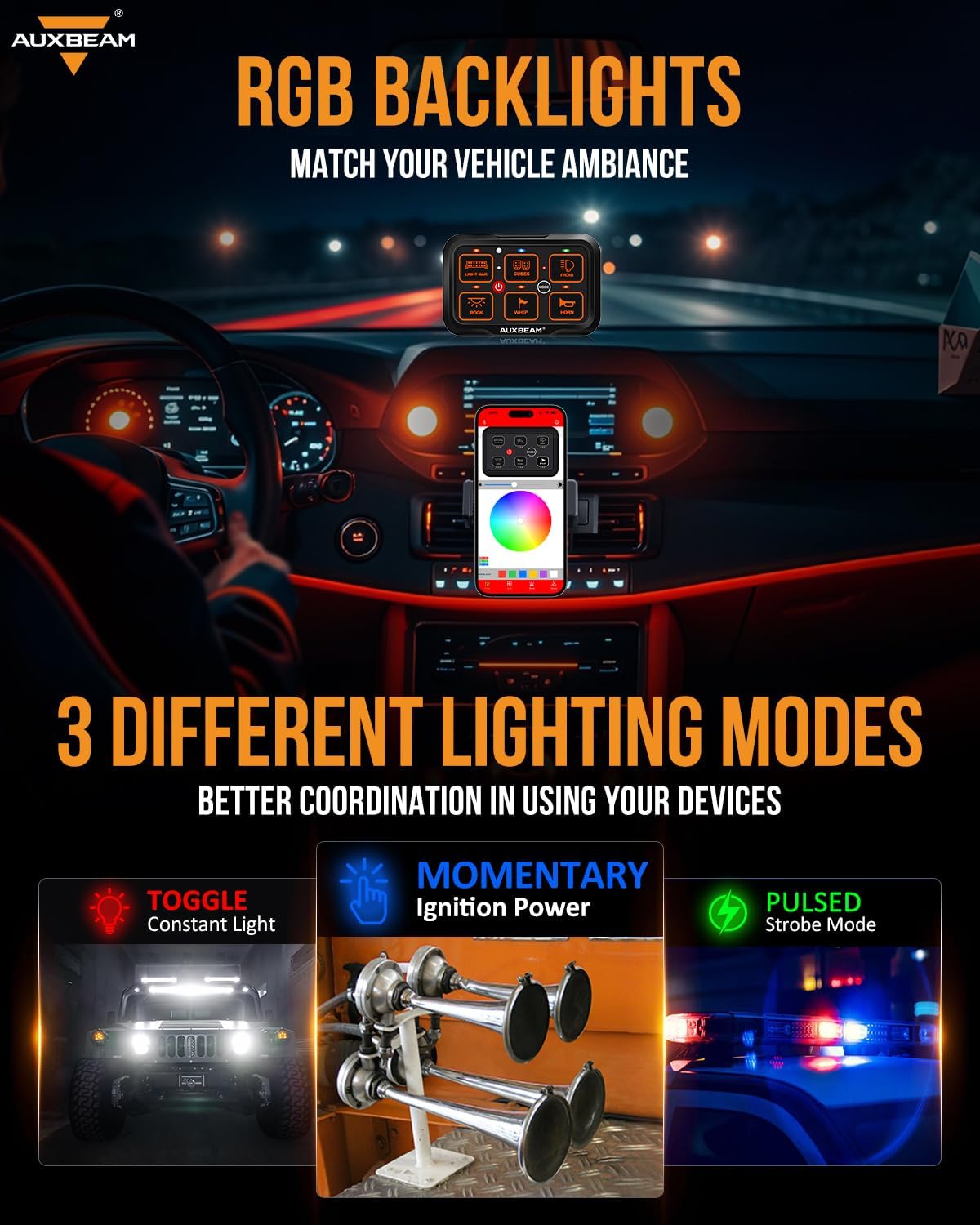
Figure 10: Visual representation of the three lighting modes.

Figure 11: Three distinct lighting modes for versatile control.
5.3 Backlight Control
The backlight brightness can be adjusted in three ways:
- Manual Backlight OFF: A single tap can turn off the backlight to reduce glare and conserve battery.
- APP Brightness Adjustment: Adjust brightness from 0-100% via the mobile application.
- Automatic Sensing: The panel can automatically adjust backlight brightness based on ambient light conditions.
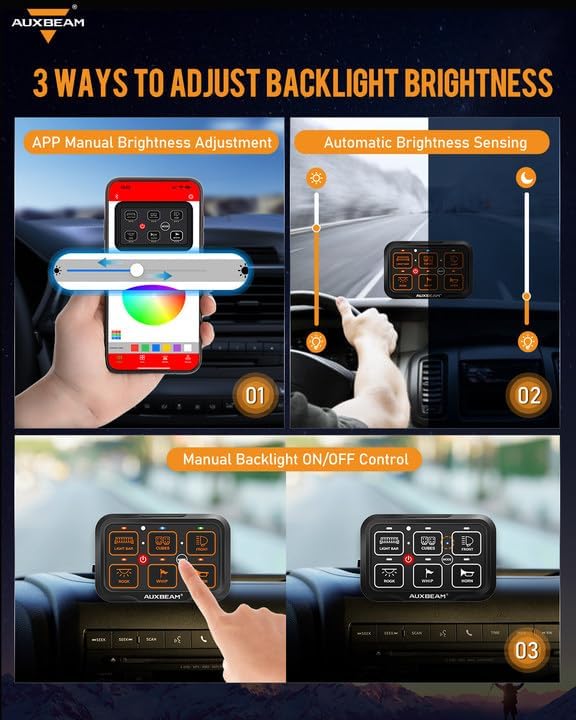
Figure 12: Methods for adjusting backlight brightness.

Figure 13: Backlight adjustment options.
5.4 Bluetooth App Control
The dedicated mobile application provides comprehensive control over your switch panel. You can personalize the appearance with RGB color options, assign intuitive icons to each gang, and synchronize multiple panels for unified management.

Figure 14: Two ways to control the switch panel: directly on the panel or via the mobile app.

Figure 15: Unlimited RGB backlight customization.
5.5 Applying Labels
The kit includes 60 reusable and customizable labels to clearly identify the function of each switch. Apply the appropriate label to each button for quick and easy reference.

Figure 16: Included labels for switch customization.
5.6 Official Product Videos
Video 1: Demonstrates the APP/Switch Panel with Memory Function, showing how settings are retained after power cycles.
Video 2: Shows the manual backlight off feature of the Auxbeam 6-gang controller, useful for night driving.
Video 3: Highlights the new version of the Auxbeam switch panel with manual off backlight functionality.
Video 4: Comprehensive demonstration of the Auxbeam 6-Gang Bluetooth RGB AR600 Switch Panel with its three distinct modes.
6. Maintenance
The Auxbeam AR-600 is designed for durability and minimal maintenance. Its IP65 waterproof rating protects against dust and water ingress. For optimal performance, ensure the panel and control box are kept clean and free from debris. The included waterproof panel cover provides additional protection against harsh weather conditions.

Figure 17: Waterproof panel cover for enhanced protection.
7. Troubleshooting
This section addresses common questions and issues users might encounter:
- Controlling Multiple Lights with One Button: To control two or more lights simultaneously with one button, connect the positive wires of both work lights into the same '+' hole of the circuit control box, and similarly for the negative poles.
- ACC Fuse Connection: Connect the red ACC Fuse to the fuse adapter. Verify the car's ACC fuse is powered when the ACC gear is open. Remove the original car ACC Fuse, insert the fuse adapter, and reinsert the entire fuse adapter into the original ACC Fuse position.
- Panel Functionality When Vehicle is Off: The switch system typically stops working when the car is powered off (due to ACC fuse connection) to prevent battery drain.
- Continuous Operation When Car is Off: To keep the switch panel powered on when the car is not started, connect the red ACC wire directly to the battery. However, this is not recommended as it can consume battery power.
- ON/OFF Button Memory Function: The central ON/OFF button primarily serves as a memory function. Devices in use can be fully closed and opened with one key. The memory function remains active even after the car is parked and turned off, restoring the previous state when the car is started the next day. Note: After power is restored to the vehicle, you may still need to press the ON/OFF button to restore accessories, ensuring sufficient power for car startup.
- Wire Length Insufficiency: If the provided wires are not long enough, extension wires are available. For the 8-gang switch panel, extension wires can be found using ASIN: B093293RJ7.
- Additional Stickers: More stickers for the RA80 XL switch panel can be obtained using ASIN: B0C13FPNP1.
8. Warranty & Support
The Auxbeam AR-600 6-Gang Bluetooth RGB Switch Panel comes with a 2-year warranty. For any inquiries, technical assistance, or support, the Auxbeam Team provides 24-hour friendly online service.


