
BAANOOL BN-403A (2G/4G)
BAANOOL BN-403A (2G/4G) GPS Tracker Device User Manual
Comprehensive guide for installation, operation, and maintenance of your BAANOOL GPS Tracker.
1. Product Overview
The BAANOOL BN-403A (2G/4G) is a versatile GPS tracking device designed for vehicles, including cars, trucks, and taxis. It offers real-time positioning without monthly fees, providing essential features for vehicle tracking and fleet management.

Image: BAANOOL BN-403A GPS Tracker device shown alongside a smartphone displaying its tracking application interface.

Image: Examples of vehicles the GPS tracker can be used with, such as cars, electric vehicles, trucks, motorcycles, and buses.
Key Features:
- Real-time Positioning: Accurate location tracking using GPS satellites.
- No Monthly Fee: Free web platform and mobile application for tracking.
- Remote Engine Cut-off: Ability to remotely disable the vehicle's engine (for 403B model, check compatibility).
- GEO-fence: Set up virtual boundaries and receive alerts when the vehicle enters or exits defined areas.
- Over Speed Alarm: Get notifications if the vehicle exceeds a configured speed limit.
- Waterproof Design: Enhanced durability for various environmental conditions.
- Compatibility: Supports 2G/4G networks and is compatible with various fuel cars.
2. Setup and Installation
Professional installation is recommended for this device. If you are unsure, please seek assistance from a qualified engineer.
2.1. Package Contents
Before starting, verify that all components are present in your package:

Image: Detailed view of the package contents for the GPS-403A, showing the GPS unit, wiring harness, relay, microphone, screwdriver, and user manual.
- GPS Tracker Device (BN-403A)
- Wiring Harness
- Relay (for engine cut-off function)
- Microphone
- Screwdriver
- User Manual
2.2. SIM Card Installation
A SIM card (not included) is required for the tracker to function. Ensure the SIM card supports 2G/4G networks and has an active data plan.
Video: Demonstrates the correct procedure for inserting the SIM card into the GPS tracker device.
- Locate the SIM card slot on the device.
- Insert the SIM card into the slot, ensuring it is correctly oriented.
- Close the SIM card slot cover securely.
2.3. Wiring and Power Connection
Connect the device to your vehicle's power supply. The TK403 A/B GPS tracker should be installed to the on-board power supply.
Video: Step-by-step guide on how to install the GPS tracker, including connecting the power wires (red for positive, black for negative) to the car battery, connecting the device to the harness, and wiring the fuel pump relay.
- Connect the red wire of the tracker to the vehicle's positive power supply (12V).
- Connect the black wire to the vehicle's negative/ground.
- Connect the white ACC line of the tracker to the vehicle's ACC line.
- For engine cut-off functionality, connect the relay as per the wiring diagram provided in the full manual.
- Connect the violet SOS line to the SOS button and install the button in an accessible location.

Image: Close-up of the GPS tracker connected to a car battery for power supply.
2.4. Signal Light Indicators
After connecting the power, observe the signal lights on the device to confirm proper operation:
Video: Shows the signal lights flashing normally on the GPS tracker, indicating proper function.
- Red Light: Indicates full battery (always on).
- Blue Light: Flashes when there is a good GPS signal.
- Green Light: Flashes when there is a good GSM signal.
3. Operating the Device
The BAANOOL GPS tracker can be controlled via SMS, the dedicated mobile application (BAANOOL IOT), or the web platform.
3.1. Mobile Application and Web Platform
Download the "BAANOOL IOT" app from the Apple App Store or Google Play. The web platform is also available for comprehensive management.

Image: Real-time tracking interface on both mobile application and web platform.

Image: Historical playback feature showing a vehicle's past routes on the map.
The platform allows you to:
- View real-time location of your vehicle.
- Access historical route playback.
- Set up and manage GEO-fences.
- Receive various alarms and notifications.
3.2. Advanced Functions
- GEO-fence: Define safe zones or restricted areas. You will receive an alert if the vehicle enters or exits these predefined zones.

Image: GEO-fence feature displaying a safe area on a map.
- Over Speed Alarm: Configure a maximum speed limit. If the vehicle exceeds this speed, an alert will be sent to your device.
- Motion Alarm: Receive alerts if the vehicle moves from its parked location without authorization.
- SOS Alarm: In case of emergency, pressing the SOS button will send an alert to pre-set numbers.
- Remote Engine Cut-off: This feature allows you to remotely cut off the engine power in emergency situations. This function requires proper relay installation.
4. Maintenance
The BAANOOL GPS tracker is designed for durability and requires minimal maintenance.
- Waterproof Feature: The device is waterproof, providing protection against splashes and rain. However, avoid submerging the device in water.
- Battery: The device includes a 3.7V 350mAh Li-ion battery. Ensure the device is properly connected to the vehicle's power supply for continuous charging and operation.
- Cleaning: Use a soft, dry cloth to clean the device. Avoid using harsh chemicals or abrasive materials.
5. Troubleshooting
If you encounter issues with your BAANOOL GPS tracker, consider the following common solutions:
- Device Offline:
- Check the SIM card: Ensure it is correctly inserted and has an active data plan with sufficient credit.
- Verify power connection: Confirm the device is receiving power from the vehicle's battery.
- Check network signal: Ensure the vehicle is in an area with good 2G/4G network coverage.
- Inaccurate Location:
- Ensure the device has a clear view of the sky for GPS signal reception. Avoid installing it in enclosed metal spaces.
- Check GPS signal indicator (blue light) on the device.
- No Alarms Received:
- Confirm alarm settings are correctly configured in the mobile app or web platform.
- Ensure the device has a stable network connection.
For persistent issues, please refer to the detailed troubleshooting section in the full user manual or contact customer support.
6. Specifications
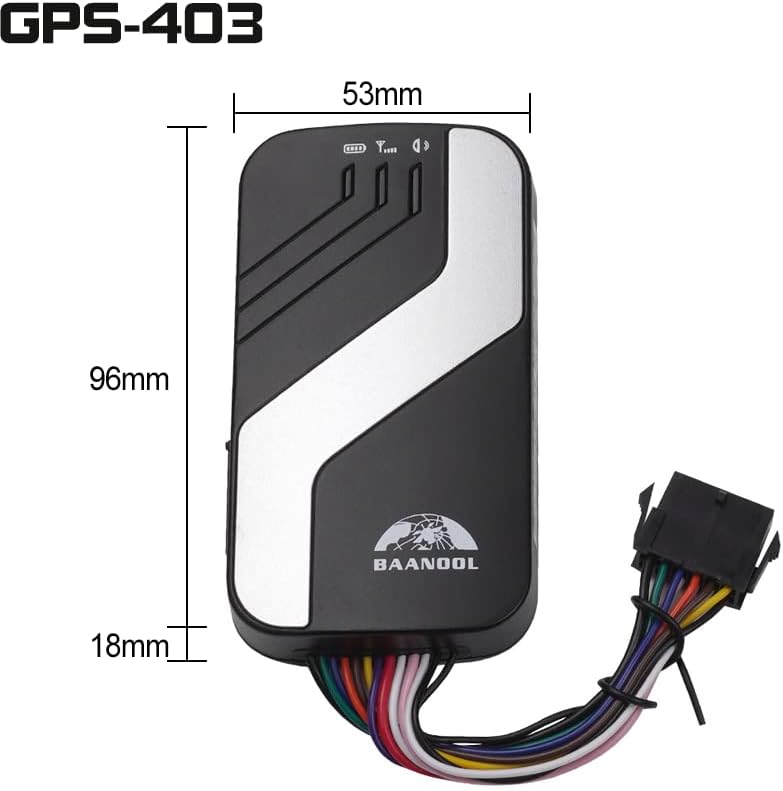
Image: Physical dimensions of the GPS-403 device.

Image: Comprehensive technical specifications for the GPS-403A/B model.
| Feature | Detail |
|---|---|
| Model | BN-403A (2G/4G) |
| Dimensions | 3.78 x 2.09 x 0.71 inches (96mm x 53mm x 18mm) |
| Item Weight | 10.2 ounces (70g) |
| Network | GSM / GPRS / LTE (2G/4G) |
| GPS Accuracy | 5m |
| Battery | Chargeable 3.7V 350mAh Li-ion battery |
| Operating Temperature | -20°C to +65°C |
| Special Feature | Waterproof |
| Connectivity Technology | Cellular |
7. Warranty and Support
BAANOOL GPS trackers come with a 15-month warranty from the manufacturer.

Image: Icon representing customer support services.
If you experience any issues with your device or require technical assistance, please contact the seller or manufacturer directly for support. They provide comprehensive after-sales service to ensure a perfect solution.
For further assistance, please visit the official BAANOOL Store on Amazon: BAANOOL Store
Related documentsBN-403A (2G/4G)


Ask a question about this manual
Ask about setup, troubleshooting, compatibility, parts, safety, or missing instructions. Manuals+ will review the question and use this page’s manual context to help answer it.