
BAANOOL BN-303F (2G)
BAANOOL BN-303F/G 2G GPS Tracker User Manual
Intelligent Management Tracking System for Vehicles
1. Introduction
This user manual provides comprehensive instructions for the installation, operation, and maintenance of your BAANOOL BN-303F/G 2G GPS Tracker. This device is designed for intelligent management and real-time tracking of vehicles, offering features such as overspeed alarms, GEO-fencing, and remote engine cut-off capabilities. It operates on a 2G network and requires a separate SIM card for functionality. A free web platform and mobile application are provided for convenient monitoring.
2. Product Overview
2.1. Package Contents
Verify that all items are present in your package:
- Giftbox
- User Manual
- GPS Unit (BN-303F/G)
- Relay
- Microphone
- Screwer
- Harness

Figure 2.1: Contents of the BN-303F/G GPS Tracker package, including the main unit, wiring harness, relay, microphone, and tools.
2.2. Device Features
- Real-time Positioning: Accurate location tracking via GPS satellites.
- Remote Engine Cut-off: Ability to remotely disable the vehicle's engine.
- Multiple Alert Functions: Includes overspeed alarm, GEO-fence, low battery alarm, power disconnection alarm, blind area alarm, SOS alarm, and movement alarm.
- Waterproof Design: Enhanced durability for various environmental conditions.
- Built-in GPS/GSM Antennas: Integrated antennas for reliable signal reception.
- Monitoring Microphone: Allows for remote audio monitoring (microphone included).
- Free Platform: Access to a free web platform and mobile application (BAANOOL IOT) with no monthly fees.
- Wide Compatibility: Compatible with various fuel vehicles (cars, motorcycles, fleets, trucks, taxis).
- 2G Network Support: Operates on 2G GSM/GPRS networks (850/900/1800/1900MHz).
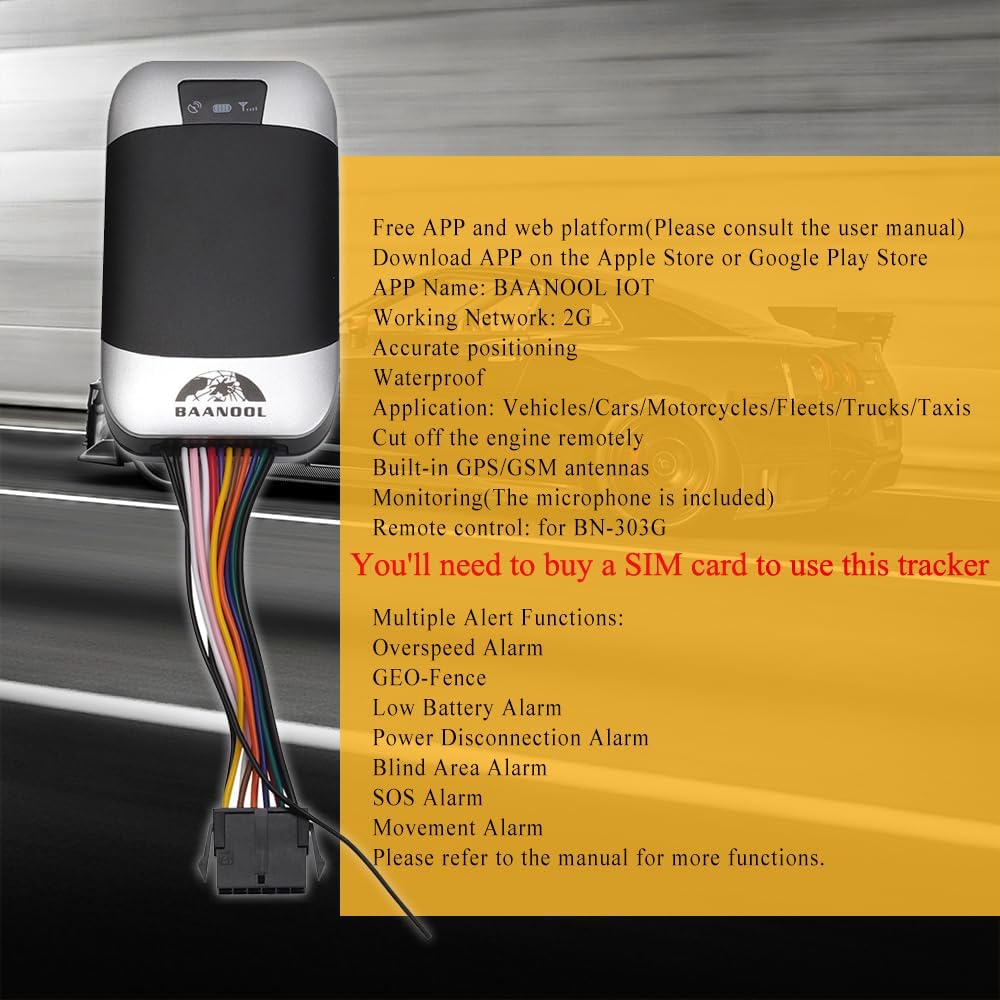
Figure 2.2: Overview of the BN-303F/G GPS Tracker's key features, including its network compatibility, application, and alert functions.

Figure 2.3: Visual representation of the GPS-303F's main functions and capabilities.
3. Setup and Installation
Professional installation is recommended for this device. Ensure the vehicle's power is off before beginning installation.
3.1. SIM Card Installation
A SIM card (not included) is required for the tracker to function. Ensure the SIM card supports 2G network and has sufficient balance for SMS and GPRS data.
- Locate the SIM card slot on the side of the GPS tracker.
- Use the provided tool or a paperclip to open the SIM card tray.
- Insert the Nano SIM card into the tray with the gold contacts facing down, ensuring correct orientation.
- Gently push the tray back into the slot until it clicks into place.
Video 3.1: Demonstration of how to correctly insert the SIM card into the GPS tracker device.
3.2. Wiring Diagram and Connections
The BN-303F/G tracker needs to be connected to the vehicle's power supply. Refer to the following instructions and the installation video for proper wiring.
- Power Connection:
- Connect the Red wire (Positive) from the tracker's harness to the vehicle's positive battery terminal.
- Connect the Black wire (Negative) from the tracker's harness to the vehicle's negative battery terminal or a reliable ground point on the car chassis.
- ACC Line Connection:
- Connect the White wire (ACC Line) from the tracker's harness to the vehicle's ACC line. This line provides power when the ignition is on.
- Fuel Pump Cut-off (Optional):
- To enable remote engine cut-off, cut the vehicle's fuel pump wire.
- Connect the two ends of the cut fuel pump wire to the appropriate terminals of the provided 12V relay.
- Connect the relay's control wires to the tracker's designated wires for engine cut-off (refer to the harness color coding).
- Door Trigger Connection (Optional):
- For door open/close alerts, connect the tracker's Blue wire (Negative) or Green wire (Positive) to the corresponding door trigger line of the vehicle.
- SOS Button Connection (Optional):
- Connect the Violet wire (SOS Line) to the provided SOS button.
- Stick the SOS button in an easily accessible but discreet location within the vehicle.
Video 3.2: Detailed guide on the installation process of the GPS Tracker, including wiring connections for power, ACC, fuel pump, door trigger, and SOS button.

Figure 3.1: The BN-303F/G GPS Tracker connected to its wiring harness, alongside a smartphone displaying the tracking application interface.
4. Operating Instructions
4.1. Power On and Signal Lights
After connecting the device to the vehicle's power, the signal lights will indicate its status:
- Red Light: Indicates full battery (always on).
- Blue Light: Flashes to indicate good GPS signal.
- Green Light: Flashes to indicate good GSM signal.
Video 4.1: Visual demonstration of the signal lights on the GPS tracker and their meanings.
4.2. Using the Free APP/Platform
Download the BAANOOL IOT APP from the Apple App Store or Google Play Store. The web platform is also available for access.
- Real-time Tracking: Monitor your vehicle's current location on a map.
- Historical Playback: Review past routes and movements of the vehicle.
- GEO-fence: Set up virtual boundaries and receive alerts when the vehicle enters or exits these areas.
- Overspeed Alarm: Configure speed limits and receive notifications if the vehicle exceeds them.
- Remote Control: Control device functions, such as engine cut-off, via the app or web platform.

Figure 4.1: The BAANOOL IOT application interface on both mobile and web platforms, demonstrating real-time tracking capabilities.

Figure 4.2: Illustration of the multi-vehicle tracking feature within the BAANOOL IOT system.


Figure 4.3: Icons illustrating key tracking features: Active Tracking, Overspeed Alarm, and Geo-Fence.
5. Maintenance
- Regularly check all wiring connections to ensure they are secure and free from corrosion.
- Ensure the SIM card has sufficient credit and data plan for continuous operation.
- Keep the device clean and free from dust and debris.
- Avoid exposing the device to extreme temperatures or direct sunlight for prolonged periods.
- If the device is waterproof, ensure all covers and seals are properly closed to maintain water resistance.
6. Troubleshooting
| Problem | Possible Cause | Solution |
|---|---|---|
| Device offline on platform/APP | No SIM card inserted, SIM card expired/no balance, 2G network unavailable, incorrect APN settings, device not powered on. | Insert valid SIM card, recharge SIM card, check 2G network coverage, configure correct APN via SMS, ensure proper power connection. |
| Inaccurate GPS location | Weak GPS signal (e.g., indoors, underground parking), device not facing sky, interference. | Move vehicle to open area, ensure device has clear view of sky, check for obstructions. |
| No response to SMS commands | Incorrect command format, SIM card issues (no SMS service, full inbox), device not registered on network. | Verify SMS command format, check SIM card SMS service, ensure device is powered and has GSM signal. |
| Engine cut-off not working | Incorrect relay wiring, relay faulty, vehicle speed too high (safety feature). | Check relay connections, test relay, ensure vehicle speed is below 20km/h for safety cut-off. |
If problems persist, please contact BAANOOL customer support for assistance.
7. Specifications
| Feature | Detail |
|---|---|
| Model | BN-303F (2G) / BN-303G |
| Dimensions | 96mm x 53mm x 16mm (3.78 x 2.09 x 0.63 inches) |
| Weight | 70g (2.47 oz) / 10.6 ounces |
| Network | 2G GSM / GPRS |
| Band | 2G (850 / 900 / 1800 / 1900MHz) |
| GPS Sensitivity | -159dBm |
| GPS Accuracy | 5m |
| GPS Start Time | Cold status: 45s, Warm status: 35s, Hot status: 1s |
| Applicable Car Power | 12V – 24V |
| Battery | Chargeable 3.7V 350mAh Li-ion battery (included) |
| Storage Temperature | -40°C to +85°C |
| Operation Temperature | -20°C to +65°C |
| Humidity | 5% – 95% non-condensing |
| Special Feature | Waterproof |
| Connectivity Technology | Cellular |
| Supported Application | Alarm, Vehicle Tracking |
8. Warranty and Support
BAANOOL GPS trackers come with a 15-month warranty. As an original manufacturer, BAANOOL provides comprehensive after-sales service.
If you encounter any problems with your device, please contact BAANOOL customer support for a solution. You can find contact information on the official BAANOOL website or through your purchase platform.

Figure 8.1: BAANOOL offers lifetime customer support for their products.
Ask a question about this manual
Ask about setup, troubleshooting, compatibility, parts, safety, or missing instructions. Manuals+ will review the question and use this page’s manual context to help answer it.