Introduction
The ISOtunes ULTRACOMM Aware is a true wireless Bluetooth hearing protection system designed to protect your hearing while enabling clear communication and environmental awareness in noisy environments. This manual provides essential information for setting up, operating, maintaining, and troubleshooting your device.

Key features include:
- Detachable Boom Mic: For clear communication in loud environments.
- Aware Technology: Level-dependent audio passthrough for environmental awareness while suppressing loud impact noises.
- Ultra Durable: IP56 rating for dust, sweat, and water resistance.
- OSHA Compliant: ANSI-Certified 24 dB Noise Reduction Rating (NRR) with SafeMax technology (limits audio output to 85 dB).
- All Day Battery: Up to 8 hours of battery life, with an additional 24 hours provided by the charging case.
Setup
Box Contents
Before first use, please verify all items are present:
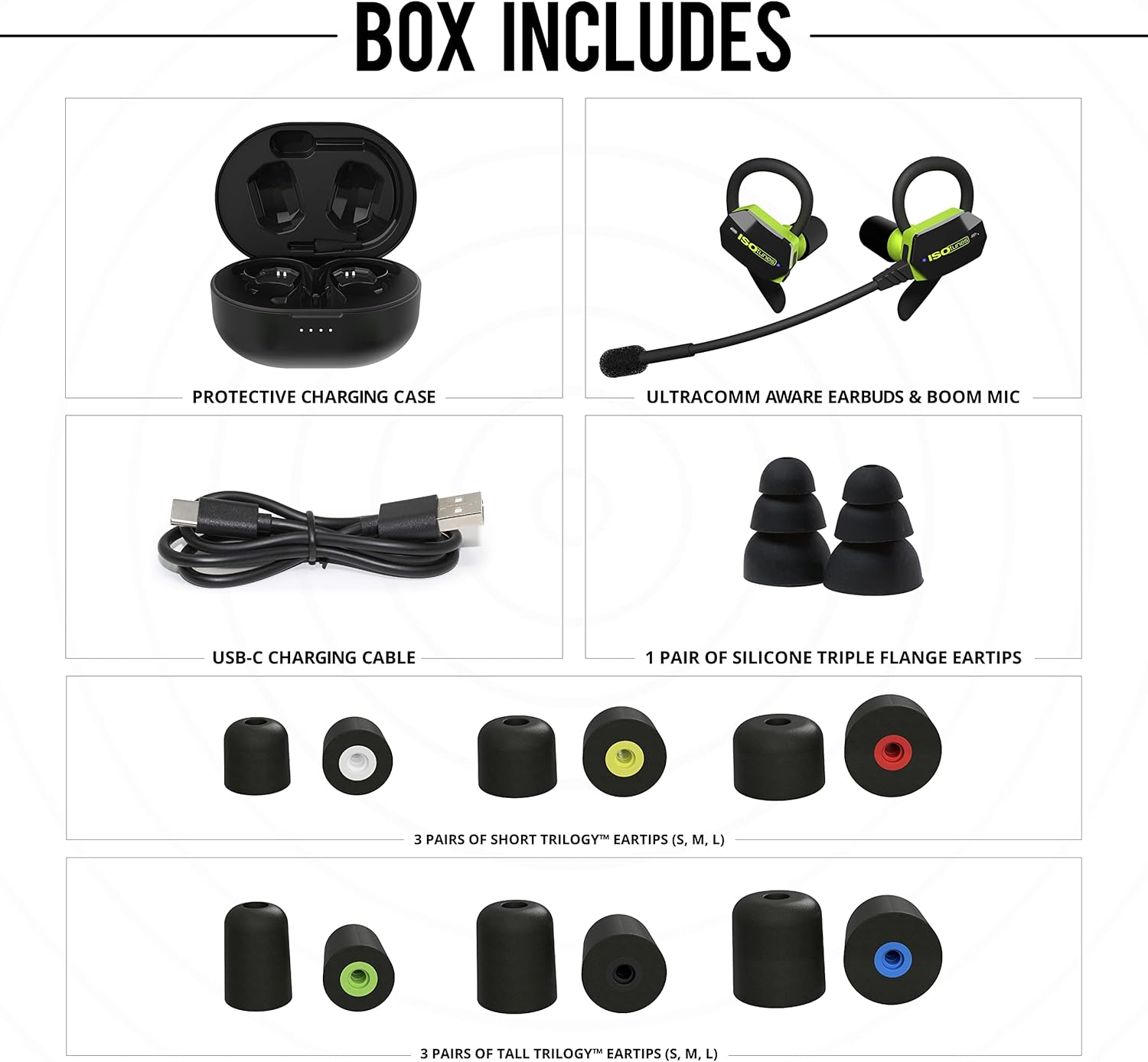
- ULTRACOMM Aware Earbuds (Left and Right)
- Detachable Boom Mic
- Protective Charging Case
- USB-C Charging Cable
- 1 Pair of Silicone Triple Flange Eartips
- 3 Pairs of Short Trilogy™ Eartips (S, M, L)
- 3 Pairs of Tall Trilogy™ Eartips (S, M, L)
Charging
The ULTRACOMM Aware earbuds and charging case come with a partial charge. For optimal performance, fully charge both before first use.
- Place the earbuds into the charging case, ensuring they are seated correctly. The LED indicators on the case will illuminate to show charging status.
- Connect the USB-C charging cable to the port on the back of the charging case and plug the other end into a compatible USB power source (e.g., wall adapter, computer USB port).
- The charging case LEDs will indicate charging progress. A full charge typically takes approximately 2-3 hours for the case and earbuds.

Eartip Selection and Fitting
Proper eartip selection and fit are crucial for both hearing protection and audio quality. Experiment with the different sizes and types of eartips provided to find the best seal and comfort for your ears.
- Choose the Right Size: Select an eartip that comfortably fits your ear canal and creates a snug seal.
- Compress Foam Eartips: For foam eartips, roll the foam between your fingers to compress it before insertion.
- Insert and Hold: Insert the eartip into your ear canal and hold it in place for a few seconds while the foam expands to create a seal.

Operating Instructions
Power On/Off
- Power On: Remove the earbuds from the charging case. They will automatically power on and attempt to connect to the last paired device.
- Power Off: Place the earbuds back into the charging case. They will automatically power off and begin charging.
Bluetooth Pairing
To pair your ULTRACOMM Aware earbuds with a new device:
- Ensure the earbuds are powered on and not connected to another device. They will enter pairing mode automatically if no previously paired device is found.
- On your device (smartphone, tablet, etc.), go to the Bluetooth settings.
- Search for available devices and select "ISOtunes ULTRACOMM Aware" from the list.
- Once connected, you will hear an audible confirmation.
Controls and Functions
The ULTRACOMM Aware earbuds feature touch-sensitive controls on each earbud. Note that volume control is primarily managed through your connected device.

- Answer/End Calls: Single tap on either earbud.
- Play/Pause Music: Single tap on either earbud.
- Skip Track: Double tap on the right earbud.
- Previous Track: Double tap on the left earbud.
- Aware Volume: Adjust the level of environmental sound passthrough by tapping the designated area on the earbuds.
Aware Technology
Aware Technology utilizes omni-directional microphones to pick up outside sounds and amplify them through your hearing protector. This allows you to maintain situational awareness while loud impact noises are suppressed.

When a harmful environmental noise is detected, ULTRACOMM Aware will amplify environmental sounds until they breach 85 dB, then cut off in less than 2 milliseconds. Once the noise returns to a safe listening level, the Aware functionality will resume.
Detachable Boom Mic
The boom mic can be attached to either the left or right earbud, providing enhanced voice clarity for calls in noisy environments.
- Attaching: Align the connector on the boom mic with the port on the earbud and gently push until it clicks into place.
- Detaching: Gently pull the boom mic away from the earbud.
- Positioning: Position the microphone close to your mouth for optimal voice pickup.
Hearing Protection Compliance
The ULTRACOMM Aware features an ANSI-Certified 24 dB Noise Reduction Rating (NRR) and SafeMax technology, ensuring compliance with OSHA standards for workplace use by limiting audio output to 85 dB.


Maintenance
Cleaning
- Earbuds: Gently wipe the earbuds with a soft, damp cloth. Do not use harsh chemicals or abrasive materials. Ensure the charging contacts are clean and dry.
- Eartips: Remove eartips from the earbuds. Foam eartips can be gently wiped. Silicone eartips can be rinsed with water and mild soap, then thoroughly dried before reattaching.
- Charging Case: Wipe the exterior of the charging case with a soft, dry cloth. Keep the charging ports free of dust and debris.
Storage
When not in use, store the ULTRACOMM Aware earbuds in their charging case to protect them from dust, moisture, and physical damage. Store in a cool, dry place away from direct sunlight and extreme temperatures.

Water and Dust Resistance
The ULTRACOMM Aware earbuds are rated IP56 for dust, sweat, and water resistance. This means they are protected against dust ingress and strong jets of water. They are not designed for submersion in water.

Troubleshooting
| Problem | Possible Cause | Solution |
|---|---|---|
| Earbuds not powering on | Low battery; Earbuds not properly seated in case. | Ensure earbuds are charged. Place them firmly in the charging case. |
| Cannot pair with device | Earbuds already connected to another device; Device Bluetooth off; Earbuds not in pairing mode. | Disconnect from other devices. Ensure Bluetooth is enabled on your device. Power cycle earbuds to re-enter pairing mode. |
| Poor sound quality / Low volume | Improper eartip seal; Device volume too low; Dirty eartips/earbud speakers. | Ensure proper eartip fit and seal. Increase volume on your connected device. Clean eartips and earbud speakers. |
| Boom mic audio unclear | Mic not positioned correctly; Environmental noise. | Ensure boom mic is positioned close to your mouth. Verify mic is securely attached. |
| Earbuds connect automatically when in case | Case lid not fully closed; Earbuds not properly seated in case. | Ensure the charging case lid is securely closed and earbuds are firmly seated. |
Specifications
| Feature | Detail |
|---|---|
| Model Number | IT-75 |
| Noise Reduction Rating (NRR) | 24 dB (ANSI-Certified) |
| SafeMax Technology | Limits audio output to 85 dB |
| Bluetooth Version | 5.2 |
| Wireless Range | Up to 30 ft (9 meters) |
| Battery Life (Earbuds) | Up to 8 hours |
| Battery Life (with Charging Case) | Additional 24 hours |
| Water/Dust Resistance | IP56 |
| Batteries Required | 3 Lithium Ion batteries (included) |
| Manufacturer | Haven Technologies, Inc. |
Warranty and Support
Warranty Information
For detailed warranty information regarding your ISOtunes ULTRACOMM Aware product, please refer to the warranty card included in your product packaging or visit the official ISOtunes website. Warranty terms and conditions may vary by region.
Customer Support
If you encounter any issues or have questions not covered in this manual, please contact ISOtunes customer support. You can find contact information and additional resources on the official ISOtunes website:


