
Introduction
The AcuRite Vertical Color Weather Station provides comprehensive weather information for your home and immediate outdoor environment. Utilizing patented Self-Calibrating Technology, it delivers a personalized 12 to 24-hour weather forecast. The vibrant color display presents indoor and outdoor temperature, humidity, barometric pressure, dew point, and heat index in an easy-to-read vertical format. The system includes a wireless sensor for outdoor data collection and offers customizable alerts to keep you informed of changing conditions.
Package Contents
- AcuRite Vertical Color Weather Station Display Unit (Model 01201M)
- AcuRite Wireless Temperature and Humidity Sensor (Model 06002RM)
- 5V Power Adapter for Display Unit
- Instruction Manual
Setup
1. Powering the Display Unit
- Connect the included 5V power adapter to the display unit and plug it into a wall outlet. The display will illuminate.
- For optional battery backup, insert 3 AAA alkaline batteries (not included) into the battery compartment on the back of the display unit. This will preserve time and settings during a power outage.
2. Installing Batteries in the Wireless Sensor
- Remove the battery compartment cover from the wireless sensor.
- Insert 2 AA alkaline or lithium batteries (not included) into the battery compartment. Ensure correct polarity (+/-).
- Replace the battery compartment cover.
3. Sensor Placement and Pairing
- Place the wireless sensor and the display unit within close proximity (e.g., 1-2 feet) during initial setup to ensure proper pairing.
- The sensor will automatically transmit data to the display unit. A wireless signal indicator on the display will confirm successful pairing.
- Once paired, choose a suitable outdoor location for the wireless sensor. It should be placed in a shaded area, away from direct sunlight and heat sources, and protected from direct rain or snow. The sensor has an integrated hanger for easy mounting.
- The wireless transmission range is up to 330 feet (100 meters) without obstruction. Consider obstacles like thick walls, metal surfaces, or other large electronic devices that may interfere with the signal.

Figure 1: AcuRite Weather Station Display Unit and Wireless Temperature/Humidity Sensor.

Figure 2: A hand demonstrates the compact size of the AcuRite Wireless Temperature/Humidity Sensor.

Figure 3: The wireless sensor is shown hanging from a tree branch, illustrating suitable outdoor placement.
Operating Instructions
1. Display Overview
The vertical color display provides a clear overview of current and forecasted weather conditions:
- Outdoor Temperature & Humidity: Current readings from the wireless sensor, with trend arrows and daily high/low records.
- Indoor Temperature & Humidity: Current readings from the display unit's built-in sensors, with trend arrows and daily high/low records.
- 12-24 Hour Weather Forecast: Icons depicting future weather conditions (sunny, cloudy, rainy, snowy, etc.) based on barometric pressure changes.
- Barometric Pressure: Current pressure reading with trend indicator.
- Clock & Calendar: Displays current time (automatically updates for Daylight Saving Time) and date.
- Moon Phase: Graphical representation of the current moon phase.
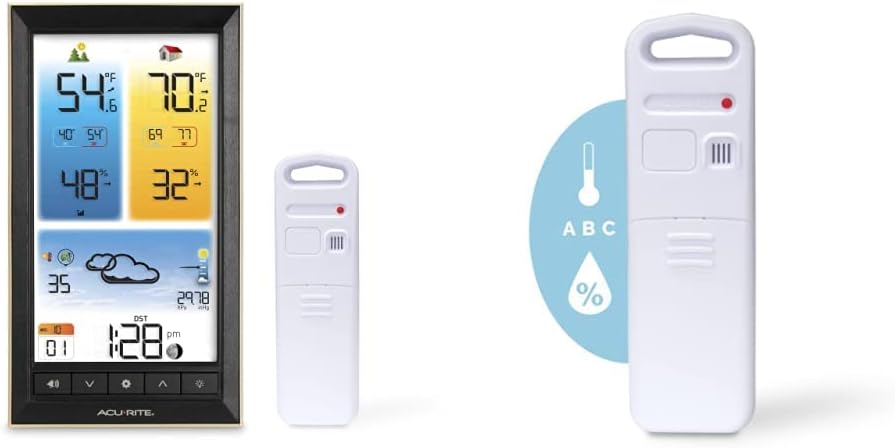
Figure 4: Front view of the AcuRite Vertical Color Weather Station display, showing various weather data.
2. Setting Alerts
The weather station allows you to set customizable alerts for temperature and humidity. Refer to the full instruction manual for detailed steps on setting specific high/low alert thresholds.
3. Backlight Control
The display features a backlight for enhanced visibility. The backlight can be set to auto-dim or adjusted manually to suit your preference and ambient lighting conditions.
Maintenance
1. Cleaning
Clean the display unit and wireless sensor with a soft, damp cloth. Do not use abrasive cleaners or chemicals that may damage the surfaces.
2. Battery Replacement
Replace batteries in both the display unit (if using backup) and the wireless sensor when the low battery indicator appears on the display. Use high-quality alkaline batteries for optimal performance. For outdoor sensors in cold climates, lithium batteries are recommended for better performance.
3. Proper Placement
Ensure the display unit is placed on a stable, level surface or mounted securely using its integrated hanger. The outdoor sensor should remain in a location protected from direct weather elements but with good air circulation for accurate readings.
Troubleshooting
| Problem | Possible Solution |
|---|---|
| No outdoor sensor reception | Ensure the sensor is within 330 ft (100 m) of the display unit. Check for obstructions (thick walls, metal, electronics). Re-sync the sensor by removing and reinserting batteries in both units. |
| Inaccurate temperature/humidity readings | Ensure the sensor is not in direct sunlight or near heat sources/vents. Allow 14 days for the Self-Calibrating Technology to establish accurate readings. |
| Display backlight does not stay on | The backlight is designed to dim after 10 seconds to save energy when running on batteries. For continuous backlight, ensure the display unit is powered by the AC adapter. |
| Weather forecast is inaccurate | The Self-Calibrating Technology requires 14 days to learn local weather patterns. Accuracy is approximately 70-75% and cannot be guaranteed for extreme weather events. |
Specifications
- Display Unit Dimensions: 12 x 10.75 inches (approximate)
- Display Power: 5V AC adapter (included), 3 x AAA alkaline batteries (optional backup, not included)
- Wireless Sensor Power: 2 x AA alkaline or lithium batteries (not included)
- Temperature Range (Indoor): 0°C to 50°C (32°F to 122°F)
- Temperature Range (Outdoor): -40°C to 70°C (-40°F to 158°F)
- Humidity Range (Indoor/Outdoor): 1% to 99% RH
- Wireless Range: 330 feet (100 meters) on 433 MHz RF signal
- Data Reporting: Outdoor sensor updates every 16 seconds
- Materials: Acrylonitrile Butadiene Styrene (ABS), Glass, Metal, Plastic
Warranty and Support
This AcuRite product is covered by a One-Year Limited Warranty. For warranty claims, technical support, or further assistance, please refer to the contact information provided in your product packaging or visit the official AcuRite website.


