
1. Introduction
Thank you for choosing the Avhrit Cordless Rotary Hammer Drill YN-5026. This updated cordless rotary hammer drill features a powerful brushless motor and 3 functions, making it suitable for both home and professional use. It comes with two portable 21V lithium battery packs for extended operation. This manual provides essential information for the safe and effective operation, maintenance, and troubleshooting of your new tool.
2. General Safety Instructions
Always follow basic safety precautions to reduce the risk of fire, electric shock, and personal injury when using power tools.
- Work Area Safety: Keep your work area clean and well-lit. Cluttered or dark areas invite accidents. Do not operate power tools in explosive atmospheres, such as in the presence of flammable liquids, gases, or dust.
- Electrical Safety: Avoid body contact with earthed or grounded surfaces such as pipes, radiators, ranges, and refrigerators. There is an increased risk of electric shock if your body is earthed or grounded.
- Personal Safety: Always wear eye protection. Use safety glasses, goggles, or a face shield. Wear hearing protection when operating the tool for extended periods. Dress properly; do not wear loose clothing or jewelry. Keep hair, clothing, and gloves away from moving parts.
- Tool Use and Care: Do not force the power tool. Use the correct power tool for your application. It will do the job better and safer at the rate for which it was designed. Disconnect the battery pack from the power tool before making any adjustments, changing accessories, or storing power tools.
- Battery Pack Use and Care: Recharge only with the charger specified by the manufacturer. Do not use battery packs with any other power tools. When the battery pack is not in use, keep it away from other metal objects that can make a connection from one terminal to another.
3. Package Contents
Upon opening your package, please verify that all the following items are included:
- 1x Cordless Rotary Hammer Drill
- 1x Charger
- 2x 4000 mAh Lithium Batteries (21V)
- 3x SDS Drill Bits (8/10/12*150mm)
- 1x Auxiliary Handle
- 1x Depth Gauge
- 1x User Manual
- 1x Plastic Carrying Case
4. Product Overview
Familiarize yourself with the components of your Avhrit Cordless Rotary Hammer Drill.

Figure 4.1: Product components including SDS-Chuck, Function Knob, Auxiliary Handle, Power Indicator, Battery, Direction Adjust Button, and Switch.
- SDS-Chuck: For quick and secure insertion of SDS drill bits.
- Function Knob: Selects between drilling, hammering, and chiseling modes.
- Auxiliary Handle: Provides additional grip and control, adjustable 360 degrees.
- Power Indicator: Displays remaining battery charge.
- Battery: Detachable 21V Lithium-Ion battery pack.
- Direction Adjust Button: Changes the rotation direction (forward/reverse).
- Switch: Triggers tool operation and controls variable speed.
5. Setup
5.1 Charging the Battery
The cordless rotary hammer drill comes with two 4000 mAh 21V lithium-ion batteries. Ensure batteries are fully charged before first use.

Figure 5.1: Two 21V 4000 mAh high-capacity lithium-ion batteries.
- Remove the battery from the tool by pressing the release button and sliding it out.
- Connect the charger to a standard power outlet.
- Insert the battery pack into the charger. The charger indicator light will show the charging status.
- Once fully charged, remove the battery from the charger.
5.2 Attaching the Auxiliary Handle
The auxiliary handle provides better control and stability during operation.
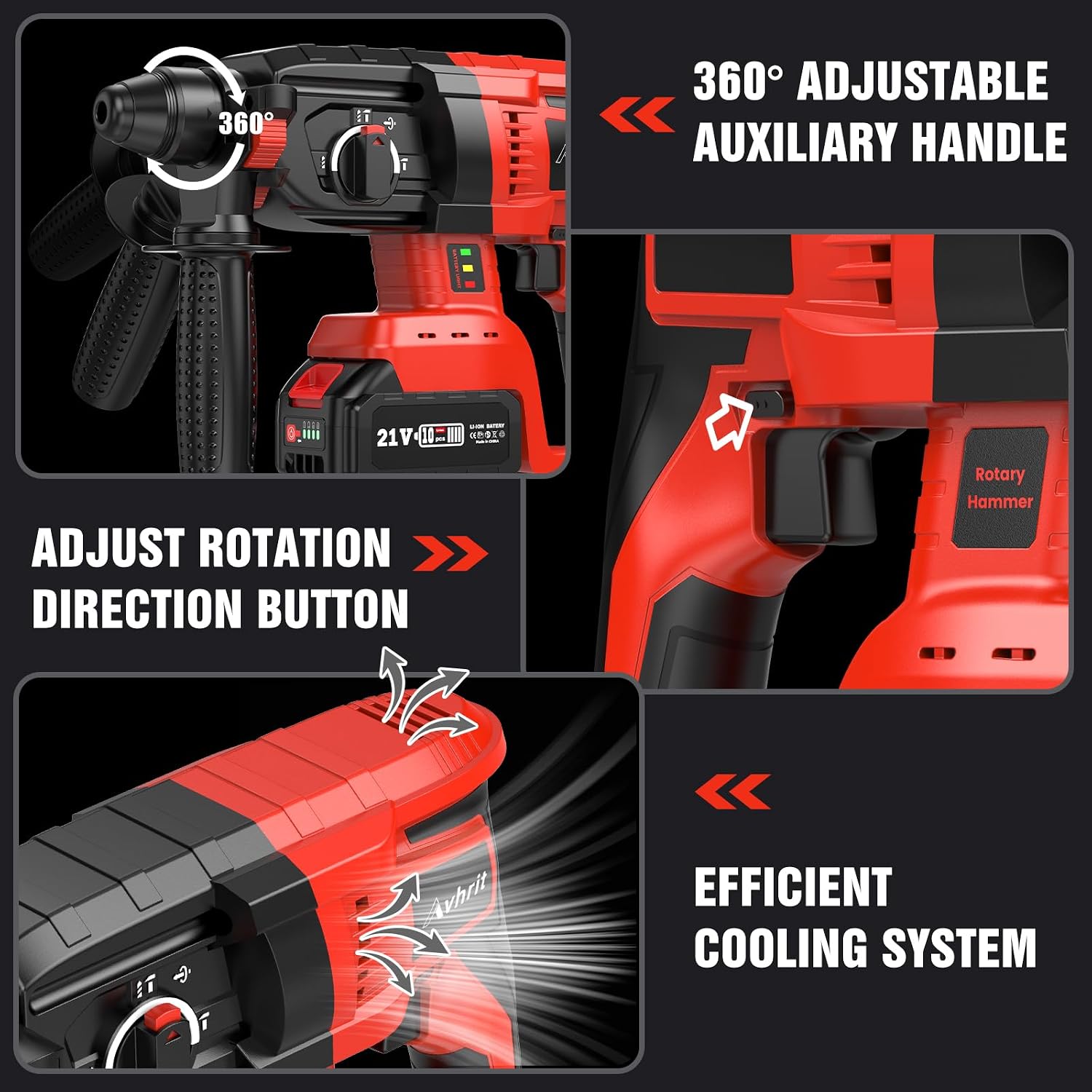
Figure 5.2: 360° adjustable auxiliary handle and rotation direction button.
- Loosen the auxiliary handle by twisting it counter-clockwise.
- Slide the handle onto the front of the drill body.
- Adjust the handle to a comfortable position (it can rotate 360 degrees).
- Tighten the handle by twisting it clockwise until secure.
5.3 Inserting SDS Drill Bits
This tool uses SDS drill bits for quick and secure changes.
- Pull back the SDS-Chuck collar.
- Insert the SDS drill bit into the chuck until it clicks into place.
- Release the collar. Pull on the bit to ensure it is securely locked.
6. Operating Instructions
6.1 Selecting Operating Mode
The rotary hammer drill offers three main functions: Drilling, Hammering, and Chiseling. Select the appropriate mode using the Function Knob.

Figure 6.1: Various operating modes for home improvement tasks.
- Drilling Mode (Drill icon): For drilling into wood, metal, or plastic without impact.
- Hammering Mode (Hammer icon): For drilling into concrete, stone, and bricks with impact.
- Chiseling Mode (Chisel icon): For light demolition work, such as removing tiles or grooving concrete.
- Chisel Position Adjustment: Allows adjustment of the chisel angle without rotation.
6.2 Adjusting Rotation Direction
Use the Direction Adjust Button located near the trigger to switch between forward and reverse rotation. Ensure the tool is off before changing direction.
6.3 Operating the Tool
Insert a charged battery, select the desired mode and rotation direction. Press the switch to start the tool. The variable speed trigger allows for precise control over the drilling speed.

Figure 6.2: Cordless design offers portability and freedom from cables.
6.4 Smart Safety Clutch
The integrated safety clutch automatically stops the machine if high torque is applied to the drill bit, protecting your wrist from injury and preventing damage to the tool.

Figure 6.3: The smart safety clutch protects both the user and the equipment.
6.5 Efficient Cooling System
The tool is equipped with an efficient cooling system to dissipate heat during prolonged use, ensuring optimal performance and extending the lifespan of the motor.

Figure 6.4: Powerful brushless motor and efficient cooling system for enhanced durability and performance.
7. Maintenance
Regular maintenance ensures the longevity and optimal performance of your tool.
- Cleaning: After each use, clean the tool with a soft, dry cloth. Do not use water or chemical cleaners. Keep ventilation openings clear of dust and debris.
- Brushless Motor: The brushless motor requires less maintenance compared to brushed motors, offering a longer lifespan and cooler operation.
- Battery Care: Store batteries in a cool, dry place away from direct sunlight. Do not store fully discharged batteries for extended periods. Recharge them periodically if not in use.
- Storage: Store the tool and accessories in the provided plastic carrying case in a dry, secure location out of reach of children.
8. Troubleshooting
If you encounter issues with your rotary hammer drill, refer to the following common problems and solutions:
| Problem | Possible Cause | Solution |
|---|---|---|
| Tool does not start | Battery not charged or improperly inserted. | Ensure battery is fully charged and correctly inserted until it clicks. |
| Reduced power or short run time | Battery charge is low or battery is old. | Recharge the battery. If the problem persists, consider replacing the battery. |
| Bit not rotating or impacting | Incorrect mode selected or bit not properly seated. | Check the Function Knob for correct mode. Re-insert the SDS bit securely. |
| Tool overheats | Prolonged heavy use or blocked ventilation. | Allow the tool to cool down. Clear any debris from ventilation openings. |
If the issue persists after attempting these solutions, please contact customer support.
9. Specifications
Key technical specifications for the Avhrit Cordless Rotary Hammer Drill YN-5026:
- Model Number: YN-5026
- Brand: Avhrit
- Power Source: Battery Powered
- Battery Type: Lithium-Ion
- Battery Voltage: 21V
- Battery Capacity: 4000 mAh
- Amperage: 30 A
- Drill Type: Rotary Hammer Drill
- Material: Plastic (housing)
- Item Weight: 3.16 Kilograms
- Product Dimensions (L x W x H): 25 x 35 x 15 cm
- Special Features: Speed lock button, Reverse rotation, Variable speed
- Drilling Capacity in Metal: 13 Millimeters
10. Warranty and Support
Your Avhrit Cordless Rotary Hammer Drill YN-5026 comes with a comprehensive warranty and dedicated customer support.
- Warranty: 24-month warranty from the date of purchase.
- After-Sales Service: 48-month after-sales service.
For warranty claims, technical assistance, or any questions regarding your product, please refer to the contact information provided in your purchase documentation or visit the official Avhrit website.