
iGPSPORT BSC300
Contents
iGPSPORT BSC300 GPS Bike Computer User Manual
Model: BSC300 | Brand: iGPSPORT
1. Introduction
The iGPSPORT BSC300 is an advanced GPS bike computer designed to enhance your cycling experience with precise navigation, comprehensive data tracking, and seamless connectivity. This manual provides essential information for setting up, operating, and maintaining your device.
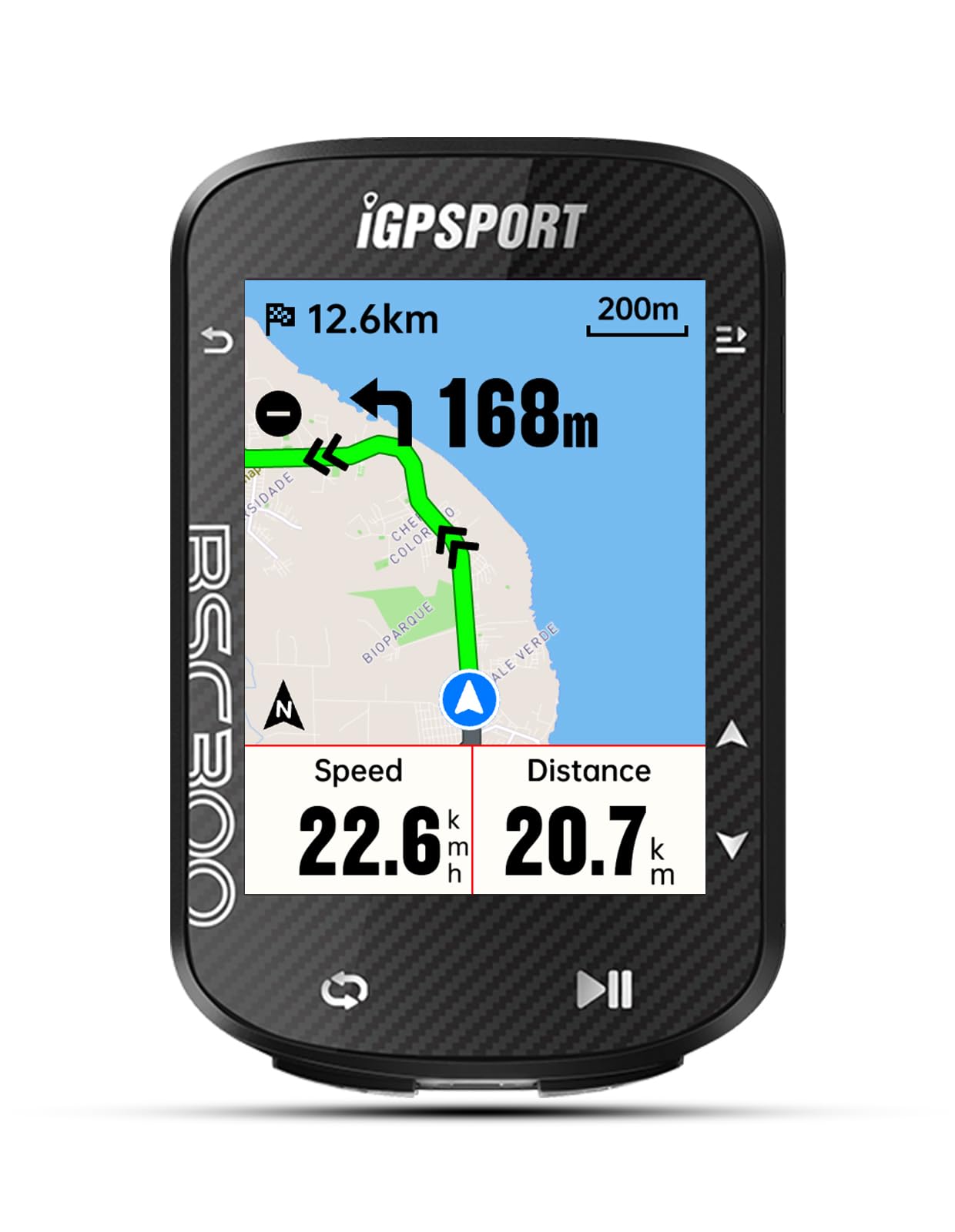
Image 1.1: The iGPSPORT BSC300 GPS Bike Computer, a compact and powerful device for cyclists.
Key Features:
- Global GPS Coverage: Supports 5 satellite systems (GPS, Beidou, GLONASS, GALILEO, QZSS) for faster and more accurate positioning.
- Offline Map Navigation: Download global offline maps, save multiple routes, and receive turn-by-turn directions and off-course warnings.
- Off-Course Warning: Notifies you if you deviate from your planned route until you return to the correct path.
- Extensive Riding Data: Tracks over 130 data points including speed, distance, incline, cadence, calories, time, and temperature.
- Data Analysis & Sharing: Connects to the iGPSPORT APP for data analysis and sharing with platforms like Strava and Komoot.
- Real-time Tracking: Accurately displays teammates' locations during group rides to prevent getting lost.
- Dual Protocol Connectivity: ANT+ and Bluetooth 5.0 support for connecting to a wide range of sensors (speed, cadence, heart rate) and smart devices.
2. Setup
2.1 Package Contents
Verify that all items are present in the package:
- 1 x BSC300 Bike Computer
- 1 x Rubber Base
- 2 x Rubber Rings
- 1 x User Manual
Note: Charging cable (Type-C standard) is not included.

Image 2.1: Contents of the iGPSPORT BSC300 package, including the device, mounting accessories, and manual.
2.2 Mounting the Device
The BSC300 is designed for handlebar mounting. Use the provided rubber base and rings to securely attach the device to your bicycle's handlebars. Ensure the mount is firm and the device is easily visible and accessible during your ride.
Image 2.2: Example of a handlebar mount for the iGPSPORT BSC300.
2.3 Initial Power On and Language Selection
Press and hold the power button to turn on the device. Upon first use, you may be prompted to select your preferred language. Navigate using the device buttons to choose English or another supported language.

Image 2.3: The language selection screen on the BSC300, showing English as an option.
3. Operating Instructions
3.1 Display and Interface
The BSC300 features a 2.4-inch auto-backlight LCD screen with a resolution of 320 x 240. The display automatically adjusts brightness for optimal visibility in various lighting conditions. Navigate through menus and data screens using the physical buttons on the device.

Image 3.1: The iGPSPORT BSC300 showing its 2.4-inch auto-backlight screen and physical dimensions.
3.2 GPS Positioning
The device supports 5 global satellite positioning systems (GPS, Beidou, GLONASS, GALILEO, QZSS) for rapid and highly accurate location tracking. Ensure you are in an open area for the best satellite signal acquisition.

Image 3.2: Illustration of the iGPSPORT BSC300 utilizing global 5-satellite positioning for enhanced accuracy.
3.3 Offline Map Navigation
Download global offline maps to the device's 8GB memory. You can save multiple routes and receive turn-by-turn directions. The off-course warning feature will alert you if you stray from your planned route, guiding you back to the correct path.

Image 3.3: The BSC300 displaying offline map navigation with route and deviation alerts.
3.4 Data Display and Customization
The BSC300 provides access to over 130 riding data points, including speed, distance, incline, cadence, calories, time, and temperature. You can customize the data fields displayed on your screen via the iGPSPORT app to prioritize the metrics most important to you.
Image 3.4: A customizable data screen on the BSC300, showing various cycling metrics.
3.5 Connectivity (ANT+ / Bluetooth 5.0)
The BSC300 supports both ANT+ and Bluetooth 5.0 protocols, allowing connection to a wide array of external sensors and smart devices. This includes speed sensors, cadence sensors, heart rate monitors, smart trainers, and smartwatches.

Image 3.5: The BSC300 demonstrating compatibility with various cycling sensors and devices via Bluetooth and ANT+.

Image 3.6: The BSC300 searching for compatible ANT+ sensors like HRM, Power, Shiftinf, Cadence, and Trainer.
3.6 App Integration and Data Sharing
Connect your BSC300 to the iGPSPORT APP for detailed analysis of your riding data. You can also seamlessly share your activities with popular platforms such as Strava and Komoot.

Image 3.7: The BSC300 showing compatibility with various cycling apps like Insta360, Komoot, and Strava.

Image 3.8: The iGPSPORT app displaying cycling activities, odometer, and map views for data analysis and sharing.
3.7 Real-time Tracking
For group rides, the real-time tracking feature allows you to accurately monitor the location of your teammates, ensuring no one gets left behind or takes a wrong turn.

Image 3.9: Real-time tracking feature showing a cyclist on a road with the iGPSPORT app displaying live location data.
3.8 Advanced Training Functions
The BSC300 supports advanced training features including custom workouts, smart trainer control, and FTP (Functional Threshold Power) detection. This allows for structured training sessions directly from your device.

Image 3.10: The BSC300 displaying advanced training options like workouts, smart trainer modes, and FTP detection.
3.9 Radar Light Functionality
When paired with a compatible radar light, the BSC300 can detect up to 8 vehicles simultaneously, providing visual and audible alerts to enhance your safety on the road.

Image 3.11: The BSC300 displaying radar light information, detecting vehicles behind the cyclist.
4. Maintenance
4.1 Cleaning and Care
To clean your BSC300, wipe it with a soft, damp cloth. Avoid using abrasive cleaners or solvents, as these can damage the device's screen and casing. Ensure the charging port cover is securely closed to maintain water resistance.
4.2 Water Resistance
The iGPSPORT BSC300 has an IPX7 international protection rating, meaning it can withstand immersion in water up to 1 meter for 30 minutes. While it is waterproof, avoid prolonged submersion and ensure the charging port is dry before charging.
4.3 Battery Information
The device is powered by a Lithium Metal cell, offering up to 20 hours of battery life on a full charge. To maximize battery longevity, avoid extreme temperatures and fully charge the device before long periods of inactivity.
5. Troubleshooting
If you encounter issues with your iGPSPORT BSC300, please refer to the following common solutions:
- Device not turning on: Ensure the battery is charged. Connect the device to a power source using a Type-C USB cable and try again.
- GPS signal not acquired: Move to an open area away from tall buildings or dense foliage. Allow a few minutes for the device to acquire satellite signals.
- Sensors not connecting: Ensure the sensors are powered on and within range. Check the device's connectivity settings to confirm ANT+ or Bluetooth is enabled. Try re-pairing the sensors.
- Screen unresponsive or frozen: Perform a soft reset by holding down the power button for approximately 10-15 seconds until the device restarts.
- Data not syncing with app: Ensure your phone's Bluetooth is on and the iGPSPORT app is open. Check for any app updates.
If the problem persists, please contact customer support.
6. Specifications
| Feature | Detail |
|---|---|
| Brand | iGPSPORT |
| Model Number | BSC300 |
| Color | Black |
| Product Dimensions (L x W x H) | 8.2 x 5.3 x 1.4 cm |
| Product Weight | 67 Grams |
| Screen Size | 2.4 Inches |
| Screen Type | LCD |
| Native Resolution | 320 x 240 |
| Battery Life | 20 Hours |
| Battery Cell Composition | Lithium Metal |
| Connectivity Technology | Bluetooth, USB, Ethernet (Note: Ethernet likely refers to data transfer capability, not a physical port) |
| Sensor Type | Speed Sensor, Cadence Sensor (Compatible with Heart Rate, Power, etc.) |
| Mounting Type | Handlebar Mount |
| Human Interface Input | Buttons |
| International Protection Rating | IPX7 |
7. Warranty Information
The iGPSPORT BSC300 comes with a 1-Year Warranty from the date of purchase. This warranty covers manufacturing defects and malfunctions under normal use. Please retain your proof of purchase for warranty claims. The warranty does not cover damage caused by misuse, accidents, unauthorized modifications, or normal wear and tear.
8. Customer Support
Your satisfaction is our priority. If you have any questions, concerns, or require technical assistance with your iGPSPORT BSC300, please do not hesitate to contact our customer service team. We aim to respond to all inquiries within 24 hours.
For further support, please visit the official iGPSPORT website or refer to the contact information provided with your product documentation.
Documents and downloads
Ask a question about this manual
Ask about setup, troubleshooting, compatibility, parts, safety, or missing instructions. Manuals+ will review the question and use this page’s manual context to help answer it.