
1. Introduction
This manual provides essential information for the safe and efficient operation of the CBBEXP FX1N-24MT-ESS/UL FX1N Series Basic Unit. It covers installation, operation, maintenance, and troubleshooting procedures. Please read this manual thoroughly before using the product and retain it for future reference.
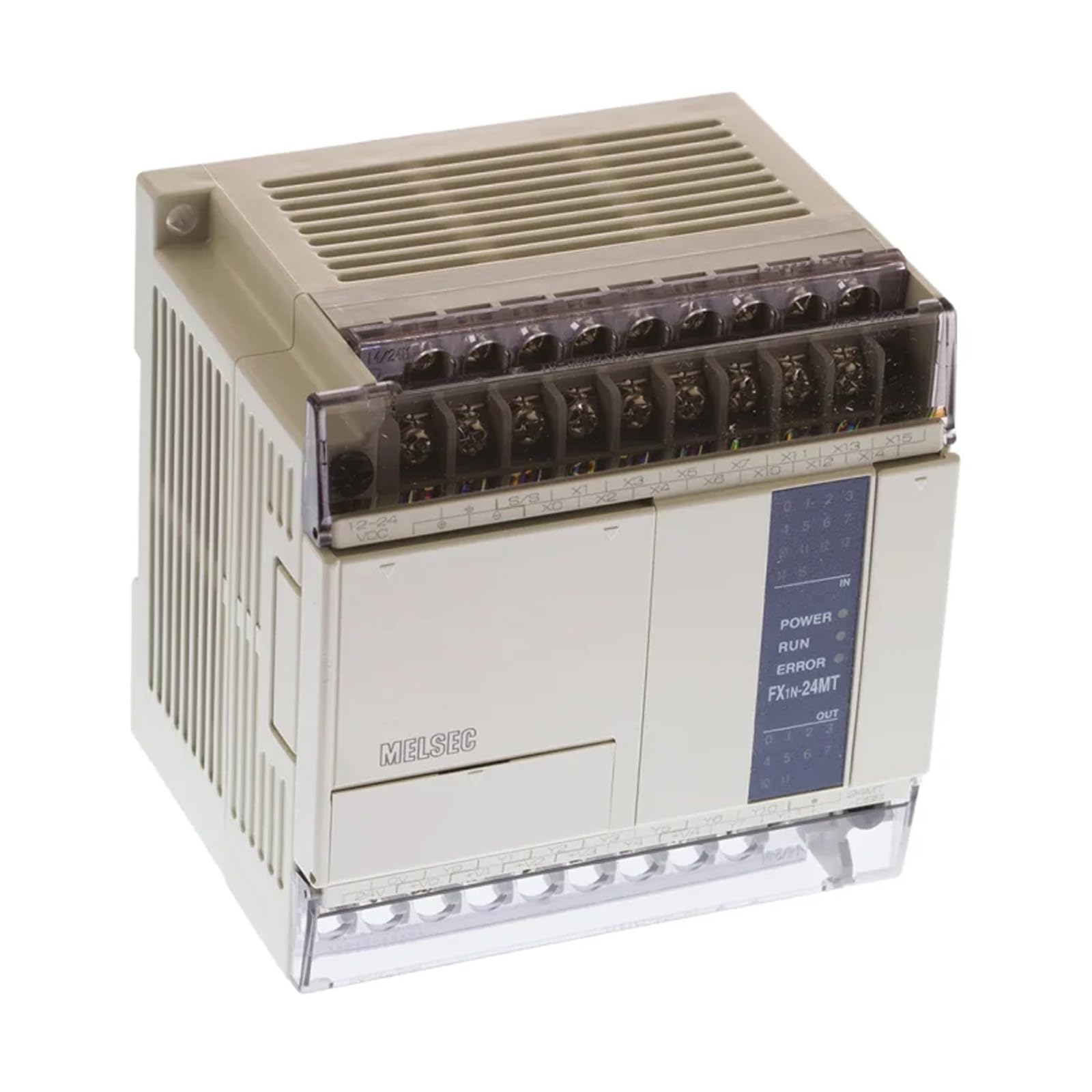
Image 1: CBBEXP FX1N-24MT-ESS/UL FX1N Series Basic Unit. This image displays the front view of the programmable controller base unit, showing its compact design and various input/output terminals.
2. Safety Information
Observe all safety precautions to prevent personal injury and equipment damage. This device is an industrial electronic component and should only be handled by qualified personnel.
- Power Supply: Ensure the power supply voltage matches the specifications of the unit. Incorrect voltage can cause damage.
- Wiring: All wiring must comply with local and national electrical codes. Disconnect power before performing any wiring or maintenance.
- Environment: Install the unit in an environment free from excessive dust, moisture, corrosive gases, and extreme temperatures.
- Grounding: Properly ground the unit to prevent electrical shock and ensure stable operation.
3. Setup
Follow these steps for the initial setup of your FX1N-24MT-ESS/UL unit.
- Mounting: Securely mount the unit on a DIN rail or panel using appropriate fasteners. Ensure adequate ventilation space around the unit.
- Power Connection: Connect the specified DC power supply to the designated power terminals. Verify polarity before applying power.
- Input/Output Wiring: Connect your sensors, actuators, and other peripheral devices to the corresponding input and output terminals. Refer to the wiring diagram for correct connections.
- Communication Setup: If connecting to a programming device or other PLCs, establish communication links using the appropriate ports and cables.
4. Operating
The FX1N-24MT-ESS/UL is a programmable logic controller (PLC) designed for automation tasks. Operation primarily involves programming and monitoring.
- Programming: Develop your control logic using compatible PLC programming software on a computer. Transfer the program to the FX1N unit via the communication port.
- Run Mode: Once the program is loaded, switch the unit to 'Run' mode to execute the control logic. Monitor the status indicators for operational feedback.
- Monitoring: Use the programming software to monitor the status of inputs, outputs, internal relays, and data registers in real-time.
- Input/Output Control: The unit processes input signals according to the loaded program and controls output devices based on the programmed logic.
5. Maintenance
Regular maintenance ensures the longevity and reliable performance of your FX1N-24MT-ESS/UL unit.
- Cleaning: Periodically clean the unit's exterior with a soft, dry cloth. Do not use solvents or abrasive cleaners. Ensure ventilation openings are clear of dust.
- Terminal Checks: Routinely inspect wiring terminals for loose connections or signs of corrosion. Tighten as necessary.
- Environmental Monitoring: Verify that the operating environment remains within specified temperature and humidity ranges.
- Firmware Updates: Check the manufacturer's website for any available firmware updates that may improve performance or address issues.
6. Troubleshooting
If you encounter issues with your FX1N-24MT-ESS/UL unit, refer to the following common problems and solutions.
| Problem | Possible Cause | Solution |
|---|---|---|
| Unit does not power on | No power supply; Incorrect wiring; Blown fuse | Check power source; Verify wiring connections; Replace fuse if necessary |
| Inputs not responding | Sensor malfunction; Incorrect input wiring; Program error | Test sensor; Check input wiring; Review PLC program logic |
| Outputs not activating | Actuator malfunction; Incorrect output wiring; Program error | Test actuator; Check output wiring; Review PLC program logic |
| Communication error | Incorrect cable; Port settings mismatch; Software issue | Verify cable integrity; Check communication settings (baud rate, parity); Restart software |
7. Specifications
Key technical specifications for the CBBEXP FX1N-24MT-ESS/UL unit:
- Model: FX1N-24MT-ESS/UL
- Type: Programmable Controller Base Unit
- Brand: CBBEXP
- UPC: 732896883428
- Number of Items: 1
- Condition: New, sealed in box
8. Warranty and Support
The CBBEXP FX1N-24MT-ESS/UL unit comes with a One-Year Warranty from the date of purchase, covering manufacturing defects. Please retain your proof of purchase for warranty claims.
For technical support, troubleshooting assistance beyond this manual, or warranty inquiries, please contact your authorized CBBEXP distributor or reseller. Provide the model number and a detailed description of the issue when seeking support.