1. Introduction
The TAXNELE THC30A is a digital electronic timer switch designed for automated control of various electrical equipment. It features daily and weekly programming capabilities, allowing for up to 20 ON/OFF settings. This device is suitable for DIN rail mounting and includes a 3V Lithium battery for power reserve, ensuring time and program data are maintained during power interruptions.
2. Product Features
- Programmable Control: Up to 20 ON/OFF settings per day or week.
- Manual Override: Allows for temporary manual control (ON/AUTO/OFF).
- Power-Off Memory: Built-in 3V Lithium battery (CR2032) maintains timing, display, and program data for up to 3 years during power outages.
- High Precision: Industrial-grade chip for accurate timing.
- LCD Display: Clear digital display for easy programming and monitoring.
- DIN Rail Mount: Designed for easy installation on standard DIN rails.
- Wide Application: Suitable for street lights, neon lamps, advertising signs, production equipment, broadcast devices, and other power control applications.

Image 2.1: The THC30A timer features a power-off memory function, supported by an internal CR2032 lithium battery, which retains settings and time for extended periods without external power.
3. Safety Information
Please read and understand all safety instructions before installation and operation. Failure to follow these instructions may result in electric shock, fire, or serious injury.
- Always disconnect power at the circuit breaker or fuse box before installing or servicing the timer switch.
- Installation should be performed by a qualified electrician or knowledgeable individual.
- Ensure the voltage and current ratings of the timer match your application requirements.
- Do not exceed the maximum load capacity of 30A or 5000W.
- Do not use in wet or damp environments unless specifically rated for such conditions.
- Keep children away from electrical devices.
4. Setup
4.1 Wiring Diagram
The THC30A timer is designed for easy wiring. Connect the input power (Live 'L' and Neutral 'N') to the 'IN' terminals and the load (e.g., light, appliance) to the 'OUT' terminals. Ensure correct polarity.

Image 4.1: Simplified wiring diagram for the THC30A timer, illustrating connections for input power (IN) and output to the load (OUT).
4.2 Initial Power-up and Reset
Upon initial power-up or after a prolonged power outage, the LCD display may be blank. The internal battery will charge, and the display should activate. If the display is erratic or unresponsive, press the RESET button using a pointed object (e.g., a pen tip) to clear all settings and restore default values.
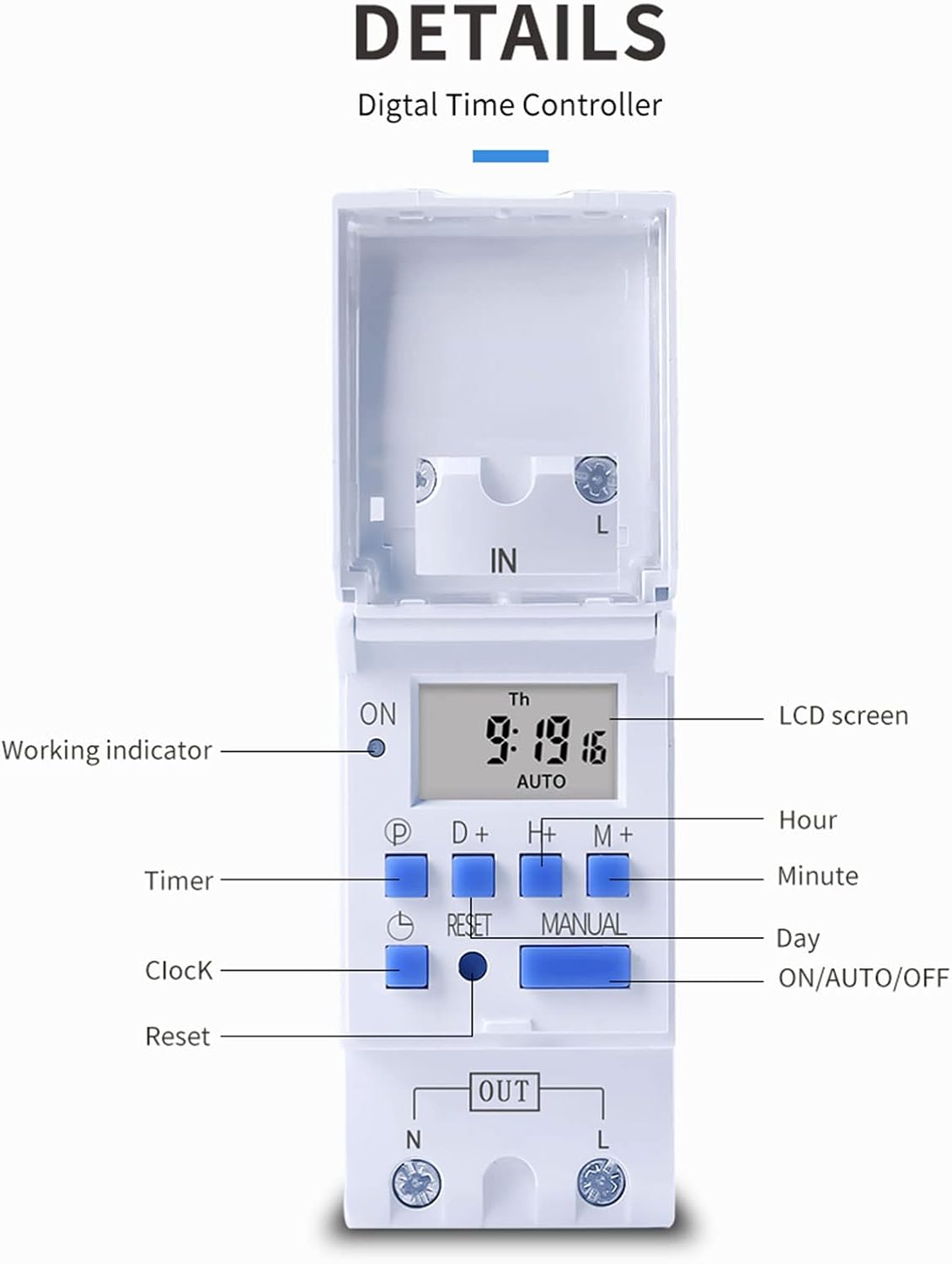
Image 4.2: Detailed view of the THC30A timer's LCD screen, control buttons (P, D+, H+, M+, RESET, MANUAL), and working indicator.
4.3 Setting Current Time
- Press the CLOCK button (P) and hold it.
- While holding CLOCK, press D+ to set the current day of the week (MON, TUE, WED, THU, FRI, SAT, SUN).
- While holding CLOCK, press H+ to set the current hour (0-23).
- While holding CLOCK, press M+ to set the current minute (0-59).
- Release the CLOCK button to save the settings.
5. Operating Instructions
5.1 Programming ON/OFF Times
The THC30A allows for up to 20 ON/OFF program settings. Each program consists of an ON time and an OFF time.
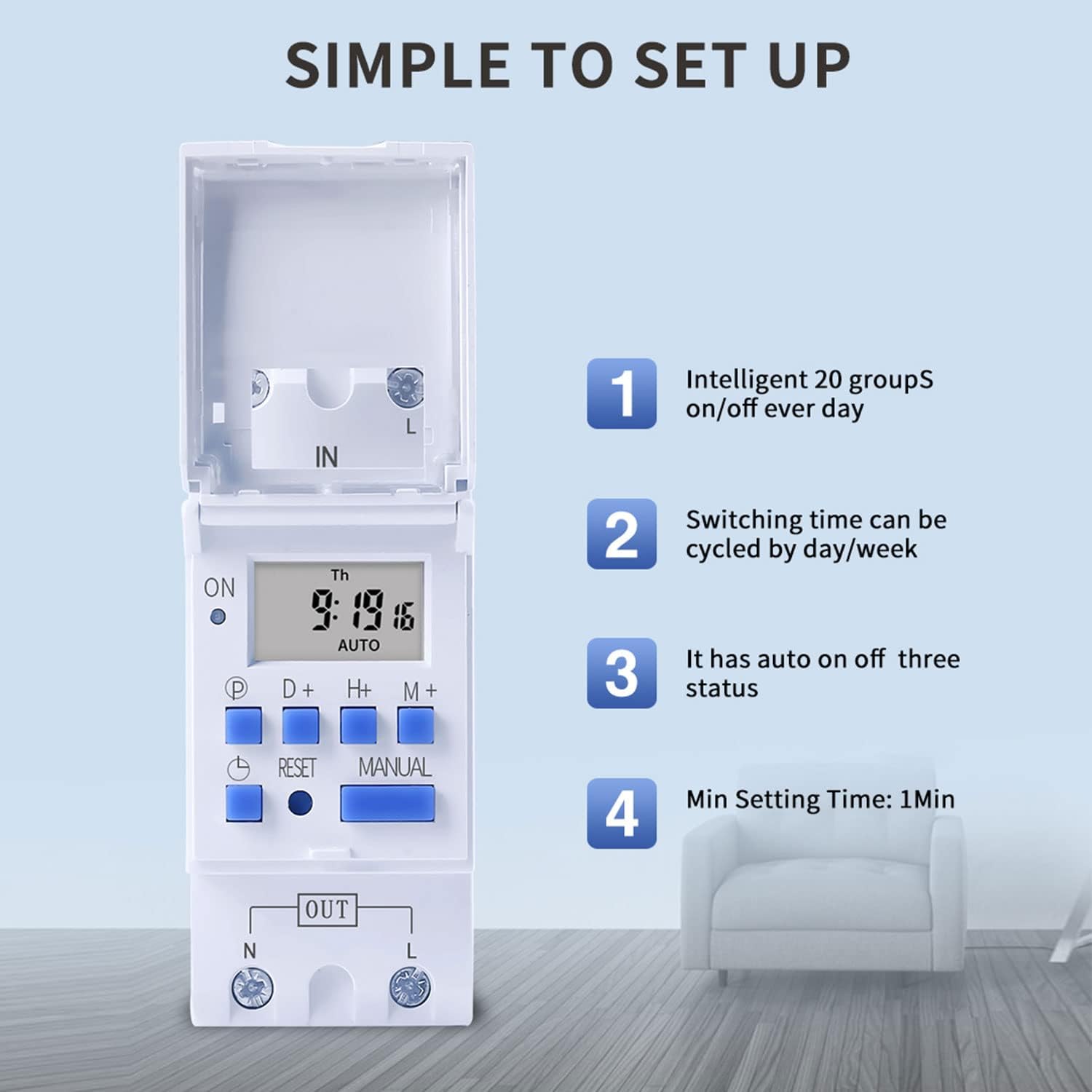
Image 5.1: The THC30A timer's programming interface, highlighting its capacity for 20 ON/OFF settings, daily/weekly cycling, auto ON/OFF status, and a minimum setting time of 1 minute.
- Press the P button (Program) once. The display will show '1 ON'.
- Press D+ to select the day(s) for this ON setting. You can choose a single day, a block of days (e.g., MON-FRI), or all 7 days.
- Press H+ to set the desired hour for the '1 ON' time.
- Press M+ to set the desired minute for the '1 ON' time.
- Press P again. The display will show '1 OFF'.
- Repeat steps 2-4 to set the day(s), hour, and minute for the '1 OFF' time.
- Continue pressing P to cycle through '2 ON', '2 OFF', up to '20 ON', '20 OFF', setting each program as needed.
- After setting all desired programs, press the CLOCK button (P) to exit programming mode and return to the current time display.
5.2 Manual Override
The MANUAL button allows you to override the programmed settings temporarily.
- Press MANUAL once: Switches from AUTO to ON (output is continuously ON).
- Press MANUAL again: Switches from ON to OFF (output is continuously OFF).
- Press MANUAL a third time: Switches from OFF to AUTO (timer resumes programmed operation).
6. Maintenance
6.1 Battery Replacement
The THC30A timer includes a built-in CR2032 lithium battery for power-off memory. This battery typically lasts for several years. If the display becomes dim or the time/settings are lost frequently during power outages, the battery may need replacement. Consult a qualified technician for battery replacement.
6.2 Cleaning
Wipe the timer's exterior with a soft, dry cloth. Do not use abrasive cleaners or solvents, as they may damage the casing or display.
7. Troubleshooting
- Display is blank: Check power supply. If power is present, the internal battery might be fully discharged; allow time for it to charge. If still blank, press the RESET button.
- Timer not switching ON/OFF as programmed:
- Ensure the timer is in AUTO mode (not ON or OFF via manual override).
- Verify that the current time and day are set correctly.
- Check that the programmed ON/OFF times and days are correct and active.
- Confirm wiring connections are secure and correct.
- Load not receiving power: Check the load device (e.g., bulb, motor) for functionality. Verify input power to the timer. Ensure the timer is in an ON state (either programmed ON or manually ON).
- Settings are lost after power outage: The internal battery may be depleted. Consider replacing the CR2032 battery.
8. Specifications

Image 8.1: Dimensions of the TAXNELE THC30A Digital Programmable Timer Switch.
| Feature | Specification |
|---|---|
| Model | THC30A |
| Type | Digital LCD Power Timer |
| Material | Plastic |
| Current Rating | 30A |
| Power Rating | 5000W |
| Voltage Options | 12V DC/AC, 24V DC/AC, 48V DC/AC, 110V AC, 220V AC, 230V AC (model dependent) |
| Time Error | ≤2 seconds/day |
| Display | LCD |
| Programming Interval | 1 minute to 168 hours (weekly cycle) |
| ON/OFF Settings | 20 ON/OFF programs |
| Operating Temperature | -20℃ to 50℃ |
| Dimensions (L x W x H) | 86 x 36 x 65mm (3.38 x 1.41 x 2.56 inches) |
| Power Reserve | 3V Lithium battery (CR2032) for data retention |
9. Warranty Information
TAXNELE products are manufactured to high-quality standards. This product is covered by a limited warranty against defects in materials and workmanship for a period specified by the retailer at the time of purchase. Please retain your proof of purchase for warranty claims. The warranty does not cover damage caused by improper installation, misuse, unauthorized modification, or natural disasters.
10. Support
For technical assistance, troubleshooting, or further inquiries regarding your TAXNELE THC30A Digital Programmable Timer Switch, please contact your retailer or the TAXNELE customer support channel provided with your purchase. When contacting support, please have your product model number (THC30A) and purchase information ready.


