
1. Introduction
Thank you for choosing the XTUGA D900 Dual UHF Wireless Microphone System. This system is designed to provide high-quality audio transmission for various applications, including karaoke, DJ events, weddings, church services, business meetings, classroom activities, and live performances. This manual will guide you through the setup, operation, and maintenance of your new wireless microphone system.
The XTUGA D900 features dual handheld microphones with adjustable echo, treble, and bass controls, paired with a versatile mini receiver that offers both 3.5mm and 6.35mm output options for broad compatibility with audio devices.

Image: The XTUGA D900 system is suitable for performances, family entertainment, classroom speeches, and program hosting.
2. Package Contents
Please check the package to ensure all items are present:
- 2 x XTUGA D900 Handheld Wireless Microphones
- 1 x Mini Wireless Receiver (with 3.5mm jack)
- 1 x 6.35mm Adapter (for receiver)
- 1 x USB Charging Cable (for receiver)
- 2 x Anti-roll Rings (for microphones)
- User Manual
3. Product Features
- High-Quality Sound: Clear voice transmission without feedback or distortion.
- Dual UHF Wireless System: Two microphones operating on independent UHF channels (ChA and ChB), each with 50 adjustable frequencies (573-599 MHz range) to prevent interference.
- On-Microphone Controls: Each handheld microphone features direct controls for volume, 7 levels of echo adjustment, and 5 levels of treble/bass adjustment.
- Versatile Receiver: Mini wireless receiver with a 3.5mm output, convertible to 6.35mm for wide compatibility with various audio equipment.
- Long Wireless Range: Stable signal transmission up to 20 meters (65 feet).
- Rechargeable Receiver: Built-in battery provides up to 8 hours of use on a 4-hour charge.
- Bluetooth Playback: The receiver supports Bluetooth connectivity for playing background music from a smartphone or other devices.

Image: Close-up of the XTUGA D900 microphone displaying its multifunctional adjustment capabilities for echo, volume, treble, and bass.
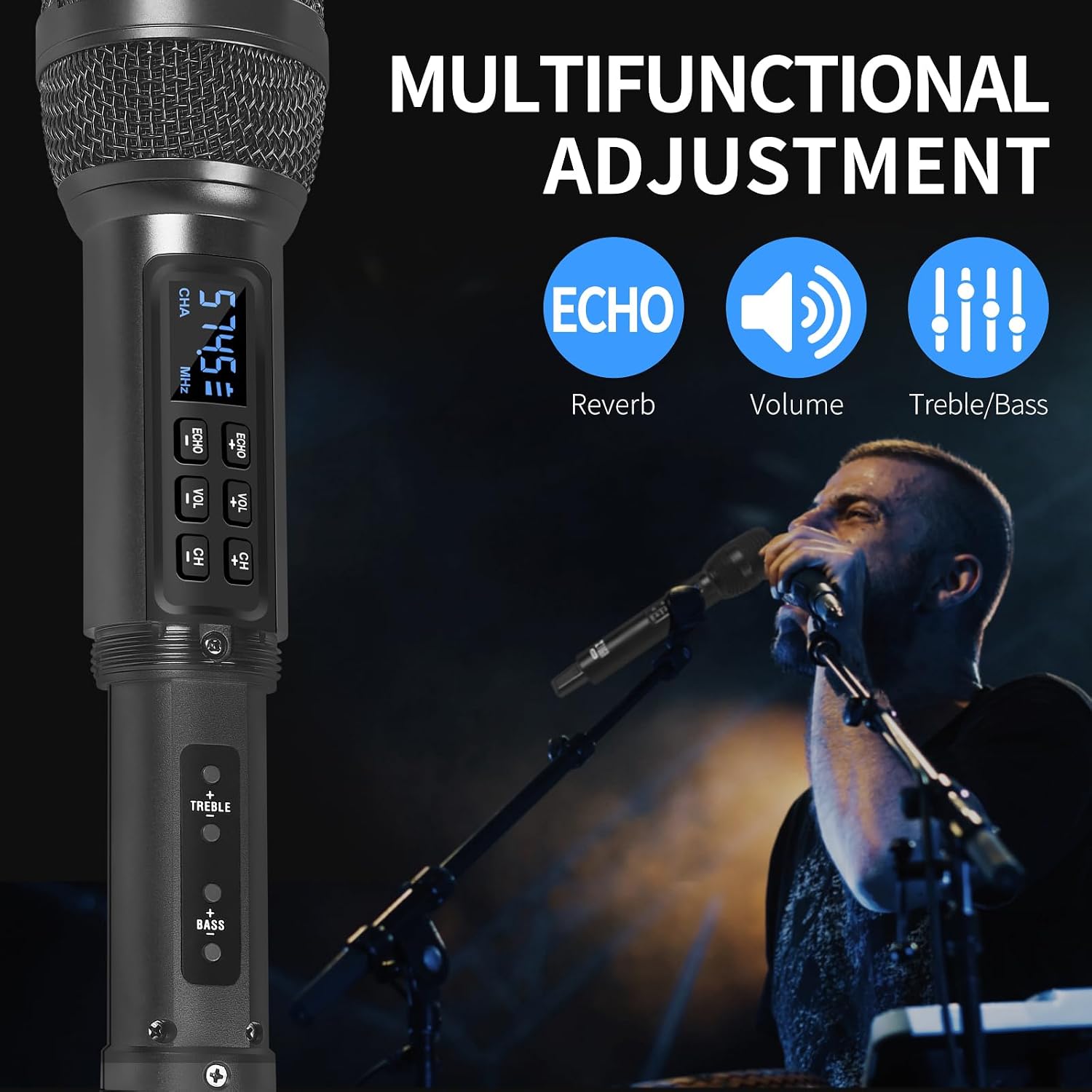
Image: The XTUGA D900 handheld microphone featuring a digital display for frequency and channel information.
4. Setup Guide
4.1. Receiver Connection
- Identify Output: Determine if your audio device (e.g., amplifier, mixer, speaker, soundbar, PC) requires a 3.5mm or 6.35mm input.
- Connect Receiver:
- For 3.5mm input: Directly plug the mini wireless receiver's 3.5mm jack into your device's audio input port.
- For 6.35mm input: Attach the provided 6.35mm adapter to the receiver's 3.5mm jack, then plug it into your device's 6.35mm audio input port.
- Power On Receiver: Press and hold the POWER button on the receiver until the indicator lights illuminate.
4.2. Microphone Setup
- Insert Batteries: Open the battery compartment of each microphone and insert two AA batteries (not included), ensuring correct polarity.
- Power On Microphones: Press and hold the power button on each microphone. The display will light up, showing the channel and frequency.
- Automatic Pairing: The microphones and receiver should automatically pair. The RF indicator lights (A.RF, B.RF) on the receiver will turn solid blue when a microphone is successfully connected.

Image: Connectivity diagram illustrating how to connect the XTUGA D900 microphone and receiver to different audio systems using 3.5mm or 6.35mm inputs. Note: Not recommended for small speakers under 15 watts.

Image: The XTUGA D900 system, showing two microphones and the receiver, highlighting a stable 20-meter wireless signal range.
5. Operating Instructions
5.1. Microphone Controls
- Power On/Off: Press and hold the power button on the microphone for 2-3 seconds.
- Volume Adjustment: Press the 'VOL +' or 'VOL -' buttons on the microphone to adjust the microphone's output volume.
- Echo Adjustment: Press the 'ECHO +' or 'ECHO -' buttons to cycle through 7 levels of echo effect.
- Treble/Bass Adjustment: Press the 'TREBLE +' or 'TREBLE -' buttons to adjust the treble. Press the 'BASS +' or 'BASS -' buttons to adjust the bass. There are 5 levels for each.
- Frequency Adjustment: Press the 'CH +' or 'CH -' buttons to change the operating frequency. Each microphone (ChA and ChB) has 50 selectable frequencies to avoid interference.

Image: Two XTUGA D900 microphones illustrating the frequency adjustment buttons (CH+/-) and their digital displays.
5.2. Receiver Bluetooth Playback
The receiver supports Bluetooth connectivity for playing background music from a compatible device.
- Activate Bluetooth: Ensure the receiver is powered on.
- Pairing: On your smartphone or Bluetooth-enabled device, search for Bluetooth devices and select "X168" to connect.
- Play Music: Once connected, you can play music from your device, and the audio will be transmitted through the receiver to your connected sound system.

Image: The XTUGA D900 receiver demonstrating Bluetooth playback functionality, connected to a smartphone.
6. Battery Information
6.1. Receiver Battery
- The receiver has a built-in rechargeable battery.
- To charge, connect the receiver to a USB power source using the provided USB charging cable.
- A full charge typically takes approximately 4 hours and provides up to 8 hours of continuous use.
- The POWER indicator light on the receiver will show charging status.
6.2. Microphone Batteries
- Each microphone requires two AA batteries (not included).
- Replace batteries when the microphone display indicates low power or when audio quality degrades.
- Always use fresh, high-quality batteries for optimal performance.

Image: The XTUGA D900 receiver highlighting its strong battery life, offering up to 8 hours of operation after a 4-hour charge.
7. Maintenance
- Cleaning: Wipe the microphones and receiver with a soft, dry cloth. Do not use liquid cleaners or solvents.
- Storage: Store the system in a cool, dry place away from direct sunlight and extreme temperatures.
- Battery Care: Remove AA batteries from microphones if not used for an extended period to prevent leakage. Charge the receiver's battery periodically if stored for long durations to maintain battery health.
- Handling: Avoid dropping the microphones or receiver, as this can damage internal components.
8. Troubleshooting
| Problem | Possible Cause | Solution |
|---|---|---|
| No sound from microphone |
|
|
| Sound distortion or interference |
|
|
| Receiver Bluetooth not connecting |
|
|
9. Specifications
| Feature | Detail |
|---|---|
| Brand | XTUGA |
| Model Name | XTUGA D900 |
| Connectivity Technology | UHF Wireless, Auxiliary, Bluetooth (Receiver) |
| Connector Type | 3.5mm Jack, 6.35mm Jack (with adapter) |
| Microphone Form Factor | Handheld |
| Frequency Range | 573 MHz - 599 MHz (30 adjustable frequencies per channel) |
| Number of Frequencies | 50 frequencies per channel (ChA and ChB) |
| Wireless Range | Up to 20 meters (65 feet) |
| Receiver Battery Life | Up to 8 hours (after 4 hours charging) |
| Microphone Power Source | 2 x AA Batteries (per microphone, not included) |
| Compatible Devices | PC, Smartphone, TV, Tablets, Laptops, Power Amplifiers, Mixers, Speakers, Soundbars, Bus Audio |
| Special Features | Volume Control, 7-level Echo Adjustment, 5-level Treble Adjustment, 5-level Bass Adjustment |
| Components Included | 2 Microphones, 1 Mini Wireless Receiver, 1 6.35mm Adapter, 1 USB Charging Cable |
| Country of Origin | China |
10. Safety Information
- Do not expose the device to rain or moisture.
- Do not disassemble the unit. Refer all servicing to qualified personnel.
- Keep away from heat sources and open flames.
- Dispose of batteries responsibly according to local regulations.
- Avoid using the system near strong electromagnetic fields, which may cause interference.
11. Warranty and Support
XTUGA products are designed for reliability and performance. For warranty information or technical support, please refer to the warranty card included with your purchase or contact XTUGA customer service through the retailer where you purchased the product.
Please retain your proof of purchase for any warranty claims.


