
1. Introduction
Thank you for choosing the Bedsure Electric Blanket. This manual provides essential information for the safe and efficient operation, maintenance, and troubleshooting of your new electric blanket. Please read it thoroughly before use and retain it for future reference.

The Bedsure Electric Blanket, Queen size, in cream color, folded neatly with its two digital controllers visible on top.
2. Safety Information
Your safety is paramount. This electric blanket has undergone rigorous testing to ensure safe performance. Please adhere to the following guidelines:
- ETL and FCC Certified: The blanket is certified for safety and electromagnetic compatibility.
- Overheat Protection: Equipped with an automatic overheat protection system.
- 8-Hour Auto Shut-Off: The blanket features a default 8-hour auto shut-off to prevent prolonged operation.
- Proper Controller Use: Always use the controller specifically designed for this blanket. Refer to the caution sticker near the connector.
- Avoid Folding or Bunching: Do not operate the blanket when folded, bunched, or creased, as this can cause overheating.
- Keep Dry: Do not use the blanket if it is wet.
- Inspect Regularly: Periodically inspect the blanket and power cord for any signs of damage. Discontinue use if damaged.
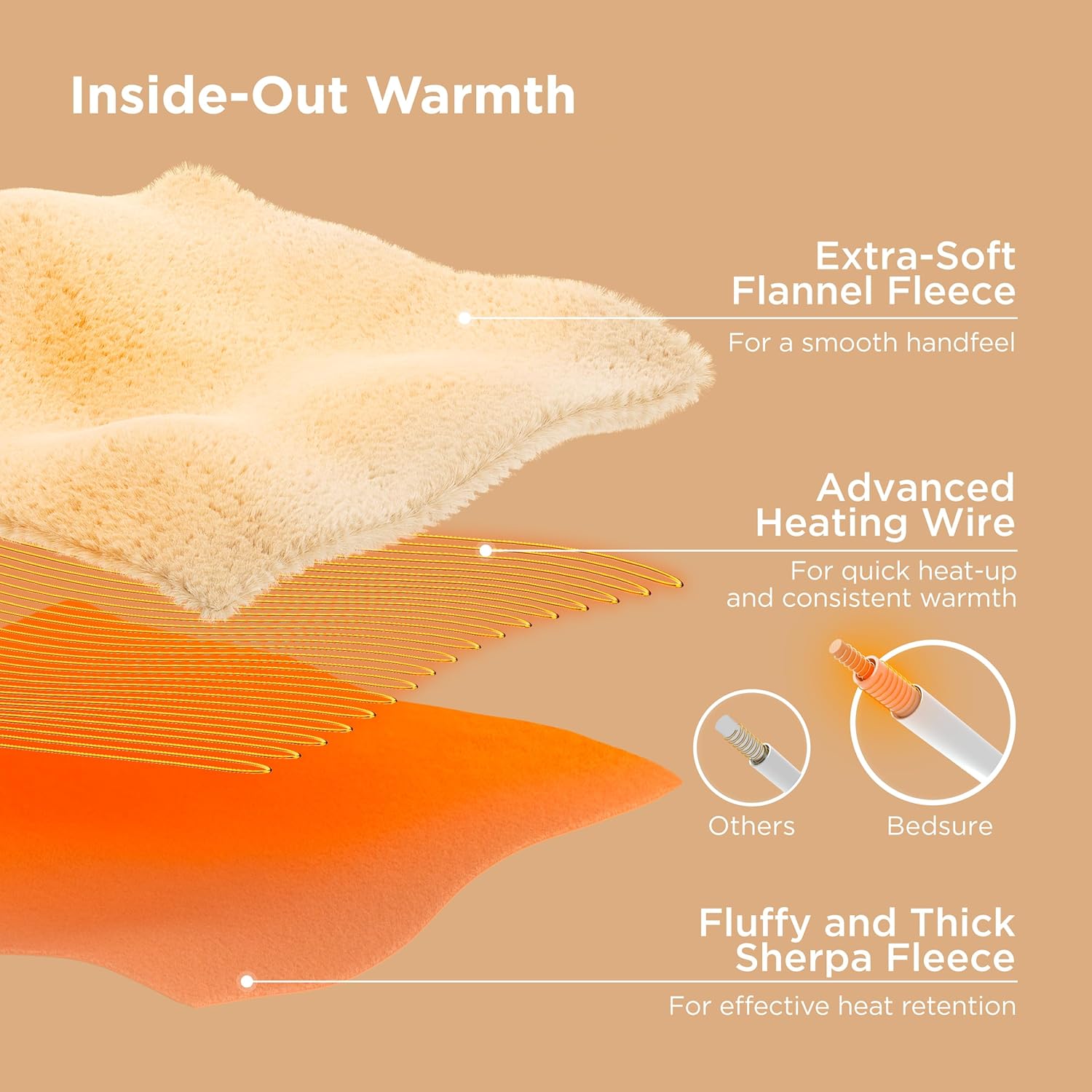
Image displaying safety certifications and features of the Bedsure Electric Blanket, including Overheat Protection, 8H Auto Shut-Off, ETL, Intertek, and FCC logos.
3. Setup
- Unpack: Carefully remove the electric blanket and controllers from the packaging.
- Position the Blanket: Lay the electric blanket flat on your bed, ensuring it is evenly spread without any folds or wrinkles. The connectors should be positioned near the head of the bed for easy access to the controllers.
- Connect Controllers: Locate the connectors on the blanket. Align the arrows on the blanket's connector and the controller's module, then firmly plug them in until they securely lock. For Queen size, there are two controllers for dual-zone heating.
- Plug into Power: Plug the power cords from the controllers into a standard 120V AC wall outlet. Ensure the cords are not pinched or covered by the blanket or furniture.
An illustration demonstrating the dual-zone heating capability of the Bedsure Electric Blanket, showing two distinct heated areas for individual comfort.
4. Operating Instructions
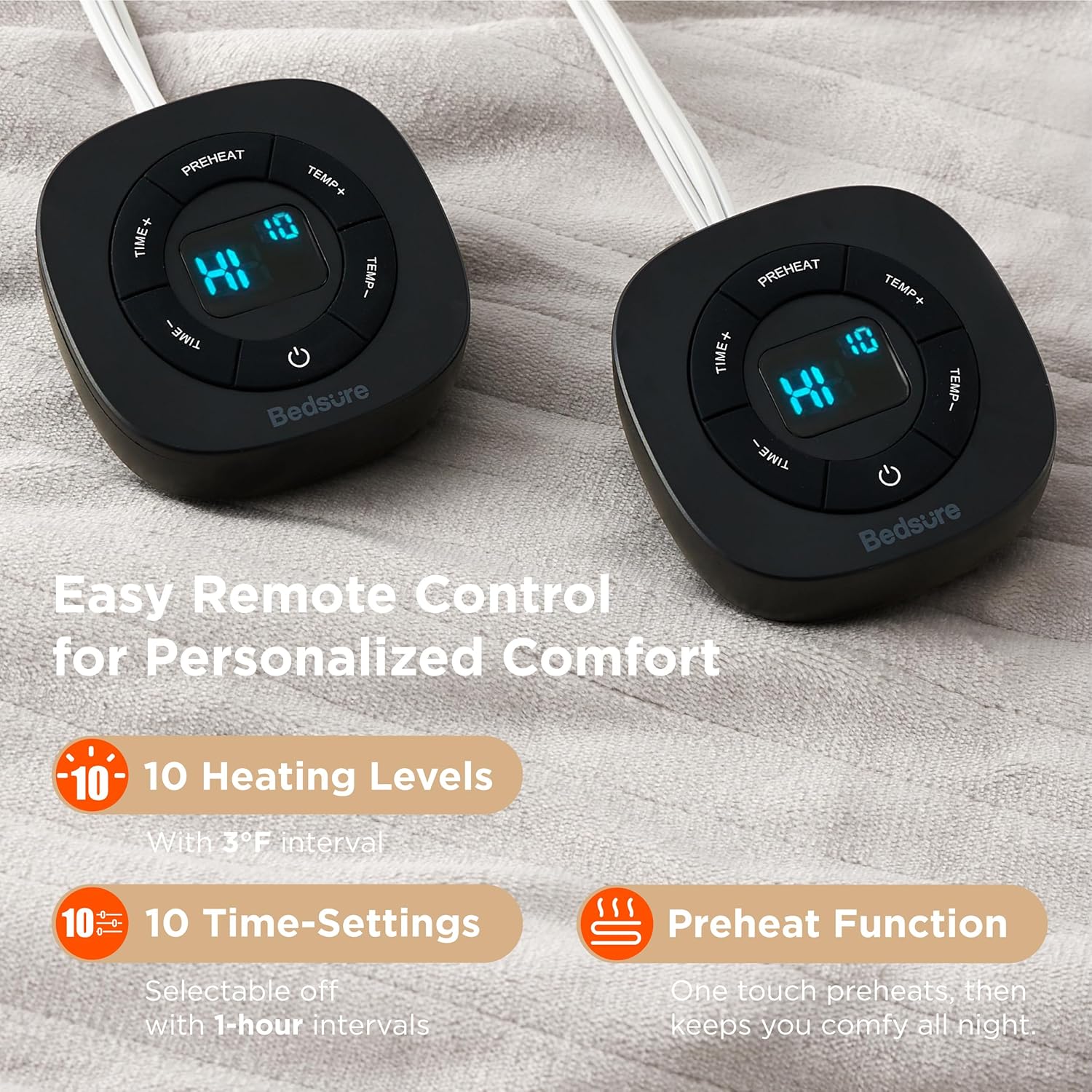
Your Bedsure Electric Blanket features dual controls, allowing each user to customize their warmth settings. Each controller offers 10 heat levels and 10 timer settings.
Controller Functions:
- Power Button: Press to turn the blanket ON or OFF.
- Temperature (TEMP+/-) Buttons: Use these buttons to select your desired heat level from 1 (lowest) to 10 (highest).
- Timer (TIME+/-) Buttons: Use these buttons to set the operating time in 1-hour intervals, up to 10 hours. The blanket will automatically shut off after the set time.
- Preheat Function: Activate the preheat function to quickly warm your bed before use. The blanket will heat to a high temperature and then maintain a comfortable level.

A close-up view of the two digital controllers for the Bedsure Electric Blanket, showing the display with 'HI 10' for heat level and 'TIME' and 'TEMP' buttons.
Video: Controller Operation
An instructional video demonstrating the basic operation of the electric blanket controller, including power on/off, heat setting adjustments, and timer functions.
5. Maintenance
Proper care will extend the life of your electric blanket. Always disconnect the power cords from the wall outlet and detach the controllers from the blanket before cleaning.
Washing Instructions:
- Machine Washable: The blanket is machine washable.
- Gentle Cycle: Use a gentle cycle with cold water.
- Mild Detergent: Use a small amount of mild detergent.
- Do Not Bleach: Avoid using bleach or harsh chemicals.
- Tumble Dry Low: Tumble dry on a low heat setting or air dry. Ensure the blanket is completely dry before reattaching controllers and using.
- Do Not Iron: Do not iron the electric blanket.
- Do Not Dry Clean: Do not dry clean.
The blanket uses a unique dyeing technique to prevent fading, ensuring its aesthetic appeal over time.
6. Troubleshooting
If your electric blanket is not functioning as expected, please refer to the following common issues and solutions:
- No Heat/Power: Ensure both the blanket connector and the wall plug are securely connected. Check if the power outlet is functional.
- Controller Error Message: If an error code appears on the controller display, try unplugging the blanket from the wall for a few minutes, then reconnecting it. Ensure the controller is correctly attached to the blanket.
- Uneven Heating: Ensure the blanket is spread flat on the bed without any folds or heavy objects on top that might impede heat distribution.
- Automatic Shut-Off: The blanket has a default 8-hour auto shut-off. If it turns off unexpectedly, check the timer setting on the controller.
Video: Heated Blanket - Controller Error
A video guide explaining how to identify and potentially resolve common controller error messages on the heated blanket.
7. Specifications
| Model Name | BS-400B-S |
| Size | Queen (84"L x 90"W) |
| Material | 100% Polyester (Flannel top, Sherpa bottom) |
| Color | Cream |
| Heat Settings | 10 Levels |
| Timer Settings | 10 (1-hour intervals) |
| Auto Shut-Off | 8 Hours (default) |
| Power Input | 120V AC, 60Hz (Dual 110W controllers) |
| Included Components | 1 Electric Blanket (84" x 90"), 2 Controllers |
| Product Weight | 7.65 Pounds |

A diagram showing the dimensions of the Queen size electric blanket: 90 inches in length and 84 inches in width.

A cross-section diagram illustrating the construction of the Bedsure Electric Blanket, highlighting the extra-soft flannel fleece, advanced heating wire, and fluffy thick sherpa fleece layers.
8. Warranty and Support
This Bedsure Electric Blanket comes with a 1-Year Warranty. For any product inquiries, technical support, or warranty claims, please contact Bedsure customer service through the retailer's platform or visit the official Bedsure website for contact information.


