
1. Safety Instructions
Read all safety instructions before operating the BAKON 968S Digital Soldering Station. Failure to follow these instructions may result in electric shock, fire, or serious injury.
- Electrical Safety: Ensure the power supply matches the station's requirements (110V for USA plug). Always connect to a grounded outlet. Do not operate in wet conditions.
- Heat Hazard: The soldering iron tip reaches very high temperatures. Avoid direct contact with skin or flammable materials. Use the soldering iron stand when not in use.
- Fume Safety: Soldering produces fumes. Work in a well-ventilated area or use a fume extractor to avoid inhaling fumes.
- ESD Safety: The station features an ESD-safe design to protect sensitive electronic components. Always follow proper ESD precautions when working with electronics.
- Tip Handling: Allow the soldering iron tip to cool before attempting to change it. Use appropriate tools for tip replacement.
- Children and Pets: Keep the soldering station and all accessories out of reach of children and pets.
2. Product Overview and Components
The BAKON 968S is a digital soldering station designed for precision soldering tasks. It features fast heating, PID temperature control, and an ESD-safe design.
2.1 Main Unit and Soldering Iron

Image: Detailed view of the BAKON 968S Soldering Station and its components, including the main unit, soldering iron, and stand.
- 2.9'' Large Real-time Digital Display: Shows current temperature and settings.
- Up Key: Used to increase temperature or navigate menus.
- Function Key: Accesses menu settings and functions.
- Down Key: Used to decrease temperature or navigate menus.
- ON/OFF Power Switch: Controls the power to the soldering station.
- Soldering Iron Stand: Provides a safe resting place for the hot soldering iron.
- Cleaning Brass Ball Kit: Used for cleaning the soldering iron tip.
- Cleaning Sponge: Used for wiping the soldering iron tip.
- Heat-resistant & Flexible Cord: Connects the soldering iron to the station.
- Lead-free Soldering Iron Tip: The interchangeable tip for soldering.
- Stainless Steel Tip Enclosure: Holds the soldering tip securely.
- Heat-resistant Bakelite Threaded Sleeve: Secures the tip enclosure.
- Heat-resistant Anti-slip Handle: Provides a comfortable and safe grip.
2.2 Included Accessories

Image: A visual representation of the items included with the BAKON 968S Soldering Station.
- Soldering Station (Main Unit)
- Soldering Iron Stand
- Solder Wire
- Tweezers
- Solder Sucker
- Soldering Iron Tips (various types)
- Soldering Iron Handle
3. Setup Instructions
Follow these steps to set up your BAKON 968S Digital Soldering Station for first use:
- Unpack: Carefully remove all components from the packaging.
- Placement: Place the soldering station on a stable, heat-resistant surface in a well-ventilated area.
- Connect Soldering Iron: Plug the soldering iron's cord into the designated port on the main soldering station unit. Ensure a secure connection.
- Position Stand: Place the soldering iron stand in a convenient and safe location near the station. Insert the brass cleaning ball and dampen the cleaning sponge with water.
- Power Connection: Connect the power cord to the soldering station and then plug it into a standard 110V AC grounded electrical outlet.
- Initial Power On: Flip the ON/OFF power switch to the 'ON' position. The LCD display will illuminate.
4. Operating Instructions
4.1 Power On/Off
- To power on, flip the ON/OFF switch located on the side of the unit to the 'ON' position.
- To power off, flip the ON/OFF switch to the 'OFF' position.
4.2 Temperature Setting and PID Control

Image: Illustration of the PID temperature control technology and rapid heating capability of the soldering station.
The BAKON 968S utilizes a high-power ceramic heating core and PID temperature control for rapid and stable heating. It can reach 350°C (662°F) in approximately 10 seconds.
- Use the Up and Down keys to adjust the desired temperature. The temperature range is 180°C to 480°C (356°F to 896°F).
- The PID program continuously monitors and corrects the actual temperature to maintain accuracy.
4.3 °C/°F Conversion and Password Lock
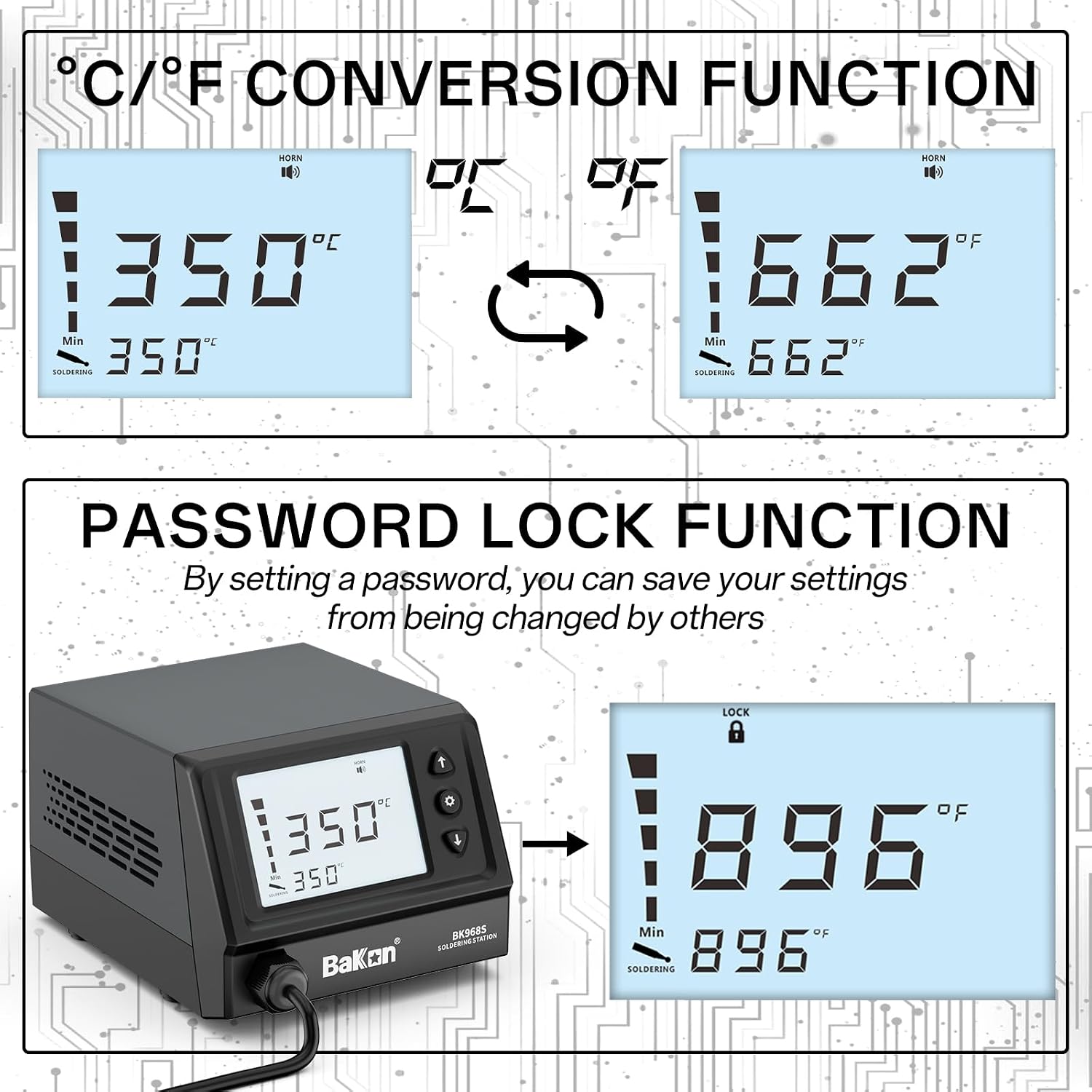
Image: The LCD screen demonstrating the ability to switch between Celsius and Fahrenheit, and the password lock feature.
- Temperature Unit Conversion: Press the Function Key to access the menu and select the option to toggle between Celsius (°C) and Fahrenheit (°F) display.
- Password Lock Function: This feature allows you to set a password to prevent unauthorized changes to temperature settings. Refer to the on-screen menu for setting and managing the password. This helps maintain temperature stability and safety.
4.4 Sleep Mode and Auto Wake

Image: The soldering station illustrating its sleep mode feature, where the iron rests in the stand and automatically reduces temperature, then wakes upon removal.
The station features a configurable sleep mode to conserve energy and prolong tip life.
- When the soldering iron is placed in its stand and remains undisturbed for a set period, the system automatically enters sleep mode, reducing the tip temperature to 100°C (212°F).
- To exit sleep mode, simply pick up the soldering iron from the stand. The station will automatically return to the previously set operating temperature.
- The sleep timer can be adjusted via the function menu (typically from 60s to 999s).
4.5 Soldering Iron Tip Replacement
Ensure the soldering iron is powered off and cooled down before attempting to replace the tip.
- Unscrew the heat-resistant bakelite threaded sleeve.
- Carefully remove the stainless steel tip enclosure and the old soldering iron tip.
- Insert the new soldering iron tip into the heating element.
- Reassemble the stainless steel tip enclosure and screw the threaded sleeve back on securely. Do not overtighten.
5. Maintenance
Proper maintenance ensures the longevity and optimal performance of your soldering station and tips.
5.1 Soldering Iron Tip Maintenance
- Tinning: Before shutting down, apply a small amount of solder to the tinned surface of the soldering iron tip. This protects the tip from oxidation.
- Temperature Control: Avoid prolonged operation at excessively high temperatures, as this can cause the plating layer on the tip's surface to crack.
- Pressure: During soldering, avoid applying excessive pressure or rubbing the soldering point with the tip. This does not improve thermal conductivity and can damage the tip.
- Cleaning: Do not clean the iron tip with rough materials or files. Use the provided brass cleaning ball or a damp sponge.
- Oxidation Removal: If the tip surface is oxidized and does not accept solder, it can be carefully cleaned using a 600-800 grit gold steel cloth or a solution like propanol. Immediately after cleaning, heat the tip to 200°C and re-tin it to prevent further oxidation.
- Flux Usage: Only use synthetic resin or activated resin fluxes. Do not use fluxes that contain high levels of chlorine or acids, as these can corrode the tip.
- Regular Inspection: At least once a week, remove the soldering iron tip for cleaning and to remove any foreign objects from the sleeve.
5.2 General Cleaning
- Wipe the main unit and soldering iron handle with a soft, dry cloth.
- Do not use abrasive cleaners or solvents.
- Ensure the unit is unplugged and cool before cleaning.
6. Troubleshooting
This section addresses common issues you might encounter with your BAKON 968S Soldering Station.
| Problem | Possible Cause | Solution |
|---|---|---|
| Station does not power on. | No power supply; faulty power cord; unit switch off. | Check power outlet and connections. Ensure ON/OFF switch is in 'ON' position. |
| Soldering iron not heating up. | Loose connection; faulty heating element/tip; short circuit. | Ensure soldering iron cable is securely connected. Check if tip is properly installed. The station has heating core short-circuit protection; if an alarm sounds, contact support. |
| Temperature display is inaccurate. | Sensor issue; incorrect calibration. | Ensure the tip is fully inserted. If issues persist, contact customer support. |
| Tip does not accept solder (oxidized). | Oxidation on the tip. | Clean the tip with a brass ball or damp sponge. If heavily oxidized, follow the oxidation removal steps in the Maintenance section. Re-tin the tip immediately. |
7. Specifications
| Feature | Detail |
|---|---|
| Model Number | BAKON 968S (also referred to as BAKON 90 in some documentation) |
| Brand | BAKON |
| Voltage | 110 volts |
| Wattage | 90 watts |
| Display Type | LCD |
| Temperature Range | 180°C ~ 480°C (356°F ~ 896°F) |
| Temperature Stability | 362°F |
| Heating Core | High power ceramic |
| ESD Safe | Yes |
| Included Components | Soldering station, soldering iron, stand, solder wire, tweezers, solder sucker, various tips. |
8. Warranty and Support
BAKON is committed to providing quality products and customer satisfaction.
- After-sales Service: For any questions, concerns, or issues regarding your BAKON 968S Soldering Station, please contact BAKON customer service.
- Contact Information: Refer to the product packaging or the official BAKON website for the most current customer support contact details.
- Short Circuit Protection: The soldering station includes heating core short-circuit protection. If the heating element or sensor experiences an abnormal short circuit, the machine will alarm and notify you. In such an event, discontinue use and contact support.


