
Introduction
This user manual provides detailed instructions for the operation and maintenance of your Jensen CD-660 Portable Stereo CD Player Boombox. Please read this manual thoroughly before using the device to ensure proper function and to maximize your listening experience. Keep this manual for future reference.
Important Safety Instructions
To reduce the risk of electric shock, fire, or injury, always follow these basic safety precautions:
- Do not expose this appliance to rain or moisture.
- Do not block any ventilation openings.
- Do not install near any heat sources such as radiators, heat registers, stoves, or other apparatus (including amplifiers) that produce heat.
- Protect the power cord from being walked on or pinched.
- Only use attachments/accessories specified by the manufacturer.
- Unplug this appliance during lightning storms or when unused for long periods.
- Refer all servicing to qualified service personnel.
Package Contents
Verify that all items listed below are included in your package:
- Jensen CD-660 Portable Stereo CD Player Boombox
- AC Adapter (120V)
- Owner's Manual
Product Overview
Familiarize yourself with the various parts and controls of your Jensen CD-660 boombox.
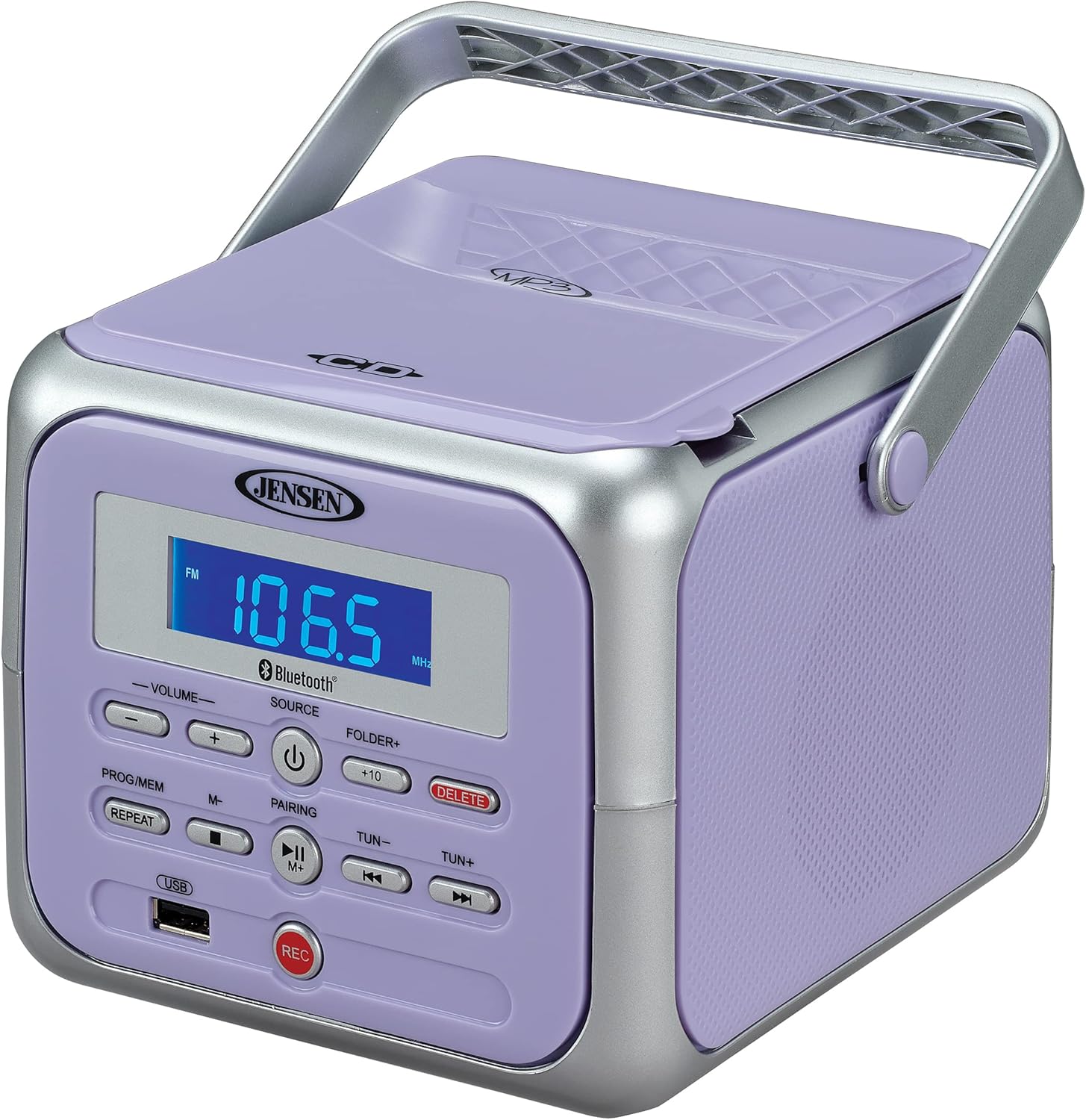
Figure 1: Front view of the Jensen CD-660 with the carrying handle extended. This image displays the main control panel, including the display screen, volume controls, source selection, and playback buttons.

Figure 2: Front view of the Jensen CD-660 with the carrying handle folded down. This perspective highlights the compact design and the arrangement of buttons and the LCD display.

Figure 3: Top view of the Jensen CD-660 with the CD compartment lid open, revealing the CD tray. This illustrates the top-loading mechanism for disc insertion.
Control Panel Features:
- LCD Display: Shows current mode, track number, frequency, and other information.
- VOLUME +/- Buttons: Adjust the audio output level.
- SOURCE Button: Selects between CD, Bluetooth, FM Radio, and Aux-in modes.
- POWER Button: Turns the unit on or off.
- PROG/MEM Button: Programs CD tracks or stores FM radio presets.
- REPEAT Button: Repeats current track or all tracks.
- PAIRING Button: Initiates Bluetooth pairing mode.
- PLAY/PAUSE Button: Starts or pauses playback.
- STOP Button: Stops playback.
- SKIP/SEARCH Buttons (◀◀ / ▶▶): Skips tracks or searches within a track.
- TUN +/- Buttons: Tunes FM radio frequency.
- FOLDER+ Button: Navigates to the next folder on a USB device.
- +10 Button: Skips 10 tracks forward on CD/USB.
- DELETE Button: Deletes recorded files from USB.
- REC Button: Initiates recording to a USB flash drive.
- USB Port: For USB flash drive playback and recording.
- Aux-in Jack: Connects external audio devices.
- Headphone Jack: For private listening.
Setup
Powering the Unit
The Jensen CD-660 can be powered by either the included AC adapter or batteries.
AC Power Operation:
- Plug the AC adapter into the AC IN jack located on the back of the unit.
- Plug the other end of the AC adapter into a standard 120V AC wall outlet.
Battery Power Operation:
For portable use, the unit requires 6 x 'C' (UM-2) batteries (not included).
- Open the battery compartment cover on the bottom of the unit.
- Insert 6 'C' size batteries, ensuring correct polarity (+/-) as indicated inside the compartment.
- Close the battery compartment cover securely.
Note: Disconnect the AC adapter when operating on battery power. Remove batteries if the unit will not be used for an extended period.
Operating Instructions
General Operation:
- Press the POWER button to turn the unit on.
- Press the SOURCE button repeatedly to select your desired mode (CD, Bluetooth, FM, USB, AUX).
- Adjust the volume using the VOLUME +/- buttons.
CD Playback:
The unit supports CD, CD-R/RW, MP3, and WMA disc formats.
- Open the CD compartment lid.
- Place a CD with the label side facing up onto the spindle.
- Close the CD compartment lid.
- Press the SOURCE button to select CD mode.
- Press the PLAY/PAUSE button to start playback.
- Use the SKIP/SEARCH buttons (◀◀ / ▶▶) to navigate tracks.
- Press the STOP button to stop playback.
Bluetooth Operation:
Stream audio wirelessly from your Bluetooth-enabled device.
- Press the SOURCE button to select Bluetooth mode. The display will show "BT" and flash, indicating pairing mode.
- On your Bluetooth device, enable Bluetooth and search for available devices.
- Select "JENSEN CD-660" from the list of devices.
- Once paired, the display will stop flashing and show "BT".
- Start playing audio on your connected device.
- Use the PLAY/PAUSE and SKIP/SEARCH buttons on the boombox or your device to control playback.
FM Radio:
Listen to your favorite FM radio stations.
- Press the SOURCE button to select FM radio mode.
- Extend the FM wire antenna for optimal reception.
- Press the TUN +/- buttons to manually tune to a station.
- Press and hold the TUN +/- buttons for automatic scanning to the next available station.
Storing and Recalling Presets:
The unit can store up to 30 FM presets.
- Tune to the desired FM station.
- Press the PROG/MEM button. The display will show a flashing preset number.
- Use the SKIP/SEARCH buttons (◀◀ / ▶▶) to select the desired preset number.
- Press the PROG/MEM button again to confirm and save the station.
- To recall a preset, press the PROG/MEM button repeatedly to cycle through stored stations.
USB Playback:
Play MP3, WAV, or FLAC audio files from a USB flash drive.
- Insert a USB flash drive into the USB port.
- Press the SOURCE button to select USB mode.
- The unit will automatically begin playing the first compatible audio file.
- Use the SKIP/SEARCH buttons (◀◀ / ▶▶) to navigate tracks.
- Use the FOLDER+ button to navigate between folders on the USB drive.
- The +10 button can be used to skip 10 tracks forward.
USB Recording:
Record audio directly to a USB flash drive from CD, FM Radio, Aux-in, or Bluetooth sources.
- Insert a USB flash drive into the USB port.
- Select the desired audio source (CD, FM, AUX, or Bluetooth).
- Start playback of the audio you wish to record.
- Press the REC button to begin recording. The display will indicate recording status.
- Press the REC button again to stop recording.
- To delete a recorded file, navigate to the file in USB playback mode and press the DELETE button.
Aux-in Connection:
Connect external audio devices like smartphones or tablets.
- Connect one end of a 3.5mm audio cable (not included) to the Aux-in jack on the boombox.
- Connect the other end of the cable to the headphone jack or audio output of your external device.
- Press the SOURCE button to select Aux-in mode.
- Start playing audio on your external device.
- Adjust the volume on both the boombox and your external device for optimal sound.
Maintenance
Cleaning the Unit:
- Wipe the exterior of the unit with a soft, damp cloth. Do not use abrasive cleaners or solvents.
- For the CD lens, use a specialized CD lens cleaner disc.
Battery Care:
- Remove batteries if the unit will not be used for an extended period to prevent leakage.
- Do not mix old and new batteries, or different types of batteries.
Troubleshooting
If you encounter issues with your Jensen CD-660, refer to the following table for common problems and solutions.
| Problem | Possible Cause | Solution |
|---|---|---|
| No power | AC adapter not connected; Batteries depleted or incorrectly inserted. | Ensure AC adapter is securely plugged in; Replace batteries or check polarity. |
| No sound | Volume too low; Incorrect source selected; Headphones connected. | Increase volume; Select correct source; Disconnect headphones. |
| CD not playing | CD inserted incorrectly; Disc is dirty or scratched; CD compartment not closed. | Insert CD with label side up; Clean or replace disc; Close compartment securely. |
| Bluetooth pairing failed | Device too far; Bluetooth not enabled on external device; Boombox not in pairing mode. | Move device closer; Enable Bluetooth; Ensure boombox is in BT pairing mode. |
| Poor FM reception | Antenna not extended; Weak signal. | Fully extend the FM wire antenna; Reposition the unit for better reception. |
| USB playback issues | Unsupported file format; USB drive not properly inserted or corrupted. | Ensure files are MP3/WAV/FLAC; Reinsert USB drive; Try a different USB drive. |
Specifications
| Feature | Detail |
|---|---|
| Model Number | CD-660 |
| Power Source | AC 120V (included adapter) or 6 x 'C' (UM-2) batteries (not included) |
| Connectivity | Bluetooth 5.1 (A2DP, AVRCP), USB, Aux-in |
| CD Compatibility | CD, CD-R/RW, MP3, WMA |
| USB Playback | MP3, WAV, FLAC |
| FM Radio | Stereo Receiver with 30 Presets, PLL Digital Tuning |
| Dimensions (W x H x D) | 6.38" x 5.2" x 6.57" (16.2 cm x 13.2 cm x 16.7 cm) |
| Weight | Approximately 2.46 lbs (1.12 kg) |
Warranty and Support
This Jensen CD-660 Portable Stereo CD Player Boombox comes with a manufacturer's warranty. Please refer to the included Owner's Manual for specific details regarding warranty coverage, terms, and conditions. For technical support or service inquiries, please contact Jensen customer service directly. Contact information can typically be found in the Owner's Manual or on the official Jensen website.


