
Important Safety Information
Before operating the Xiaomi Mi Electric Scooter 4, please read this manual carefully and retain it for future reference. Always wear a helmet and protective gear. Observe local traffic laws and regulations. This scooter is designed for adults.
- Do not ride in heavy rain or through puddles deeper than 2 cm.
- Avoid riding on slippery surfaces, loose gravel, or steep inclines.
- Maintain a safe distance from other vehicles and pedestrians.
- Regularly check tire pressure and brake function.
- Do not allow children to operate the scooter.
Package Contents
Verify that all items are present in the package:
- Xiaomi Mi Electric Scooter 4
- Power Adapter
- T-handle Hex Wrench
- Extension Nozzle
- Screws (x4)
- User Manual (this document)
Setup and Assembly
1. Unfolding the Scooter
Carefully lift the stem of the scooter until it locks into the upright position. Ensure the folding mechanism is securely latched. You should hear a click.

Image: Side view of the Xiaomi Mi Electric Scooter 4 in its fully unfolded and ready-to-use position.
2. Attaching the Handlebar
Align the handlebar with the stem and gently push it down. Use the provided T-handle hex wrench and screws to secure the handlebar firmly. Ensure all four screws are tightened evenly.
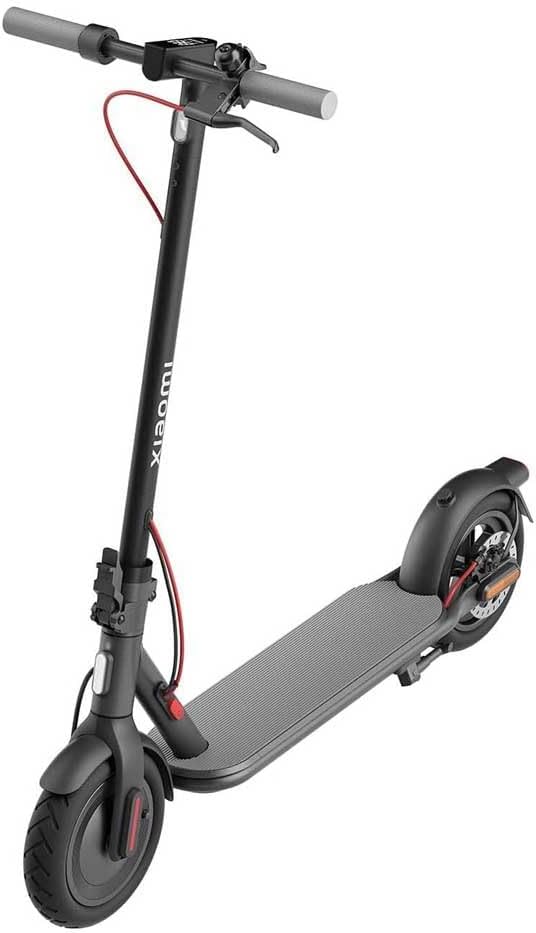
Image: Front three-quarter view of the Xiaomi Mi Electric Scooter 4, showing the handlebar securely attached to the stem.
3. Initial Charging
Before first use, fully charge the scooter's battery. Connect the power adapter to the charging port located on the side of the deck, then plug it into a power outlet. The indicator light on the charger will change from red to green when charging is complete.
Charging time is approximately 4-5 hours for a full charge.
Operating Instructions
1. Power On/Off
- Power On: Press and hold the power button on the display for 2 seconds.
- Power Off: Press and hold the power button for 3 seconds while the scooter is stationary.

Image: Detailed view of the scooter's handlebar, showing the integrated display, power button, and brake lever.
2. Riding the Scooter
- Starting: Place one foot on the deck and push off with the other foot. Once you reach a speed of 5 km/h (3 mph), press the accelerator lever to engage the motor.
- Acceleration: Gently press the accelerator lever with your right thumb.
- Braking: Squeeze the brake lever on the left handlebar to activate the front and rear brakes. For emergency stops, apply both brakes firmly.
- Speed Modes: Double-press the power button to switch between speed modes (e.g., Pedestrian, Standard, Sport). The current mode will be indicated on the display.
3. Folding the Scooter
To fold the scooter for storage or transport:
- Ensure the scooter is powered off.
- Locate the folding latch mechanism at the base of the stem.
- Pull the safety lock and then the folding lever to release the stem.
- Carefully fold the stem downwards until it clicks into place, securing it to the rear fender.

Image: Side view of the Xiaomi Mi Electric Scooter 4 in its compact, folded configuration, ready for transport or storage.
Maintenance
1. Cleaning
Wipe the scooter clean with a soft, damp cloth. Do not use alcohol, gasoline, kerosene, or other corrosive chemical solvents. Do not wash the scooter with a high-pressure water jet.
2. Tire Care
Regularly check tire pressure. The recommended tire pressure is typically indicated on the tire sidewall or in the specifications section. Use the provided extension nozzle to inflate tires if necessary.
3. Brake Adjustment
If the brakes feel loose or too tight, they may require adjustment. Consult a qualified technician or refer to the official Xiaomi support resources for detailed instructions on brake adjustment.
4. Battery Care and Storage
- Store the scooter in a cool, dry place between 0°C and 45°C (32°F and 113°F).
- Do not store the battery fully discharged for extended periods. Charge it to approximately 50-70% if storing for more than 30 days.
- Recharge the battery every 30-60 days to prevent over-discharge.
Troubleshooting
- Scooter not turning on: Ensure the battery is charged. Press and hold the power button for the required duration.
- Motor not engaging: Ensure you push off to at least 5 km/h before pressing the accelerator. Check for any error codes on the display.
- Reduced range: This can be due to low tire pressure, riding uphill frequently, heavy loads, or cold weather.
- Error codes: If an error code appears on the display, refer to the official Xiaomi support website or contact customer service for specific solutions.
Specifications
| Feature | Specification |
|---|---|
| Brand | XIAOMI |
| Model Name | Mi Electric Scooter 4 |
| Age Range (Description) | Adult |
| Special Features | Foldable |
| Weight Limit | 120 Kilogram |
| Number of Wheels | 2 |
| Wheel Material | Rubber |
| Frame Material | Alloy Steel |
| Item Weight | 17.2 Kilogram |
| Handlebar Type | Fixed |
Warranty and Support
For warranty information, technical support, or service inquiries, please visit the official Xiaomi website or contact their customer service department. Keep your purchase receipt as proof of purchase.
Official Xiaomi Website: www.mi.com


