
TRIUMPHKEY Electric Height Adjustable Desk (Model: scrivania regolabile in altezza)
TRIUMPHKEY Height Adjustable Desk User Manual
Model: Electric Height Adjustable Desk (scrivania regolabile in altezza)
Introduction
Thank you for choosing the TRIUMPHKEY Height Adjustable Desk. This manual provides essential information for the safe assembly, operation, and maintenance of your new desk. Please read it thoroughly before use and retain it for future reference.
This electric height-adjustable desk is designed to enhance your workspace ergonomics, allowing you to switch between sitting and standing positions effortlessly. It features a robust frame, a spacious desktop, and convenient functions like memory presets and a USB charging port.

Image: Product details showing overall dimensions (180cm length, 80cm width, 72-118cm height range) and the four-part desktop construction.
Important Safety Information
- Ensure all components are securely fastened before use.
- Keep children and pets away from the desk during operation to prevent injury.
- Do not overload the desk. The maximum weight capacity is 70 kg.
- Avoid placing liquids directly on the control panel or near electrical components.
- Do not attempt to disassemble or repair the motor or control system yourself. Contact customer support for assistance.
- Ensure there are no obstructions in the desk's path when adjusting height. The anti-collision system is designed to prevent damage, but caution is always advised.

Image: Illustration of the anti-collision technology, showing the desk automatically stopping and reversing when an obstruction is detected during height adjustment.
Package Contents
Please check the package carefully to ensure all parts are present and undamaged. If any parts are missing or damaged, please contact customer support.
- Desktop sections (4 parts)
- Desk legs (2)
- Foot pads (2)
- Control panel with USB port
- Motor and power adapter
- Cable management tray
- Headphone hook
- Assembly hardware (screws, tools)
- Instruction manual

Image: A visual representation of all parts included in the product package, such as desktop panels, frame components, control panel, and accessories.
Setup and Assembly
Follow these steps to assemble your TRIUMPHKEY Height Adjustable Desk. It is recommended to have two people for assembly.
- Unpack Components: Lay out all parts on a clean, soft surface to prevent scratches. Refer to the package contents list to ensure everything is present.
- Assemble Desktop: Connect the four desktop sections using the provided dowels and metal plates. Ensure they are aligned perfectly and secured with screws from underneath.
- Attach Legs to Frame: Secure the desk legs to the main frame using the designated screws.
- Mount Feet: Attach the foot pads to the bottom of the desk legs.
- Install Control Panel: Mount the control panel to the underside of the desktop in the desired location.
- Connect Wiring: Connect the motor, control panel, and power adapter according to the wiring diagram in the included manual. Ensure all connections are secure.
- Install Cable Management: Attach the cable management tray and headphone hook to the underside of the desk.
- Initial Power-Up: Plug the power adapter into a wall outlet. The desk should be ready for initial calibration or use.

Image: Close-up view of the cable management tray and headphone hook, illustrating how they help keep the workspace tidy.
Operating Instructions
Control Panel Functions

Image: Detailed view of the multifunction control panel, highlighting the memory buttons, up/down controls, and integrated USB charging port.
- Up/Down Buttons (▲ / ▼): Press and hold to adjust the desk height continuously. Release to stop at the desired height.
- Memory Presets (1, 2, 3):
To Save a Height: Adjust the desk to your desired height. Press the 'M' button, then press one of the number buttons (1, 2, or 3) within 3 seconds. The display will show 'S-' followed by the number, indicating the height is saved.
To Recall a Height: Press the corresponding number button (1, 2, or 3). The desk will automatically move to the saved height. - USB Charging Port: Located on the side of the control panel. Use it to charge your mobile devices.
- Sedentary Reminder: This function can be activated to remind you to change positions after a set period. Refer to the detailed manual for programming instructions.
Anti-Collision System
The desk is equipped with an anti-collision system. If the desktop encounters an obstruction while moving up or down, it will automatically stop and reverse slightly to prevent damage or injury. Always ensure the path is clear, especially when children or pets are nearby.
Maintenance
- Cleaning: Wipe the desktop and frame with a soft, damp cloth. Avoid harsh chemicals or abrasive cleaners.
- Inspection: Periodically check all screws and connections to ensure they are tight. Retighten if necessary.
- Cable Management: Keep cables organized in the cable management tray to prevent tangles and damage.
- Motor Care: The motor is designed for long-term use and requires no special maintenance. Avoid exposing it to excessive moisture or extreme temperatures.
Troubleshooting
| Problem | Possible Cause | Solution |
|---|---|---|
| Desk does not move. | Power cable disconnected; Motor cable disconnected; Overload. | Check all power and motor connections. Reduce weight on the desk. |
| Desk moves unevenly or makes unusual noise. | Loose connections; Obstruction; Uneven weight distribution. | Check all connections. Clear any obstructions. Redistribute weight evenly. |
| Anti-collision system triggers too often. | Sensitivity setting too high; Minor vibrations. | Refer to the detailed manual for adjusting anti-collision sensitivity. Ensure stable environment. |
| Memory presets not working. | Height not saved correctly. | Re-save the desired height following the instructions in the 'Operating Instructions' section. |
Specifications
- Brand: TRIUMPHKEY
- Model Number: scrivania regolabile in altezza (0287)
- Desktop Dimensions (L x W): 180 x 80 cm
- Height Range: 72 - 118 cm
- Weight Capacity: 70 kg
- Material: Alloy Steel (frame), Engineered Wood (desktop)
- Motor Noise Level: < 50 dB
- Features: 3 Memory Presets, USB Charging Port, Anti-Collision System, Sedentary Reminder, Cable Management, Headphone Hook
- Product Weight: 15.5 kg
- Color: Beige + Black
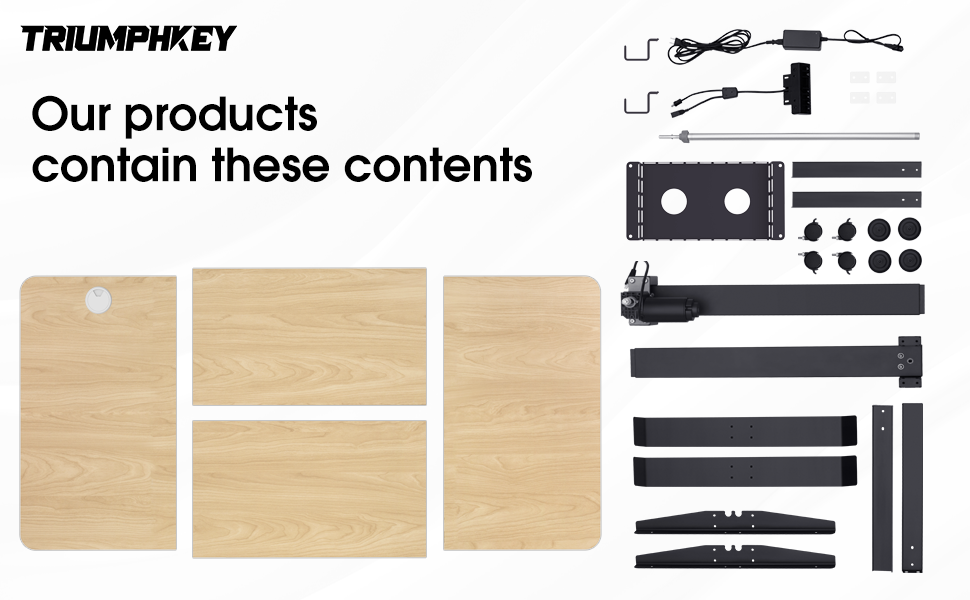
Image: Visual representation of the desk's robust construction, capable of supporting up to 70 kg of weight.

Image: The desk shown at its minimum (72cm) and maximum (118cm) height, illustrating its adjustable range.
Warranty and Support
Warranty Information: This TRIUMPHKEY product comes with a standard manufacturer's warranty. Please refer to the warranty card included in your package for specific terms and conditions, including coverage duration and claim procedures. Keep your proof of purchase for warranty claims.
Customer Support: For any questions, technical assistance, or warranty claims, please contact TRIUMPHKEY customer support. You can typically find contact information on the brand's official website or through your purchase platform.
Online Resources: Visit the TRIUMPHKEY Store on Amazon for additional product information and support.
Related documentsElectric Height Adjustable Desk (Model: scrivania regolabile in altezza)

Ask a question about this manual
Ask about setup, troubleshooting, compatibility, parts, safety, or missing instructions. Manuals+ will review the question and use this page’s manual context to help answer it.