
1. Introduction
This manual provides instructions for the safe and effective operation of your PREXISO 3-in-1 Digital Angle Gauge. This device combines the functions of a digital level, angle meter, and laser line projector, designed for precision measurements in various applications such as woodworking, construction, and home renovation. Please read this manual thoroughly before use and retain it for future reference.
2. Safety Information
WARNING: This product contains a Class II laser. Avoid direct eye exposure to the laser beam. Maximum laser output is < 1 mW.
- Do not stare directly into the laser beam.
- Do not aim the laser beam at people or animals.
- Do not disassemble the device; laser radiation can be hazardous.
- Keep the device out of reach of children.
- Use only as instructed in this manual.
3. Product Overview
The PREXISO Digital Angle Gauge is a compact and versatile tool. It features a large, backlit LCD display for clear readings and a magnetic base for secure attachment to metallic surfaces.

Image 3.1: Front view of the PREXISO Digital Angle Gauge with display elements and control buttons labeled. Key components include the ZERO indicator, Data Hold, IN/FT / mm/m Unit, Measured Value, Low Battery Indicator, Angle Position Indicators, Laser Apertures, Power/ZERO Function button, Laser ON/OFF button, MODE Setting button, Data HOLD & Audible Buzzer ON/OFF button, and Magnetic V-groove Base & Backside.
Components:
- LCD Display: Shows angle measurements, units, battery status, and mode indicators.
- Power/ZERO Button: Turns the device on/off and sets the zero reference in relative measurement mode.
- Laser ON/OFF Button: Activates and deactivates the laser lines.
- MODE Button: Switches between measurement units (degrees, %, mm/m, IN/FT) and angle ranges (0-90°, 0-180°).
- HOLD/Buzzer Button: Freezes the current measurement on the display and toggles the audible buzzer.
- Laser Apertures: Emitters for horizontal, vertical, and cross laser lines.
- Magnetic Base: Allows for secure attachment to metal surfaces.
- USB-C Charging Port: For recharging the internal battery.
4. Setup
4.1 Charging the Device
The device is equipped with a rechargeable Lithium Polymer battery. Before first use, or when the low battery indicator appears on the display, charge the device using the provided USB-C cable.
- Connect the USB-C end of the cable to the charging port on the device.
- Connect the USB-A end to a standard USB power adapter (not included) or a computer USB port.
- The charging indicator on the display will show charging status.
- Once fully charged, disconnect the cable.

Image 4.1: The PREXISO Digital Angle Gauge demonstrating its compact size fitting into a pocket and highlighting the USB-C charging port on the side.
4.2 Power On/Off
- To power on, press the Power/ZERO button.
- To power off, press and hold the Power/ZERO button for approximately 3 seconds.
5. Operating Instructions
5.1 Measurement Modes (Absolute and Relative)
The device offers two measurement modes:
- Absolute Measurement Mode (ABS): This is the default mode upon powering on. It measures the angle relative to a true horizontal surface (0°).
- Relative Measurement Mode (REL): To enter this mode, press the Power/ZERO button briefly while the device is on. The display will show 'ZERO' and then '0.00°', setting the current position as the new 0° reference. This is useful for measuring angles relative to a non-level surface.

Image 5.1: Visual representation of Absolute Angle Measurement (measuring from a true horizontal) and Relative Angle Measurement (setting a new zero reference for differential measurements).
5.2 Changing Measurement Units and Range
Press the MODE button to cycle through the available measurement units and angle ranges:
- Degrees (°)
- Percentage (%)
- mm/m
- IN/FT
The device supports two angle ranges: 0-90° (4 x 90°) and 0-180°.
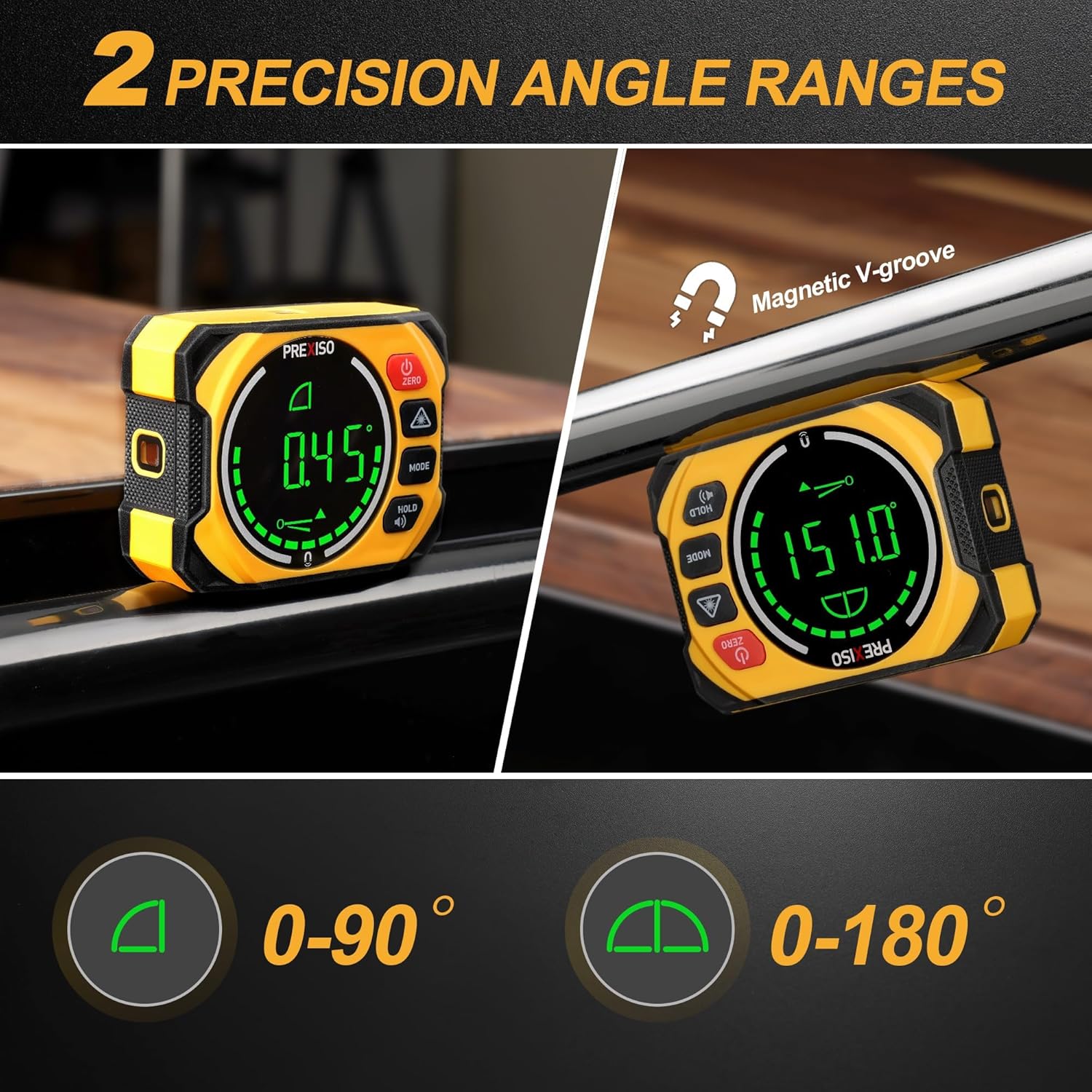
Image 5.2: The device displaying measurements in both 0-90° and 0-180° ranges, highlighting its magnetic V-groove for pipe attachment.
5.3 Laser Line Modes
The integrated laser can project three types of lines:
- Horizontal Line: Projects a level line.
- Vertical Line: Projects a plumb line.
- Cross-Line: Projects both horizontal and vertical lines simultaneously.
Press the Laser ON/OFF button to cycle through these modes or turn the laser off.

Image 5.3: Examples of the three laser line modes: Horizontal, Vertical, and Cross-line, demonstrating their application for finding desired slope lines.
5.4 Magnetic Base and Auto-Reversible Display
- The strong magnetic base allows the device to be securely attached to ferrous metal surfaces, freeing your hands for other tasks.
- The LCD display automatically rotates when the device is inverted, ensuring readings are always upright and easy to read.
5.5 Data Hold and Audible Buzzer
- Press the HOLD/Buzzer button briefly to freeze the current measurement on the display. Press again to release.
- Press and hold the HOLD/Buzzer button to toggle the audible buzzer on or off. The buzzer will alert when the device is within ±1° of the horizontal (0°) or vertical (90°) position.
5.6 Error Indication
If the angle gauge is used in an incorrect position, specifically tilted diagonally over 30 degrees, the screen will display "ERROR" to prompt the user to correct the device's orientation for accurate measurement.

Image 5.4: Illustration of the device displaying an "ERR" message when tilted diagonally beyond 30 degrees, indicating an incorrect measurement position.
6. Calibration
The device is factory-calibrated. However, for lasting accuracy, user calibration is possible. Perform calibration on a flat, smooth surface with a tilt no more than 5°.
- Place the device on a flat, stable surface.
- Press and hold the MODE button, then briefly press the Power/ZERO button. The display will show "CAL 1".
- Press the MODE button again. The display will show "CAL 2".
- Rotate the equipment 180° on the same flat surface.
- Press the MODE button. The display will show "CAL 2" again, then briefly show "0.00°" indicating calibration is complete.
Tip: If the surface tilt exceeds 5° during calibration, the display will read "ERR".

Image 6.1: A visual guide detailing the steps for user calibration of the angle gauge, including placing the device, pressing buttons, and rotating 180 degrees.
7. Maintenance
- Clean the device with a soft, damp cloth. Do not use abrasive cleaners or solvents.
- Store the device in its protective pouch in a dry, dust-free environment when not in use.
- Avoid exposing the device to extreme temperatures or direct sunlight for prolonged periods.
- Ensure the laser apertures are clean and free from obstructions for optimal performance.
8. Troubleshooting
| Problem | Possible Cause | Solution |
|---|---|---|
| Device does not power on | Low battery | Charge the device using the USB-C cable. |
| Display shows "ERROR" | Device tilted beyond 30 degrees or calibration surface not flat | Ensure the device is placed on a stable surface within 30 degrees of the intended measurement plane. Re-calibrate on a flat surface. |
| Inaccurate measurements | Device needs calibration | Perform user calibration as described in Section 6. |
| Laser beam is dim or not visible | Low battery or obstructed aperture | Charge the device. Clean the laser apertures. |
9. Specifications
| Feature | Detail |
|---|---|
| Brand | Prexiso |
| Model | B0C4F7DBV1 |
| Material | Metal |
| Operation Mode | Automatic |
| UPC | 840128502389 |
| Item Weight | 9.9 ounces |
| Package Dimensions | 5.71 x 4.88 x 2.4 inches |
| Batteries | 1 Lithium Polymer battery (included) |
| Laser Class | Class II, < 1 mW |
| Angle Resolution | 0.05° |
| Angle Accuracy | ±0.1° at 0° and 90°, ±0.2° at other angles |
| Measuring Range | 0 to 360° (4 x 90°) |
| Date First Available | September 16, 2023 |
10. Warranty and Support
For warranty information or technical support, please refer to the documentation included with your purchase or contact PREXISO customer service through their official website or the retailer where the product was purchased. Please have your model number (B0C4F7DBV1) and purchase date available when contacting support.