
UTRAI Jstar 8
UTRAI Portable Car Jump Starter Jstar 8 User Manual
Model: Jstar 8
Introduction
Thank you for choosing the UTRAI Portable Car Jump Starter Jstar 8. This manual provides essential information for the safe and effective operation, maintenance, and troubleshooting of your device. Please read this manual thoroughly before use and retain it for future reference.
The UTRAI Jstar 8 is a versatile and powerful portable jump starter designed to provide reliable starting power for a wide range of 12V vehicles, including cars, SUVs, pickups, vans, RVs, motorcycles, snowmobiles, and lawnmowers. It is capable of jump-starting gasoline engines up to 10 liters and diesel engines up to 8 liters. Beyond its primary function, it also serves as a portable power bank for your electronic devices and features a multi-mode LED flashlight for emergencies.

Image: The UTRAI Portable Car Jump Starter Jstar 8, showcasing the main unit with its digital display and the attached smart jumper clamps.
What's in the Box
Upon opening your UTRAI Portable Car Jump Starter package, you should find the following items:
- 1x JS-8 Car Jump Starter
- 1x Smart Jumper Clip
- 1x USB-C cable
- 1x User Manual
- 1x Storage Bag
Product Overview
Familiarize yourself with the components of your UTRAI Jstar 8 jump starter:

Image: A detailed diagram illustrating the various components of the UTRAI Jstar 8, including the power button, display screen, USB output ports, LED light, EC5 output port, and the smart jumper clamp with its red and black battery clamps and LED indicators.
- Main Unit: Houses the battery, display, and control circuitry.
- 3-inch Super Large LCD Display: Shows battery percentage, input/output status, and warning symbols.
- Power Button: Activates the device and controls the LED flashlight.
- USB Output Ports (x2): For charging external electronic devices.
- EC5 Output Port: Connection point for the smart jumper clamp.
- LED Flashlight: Integrated light with multiple modes.
- Smart Jumper Clamp: Features red (positive) and black (negative) clamps with built-in safety features and LED indicators.
Setup
Initial Charging
Before first use, fully charge the UTRAI Jstar 8. Use the provided USB-C cable to connect the jump starter to a USB wall adapter (not included) or a powered USB port. The LCD display will show the charging progress. A full charge is indicated by 100% on the display.
Checking Battery Level
Press the power button once to activate the display and check the remaining battery percentage. It is recommended to keep the jump starter charged above 50% for optimal performance, especially before attempting to jump start a vehicle.
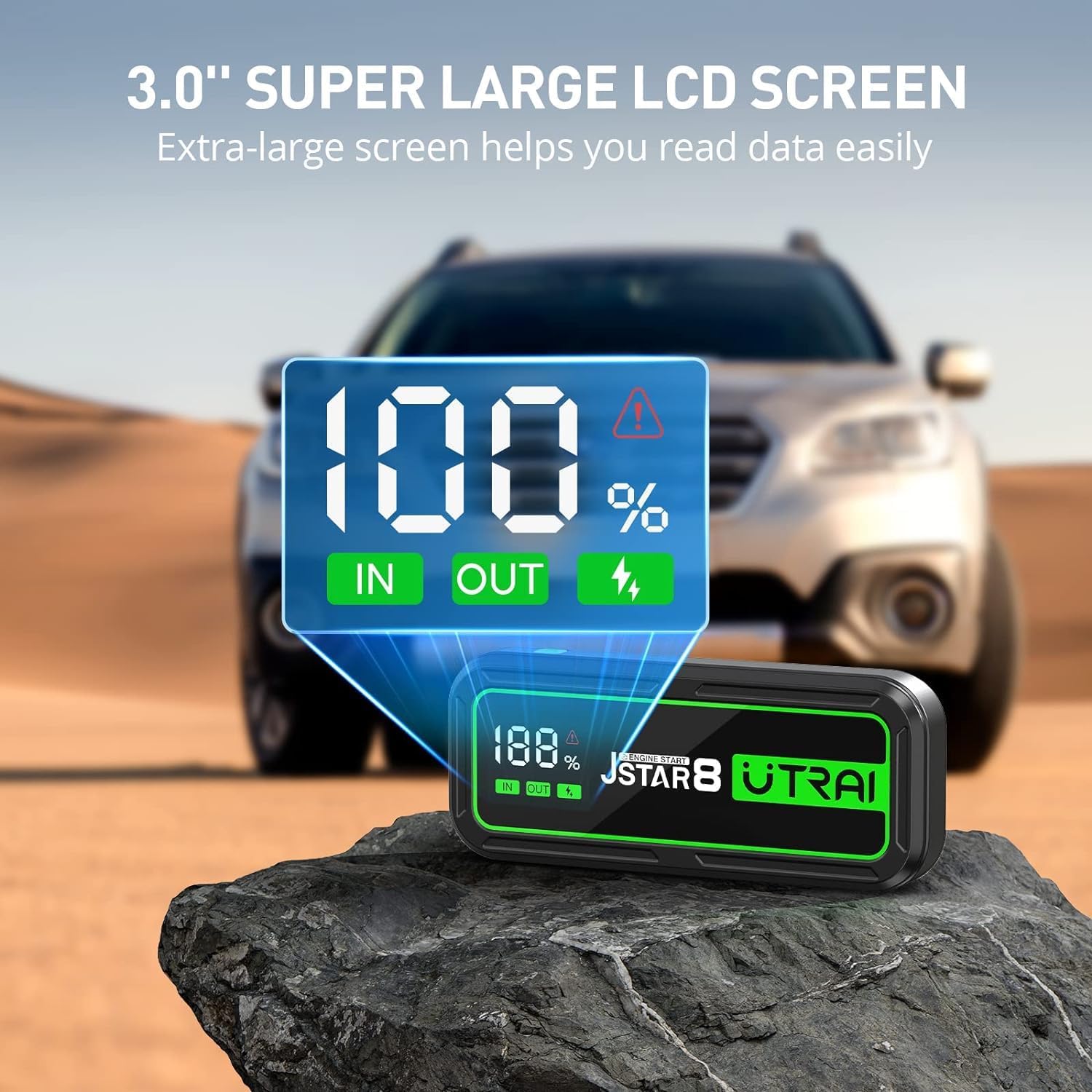
Image: The UTRAI Jstar 8 with its large LCD screen prominently displaying '100%' charge, along with 'IN' and 'OUT' indicators, signifying its readiness for use.
Operating Instructions
Jump Starting a Vehicle
Follow these steps carefully to jump start your vehicle:
- Prepare the Vehicle: Ensure the vehicle's ignition is off and all accessories (lights, radio, A/C) are turned off. Engage the parking brake.
- Connect the Smart Clamp: Plug the blue end of the smart jumper clamp into the EC5 output port on the UTRAI Jstar 8. Ensure a firm connection.
- Connect to Car Battery:
- Connect the red (+) clamp to the positive (+) terminal of the vehicle's battery.
- Connect the black (-) clamp to the negative (-) terminal of the vehicle's battery.
The smart clamp's LED indicator will show the connection status. Refer to the smart clamp's manual for specific indicator meanings (e.g., solid green for ready, flashing for error).
- Start the Vehicle: Once the smart clamp indicates a safe connection (usually a solid green light), return to your vehicle and start the engine. Do not crank for more than 3 seconds. If the vehicle does not start, wait at least 30 seconds before attempting again.
- Disconnect Clamps: As soon as the vehicle starts, immediately disconnect the black (-) clamp from the vehicle battery, then disconnect the red (+) clamp. Finally, unplug the smart clamp from the jump starter.

Image: A visual guide showing the three easy steps to jump start a vehicle: 1) Plug the clamp into the jump starter, 2) Clip the clamp to the car battery, and 3) Start your vehicle.
Using as a Portable Power Bank
The UTRAI Jstar 8 features a 74000mWh battery capacity and two USB output ports, allowing you to charge various electronic devices such as smartphones, tablets, smartwatches, and cameras.
- Connect your device's USB charging cable to one of the USB output ports on the jump starter.
- The jump starter will automatically begin charging your device. The LCD display will show 'OUT' indicating power output.

Image: The UTRAI Jstar 8 acting as a power bank, simultaneously charging an iPhone, a Samsung Galaxy S23, and an iPad Air, demonstrating its 74000mWh battery capacity.
Using the LED Flashlight
The integrated 200-lumen LED flashlight offers three modes for various situations:
- Lighting Mode: Press and hold the power button for 3 seconds to turn on the steady light.
- Flash Mode: Press the power button once more to switch to flashing mode.
- SOS Mode: Press the power button a third time to activate the SOS signal mode.
- Turn Off: Press the power button again to turn off the flashlight, or press and hold for 3 seconds.

Image: The UTRAI Jstar 8 with its bright LED flashlight illuminated, highlighting its three modes: SOS, Normal, and Strobe, useful for various emergency situations.
Maintenance
Proper maintenance ensures the longevity and performance of your UTRAI Jstar 8:
- Recharge Regularly: To maintain battery health, recharge the jump starter at least once every 3-6 months, even if not used. This prevents deep discharge and extends battery life.
- Storage: Store the device in a cool, dry place away from direct sunlight, moisture, and flammable materials. Use the provided storage bag for protection.
- Cleaning: Wipe the unit with a soft, dry cloth. Do not use harsh chemicals or abrasive cleaners.
- Temperature: Avoid exposing the device to extreme temperatures. While designed to work in cold conditions (down to -40°F), prolonged storage in such conditions or extreme heat can affect battery performance.

Image: An infographic highlighting key features of the UTRAI Jstar 8, including its 74000mWh battery, power bank capability, 3-mode light, Smart NTC protection, and ABS fireproof shell, all contributing to its robust design.
Troubleshooting
If you encounter issues with your UTRAI Jstar 8, refer to the following common problems and solutions:
| Problem | Possible Cause | Solution |
|---|---|---|
| Device does not turn on or display is blank. | Battery is completely discharged. | Charge the device fully using the USB-C cable. |
| Vehicle does not start after connecting. | Incorrect clamp connection; vehicle battery too low; engine size exceeds capacity; smart clamp error. | Ensure clamps are connected correctly (red to +, black to -). Check smart clamp LED indicators for error codes. Ensure jump starter is sufficiently charged. Wait 30 seconds before re-attempting. |
| Overheat warning symbol on display. | Device is overheating due to prolonged use or high load. | Disconnect the device and allow it to cool down for several minutes before attempting further use. |
| USB charging not working. | Device not powered on; cable issue; device being charged is incompatible. | Ensure jump starter is powered on. Try a different USB cable. Verify your device is compatible with standard USB charging. |
If problems persist, please refer to the Warranty and Support section for further assistance.
Specifications
| Feature | Specification |
|---|---|
| Brand | UTRAI |
| Model Number | Jstar 8 |
| Peak Current | 3000 Amps |
| Battery Capacity | 74000mWh (74Wh) |
| Engine Compatibility (Gas) | Up to 10 Liters |
| Engine Compatibility (Diesel) | Up to 8 Liters |
| Output Ports | 2x USB Output, 1x EC5 Output |
| LED Flashlight | 200 Lumens (Lighting/Flash/SOS modes) |
| Display | 3-inch Super Large LCD Screen |
| Operating Temperature | Designed to work in -40°F (specific range not provided, but cold weather performance highlighted) |
| Dimensions (D x W x H) | 3"D x 8.1"W x 6.1"H |
| Item Weight | 2.64 pounds (1.2 Kilograms) |
| Battery Type | Lithium Polymer |
Safety Information
Your safety is paramount. Please adhere to the following safety guidelines:
- Always read the entire user manual before operating the device.
- Do not attempt to jump start a frozen battery.
- Ensure proper polarity when connecting the clamps (red to positive, black to negative). Incorrect connection can cause sparks, damage the device, or injure the user. The smart clamp has built-in protections to help prevent this.
- Do not allow the red and black clamps to touch each other once connected to the jump starter.
- Keep the device away from children.
- Do not expose the device to rain or water.
- Do not disassemble, modify, or attempt to repair the device yourself. This will void the warranty and may cause harm.
- Use only the provided smart jumper clamp and USB-C cable.
- If the device becomes excessively hot during use, disconnect it immediately and allow it to cool down. The device features NTC protection to prevent overheating.
- Dispose of the device according to local regulations for lithium-ion batteries. Do not dispose of in household waste.

Image: An illustration of the UTRAI Jstar 8's unique safety design, highlighting features like NTC protection, ABS fireproof shell, and safeguards against swelling, overheating, explosion, and leakage.
Warranty and Support
For warranty information, technical support, or any inquiries regarding your UTRAI Portable Car Jump Starter Jstar 8, please contact UTRAI customer service directly. Refer to the contact information provided on the product packaging or the official UTRAI website.
Ask a question about this manual
Ask about setup, troubleshooting, compatibility, parts, safety, or missing instructions. Manuals+ will review the question and use this page’s manual context to help answer it.