
1. Introduction
This manual provides comprehensive instructions for the safe and correct installation, operation, and maintenance of your GRIFEMA GB1006-4 articulated tilting swivel TV wall mount. Please read this manual thoroughly before installation and retain it for future reference. This wall mount is designed to securely hold flat and curved televisions ranging from 26 to 65 inches, with a maximum weight capacity of 35 kg (77 lbs) and VESA compatibility up to 400x400mm.

Image: The GRIFEMA GB1006-4 TV wall mount shown in different home and office environments, demonstrating its versatility.
2. Safety Information
WARNING: Failure to read and follow all instructions may result in personal injury, property damage, or voiding of your warranty. If you do not understand these instructions or have doubts about the safety of the installation, please contact a qualified installer.
- Ensure the mounting surface (wall) can safely support the combined weight of the mount and the television.
- Do not exceed the maximum weight capacity of 35 kg (77 lbs).
- This product is designed for installation on solid concrete walls, concrete block walls, or brick walls.
- DO NOT INSTALL this product on plaster walls, cavity walls, or soft walls, as this may lead to instability and potential failure.
- Use only the provided mounting hardware. If your installation requires different hardware, consult a professional.
- Keep small parts away from children.
- Always use appropriate safety equipment and tools during installation.
- Periodically check that the mount is secure and all fasteners are tight.

Image: Illustration of compatible wall types for installation, including solid concrete, concrete block, and brick walls, with a clear warning against unsuitable wall types.
3. Package Contents
Verify that all components are present and undamaged before beginning installation. If any parts are missing or defective, contact GRIFEMA customer support.
- Wall Plate Assembly
- TV Bracket Arms (2x)
- Mounting Hardware Kit (various screws, anchors, washers for wall and TV)
- Spirit Level
- Wrenches
- Cable Ties

Image: The GRIFEMA GB1006-4 TV wall mount components, including the main assembly, TV brackets, and various installation hardware.
4. Product Features
- Double Arms Design: Provides enhanced stability and precise adjustment for optimal viewing angles.
- Wide Compatibility: Supports flat and curved TVs from 26 to 65 inches, with a maximum weight of 35 kg (77 lbs). Compatible with VESA patterns from 50x50mm to 400x400mm.
- Adjustable Tilt: Allows tilting the TV +8° upwards and -12° downwards to reduce glare and optimize viewing.
- Swivel Functionality: The mount can swivel ±45° left or right, providing flexible viewing angles from different positions in a room.
- Extend and Retract: The arm extends from a minimum distance of 60mm (2.36 inches) from the wall to a maximum of 375mm (14.76 inches), offering versatile positioning.
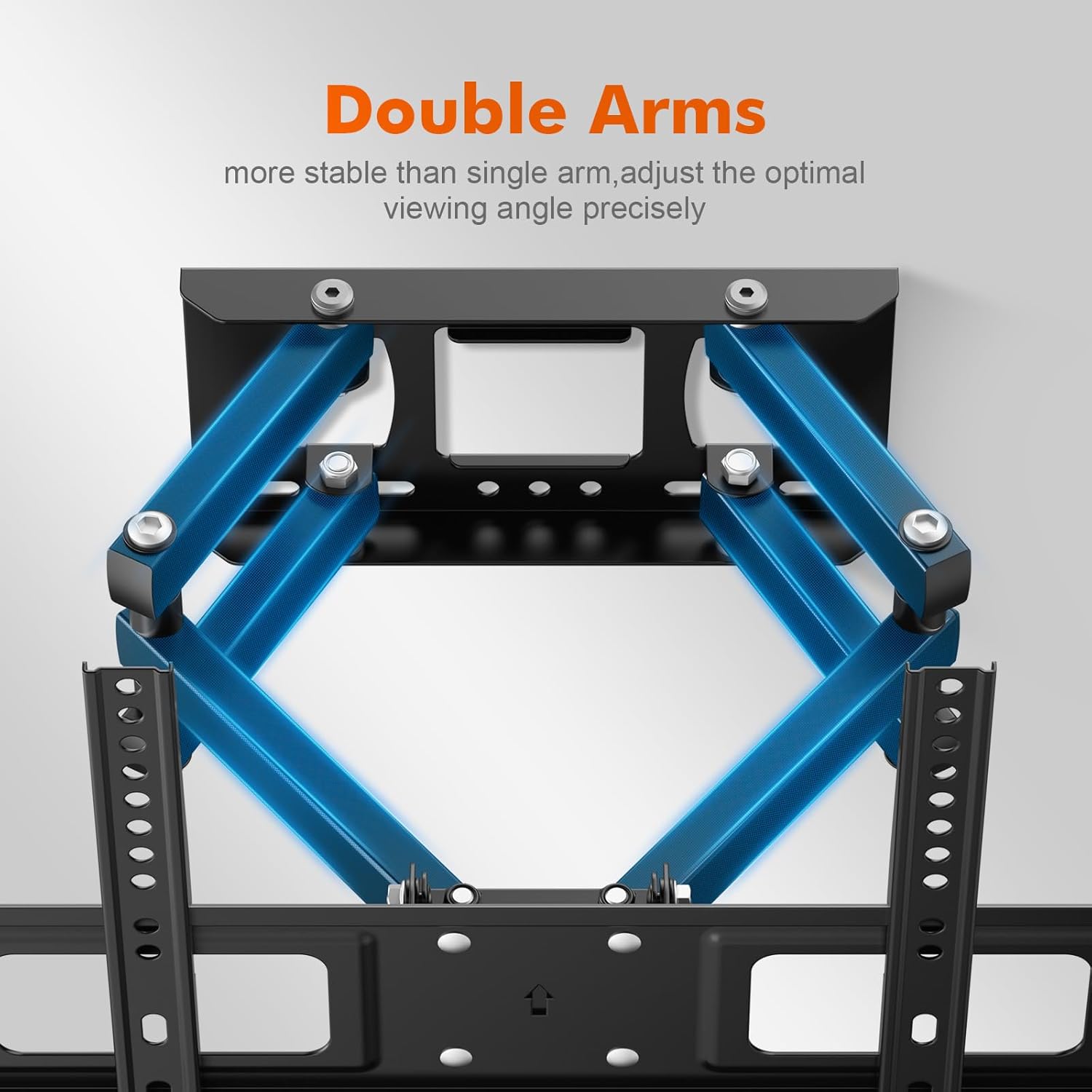
Image: A detailed view of the double arm construction, highlighting its robust design for stability.

Image: An illustration demonstrating the broad compatibility of the mount with various TV sizes, weights, and VESA standards.

Image: A visual representation of the TV's tilt capability, showing how the screen can be angled up or down for better viewing.

Image: An illustration demonstrating the TV's swivel range, allowing it to be turned left or right by up to 45 degrees.

Image: A side profile view illustrating the mount's ability to extend and retract the TV from the wall, showing the minimum and maximum distances.
5. Specifications
| Brand | GRIFEMA |
| Model Number | GB1006-4 |
| Compatible Devices | Television |
| Mounting Type | Wall Mount |
| Movement Type | Swivel, Tilt, Extendable |
| Material | Alloy Steel |
| Color | Black |
| Max Tilt Angle | 12 degrees |
| Max Swivel Angle | ±45 degrees |
| Extension from Wall | 60mm - 375mm |
| Max TV Weight | 35 kg (77 lbs) |
| VESA Compatibility | 50x50mm to 400x400mm |
| TV Size Compatibility | 26 - 65 inches |
6. Installation Guide
6.1. Pre-Installation Checklist
- Verify your TV's weight and VESA pattern are within the mount's specifications.
- Identify your wall type (solid concrete, concrete block, or brick).
- Choose a suitable mounting location, considering viewing angles and power/cable access.
6.2. Tools Required (Not Included)
- Electric Drill
- Stud Finder (if applicable)
- Pencil
- Measuring Tape
- Phillips Head Screwdriver
- Hammer (for anchors)
6.3. Wall Plate Installation
- Position the wall plate at your desired height and use the integrated spirit level to ensure it is perfectly horizontal. Mark the drill hole locations with a pencil.
- Drill pilot holes at the marked locations. For concrete/brick walls, use a masonry drill bit of the appropriate size (refer to hardware kit for specific drill bit size) and depth.
- Insert wall anchors into the drilled holes. Tap gently with a hammer until flush with the wall surface.
- Align the wall plate with the holes and secure it to the wall using the provided lag bolts and washers. Tighten all bolts firmly.

Image: A detailed view of the wall plate, showing the attachment points for securing it to the wall.
6.4. TV Bracket Installation
- Lay your TV face down on a soft, clean surface to prevent scratches.
- Identify the correct diameter and length of screws for your TV's VESA mounting holes from the hardware kit. Use washers if necessary to ensure a snug fit without over-tightening.
- Attach the two TV bracket arms to the back of your television using the selected screws. Ensure the brackets are oriented correctly (hooks facing upwards) and are securely fastened.

Image: A detailed view of one of the TV bracket arms, showing its design for attachment to the television.
6.5. Mounting the TV
- With assistance, carefully lift the television and hook the TV bracket arms onto the wall plate assembly.
- Ensure the TV is centered and level.
- Locate the safety screws or locking mechanism on the bottom of the TV brackets and tighten them to secure the TV to the wall plate, preventing accidental dislodgement.
6.6. Adjustments
After mounting, you can adjust the TV's position. Refer to the 'Operation' section for detailed adjustment instructions.
7. Operation
The GRIFEMA GB1006-4 mount offers flexible positioning for your television:
- Tilt Adjustment: To adjust the vertical tilt, loosen the tilt adjustment knobs on the TV brackets, set the desired angle (+8° to -12°), and re-tighten the knobs securely.
- Swivel Adjustment: To swivel the TV horizontally, gently push or pull the TV to the desired angle (up to ±45° left or right). The articulated arms allow for smooth movement.
- Extension/Retraction: To extend or retract the TV from the wall, gently pull the TV forward or push it back. The mount allows extension from 60mm to 375mm.
8. Maintenance
Regular maintenance ensures the longevity and safe operation of your TV wall mount:
- Cleaning: Wipe the mount with a soft, dry cloth. Avoid abrasive cleaners or solvents.
- Periodic Check: Every few months, check all screws and bolts to ensure they remain tight. Re-tighten if any looseness is detected.
- Movement Check: Ensure the articulated arms move smoothly. If movement becomes stiff, apply a small amount of silicone-based lubricant to the pivot points.
9. Troubleshooting
- TV is not level: Ensure the wall plate is level during installation. If the TV is slightly off-level after mounting, some mounts allow for minor post-installation leveling adjustments on the TV brackets. Consult the specific bracket design for this feature.
- Difficulty moving the TV (tilt/swivel/extend): Check for any obstructions. Ensure all adjustment knobs (for tilt) are loosened before attempting to change the angle, and re-tighten afterward. If movement is stiff, apply lubricant as per maintenance instructions.
- Mount feels unstable: Immediately remove the TV from the mount. Re-check all wall plate and TV bracket connections. Ensure the wall type is compatible and the correct anchors/screws were used. If unsure, consult a professional installer.
10. Warranty and Support
GRIFEMA products are manufactured to high-quality standards. For specific warranty information, please refer to the documentation included with your purchase or visit the official GRIFEMA website. If you encounter any issues or require technical assistance, please contact GRIFEMA customer support through their official channels or the retailer where the product was purchased.