

Introduction
Thank you for choosing the Quantum Men's Blue Silicone Strap Watch, model PWG988.699. This manual provides essential information for the proper setup, operation, and maintenance of your new timepiece. Please read these instructions carefully to ensure optimal performance and longevity of your watch.
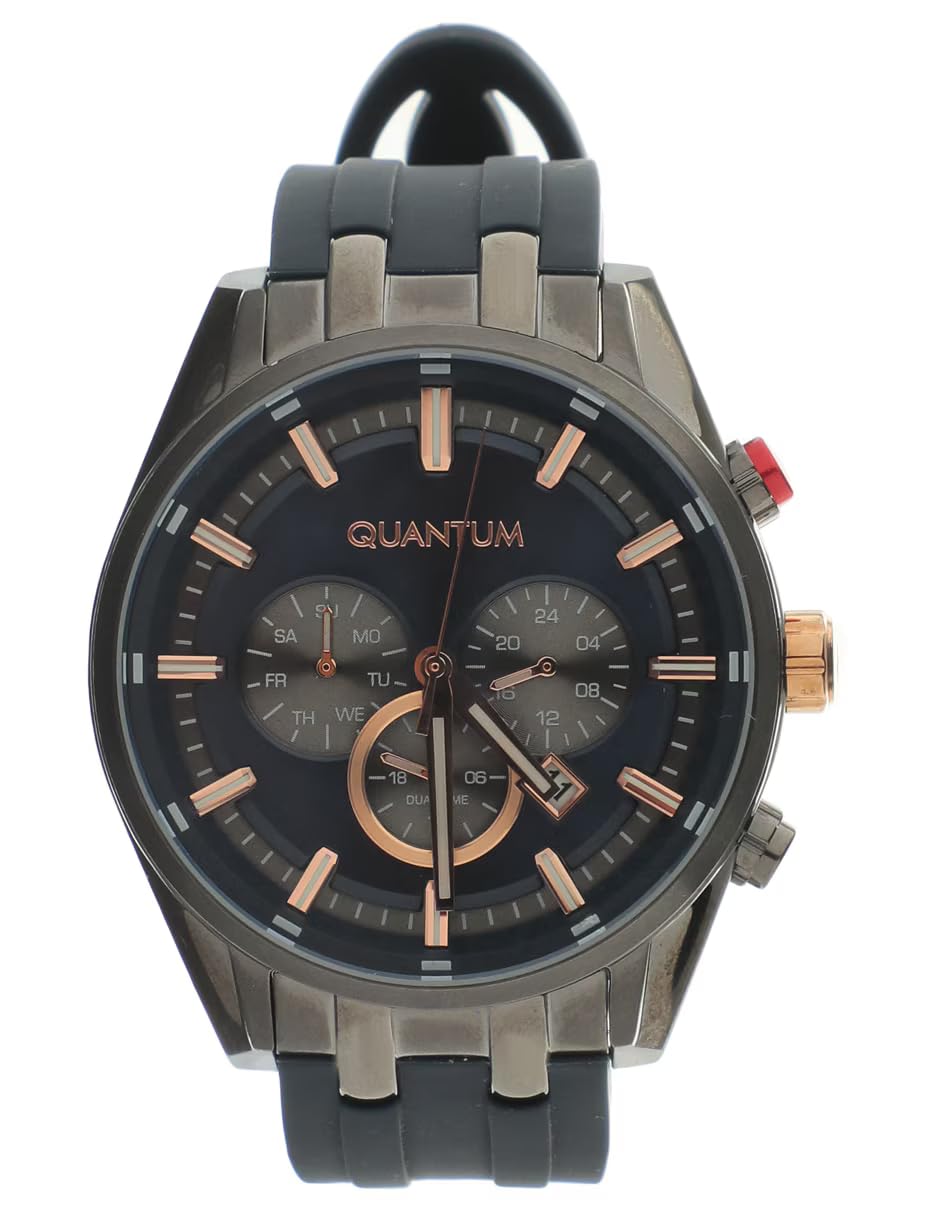
Image: Front view of the Quantum Men's Blue Silicone Strap Watch, showcasing the blue dial, rose gold-tone case, and blue silicone strap.
Product Features
- Design: This Quantum watch features a blue silicone strap and a 46mm case, designed for a modern and versatile look.
- Materials: Equipped with a durable silicone strap and a mineral glass lens. It utilizes Japanese quartz movement for accurate analog timekeeping.
- Water Resistance: Rated for water resistance up to 100 meters (10 ATM). It is suitable for splashes, rain, and swimming, but not recommended for diving or prolonged submersion. Avoid manipulating buttons underwater.
- Packaging: Each watch comes in an original brand case, making it ready for personal use or as a gift.
Setup
Setting the Time
- Pull the crown (the knob on the side of the watch case) out to the second click position.
- Turn the crown clockwise or counter-clockwise to set the hour and minute hands to the correct time.
- Push the crown back into its normal position to start the watch.
Adjusting the Strap
The silicone strap features a traditional buckle clasp. To adjust, simply thread the strap through the buckle and secure it at a comfortable fit on your wrist. Ensure it is snug but not too tight to allow for proper circulation.

Image: Side view of the watch, showing the crown and pushers used for time setting and chronograph functions.
Operating Instructions
Basic Timekeeping
Your Quantum watch displays time using analog hour, minute, and second hands. The watch is powered by a reliable quartz movement, ensuring accurate timekeeping.
Chronograph Function
This watch model includes a chronograph function, indicated by the sub-dials and additional pushers on the side of the case. General operation is as follows:
- Start/Stop: Press the top pusher to start and stop the chronograph.
- Reset: Press the bottom pusher to reset the chronograph hands to zero when the chronograph is stopped.
Water Resistance Guidelines
Your Quantum watch is water resistant to 100 meters (10 ATM). Understanding water resistance ratings is crucial for proper care:
- 3 ATM (30m): Suitable for daily use, splash/rain resistant. Not suitable for showering, bathing, swimming, snorkeling, water-related work, or fishing.
- 5 ATM (50m): Suitable for daily use, showering, bathing, shallow-water swimming, fishing, water-related work. Not suitable for snorkeling or diving.
- 10 ATM (100m): Suitable for daily use, showering, bathing, swimming, snorkeling, water sports. Not suitable for diving.
- 20 ATM (200m): Suitable for all high-impact water sports and diving.
Important: Never operate the crown or pushers when the watch is wet or submerged in water. This can compromise the water resistance seals.

Image: A chart illustrating different water resistance levels (ATM/meters) and their suitability for various water activities, indicating that 10 ATM is suitable for swimming and snorkeling but not diving.
Maintenance
- Cleaning: Wipe your watch regularly with a soft, dry cloth to remove dust and dirt. For the silicone strap, you can use a mild soap solution and rinse thoroughly, ensuring the watch case does not get excessively wet.
- Avoid Chemicals: Do not expose your watch to harsh chemicals, solvents, or detergents, as these can damage the case, strap, or seals.
- Temperature Extremes: Avoid exposing your watch to extreme temperatures (hot or cold) or sudden temperature changes, which can affect its accuracy and water resistance.
- Battery Replacement: When the battery runs low, have it replaced by a qualified watch technician to ensure the water resistance is maintained.
Troubleshooting
Watch Not Running
- Check if the crown is pushed all the way in. If it's pulled out, the watch will not run.
- The battery may be depleted. Contact a professional watch repair service for battery replacement.
Incorrect Time
- Reset the time as described in the "Setting the Time" section.
- If the time continues to be inaccurate, the watch may require servicing.
Specifications
| Brand | Quantum |
| Model Number | PWG988.699 |
| Display Type | Analog |
| Movement Type | Quartz |
| Case Material | Alloy Steel |
| Case Diameter | 46 Millimeters |
| Band Material | Silicone |
| Band Color | Blue |
| Clasp Type | Buckle |
| Crystal Material | Mineral Glass |
| Water Resistance Depth | 100 Meters (10 ATM) |
| Power Source Type | Battery |
| Country of Origin | Turkey |
| Included Components | 1 original packaging, 1 watch |
Warranty and Support
Your Quantum watch comes with a Limited Warranty. Please retain your proof of purchase for any warranty claims. For specific details regarding the warranty period and coverage, refer to the documentation included with your purchase or contact Quantum customer support.
For technical assistance, repairs, or further inquiries, please contact the retailer where the watch was purchased or visit the official Quantum website for support information.