
1. Product Overview
The Fisher-Price Learning Fun DJ Game Table is an interactive musical activity center designed to engage babies and toddlers aged 6 months to 3 years. It features three piano play modes, multi-colored lights, and 12 fine motor activities. The toy supports three Smart Stages learning levels, introducing children to colors, shapes, numbers, counting, opposites, and the alphabet. It also includes a unique record and play function.

Image: The Fisher-Price Learning Fun DJ Game Table in its assembled form, with a child interacting with the various features.
2. Setup and Assembly
Follow these steps to set up your Fisher-Price Learning Fun DJ Game Table:
- Unpack the Toy: Carefully remove all components from the packaging. Ensure all parts are present.
- Install Batteries: The toy requires 3 AA batteries, which are included. Locate the battery compartment, typically on the underside of the main unit, and insert the batteries according to the polarity indicators. Secure the battery compartment cover.
- Attach Table Legs (Optional): The DJ Game Table can be used on the floor without legs or as a standing activity table. If desired, attach the four table legs to the designated slots on the underside of the main unit. Ensure they click securely into place.

Image: A child playing with the DJ Game Table in a seated position, demonstrating use without the table legs attached.
- Place on a Flat Surface: Position the assembled toy on a stable, flat surface, either on the floor or a sturdy table, depending on whether the legs are attached.
3. Operating Instructions
The DJ Game Table offers multiple interactive features and learning modes:
3.1 Power On/Off and Volume Control
- Locate the power switch, usually on the side or back of the main unit. Slide it to the "On" position.
- Adjust the volume using the dedicated volume control switch, typically offering two settings (low/high).
3.2 Language Selection
- Press the globe button to cycle through the available languages: Dutch, French, German, Italian, or English. Select your preferred language for learning phrases and songs.
3.3 Piano Play Modes
The piano features 8 keys and offers three distinct play modes:
- Piano Mode: Play individual notes and melodies.
- Learning Mode: Introduces colors, shapes, numbers, and the alphabet through interactive songs and phrases.
- Synthesizer Mode: Explore different musical sounds and effects.
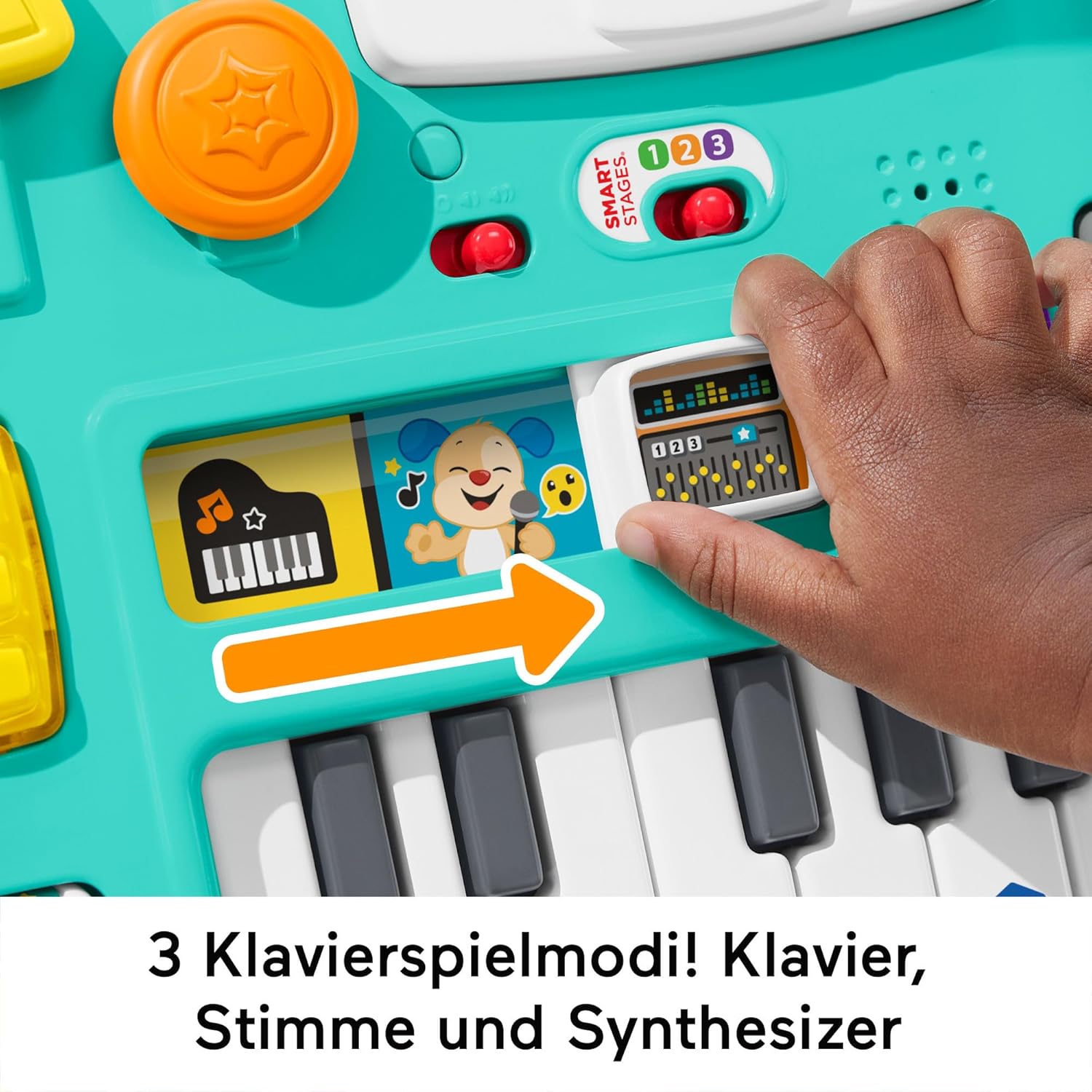
Image: A detailed view of the piano keys and the mode selection switch, highlighting the three play options.
3.4 Smart Stages Learning Levels
The toy includes three Smart Stages levels that adapt learning content as your child grows:
- Level 1 - Explore: Introduces first words and sounds that spark curiosity.
- Level 2 - Encourage: Prompts children through questions and simple directions.
- Level 3 - Pretend: Encourages imaginative play and early role-playing.

Image: A close-up of the Smart Stages selector switch, showing the three learning levels: Explore, Encourage, and Pretend.
3.5 Record and Play Feature
- Locate the record button (often indicated by a microphone icon). Press it to begin recording a short message or sound.
- Once recorded, press the play button to hear the DJ mix your message into a song.
3.6 Additional Activities
Explore the 12 engaging fine motor activities, including:
- The luminous puppy disc for turning.
- The luminous numeric keypad for pressing.
- Various buttons, sliders, and textured elements designed for tactile exploration.

Image: A baby standing and actively engaging with the various interactive elements of the DJ Game Table, including the turntable and keyboard.
4. Maintenance
Proper maintenance ensures the longevity and safe operation of your DJ Game Table:
- Cleaning: Wipe the toy with a soft, damp cloth. Do not immerse the toy in water. Avoid using harsh chemicals or abrasive cleaners.
- Battery Care:
- Always use fresh AA alkaline batteries.
- Do not mix old and new batteries, or different types of batteries.
- Remove batteries if the toy will not be used for an extended period to prevent leakage.
- Dispose of used batteries responsibly according to local regulations.
- Storage: Store the toy in a cool, dry place away from direct sunlight and extreme temperatures.
5. Troubleshooting
If you encounter issues with your DJ Game Table, try the following solutions:
- No Sound or Lights:
- Ensure the power switch is in the "On" position.
- Check the batteries. Replace them with fresh AA alkaline batteries if they are low or depleted.
- Verify that the battery compartment cover is securely closed.
- Intermittent Functionality:
- This may indicate low batteries. Replace them.
- Try turning the toy off and then on again (power cycle).
- Incorrect Language:
- Press the globe button repeatedly until the desired language is selected.
6. Specifications
| Feature | Detail |
|---|---|
| Model Number | HRB67 |
| Recommended Age | 6 months - 3 years |
| Product Dimensions | 24 x 40 x 36 cm; 2.56 kg |
| Material Type | Plastic, Multiple materials |
| Batteries Required | 3 AA batteries (included) |
| Educational Objective | Develop and reinforce cognitive and motor skills through play |
| Number of Game Players | 1 |
| Assembly Required | Yes |
| Release Date | June 6, 2023 |
7. Warranty Information
For detailed warranty information regarding your Fisher-Price Learning Fun DJ Game Table, please refer to the warranty card included with your purchase or visit the official Fisher-Price website. Warranty terms and conditions may vary by region.
8. Customer Support
If you have any questions, require assistance, or need to report an issue with your product, please contact Fisher-Price customer support. Contact information can typically be found on the product packaging, the official Fisher-Price website, or through the retailer where the product was purchased.
You can visit the official Fisher-Price store for more information: Fisher-Price Store


