
1. Safety Information
Read and understand all safety precautions before operating this welding machine. Failure to follow these instructions can result in serious injury or death.
1.1 General Safety Warnings
- Electric Shock: Welding current can kill. Do not touch live electrical parts. Wear dry, insulating gloves and clothing. Ensure the work area is dry.
- Fumes and Gases: Welding produces fumes and gases hazardous to health. Work in a well-ventilated area. Use an exhaust fan or fume extractor.
- Arc Rays: Arc rays can burn eyes and skin. Wear a welding helmet with appropriate shade filter and protective clothing.
- Fire and Explosion: Welding sparks and hot metal can cause fires. Keep flammable materials away from the work area. Have a fire extinguisher readily available.
- Burns: Hot metal and equipment can cause severe burns. Wear protective gloves and clothing.
1.2 Personal Protective Equipment (PPE)
- Welding helmet with appropriate shade.
- Flame-resistant clothing (long sleeves and pants).
- Leather welding gloves.
- Safety glasses or goggles.
- Ear protection.
2. Product Overview
The ARCCAPTAIN TIG205A (Model TIG200PACDC) is a versatile multi-process welding machine designed for both professional and hobbyist use. It supports TIG (Tungsten Inert Gas) welding in both AC (Alternating Current) and DC (Direct Current) modes, as well as MMA (Manual Metal Arc) or Stick welding. Featuring advanced MCU technology and an IGBT inverter, this machine offers precise control and stable arc performance.
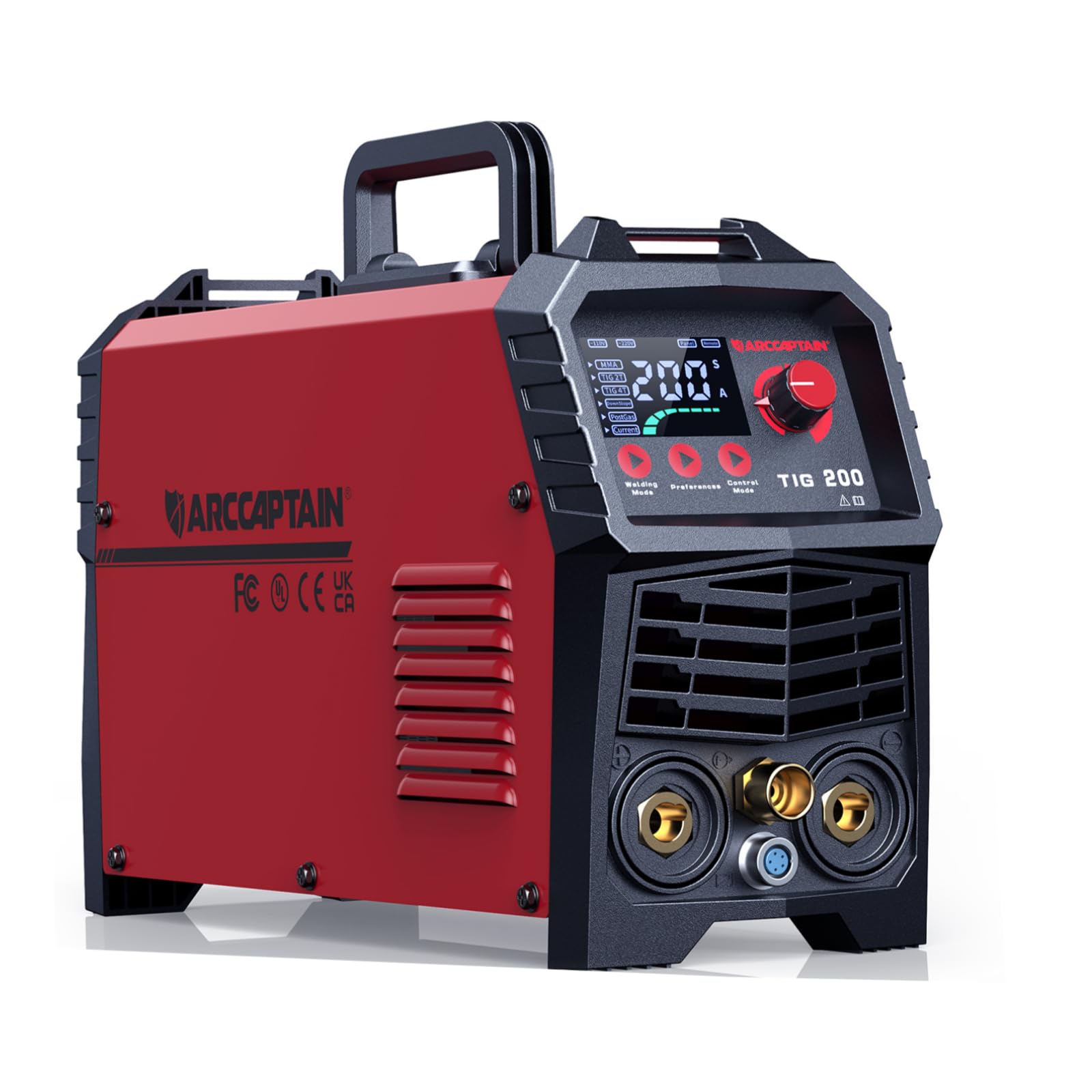
The front panel of the ARCCAPTAIN TIG205A welder, highlighting the easy-to-read digital display and intuitive control buttons for selecting welding parameters.

The ARCCAPTAIN TIG205A welding machine shown with its standard accessories, including the TIG torch, ground clamp, and power cables, ready for setup.
3. Setup
3.1 Unpacking and Inspection
- Carefully remove the welding machine and all accessories from the packaging.
- Inspect the machine for any signs of damage during shipping. Contact your supplier immediately if any damage is found.
- Verify that all components listed in the packing list are present.
3.2 Power Connection
The TIG205A supports dual voltage input (110V/220V). Ensure the correct power cord is used and connected to a suitable power outlet with proper grounding.
- Connect the power plug to a dedicated circuit with adequate amperage.
- Ensure the voltage selector (if present) is set correctly for your power supply.
3.3 Gas Connection (for TIG Welding)
For TIG welding, an inert shielding gas (typically Argon) is required.
- Connect the gas hose from the machine's gas inlet to your Argon gas cylinder's regulator.
- Ensure all connections are tight to prevent gas leaks.
- Set the gas flow rate according to your welding application (typically 10-15 L/min).
3.4 Torch and Ground Clamp Connection
- Connect the TIG torch cable to the appropriate connector on the front panel.
- Connect the ground clamp cable to the designated ground terminal.
- Attach the ground clamp securely to the workpiece, ensuring good electrical contact.
3.5 Electrode Holder Connection (for MMA Welding)
- For MMA welding, connect the electrode holder cable to the positive (+) terminal.
- Connect the ground clamp cable to the negative (-) terminal.

This image illustrates the advanced LED control panel of the ARCCAPTAIN TIG205A, featuring detailed parameter adjustments like DownSlope and PostGas for improved weld quality, contrasted with a simpler, less functional panel found on other machines.

An internal diagram of the ARCCAPTAIN TIG205A welding machine, revealing its advanced MCU technology, IGBT inverter, and efficient cooling system, which contribute to its performance and reliability.
4. Operating Instructions
4.1 Control Panel Overview
The ARCCAPTAIN TIG205A features a large LED display for easy parameter adjustment and monitoring.

A close-up of the ARCCAPTAIN TIG205A's comprehensive LED display, illustrating the detailed settings for AC TIG, DC TIG, MMA, and SPOT welding modes, including parameters like amperage, AC balance, frequency, and waveform selection (Square and Triangle waves).
4.2 Welding Modes and Parameter Adjustment
Use the 'Welding Mode' and 'Control Mode' buttons to navigate and adjust settings.
4.2.1 TIG Welding (AC TIG, DC TIG, Pulse TIG)
- Mode Selection: Select AC TIG for aluminum and magnesium alloys, DC TIG for stainless steel, carbon steel, copper, and titanium. Pulse TIG offers enhanced control for thin materials and out-of-position welding.
- Current (A): Adjust the welding amperage based on material thickness and type.
- DownSlope (S): Controls the time it takes for the welding current to decrease from the peak current to the crater current, preventing crater cracking.
- PostGas (S): Sets the duration for shielding gas flow after the arc is extinguished, protecting the hot weld puddle and tungsten electrode from atmospheric contamination.
- AC Balance (%): (For AC TIG) Adjusts the balance between electrode negative and electrode positive, controlling cleaning action and penetration.
- Frequency (Hz): (For AC TIG) Adjusts the AC waveform frequency, influencing arc focus and bead width.
- HF Start: The High-Frequency Start feature ensures easy arc initiation without touching the workpiece, preserving tungsten integrity and preventing contamination.

A welder demonstrating the High-Frequency (HF) Start feature of the ARCCAPTAIN TIG205A, which ensures super easy arc initiation without contact, resulting in clean and precise weld beads on various metals.
4.2.2 MMA (Stick) Welding
- Current (A): Set the amperage according to the electrode type and diameter.
- Arc Force: Helps prevent the electrode from sticking to the workpiece by temporarily increasing the current when the arc length becomes too short.
- Hot Start: Provides an initial surge of current to make arc ignition easier, especially with difficult-to-start electrodes.
4.3 Material Compatibility
The ARCCAPTAIN TIG205A is capable of welding a wide range of materials:
- Aluminum
- Magnesium Alloy
- Stainless Steel
- Carbon Steel
- Copper
- Titanium

This visual guide displays the diverse range of materials that can be welded using the ARCCAPTAIN TIG205A, including Aluminum, Magnesium Alloy, Stainless Steel, Carbon Steel, Copper, and Titanium, highlighting its versatility.
5. Maintenance
Regular maintenance ensures the longevity and optimal performance of your welding machine.
5.1 Cleaning
- Periodically clean the machine's exterior with a dry, soft cloth.
- Use compressed air to blow out dust and debris from the ventilation openings. Ensure the machine is unplugged before cleaning.
- Clean the TIG torch collet body, collet, and gas lens regularly to ensure proper gas flow and arc stability.
5.2 Inspection
- Inspect all cables (power, ground, torch) for cuts, cracks, or frayed insulation. Replace damaged cables immediately.
- Check all connections for tightness. Loose connections can cause overheating and poor performance.
- Ensure the cooling fan is free from obstructions and operating correctly.
5.3 Storage
When not in use, store the welding machine in a clean, dry environment, away from excessive dust, moisture, and extreme temperatures.
6. Troubleshooting
This section provides solutions to common issues you might encounter.
| Problem | Possible Cause | Solution |
|---|---|---|
| Machine does not power on | No power supply; Power switch off; Internal fuse blown | Check power cord and outlet; Turn on power switch; Contact service for fuse replacement. |
| No arc / Weak arc | Poor ground connection; Incorrect current setting; Contaminated tungsten (TIG); Incorrect electrode (MMA) | Ensure ground clamp is secure; Adjust current; Clean/replace tungsten; Use correct electrode. |
| Poor weld quality (porosity, contamination) | Insufficient shielding gas; Gas leak; Dirty workpiece; Incorrect PostGas setting | Check gas cylinder and flow rate; Inspect gas hose for leaks; Clean workpiece thoroughly; Adjust PostGas time. |
| Overheat protection activated | Exceeded duty cycle; Blocked ventilation; High ambient temperature | Allow machine to cool down; Clear ventilation openings; Operate in a cooler environment. |
| Error code displayed | Specific internal fault | Refer to the detailed error code list in the full manual (if available) or contact ARCCAPTAIN support. |

An infographic detailing the safety features integrated into the ARCCAPTAIN TIG205A welder, including Voltage Reduction Device (VRD), overvoltage protection, overload protection, overheating protection, and overcurrent protection, ensuring safe operation.
7. Specifications
Technical specifications for the ARCCAPTAIN TIG205A (Model TIG200PACDC) welding machine.
| Feature | Detail |
|---|---|
| Manufacturer | ARCCAPTAIN |
| Part Number | TIG200PACDC |
| Item Model Number | TIG200PACDC |
| Parcel Dimensions | 54.1 x 43.94 x 34.04 cm |
| Item Weight | 16.5 kg |
| Batteries Required? | No |
| ASIN | B0C49XLTWP |
| Date First Available | Nov. 27 2024 |
8. Warranty and Support
ARCCAPTAIN products are manufactured to high-quality standards. For warranty information, technical support, or service inquiries, please refer to the official ARCCAPTAIN website or contact their customer service directly. Keep your purchase receipt as proof of purchase for warranty claims.
For the most up-to-date information, visit the official ARCCAPTAIN store: ARCCAPTAIN Store


