
Introduction
The Lenovo XT60 Wireless Bluetooth Earphones are designed to provide a high-quality audio experience with the convenience of true wireless communication. Featuring Active Noise-Cancellation and a waterproof design, these earphones are suitable for various activities, from daily commutes to intense workouts. With Bluetooth 5.3, they offer stable and fast connectivity to your devices.

Figure 1: Lenovo XT60 Earphones in their charging case, showcasing the compact design and digital power display.
What's in the Box
Upon opening the package, you should find the following items:
- Lenovo XT60 Wireless Bluetooth Earphones (Left and Right)
- Charging Case
- USB Charging Cable
- Multiple Sizes of Soft Silicone Ear Tips (S, M, L)
- User Manual (this document)

Figure 2: Included soft silicone ear tips in small, medium, and large sizes for a comfortable and secure fit.
Features
- True Wireless Communication: Enjoy complete freedom of movement without cables.
- Active Noise-Cancellation: Reduces external noise for an immersive listening experience.
- Waterproof Design: Designed to withstand sweat and rain, ideal for workouts and outdoor use.
- Bluetooth 5.3: Provides stable, fast, and efficient wireless connectivity.
- Dynamic Vocalism Principle: Ensures clear and accurate sound reproduction.
- Digital Power Display: The charging case features a digital display to show the power status of both the earbuds and the case.
- Long Battery Life: Up to 6.5 hours of single-ear endurance, with the charging case providing up to 24 hours of total listening time.
- Adjustable Swing Type Sports Headset: Ergonomic design with ear hooks for a secure and comfortable fit during physical activity.
- Touch Control: Intuitive touch-sensitive controls for media playback and call management.

Figure 3: The digital display on the charging case provides real-time battery information for both earbuds and the case.

Figure 4: Illustration of the large battery capacity, showing 400mAh for the charging box, 24 hours with the charging case, and 6.5 hours of single-ear endurance.
Setup and Getting Started
1. Charging the Earphones and Case
Before first use, fully charge the earphones and the charging case. Connect the provided USB charging cable to the charging port on the case and a compatible USB power source. The digital display on the case will indicate the charging status.
- The earbuds will charge automatically when placed inside the charging case.
- Monitor the digital display for battery levels.
2. Pairing with Your Device
- Ensure the earphones are charged.
- Open the charging case. The earphones will automatically enter pairing mode (indicated by flashing LED lights on the earbuds).
- On your device (smartphone, tablet, laptop), go to the Bluetooth settings.
- Search for "Lenovo XT60" in the list of available devices.
- Select "Lenovo XT60" to connect. Once connected, a voice prompt will confirm successful pairing, and the LED lights will turn off.
Note: The earphones will automatically reconnect to the last paired device when taken out of the case, if Bluetooth is enabled on the device.
3. Wearing the Earphones
The Lenovo XT60 earphones feature an adjustable swing-type design with ear hooks for a secure and comfortable fit. Choose the ear tips that best fit your ear canal for optimal sound quality and noise isolation.
- Gently insert the earbud into your ear canal.
- Adjust the ear hook over your ear until it feels secure and comfortable. The ear hook can rotate to adapt to your ear shape.

Figure 5: The adjustable swing-type design ensures a secure fit, especially during sports or active use.

Figure 6: The new structure conforms to human body wearing engineering, providing strong ear grip and allowing the elastic structure to adapt to the ear.
Operating Instructions
The Lenovo XT60 earphones feature intuitive touch controls. The following gestures control various functions:
Music Playback
- Play/Pause: Single tap on either earbud.
- Next Track: Double tap on the right earbud.
- Previous Track: Double tap on the left earbud.
- Volume Up: Triple tap on the right earbud.
- Volume Down: Triple tap on the left earbud.
Call Management
- Answer/End Call: Single tap on either earbud.
- Reject Call: Press and hold either earbud for 2 seconds.
Voice Assistant
- Activate Voice Assistant: Press and hold either earbud for 3 seconds.
Active Noise Cancellation (ANC)
The Active Noise Cancellation feature helps to reduce ambient noise. Specific control for ANC is typically integrated with the touch controls, often a long press or a specific tap sequence. Refer to the quick start guide included in your package for the exact ANC activation method if not listed here.
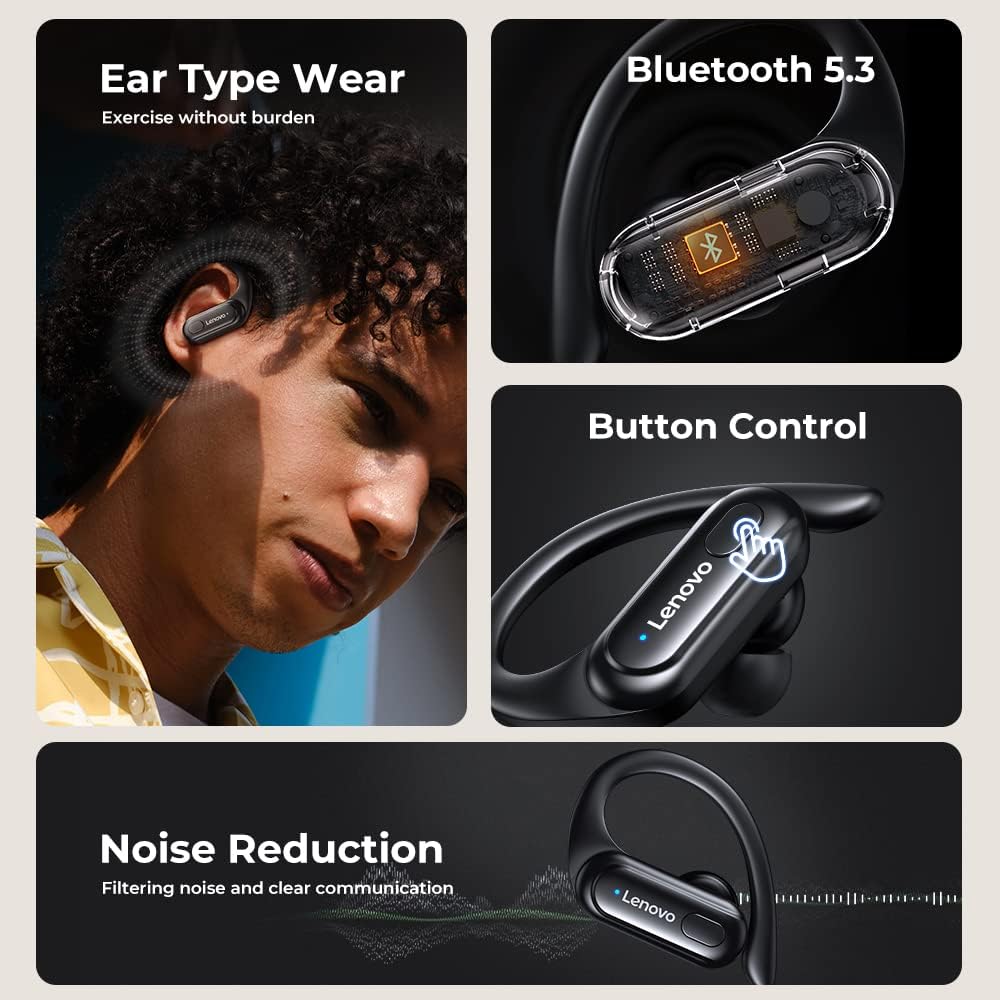
Figure 7: Overview of key features including comfortable wear, Bluetooth 5.3, touch controls, and noise reduction capabilities.

Figure 8: The advanced Bluetooth 5.3 chip ensures a stable and efficient wireless connection.
Maintenance
- Cleaning: Regularly clean the earbuds and charging case with a soft, dry, lint-free cloth. Do not use harsh chemicals or abrasive materials.
- Water Resistance: The earphones are waterproof. However, avoid prolonged submersion in water. Ensure the charging port is dry before charging.
- Storage: When not in use, store the earphones in their charging case to protect them and keep them charged. Store in a cool, dry place away from extreme temperatures.
- Battery Care: To prolong battery life, avoid fully discharging the battery frequently. Charge the earphones regularly, even if not in constant use.
Troubleshooting
| Problem | Possible Cause | Solution |
|---|---|---|
| Earphones not pairing. | Bluetooth is off on device; earphones not in pairing mode; interference. | Ensure Bluetooth is on. Place earphones back in case, close, then open to re-enter pairing mode. Move closer to device. |
| No sound from one earbud. | Low battery; earbud not connected; dirty ear tip. | Charge both earbuds. Re-pair the earphones. Clean ear tips and mesh. |
| Charging case not charging. | Faulty cable/adapter; dirty charging port. | Try a different USB cable and power adapter. Clean the charging port. |
| Poor sound quality. | Improper fit; low battery; distance from device; interference. | Adjust fit and try different ear tip sizes. Charge earphones. Reduce distance to device. Avoid strong electromagnetic fields. |
Specifications
| Feature | Detail |
|---|---|
| Model Name | XT60 |
| Connectivity Technology | Wireless (Bluetooth 5.3) |
| Noise Control | Active Noise Cancellation |
| Water Resistance Level | Water Resistant |
| Audio Driver Type | Dynamic Driver (Bio-Diaphragm Dynamic Coil) |
| Frequency Range | 20 Hz - 20,000 Hz |
| Impedance | 40 Ohm |
| Control Type | Media Control (Touch) |
| Battery | 1 Lithium Ion battery (included) |
| Charging Case Capacity | 400mAh |
| Single-ear Endurance | Up to 6.5 hours |
| Total Playtime (with case) | Up to 24 hours |
| Compatible Devices | Cellphones, Tablets, Laptops |
| Item Weight | 1.41 ounces |
| Manufacturer | Lenovo |

Figure 9: The Bio-Diaphragm Dynamic Coil technology contributes to the clear and crisp sound quality.
Official Product Video
Video 1: An official product video demonstrating the Lenovo XT60 earphones, including unboxing, features, and usage. This video highlights the design, fit, and interaction with a mobile device.
Warranty and Support
Lenovo products typically come with a standard manufacturer's warranty. Please refer to the warranty card included in your product packaging for specific terms and conditions, including warranty period and coverage details.
For technical support, troubleshooting assistance, or warranty claims, please visit the official Lenovo support website or contact their customer service. You can also visit the Lenovo Store on Amazon for more product information and support resources.


