
1. Introduction
The FLASHFISH P60 is a portable power station designed to provide reliable power for various outdoor activities and emergency situations. With a 520Wh capacity and multiple output options, it serves as a versatile power source for charging smartphones, tablets, cameras, laptops, and small appliances.
This manual provides essential information for the safe and efficient operation, maintenance, and troubleshooting of your FLASHFISH P60 Portable Power Station. Please read it thoroughly before use and retain it for future reference.
2. Safety Instructions
To ensure safe operation, always follow these guidelines:
- Do not disassemble, repair, or modify the unit.
- Keep the unit away from fire, water, and extreme temperatures.
- Do not use or store the unit in direct sunlight or high-temperature environments.
- Ensure proper ventilation during use and charging.
- Keep out of reach of children and pets.
- Use only approved accessories and charging cables.
- Avoid dropping or subjecting the unit to strong impacts.
- If the unit emits smoke, odor, or unusual noise, discontinue use immediately and contact support.
3. Product Overview
The FLASHFISH P60 features a robust design with multiple ports for diverse power needs. It includes AC outlets, DC outputs, and USB ports (QC3.0 and Type-C) for simultaneous charging of various devices.
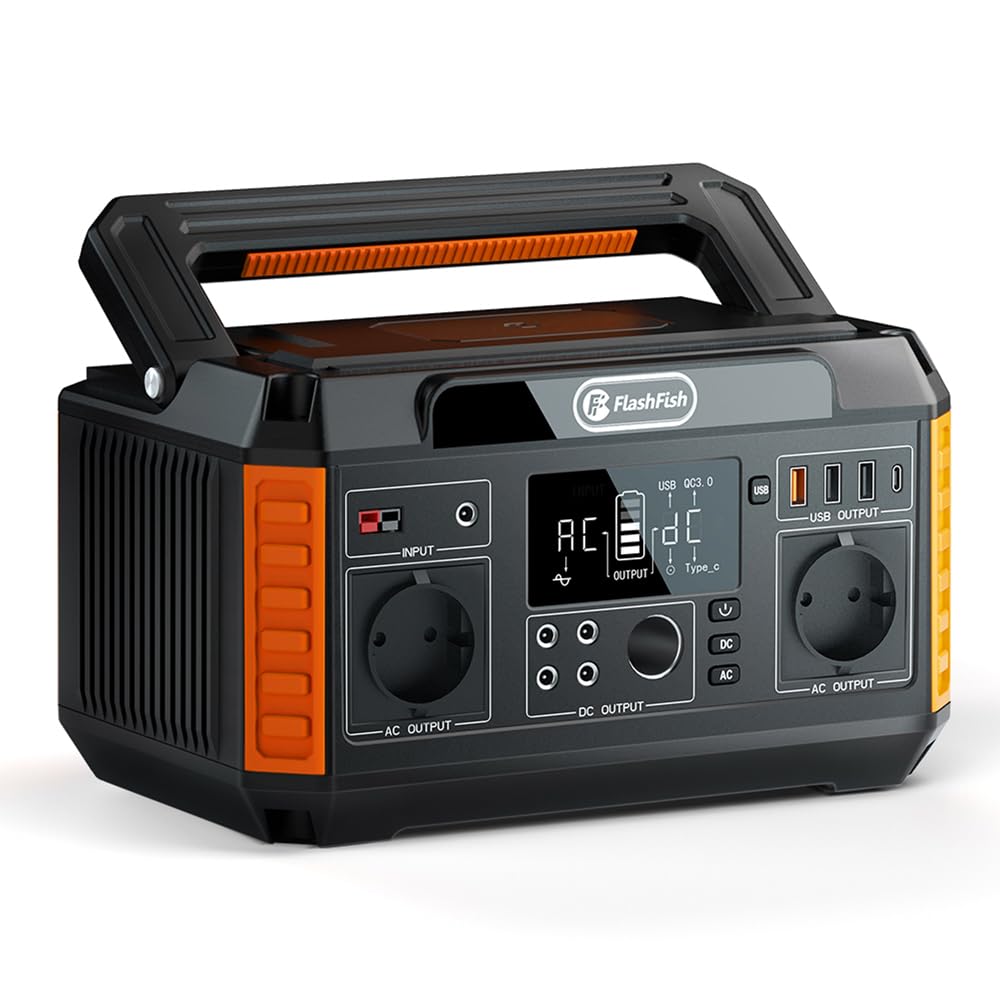
Figure 3.1: Front view of the FLASHFISH P60 Portable Power Station.

Figure 3.2: Detailed view of the FLASHFISH P60, highlighting its input and output ports. This includes the input port, USB 5-9V/2A Quick Charge 3.0, USB 5V/3.1A, Type-C 5-9V/2A, 500W 110V 60Hz AC outlet, DC output 9-12.6V/10A, and a car adapter port.
Key Features:
- High Capacity: 520Wh (140,400mAh) lithium-ion battery for extended power supply.
- Multiple Outputs: 230V/560W (Surge 1100W) AC outlets, 5 DC outputs, and 4 USB outputs (including QC3.0 and PD18W Type-C).
- Pure Sine Wave: Provides stable power suitable for sensitive electronics.
- Fast Charging: Supports QC3.0 and PD fast charging technologies.
- Safety System: Integrated Battery Management System (BMS) with overload, short-circuit, and temperature protection.
- Integrated LED Light: Can be used for emergency lighting.
- Portable Design: Compact and lightweight (5.8 kg) with an integrated handle for easy transport.
4. Setup and Charging
Before first use, fully charge the FLASHFISH P60. The unit can be charged via a wall adapter, car charger, or solar panel.
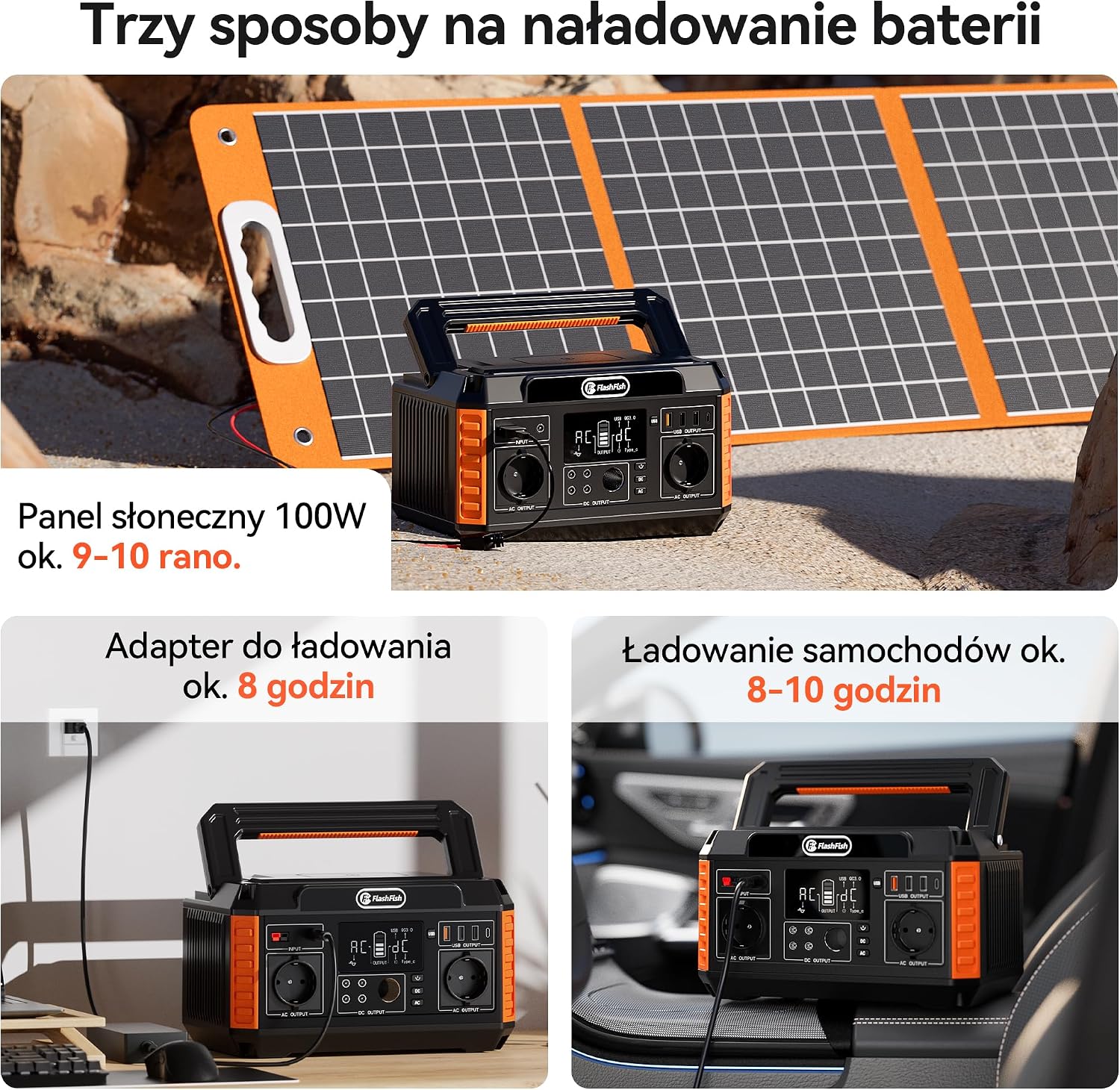
Figure 4.1: The three primary methods for charging the FLASHFISH P60. These include a 100W solar panel (approx. 9-10 hours), a wall charging adapter (approx. 8 hours), and a car charger (approx. 8-10 hours).
Charging Methods:
- AC Wall Charger: Connect the provided AC adapter to the input port and plug it into a standard wall outlet. Charging time is approximately 8 hours.
- Car Charger: Connect the provided car charger to the input port and plug it into your vehicle's 12V cigarette lighter socket. Charging time is approximately 8-10 hours.
- Solar Panel (Optional): Connect a compatible 13-22V DC solar panel (not included) to the input port. Charging time with a 100W solar panel is approximately 9-10 hours, depending on sunlight intensity.

Figure 4.2: The power station charging from a wall outlet. It features automatic separation upon full charge to prevent energy waste and overcharging. A full charge from 0-100% takes approximately 7 hours when using a 1xTSP100W solar panel (not included) under ideal conditions.
The unit features an automatic separation function that stops charging once the battery is full, preventing overcharging and energy consumption.
5. Operating Instructions
The FLASHFISH P60 allows you to power various devices using its different output ports.
Using Output Ports:
- AC Outputs: Press the AC power button to activate the 230V AC outlets. Connect your devices. Note: Ensure the total power consumption of AC devices does not exceed 560W (1100W surge).
- DC Outputs: Press the DC power button to activate the DC ports. Connect your 9-12.6V/10A DC devices.
- USB Outputs: The USB ports (QC3.0, 5V/3.1A, and Type-C PD18W) are typically active when the unit is on. Connect your USB-powered devices.
The DC and USB outputs support simultaneous charging and discharging. However, AC outputs do not support this function.
Integrated LED Light:
The unit is equipped with an LED light for illumination. Press the dedicated LED light button to turn it on/off or cycle through different modes (if available).

Figure 5.1: Examples of device usage with the FLASHFISH P60. A 60W projector can run for 8.5+ hours, a 5W router for 100+ hours, a 150W TV for 3+ hours, and a 70W fan for 7+ hours. Always ensure AC power consumption does not exceed 500 watts before use.
6. Maintenance
Proper maintenance ensures the longevity and optimal performance of your FLASHFISH P60.
Battery Care:

Figure 6.1: An illustration of the internal lithium battery cells. The expected lifespan of the lithium battery is 5-8 years. It is recommended to fully charge and discharge the unit once a week to maintain battery health.
- The lithium battery has an estimated lifespan of 5-8 years.
- To maintain battery health, it is recommended to fully charge and discharge the unit at least once a week.
- Store the unit in a cool, dry place away from direct sunlight when not in use.
- If storing for extended periods, charge the unit to 50-80% every 3-6 months.
Cleaning:
- Use a dry, soft cloth to clean the exterior of the unit.
- Do not use abrasive cleaners or solvents.
7. Troubleshooting
If you encounter issues with your FLASHFISH P60, refer to the following common problems and solutions:
- Unit not turning on: Ensure the power button is pressed firmly. Check if the battery is completely depleted and try charging it.
- No output from ports: Ensure the respective output buttons (AC, DC) are activated. Check if the device connected is within the power station's wattage limits.
- Charging slowly: Verify that the charging adapter or solar panel is correctly connected and functioning. Ensure the solar panel is receiving adequate sunlight.
- Overload protection activated: If the unit shuts down, it may be due to an overload. Disconnect some devices and restart the unit. Ensure total power consumption is within limits.
- Unusual noise or smell: Immediately turn off the unit and disconnect all devices. Contact customer support.
For further assistance, please contact customer support.
8. Specifications

Figure 8.1: Physical dimensions of the FLASHFISH P60: 30.61 cm (length) x 18.9 cm (width) x 20 cm (height).
| Feature | Specification |
|---|---|
| Model Name | P60 |
| Brand | FF FLASHFISH |
| Battery Capacity | 520 Wh (140,400 mAh) |
| AC Output | 230V / 560W (Pure Sine Wave, 1100W Surge) |
| DC Outputs | 5 ports, 9-12.6V / 10A |
| USB Outputs | 4 ports (QC3.0, 5V/3.1A, Type-C PD18W) |
| Input (Charging) | DC 13-22V / 6A Max (Solar compatible) |
| Weight | 5.8 Kilograms |
| Dimensions (L x W x H) | 30.6 cm x 18.9 cm x 17.6 cm |
| Operating Temperature | Not specified (general range: 0-40°C recommended) |
| Included Components | 1x Portable Power Supply 520 Wh, 1x AC Adapter, 1x Car Charger, 1x User Manual |

Figure 8.2: The product package includes the FLASHFISH P60 Portable Power Station, an AC power adapter, a car charger, and a user manual.
9. Warranty and Support
FLASHFISH products are designed for reliability and performance. For specific warranty details, please refer to the warranty card included with your product or visit the official FLASHFISH website.
Customer Support:
If you have any questions, require technical assistance, or need to report an issue, please contact FLASHFISH customer support through the following channels:
- Website: Visit the official FLASHFISH website for FAQs and support contact information.
- Email: Refer to your product packaging or included documentation for support email addresses.
Please have your model number (P60) and purchase date ready when contacting support.

