
POOLEX PC-POOLICAN-100
Poolex Poolican Heat Pump User Manual
Model: PC-POOLICAN-100
Introduction
The Poolex Poolican is a compact, centralized, and connected 4-in-1 solution designed for pools up to 25m³. It integrates essential pool functions: circulation, filtration, heating, and water treatment (salt electrolysis). This manual provides detailed instructions for the safe and efficient installation, operation, and maintenance of your Poolican system.
Please read this manual thoroughly before installation and use to ensure optimal performance and longevity of your device.
Safety Information
Always observe the following safety precautions to reduce the risk of injury or damage:
- Ensure the power supply matches the specifications of the unit.
- Do not operate the unit if the power cord or plug is damaged.
- Keep children and pets away from the unit during operation.
- Do not attempt to repair or modify the unit yourself. Contact qualified service personnel.
- Ensure proper ventilation around the unit to prevent overheating.
- Disconnect power before performing any maintenance or cleaning.
- Install the unit on a stable, level surface, away from direct sunlight and extreme weather conditions.
Product Overview
The Poolex Poolican combines four key pool functions into one compact unit:
- Circulation Pump: For water movement and filtration.
- Cartridge Filter: For effective water purification.
- Salt Electrolyzer: For automatic water treatment.
- Full Inverter Heat Pump (5 kW): For efficient pool water heating.

Figure 1: Front view of the Poolex Poolican heat pump, showcasing its compact design.

Figure 2: Angled view of the Poolex Poolican, highlighting its sleek profile.

Figure 3: Top view of the Poolican unit, showing the integrated control panel.
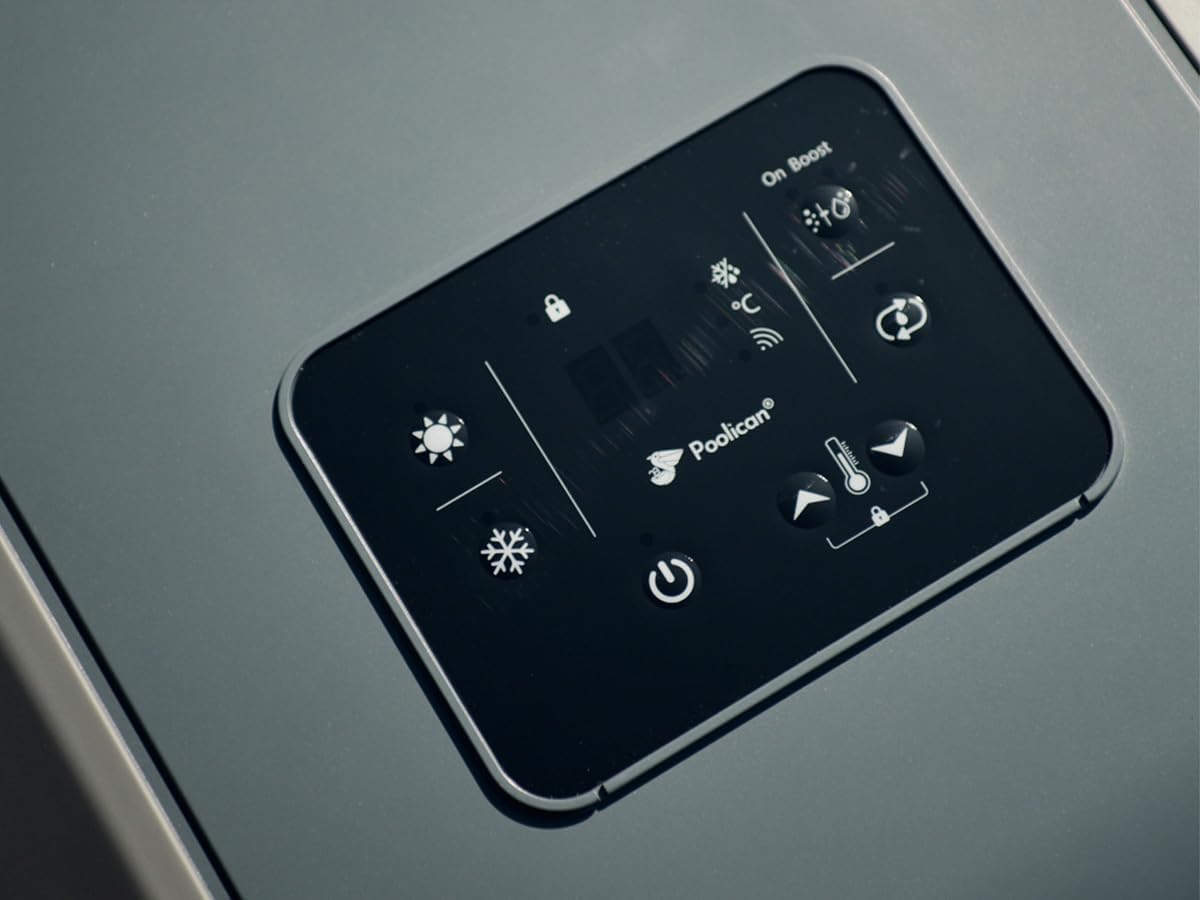
Figure 4: Detailed view of the Poolican's intuitive control panel with various function indicators.

Figure 5: Diagram illustrating the four integrated functions: Circulation (0.75 CV pump), Filtration (anti-bacterial, eco-filtration), Heating (5kW Full Inverter heat pump), and Treatment (salt electrolyzer, max 5gr/h production).

Figure 6: Dimensions of the Poolican unit (405mm x 805mm x 595mm) and emphasis on its "Plug & Play" installation.

Figure 7: Rear view of the Poolican, showing the air intake grille.

Figure 8: Side view of the Poolican, indicating the water connection port.

Figure 9: Illustration of the Poolican's WiFi connectivity and control via a smartphone application, allowing users to choose ideal temperature, adjust circulation/filtration, control salt electrolyzer, and program usage.
Setup and Installation
The Poolican is designed for quick and easy "Plug & Play" installation. The UConnect kit allows for setup by the poolside in minutes.
1. Site Selection
- Place the Poolican unit on a stable, level surface near your pool.
- Ensure adequate space around the unit for proper air circulation (refer to Figure 7 for air intake/outlet).
- Avoid direct exposure to prolonged sunlight or extreme weather.
2. Water Connections
- Connect the provided suction hose to the water inlet of the Poolican.
- Connect the discharge hose to the water outlet of the Poolican.
- Ensure all connections are secure and watertight.
3. Electrical Connection
- Plug the Poolican unit directly into a standard 230V AC power outlet.
- The integrated 230V to 12V electrical transformer simplifies the setup for the salt electrolyzer.
- Ensure the outlet is protected by a Residual Current Device (RCD) for safety.
4. Initial Start-up
- Once all connections are made, turn on the power to the unit.
- Follow the on-screen prompts on the control panel (Figure 4) for initial configuration.
Operating Instructions
The Poolican features an intuitive control panel and can also be managed via a smartphone application.
Control Panel Operation
Refer to Figure 4 for the layout of the control panel.
- Power Button: Press to turn the unit on or off.
- Temperature Setting: Use the up/down arrows to adjust the desired pool water temperature.
- Mode Selection: Cycle through different operating modes (e.g., heating, cooling, automatic).
- Timer Function: Set specific operating times for circulation and heating.
- Lock Function: Lock the control panel to prevent accidental changes.
Smartphone App Control
The Poolican can be connected to your home WiFi network for remote control via a dedicated smartphone application (Figure 9).
- Download the official Poolex app from your device's app store.
- Follow the in-app instructions to connect your Poolican unit to the app.
- Through the app, you can:
- Choose your ideal water temperature.
- Adjust circulation and filtration settings.
- Control the salt electrolyzer.
- Program usage schedules.
Maintenance
Regular maintenance ensures the longevity and efficient operation of your Poolican system.
1. Filter Cartridge Cleaning/Replacement
- The integrated cartridge filter requires regular cleaning. Frequency depends on pool usage and water quality.
- Disconnect power to the unit before accessing the filter.
- Remove the filter cartridge and rinse it thoroughly with a hose.
- Replace the cartridge if it is damaged or cannot be cleaned effectively.
2. Salt Electrolyzer Cell Cleaning
- Periodically inspect the salt electrolyzer cell for scale buildup.
- If scale is present, follow the manufacturer's instructions for cleaning the cell, typically involving a mild acid solution.
3. General Cleaning
- Keep the exterior of the unit clean and free from debris.
- Ensure the air intake and outlet grilles (Figure 7) are not obstructed.
- Use a soft, damp cloth for cleaning. Do not use abrasive cleaners or solvents.
4. Winterization
- Before winter, drain all water from the unit and hoses.
- Store the Poolican in a dry, protected area where temperatures do not drop below freezing.
Troubleshooting
This section addresses common issues you might encounter with your Poolican unit.
| Problem | Possible Cause | Solution |
|---|---|---|
| Unit does not power on. | No power supply; tripped circuit breaker; damaged power cord. | Check power connection; reset circuit breaker; inspect power cord for damage. |
| Poor water circulation. | Clogged filter cartridge; air in the system; pump malfunction. | Clean or replace filter; bleed air from the system; contact support if pump is faulty. |
| Pool not heating effectively. | Incorrect temperature setting; low ambient temperature; heat pump issue. | Verify temperature setting; ensure unit is operating in suitable conditions; contact support. |
| Salt electrolyzer not producing chlorine. | Low salt level; dirty cell; flow sensor issue. | Check and adjust salt level; clean electrolyzer cell; ensure proper water flow. |
If the problem persists after attempting these solutions, please contact Poolex customer support.
Specifications
| Feature | Detail |
|---|---|
| Model Number | PC-POOLICAN-100 |
| Brand | POOLEX |
| Product Type | Centralized and Connected Heat Pump for Pools |
| Recommended Pool Volume | Up to 25 m³ |
| Heat Pump Type | Full Inverter, Reversible |
| Heat Pump Power | 5 kW |
| Circulation Pump Power | 0.75 CV |
| Filtration Type | Cartridge Filter (Anti-bacterial, Eco-filtration) |
| Salt Electrolyzer Production | Max. 5 gr/h |
| Connectivity | WiFi, Smartphone App Control |
| Power Supply | 230V AC (with integrated 230V/12V transformer) |
| Item Weight | 50 Kilograms |
| Dimensions (approx.) | 805 mm (L) x 405 mm (W) x 595 mm (H) |
Warranty and Support
For warranty information and technical support, please refer to the official Poolex website or contact your authorized dealer. Keep your proof of purchase for warranty claims.
Manufacturer: Poolex
Contact: Refer to the official Poolex website for the most up-to-date contact information and support resources.
Related documentsPC-POOLICAN-100


Ask a question about this manual
Ask about setup, troubleshooting, compatibility, parts, safety, or missing instructions. Manuals+ will review the question and use this page’s manual context to help answer it.