
1. Product Overview
The Dirt Devil DD2504 Bagless Vacuum Cleaner is designed for efficient and thorough cleaning of various floor types. Featuring a powerful motor, advanced filtration, and a lightweight design, it offers convenience and performance for your home cleaning needs.
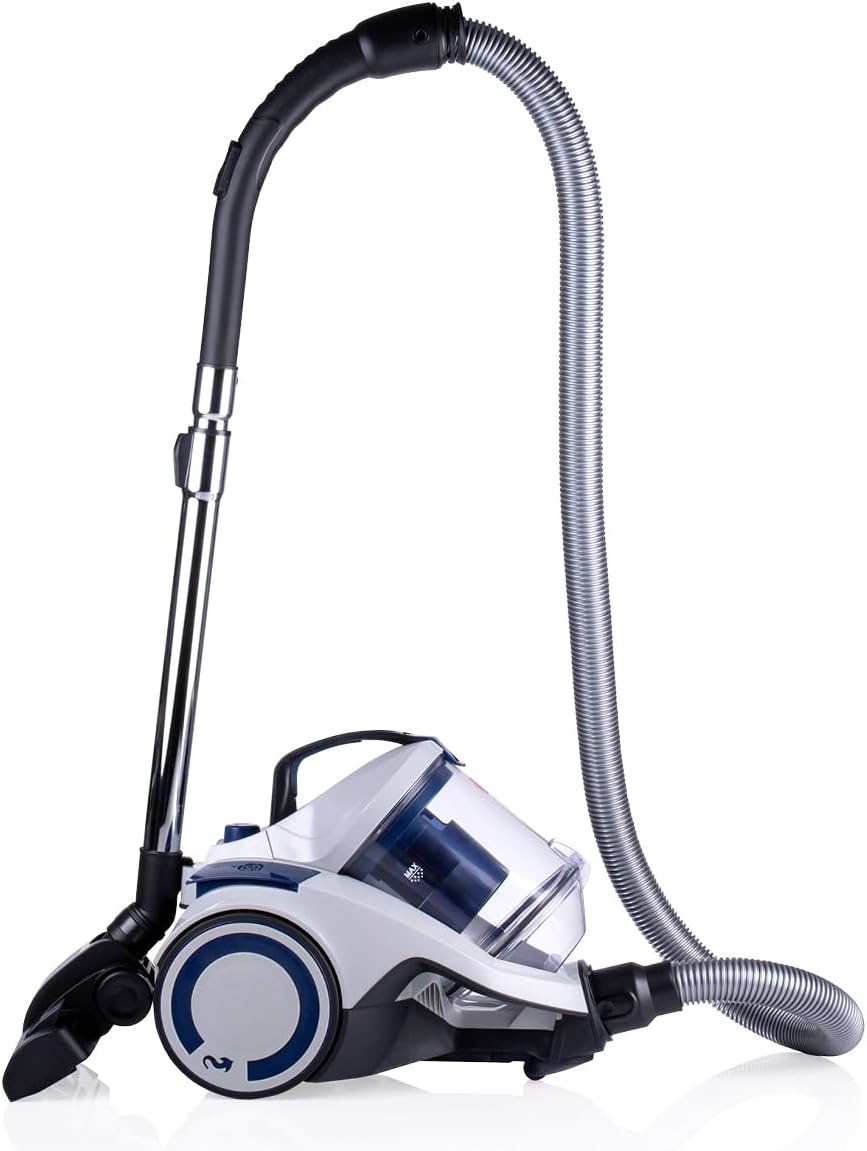
Image: The Dirt Devil DD2504 Bagless Vacuum Cleaner with its hose and telescopic wand.
The Dirt Devil DD2504 Bagless Vacuum Cleaner is ideal for those sensitive to dust and allergens, thanks to its HEPA 12 filter and a generous 2.7-liter dust collection bin. It features a 6-meter power cord, providing an extensive 9-meter operating radius for wide coverage. Weighing only 4.9 kilograms, this vacuum is easy to maneuver and transport throughout your home.
2. Setup Guide
Follow these steps to set up your Dirt Devil DD2504 vacuum cleaner for first use:
- Unpack Components: Carefully remove all parts from the packaging. Ensure you have the main unit, flexible hose, telescopic tube, combination brush, crevice tool, and parquet brush.
- Attach the Hose: Insert the flexible hose into the suction inlet on the main unit until it clicks securely into place.
- Connect the Telescopic Tube: Attach the telescopic tube to the handle end of the flexible hose. Adjust the length of the telescopic tube by pressing the release button and sliding it to your desired height.
- Attach the Floor Tool: Select the appropriate floor tool (combination brush or parquet brush) and attach it to the end of the telescopic tube.
- Power Connection: Extend the power cord and plug it into a suitable 220-240V AC 50/60Hz power outlet.

Image: The vacuum cleaner shown with its various attachments, including the combination brush and crevice tool.
3. Operating Instructions
Operating your Dirt Devil DD2504 vacuum cleaner is straightforward:
- Power On/Off: Press the power button located on the main unit to turn the vacuum cleaner on or off.
- Adjust Suction Power: The vacuum features adjustable suction control. Rotate the dial on the main unit to increase or decrease suction power as needed for different surfaces.
- Using Attachments:
- Combination Brush: Use for general cleaning on both hard floors and carpets. Switch between modes using the foot pedal on the brush head.
- Parquet Brush: Ideal for sensitive surfaces like parquet, laminate, or delicate tiles to prevent scratches.
- Crevice Tool: Attach directly to the hose handle or telescopic tube for cleaning tight spaces, corners, and upholstery.
- Maneuvering: The vacuum's lightweight design (4.9 kg) and 9-meter operating radius allow for easy movement around your home.
- Cord Rewind: After use, press the automatic cord rewind button to retract the power cord safely and quickly into the unit.

Image: A hand using the crevice tool to clean between sofa cushions.

Image: The vacuum cleaner being used on a circular rug, demonstrating its maneuverability.
4. Maintenance and Cleaning
Regular maintenance ensures optimal performance and extends the lifespan of your vacuum cleaner:
- Emptying the Dustbin:
The 2.7-liter dustbin should be emptied regularly, especially when the "MAX" fill line is reached. To empty, detach the dustbin from the main unit, open the lid, and dispose of the contents into a waste bin. Reattach securely. The cyclonic action ensures clean air is expelled, leaving only dust and dirt in the bin. This bagless design eliminates the need for replacement vacuum bags.

Image: The transparent dustbin detached from the vacuum, showing how it opens for easy emptying.
- Cleaning the HEPA 12 Filter:
The HEPA 12 filter is washable and crucial for trapping fine dust particles and allergens. This filter removes up to 99.5% of small dust particles from the air, preventing them from being expelled back into your home and minimizing respiratory irritations or allergic reactions. Remove the filter from its compartment (usually within or near the dustbin). Rinse it under cold running water until the water runs clear. Allow the filter to air dry completely for at least 24 hours before reinserting it. Do not use heat to dry.
- Cleaning Attachments: Wipe down the hose, telescopic tube, and brush heads with a damp cloth as needed. Remove any tangled hair or debris from the brush rolls.
5. Troubleshooting
If you encounter issues with your Dirt Devil DD2504, refer to the following common problems and solutions:
| Problem | Possible Cause | Solution |
|---|---|---|
| No power | Not plugged in; power outlet fault; thermal cut-out activated. | Check power cord connection; try a different outlet; unplug and allow unit to cool for 30 minutes before restarting. |
| Loss of suction | Dustbin full; filter clogged; hose/tube/brush blocked. | Empty dustbin; clean/dry HEPA filter; check and clear any blockages in the hose, telescopic tube, or brush head. |
| Unusual noise | Blockage in hose/brush; foreign object in fan; motor issue. | Check for and remove blockages; if noise persists, contact customer support. |
| Dust escaping | Dustbin not properly sealed; filter not installed correctly or damaged. | Ensure dustbin is securely closed; check filter for proper installation and damage. |
6. Technical Specifications
| Feature | Specification |
|---|---|
| Model | DD2504 / V8229 |
| Power Source | Mains powered |
| Input Voltage | 220 - 240 V AC 50/60 Hz |
| Technology | Monocyclone |
| Power | 700 W |
| Dustbin Capacity | 2.7 Liters |
| Filter Type | HEPA 12 (Washable) |
| Operating Radius | 9 meters |
| Cable Length | 6 meters |
| Weight | 4.9 Kilograms |
| Noise Level | 79 dB |
| Tube Length | 86 cm |
| Tube Material | Metal |
| Automatic Cord Rewind | Yes |
| Adjustable Suction Control | Yes |

Image: Visual summary of key specifications including 9m cable length, 2.7L capacity, 79dB noise level, 4.9kg weight, and 2-year guarantee.
7. Warranty and Customer Support
Your Dirt Devil DD2504 Bagless Vacuum Cleaner comes with a 2-year guarantee, ensuring peace of mind regarding its quality and performance.
For any questions, technical assistance, or warranty claims, please contact Dirt Devil customer support through their official website or the retailer where you purchased the product. Please have your model number (DD2504) and proof of purchase ready when contacting support.

