
Introduction
Thank you for choosing the Kisonli KS-1981 Wireless Stereo Speaker. This manual provides essential information for the safe and efficient operation of your device. Please read it carefully before use and retain it for future reference.
Product Overview
The Kisonli KS-1981 is a portable wireless stereo music speaker designed for versatile audio playback. It features Bluetooth connectivity, FM radio, and support for USB, AUX, and TF card inputs. Its compact design and clear sound make it suitable for various uses.

Figure 1: Front view of the Kisonli KS-1981 Wireless Stereo Speaker.
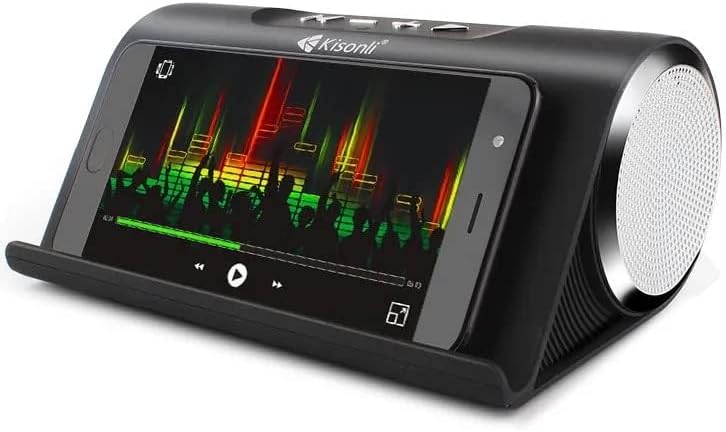
Figure 2: Kisonli KS-1981 speaker with a smartphone in its integrated stand, demonstrating media playback.
Setup
1. Charging the Speaker
Before first use, fully charge the speaker. Connect the provided USB charging cable to the speaker's charging port and the other end to a USB power adapter (not included) or a computer's USB port. The charging indicator light will illuminate during charging and turn off when fully charged.
2. Powering On/Off
- To power on: Press and hold the Power button (usually marked with an 'M' or power symbol) for a few seconds until you hear an audible prompt or see an indicator light.
- To power off: Press and hold the Power button again for a few seconds.
3. Bluetooth Pairing
- Ensure the speaker is powered on and in Bluetooth mode (it usually defaults to this mode or can be switched using the 'M' button). The Bluetooth indicator light will flash, indicating it's ready for pairing.
- Enable Bluetooth on your smartphone, tablet, or other device.
- Search for available Bluetooth devices and select "KS-1981" from the list.
- Once paired, the speaker will emit a confirmation sound, and the Bluetooth indicator light will stop flashing.
4. Connecting via AUX/USB/TF Card
- AUX Mode: Connect one end of a 3.5mm audio cable (not included) to the speaker's AUX port and the other end to your audio device's headphone jack. Press the 'M' button to switch to AUX mode.
- USB Mode: Insert a USB flash drive containing MP3 audio files into the USB port. The speaker will automatically switch to USB mode and begin playback.
- TF Card Mode: Insert a TF (MicroSD) card containing MP3 audio files into the TF card slot. The speaker will automatically switch to TF card mode and begin playback.
Operating Instructions
Button Functions
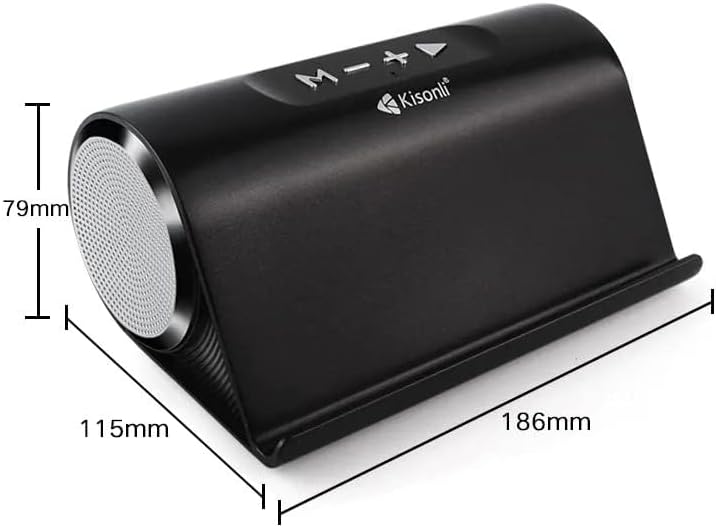
Figure 3: Top view of the Kisonli KS-1981 speaker showing control buttons and dimensions.
- 'M' Button (Mode/Power):
- Long press: Power On/Off.
- Short press: Switch between Bluetooth, FM Radio, AUX, USB, and TF card modes.
- '-' Button (Volume Down/Previous Track):
- Short press: Decrease volume.
- Long press: Go to the previous track/station.
- '+' Button (Volume Up/Next Track):
- Short press: Increase volume.
- Long press: Go to the next track/station.
- Play/Pause Button (►/−):
- Short press: Play/Pause music.
- In FM mode, long press to auto-scan and save FM stations.
FM Radio Operation
- Switch to FM mode using the 'M' button.
- Long press the Play/Pause button to automatically scan and save available FM radio stations.
- Use the '+' and '-' buttons (long press) to navigate between saved stations.
Maintenance
- Cleaning: Use a soft, dry cloth to clean the speaker's surface. Do not use abrasive cleaners, alcohol, or solvents.
- Storage: Store the speaker in a cool, dry place away from direct sunlight and extreme temperatures.
- Battery Care: To prolong battery life, avoid fully discharging the battery frequently. Charge the speaker regularly, even if not in use for extended periods.
- Water Resistance: The product is listed as water-resistant, but not waterproof. Avoid submerging it in water or exposing it to heavy rain.
Troubleshooting
| Problem | Solution |
|---|---|
| Speaker does not power on. | Ensure the battery is charged. Connect the speaker to a power source and try again. |
| No sound. | Check the volume level on both the speaker and your connected device. Ensure the correct input mode is selected (Bluetooth, AUX, USB, TF). |
| Bluetooth pairing fails. | Ensure the speaker is in Bluetooth pairing mode. Turn off and on Bluetooth on your device. Move the speaker closer to your device. Clear previous Bluetooth connections on your device. |
| Poor FM radio reception. | Relocate the speaker to an area with better signal. Extend any integrated antenna if available. |
| USB/TF card not playing. | Ensure the files are in a compatible format (e.g., MP3). Check if the card/drive is inserted correctly. Try a different USB/TF card. |
Specifications
| Feature | Detail |
|---|---|
| Brand Name | Kisonli |
| Model Name | KS-1981 |
| Maximum Speaker Output Power | 16 Watts |
| Connectivity Technology | USB, Bluetooth |
| Audio Output Mode | Stereo |
| Mounting Type | Floor Standing |
| Material | Thermoplastic Polyurethane |
| Speaker Type | Multimedia |
| Special Features | Bluetooth, Wireless |
| Recommended Uses | For Televisions, For Computers, For Smartphones or Tablets, For Music Players |
| Woofer Diameter | 4 Inches |
| Color | Blue (Note: Product images show black, but specification lists blue) |
| Water Resistant | Yes |
| Control Method | Touch |
| Speaker Size | 30 Centimeters |
| Water Resistance Level | Not Water Resistant (Conflicting with 'Water Resistant: Yes' above, user should refer to product packaging for clarity) |
| Specific Uses | Music |
| Product Dimensions (DxWxH) | 10 x 18 x 8 cm |
| Item Weight | 1.32 Pounds |
| Compatible Devices | Tablet, Laptop, Smartphone |
| Power Source | Battery Powered |
| Included Components | Ear Pads (Note: This seems incorrect for a speaker, likely a data entry error in source) |
| Manufacturer | Kisonli |
| Surround Sound Channel Configuration | 2 |
| Wireless Communication Technology | Bluetooth |
| Communication Protocol | Bluetooth |
| Audio Driver Type | Dynamic Driver |

Figure 4: Kisonli KS-1981 speaker with its retail packaging and charging/AUX cables.
Warranty and Support
Warranty Information
This product comes with a one-year warranty from the date of purchase, covering manufacturing defects. Please retain your proof of purchase for warranty claims. The warranty does not cover damage caused by misuse, accidents, unauthorized modifications, or normal wear and tear.
Customer Support
For technical assistance, warranty claims, or any questions regarding your Kisonli KS-1981 speaker, please contact your retailer or the manufacturer's customer service. Refer to the product packaging or the retailer's website for specific contact details.