
1. Introduction
This manual provides comprehensive instructions for the installation, operation, and maintenance of your Tbest 36V/48V 22A Rectangular Brushless Motor Controller. This controller is designed for electric bicycles and scooters equipped with 36V/48V 500W/750W brushless motors. Please read this manual thoroughly before installation and use to ensure proper function and safety.
2. Safety Information
- Always disconnect power from the battery before performing any installation, maintenance, or wiring adjustments.
- Ensure all connections are secure and correctly polarized to prevent damage to the controller or motor.
- Avoid exposing the controller to extreme temperatures, direct sunlight for prolonged periods, or corrosive environments.
- Do not attempt to open or modify the controller casing, as this will void the warranty and may cause damage or injury.
- Ensure the motor cable is a 9-conductor waterproof cable and that your display unit is from the KT series for compatibility.
3. Package Contents
Please check the package contents upon receipt:
- 1 x Tbest Rectangular Brushless Motor Controller
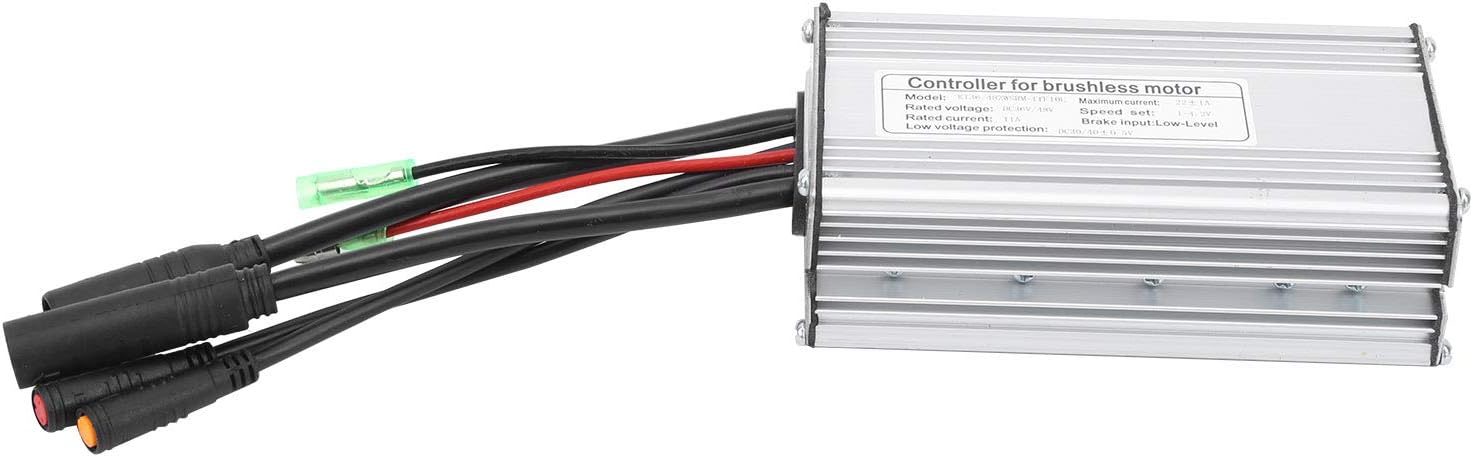
Figure 3.1: The Tbest Rectangular Brushless Motor Controller with various connection cables.
4. Setup and Installation
Follow these steps for proper installation of the controller:
- Preparation: Ensure the e-bike's power is off and the battery is disconnected. Identify a suitable mounting location for the controller, away from direct heat, moisture, and physical impact.
- Motor Connection: Connect the motor's 9-conductor waterproof cable to the corresponding port on the controller. Ensure the connection is firm and secure.
- Battery Connection: Connect the controller's power input cables (typically red for positive, black for negative) to your 36V or 48V battery. Double-check polarity before connecting.
- Display/Throttle Connection: Connect your KT series display unit and throttle to their respective ports on the controller. The controller supports a speed adjustment range of 1-4.2V.
- Brake Levers: Connect your brake levers to the controller. The controller uses a low-level brake input signal.
- Light Cable (if applicable): If your model includes a light cable, connect it to your e-bike's lighting system.
- Secure Mounting: Securely mount the controller using appropriate fasteners. Ensure cables are routed neatly and are not pinched or strained.

Figure 4.1: Close-up view of the controller's cable connections, showing various ports for motor, battery, display, and accessories.
5. Operating Instructions
Once installed, operate the controller as follows:
- Power On: Reconnect the battery and turn on your e-bike's power switch. The display unit should illuminate.
- Throttle Control: Use the throttle to control the motor speed. The controller provides smooth and efficient power delivery.
- Braking: Activating the brake levers will cut power to the motor, ensuring safe stopping.
- Display Functions: Refer to your KT series display unit's manual for specific functions such as speed indication, battery level, and assistance modes.

Figure 5.1: An electric bicycle shown with the Tbest controller in the foreground, illustrating its application.
6. Maintenance
To ensure the longevity and optimal performance of your controller, follow these maintenance guidelines:
- Cleaning: Periodically wipe the controller's exterior with a soft, dry cloth. Do not use abrasive cleaners or solvents. Ensure no moisture enters the casing.
- Cable Inspection: Regularly check all cables and connectors for signs of wear, fraying, or corrosion. Replace damaged cables immediately.
- Environmental Protection: While the controller is designed to be durable, avoid prolonged exposure to heavy rain, extreme dust, or direct sunlight.
- Storage: If the e-bike is stored for an extended period, ensure the controller is kept in a dry, cool place.
7. Troubleshooting
If you encounter issues with your controller, refer to the following common problems and solutions:
| Problem | Possible Cause | Solution |
|---|---|---|
| Motor not responding | Loose motor cable connection, battery low, incompatible display/motor. | Check all connections. Ensure battery is charged. Verify motor uses a 9-conductor waterproof cable and display is KT series. |
| Controller not powering on | Incorrect battery connection, faulty battery, controller damage. | Check battery polarity and connection. Test battery voltage. If issues persist, contact support. |
| Erratic motor behavior | Loose connections, motor hall sensor issue, interference. | Inspect all wiring. Ensure motor and controller are compatible. |
If troubleshooting steps do not resolve the issue, please contact Tbest customer support.
8. Specifications
| Feature | Detail |
|---|---|
| Model | Tbestkbuwgdegcp |
| Material | Aluminum Alloy |
| Maximum Current | 22 ± 1A |
| Rated Voltage | DC36V / 48V (Universal) |
| Speed Adjustment | 1 - 4.2V |
| Rated Current | 11A |
| Brake Input | Low Level |
| Low Voltage Protection | DC30 / 40 ± 0.5V |
| Compatible Motors | 36V/48V 500W/750W Brushless Motors |
| Dimensions (Approx.) | 23 x 16.7 x 11.7 cm (Package) |
| Weight (Approx.) | 500 grams (Package) |
9. Warranty and Support
Tbest products are manufactured to high-quality standards. For warranty information, please refer to the documentation provided with your purchase or visit the official Tbest website. If you require technical assistance or have questions regarding your controller, please contact Tbest customer support through their official channels. Please have your model number (Tbestkbuwgdegcp) and purchase details ready when contacting support.
For more information, visit the Tbest Store on Amazon.