
Introduction
The Coby Encore True Wireless Bluetooth Speaker (Model CSTW502BKRD) is designed to provide high-fidelity audio with the convenience of wireless connectivity. This speaker features a vintage-inspired design, making it a suitable addition to various home décors. It supports Bluetooth 5.3 for stable connections and offers True Wireless Stereo (TWS) functionality for pairing with a second speaker. An auxiliary input is also available for wired connections.
Key features include:
- Wireless Hi-Fi Audio for the Home: High-definition sound with Bluetooth connectivity.
- True Wireless Pairing: Automatically links multiple speakers for stereo sound.
- Elegant Design: Red speaker cover and stabilizer legs complement home furnishings.
- AUX Input: Allows wired connection for non-Bluetooth devices.
- Up to 7 Hours Wireless Play Time: Rechargeable lithium-ion battery for extended use.
- Bluetooth 5.3: Ensures fast pairing and uninterrupted audio streaming.

Image: Front view of the Coby Encore speaker, highlighting its True Wireless Connectivity feature.
Setup Guide
1. Unboxing and Package Contents
Carefully remove all components from the packaging. Ensure the following items are present:
- Coby Encore True Wireless Bluetooth Speaker
- USB Charging Cable
- User Manual (this document)
2. Charging the Speaker
Before initial use, fully charge the speaker. Connect the supplied USB charging cable to the Micro USB Port on the back of the speaker and the other end to a USB power adapter (not included) or a computer's USB port.

Image: Side view of the Coby Encore speaker, indicating its rechargeable battery and up to 7 hours of playtime.
- The LED Signal light will illuminate during charging.
- A full charge typically takes approximately 3-4 hours.
- Once fully charged, the LED indicator may change color or turn off, depending on the model.
3. Powering On/Off
Locate the ON/OFF button on the back panel of the speaker.
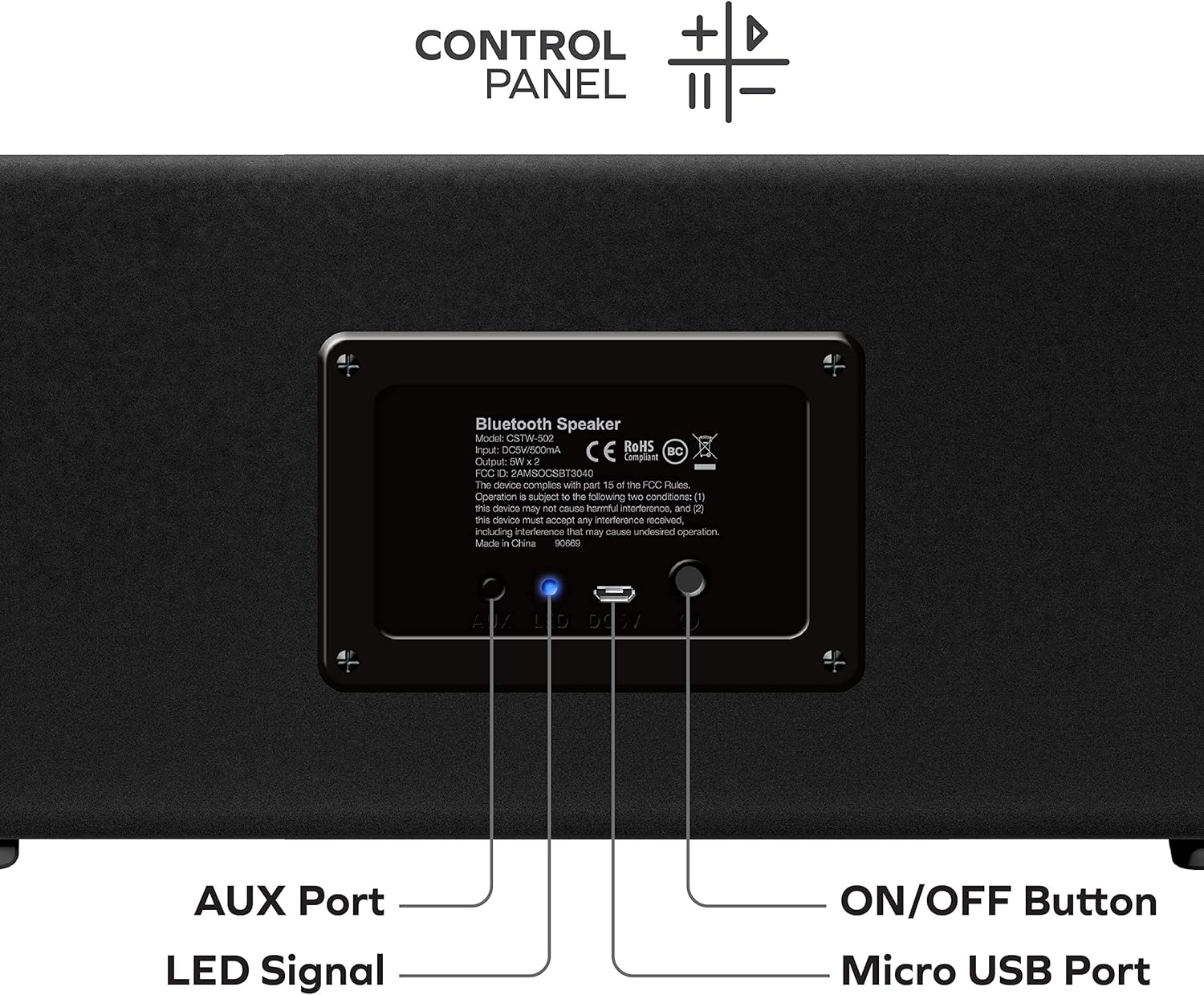
Image: Rear view of the Coby Encore speaker, detailing the AUX Port, LED Signal, Micro USB Port, and ON/OFF Button.
- To power on: Press and hold the ON/OFF button for a few seconds until you hear an audible prompt or see the LED Signal light illuminate.
- To power off: Press and hold the ON/OFF button again for a few seconds until you hear an audible prompt or the LED Signal light turns off.
4. Bluetooth Pairing
After powering on, the speaker will automatically enter Bluetooth pairing mode. The LED Signal light will typically flash to indicate it is ready to pair.
- Enable Bluetooth on your smartphone, tablet, or other audio device.
- Search for available Bluetooth devices.
- Select "Coby Encore" from the list of devices.
- Once paired, the speaker will emit an audible confirmation, and the LED Signal light will become solid.
5. True Wireless Stereo (TWS) Pairing (Optional)
To achieve a stereo sound experience, you can pair two Coby Encore speakers together.
- Ensure both Coby Encore speakers are powered on and not connected to any other Bluetooth device.
- On one of the speakers (this will be the primary speaker), press and hold the TWS pairing button (refer to the control panel diagram if available, otherwise assume a dedicated button or a long press on a specific control). The speaker will enter TWS pairing mode.
- The two speakers will automatically search for and connect to each other. An audible tone will confirm successful TWS pairing.
- Once TWS paired, connect your audio device to the primary speaker via Bluetooth as described in step 4. Both speakers will now play audio in stereo.
6. AUX Input Connection
For devices without Bluetooth, use the AUX input.
- Connect a 3.5mm audio cable (not included) from your audio device's headphone jack to the AUX Port on the back of the speaker.
- The speaker should automatically switch to AUX mode. If not, you may need to press a mode button (refer to control panel).
Operating Instructions
The Coby Encore speaker features integrated controls for convenient audio management.
Control Panel Functions
While the exact layout may vary, typical controls include:
- Volume Up/Next Track: Short press for volume up, long press for next track.
- Volume Down/Previous Track: Short press for volume down, long press for previous track.
- Play/Pause: Press to play or pause audio.
- Mode Button: (If present) Press to switch between Bluetooth and AUX input modes.
Note: For precise control functions, refer to the detailed control panel diagram on the product packaging or a dedicated section in the full manual.
Bluetooth Operation
Once paired with your device, audio will stream wirelessly to the speaker. You can control playback and volume either from your connected device or using the speaker's integrated controls.
AUX Input Operation
When connected via the AUX port, the speaker will play audio from the wired source. Volume can be adjusted on both the speaker and the connected device. Playback controls (play/pause, track skip) typically function only on the connected device when using AUX input.
Maintenance
Cleaning
- Wipe the speaker's exterior with a soft, dry cloth.
- Do not use abrasive cleaners, waxes, or solvents as they may damage the finish.
- Avoid getting moisture into any openings.
Battery Care
- To prolong battery life, fully charge the speaker before its first use.
- Avoid exposing the speaker to extreme temperatures (hot or cold), as this can affect battery performance.
- If storing the speaker for an extended period, charge it to approximately 50% every few months.
Storage
Store the speaker in a cool, dry place away from direct sunlight and excessive dust when not in use.
Troubleshooting
If you encounter issues with your Coby Encore speaker, refer to the following common problems and solutions:
| Problem | Possible Cause | Solution |
|---|---|---|
| Speaker will not turn on. | Low battery. | Charge the speaker fully using the provided USB cable. |
| No sound. | Volume too low; device not connected; incorrect input mode. | Increase volume on both speaker and connected device. Ensure Bluetooth is paired or AUX cable is properly connected. Check input mode. |
| Bluetooth device will not pair. | Speaker not in pairing mode; device too far; interference; previously paired to another device. | Ensure speaker is in pairing mode (flashing LED). Move device closer. Turn off other Bluetooth devices. Forget "Coby Encore" on your device and try pairing again. |
| True Wireless Stereo (TWS) pairing fails. | Speakers too far apart; one speaker already paired to a device. | Ensure both speakers are close to each other and not connected to any other Bluetooth device before initiating TWS pairing. |
| Poor sound quality. | Low battery; device too far; interference. | Charge the speaker. Move the connected device closer to the speaker. Avoid obstacles between the speaker and the device. |
Product Specifications
| Model Name | Encore TWS Speaker |
| Item Model Number | CSTW502BKRD |
| Brand | Coby |
| Speaker Type | Soundbar |
| Connectivity Technology | Auxiliary, Bluetooth, USB |
| Wireless Communication Technology | Bluetooth 5.3 |
| Speaker Maximum Output Power | 5 Watts (per speaker, 2 x 5W drivers mentioned in description) |
| Power Source | Battery Powered (1 Lithium Ion battery included) |
| Playtime | Up to 7 Hours |
| Product Dimensions | 4.5"D x 12.15"W x 5"H |
| Item Weight | 3.1 pounds |
| Included Components | USB Charging Cable |
| UPC | 083832609917 |

Image: The Coby Encore speaker with its dimensions clearly marked.
Warranty Information
The Coby Encore True Wireless Bluetooth Speaker is covered by a 90-day manufacturer's warranty from the date of purchase. This warranty covers defects in materials and workmanship under normal use. It does not cover damage caused by misuse, accident, unauthorized modification, or external causes such as drops or liquid damage.
Please retain your proof of purchase for warranty claims. For detailed warranty terms and conditions, refer to the documentation included with your product or contact customer support.
Customer Support
For further assistance, technical support, or warranty inquiries, please contact Coby customer service. Contact information can typically be found on the official Coby website or on the product packaging.
Before contacting support, please ensure you have:
- Read this user manual thoroughly.
- Attempted the troubleshooting steps provided.
- Your product model number (CSTW502BKRD) and proof of purchase readily available.


