
1. Introduction
This manual provides essential information for the installation, operation, and maintenance of your Acouto 12V Range Hood. Designed for RVs, camper vans, yachts, and other compact kitchen environments, this range hood effectively removes smoke and odors, improving air quality during cooking. Please read this manual thoroughly before use and retain it for future reference.
2. Safety Information
Always observe the following safety precautions to prevent injury or damage to the appliance:
- Disconnect power before performing any installation, maintenance, or cleaning procedures.
- Ensure the appliance is installed by a qualified professional in accordance with local electrical codes.
- Do not operate the range hood if any parts are damaged. Contact customer support for replacement parts.
- Keep children and pets away from the appliance during operation.
- Ensure adequate ventilation in the kitchen area.
3. Product Overview
The Acouto 12V Range Hood features a compact design with advanced functionalities for efficient kitchen ventilation.
Key Features:
- 3-Speed Adjustable Fan: Provides powerful performance with speeds up to 5000 RPM x 2.
- Touchable Screen Controls: Tempered glass touch switch for easy and precise operation.
- Dual LED Lighting: Integrated LED lights provide full brightness for your cooking area.
- Pure Copper Motor: Ensures durability and reliable performance.
- Double Eddy Current Wind Wheel: Designed for stronger suction power.
- Removable Filter Screen: Easy to clean and maintain.
- Wide Application: Suitable for RVs, camper vans, yachts, and various kitchen setups.
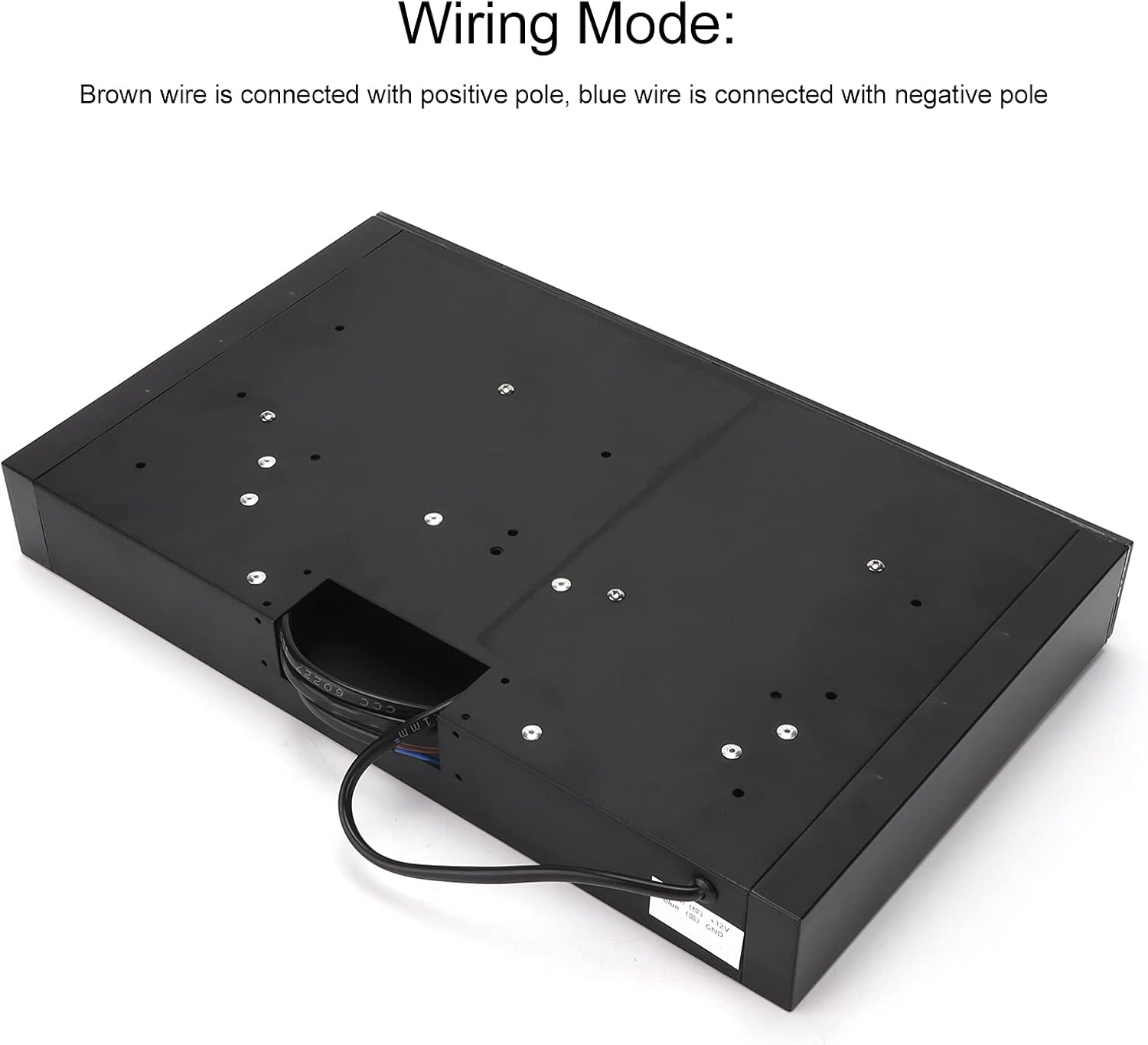
Figure 3.1: Key features of the Acouto 12V Range Hood, highlighting the pure copper motor, double vortex wind wheel for stronger suction, and double LED lighting for full brightness.
4. Specifications
| Specification | Value |
|---|---|
| Shell Material | ABS and Aluminum Alloy |
| Operating Voltage | 12V |
| Fan Speed (Gear 1) | 3000 RPM x 2 |
| Current (Gear 1) | 1.2A |
| Power (Gear 1) | 15W |
| Fan Speed (Gear 2) | 4000 RPM x 2 |
| Current (Gear 2) | 2.5A |
| Power (Gear 2) | 25W |
| Fan Speed (Gear 3) | 5000 RPM x 2 |
| Current (Gear 3) | 3.5A |
| Power (Gear 3) | 40W |
| Controls | Tempered Glass Touch Switch |
| Motor Type | Pure Copper |
| Air Intake | Two Side |
| Lighting | Two LED Lights |
| Filter Type | Removable Screen (Mesh) |
| Dimensions (L x W x H) | 46.99 x 27.94 x 10.16 cm (18.5 x 11 x 4 inches) |
| Weight | 2.54 kg (5.6 lbs) |

Figure 4.1: Dimensional drawing of the Acouto 12V Range Hood, providing precise measurements for installation planning.
5. Setup and Installation
The Acouto 12V Range Hood is designed for straightforward installation above your RV, camper, or yacht kitchen stove. No complex hole cutting is required for mounting.
Installation Steps:
- Positioning: Mount the range hood directly above your cooking area. Ensure there is sufficient clearance as per local regulations and manufacturer recommendations.
- Mounting: Secure the range hood using appropriate fasteners (included in the screw package kit) to the cabinet or wall structure.
- Wiring: Connect the power wires to your 12V DC power source. The brown wire connects to the positive (+) pole, and the blue wire connects to the negative (-) pole. Ensure all connections are secure and insulated.
- Air Outlet: Attach the air outlet accessories to direct exhaust air appropriately.
- Filter Screen: Ensure the filter screen is properly inserted into its designated slot.

Figure 5.1: Wiring diagram for the Acouto 12V Range Hood. Connect the brown wire to the positive (+) terminal and the blue wire to the negative (-) terminal of your 12V power supply.

Figure 5.2: The Acouto 12V Range Hood seamlessly integrated into an RV kitchen environment, positioned above the cooking stove.
6. Operating Instructions
The range hood features a user-friendly touch screen panel for controlling its functions.

Figure 6.1: The highly sensitive touch screen panel allows for convenient adjustment of settings.
Control Functions:
- Power Button (O): Touch to turn the range hood on or off.
- Light Button (💡): Touch to turn the LED lights on or off.
- Fan Speed Adjustment (+/-): Use the '+' and '-' buttons to cycle through the three fan speed settings (Gear 1, Gear 2, Gear 3).

Figure 6.2: The Acouto 12V Range Hood in operation, with its illuminated touch controls visible.

Figure 6.3: The Acouto 12V Range Hood with its dual LED lights activated, providing ample illumination for cooking.
7. Maintenance
Regular maintenance ensures optimal performance and longevity of your range hood.
Cleaning the Filter Screen:
The range hood is equipped with a removable filter screen for easy cleaning.
- Power Off: Ensure the range hood is turned off and disconnected from power before cleaning.
- Remove Filter: Gently unlatch and remove the filter screen from the range hood.
- Clean Filter: Wash the filter screen with warm, soapy water. For stubborn grease, a degreasing agent can be used. Rinse thoroughly.
- Dry and Reinstall: Allow the filter screen to dry completely before reinstalling it into the range hood.

Figure 7.1: The removable filter screen is designed for easy access and cleaning, ensuring efficient air filtration.
General Cleaning:
- Wipe the exterior surfaces of the range hood with a soft, damp cloth.
- Do not use abrasive cleaners or harsh chemicals, as they may damage the finish.
8. Troubleshooting
If you encounter issues with your Acouto 12V Range Hood, refer to the following common troubleshooting steps:
| Problem | Possible Cause | Solution |
|---|---|---|
| Range hood does not turn on | No power supply Loose wiring connection | Check the 12V power source. Verify that the brown and blue wires are securely connected to the positive and negative terminals, respectively. |
| Fan is weak or noisy | Clogged filter screen Obstruction in fan blades | Clean the filter screen as described in Section 7. Inspect for any foreign objects obstructing the fan blades (ensure power is disconnected first). |
| LED lights not working | Loose connection Faulty LED module | Check wiring connections to the LED lights. If problem persists, contact customer support for assistance. |
| Touch controls unresponsive | Power issue Moisture on panel | Ensure stable 12V power supply. Wipe the touch panel dry with a clean cloth. |
If the problem persists after attempting these solutions, please contact Acouto customer support for further assistance.
9. Warranty and Support
For warranty information or technical support, please refer to the documentation provided at the time of purchase or visit the official Acouto website. Keep your purchase receipt as proof of purchase for any warranty claims.