
Product Overview
The EZVALO EZ321 is a versatile 6-in-1 digital alarm clock designed to enhance your daily routine. It integrates a digital alarm clock, FM radio, countdown timer, wireless charger, night light, and Bluetooth speaker into a single compact device. This manual provides detailed instructions for setup, operation, maintenance, and troubleshooting to ensure optimal performance and user experience.

Image: The EZVALO EZ321 Digital Alarm Clock, showcasing its sleek design and a smartphone actively charging on its wireless charging pad.
Setup
1. Unboxing and Inspection
Carefully remove all components from the packaging. Verify that all items are present:
- EZVALO EZ321 Digital Alarm Clock
- Power Adapter (Type C cable)
- User Manual (this document)
Inspect the device for any signs of damage. If any components are missing or damaged, contact customer support immediately.
2. Power Connection
- Connect the provided Type C power cable to the Type C input port on the back of the alarm clock.
- Plug the other end of the power cable into a standard wall outlet.
- The LED display will illuminate, indicating the device is powered on.
The device requires 1 Lithium-ion battery for operation, which is typically pre-installed or included. Ensure it is properly seated if you need to replace it.
Operating Instructions
General Controls
The device features several control buttons on its front panel:
- M (Mode) Button: Switches between different modes (e.g., Time, Bluetooth, FM Radio).
- < (Previous/Decrease) Button: Navigates backward or decreases values.
- > (Next/Increase) Button: Navigates forward or increases values.
- Z (Snooze/Light) Button: Activates snooze during an alarm, or controls the night light.

Image: Overview of the EZVALO EZ321's six primary functions, including dual alarm, FM radio, countdown timer, wireless charging, night light, and wireless speaker.
Time and Alarm Settings
- Setting Time:
Press and hold the M button to enter time setting mode. Use the < and > buttons to adjust hours and minutes. Press M again to confirm and move to the next setting.
- Setting Dual Alarms:
Briefly press the M button to cycle to Alarm 1 setting. Press and hold M to set the alarm time using < and >. Repeat for Alarm 2. You can choose between FM radio or a standard buzzer for the alarm sound.

Image: A user interacting with the alarm clock, highlighting the dual alarm and snooze features for a pleasant start to the day.
- Snooze Function:
When an alarm sounds, press the Z button to activate snooze. The alarm will temporarily stop and sound again after a set interval (e.g., 9 minutes).
- Sleep Timer:
The device features a countdown timer with multiple preset options (5, 15, 30, 45, 60 minutes). This is ideal for falling asleep to music or radio, which will automatically turn off after the selected duration.

Image: The alarm clock displaying its countdown timer feature, useful for productivity or timed activities.
Night Light Functions
The EZVALO EZ321 includes an integrated night light with adjustable modes:
- Activating Light: Briefly press the Z button to cycle through light modes.
- Light Modes:
- RGB Light Mode: Cycles through various colors.
- Soft Light Mode: Provides a warm, dim illumination.
- Bright Light Mode: Offers a brighter, more direct light.
- Adjusting Brightness: The display brightness can also be adjusted to suit your preference.
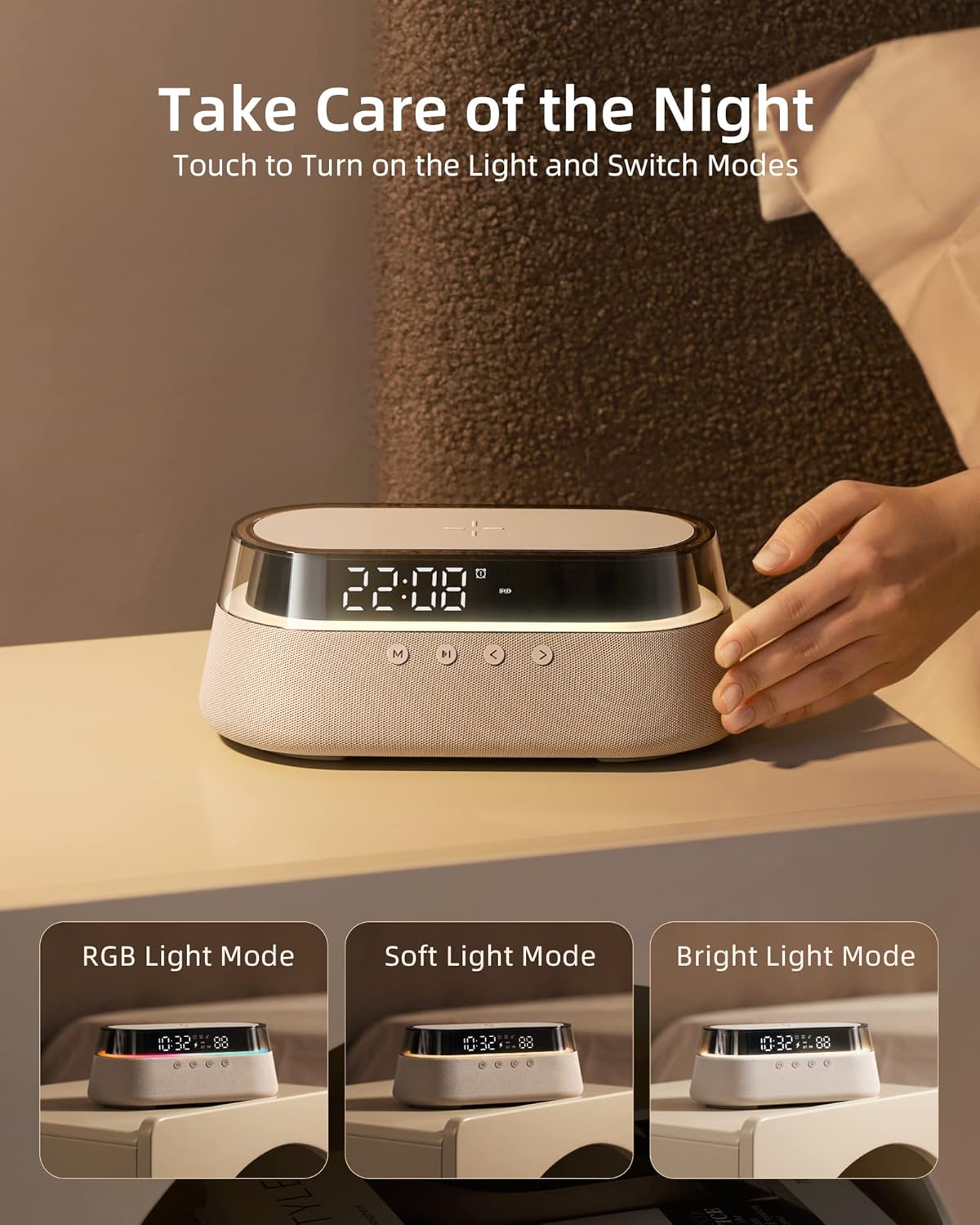
Image: The alarm clock demonstrating its versatile night light capabilities, including RGB, soft, and bright light settings.
Audio Functions (Bluetooth & FM Radio)
- Bluetooth Pairing:
Press the M button until "BT" appears on the display. On your smartphone or audio device, search for "EZVALO EZ321" in the Bluetooth settings and pair. A confirmation sound will indicate successful pairing.
- FM Radio:
Press the M button until "FM" appears on the display. Use the < and > buttons to manually tune to desired radio stations. The device features a built-in antenna for reception.
- Wireless Speaker:
Enjoy high-quality audio playback through the integrated wireless speaker, whether via Bluetooth or FM radio. The device can also display dynamic RGB lighting that syncs with the rhythm of the music.

Image: The alarm clock showcasing its wireless speaker and dynamic RGB light mode, creating an immersive audio-visual experience.
Wireless Charging
The EZVALO EZ321 features a 15W fast wireless charging pad compatible with Qi-certified devices.
- Place your Qi-compatible smartphone or device centrally on the charging pad located on top of the alarm clock.
- Ensure the device is properly aligned. The charging indicator on the alarm clock's display will show charging status.
- The wireless charger supports up to 15W fast charging and includes built-in overcharge protection for safe and efficient charging.
- The charging pad is designed to be phone case friendly, accommodating cases up to 5mm thick.

Image: A smartphone being wirelessly charged on the EZVALO EZ321, emphasizing its 15W fast charging capability.

Image: The alarm clock demonstrating wide compatibility for wireless charging with iPhones, Samsung phones, other Qi-certified devices, and AirPods.
Maintenance
Cleaning
- Before cleaning, ensure the device is unplugged from the power source.
- Use a soft, dry cloth to wipe the exterior surfaces of the alarm clock.
- For stubborn marks, slightly dampen the cloth with water. Avoid using harsh chemicals, abrasive cleaners, or solvents, as these can damage the finish.
- Do not immerse the device in water or any other liquid.
Storage
When not in use for extended periods, store the EZVALO EZ321 in a cool, dry place away from direct sunlight and extreme temperatures. Keep it protected from dust and moisture.
Troubleshooting
| Problem | Possible Cause | Solution |
|---|---|---|
| Device does not power on. | No power connection or faulty adapter. | Ensure the power cable is securely connected to both the device and the wall outlet. Try a different outlet. |
| Wireless charging not working. | Misalignment, non-Qi compatible device, or foreign objects. | Ensure your device is Qi-compatible and centered on the charging pad. Remove any metal objects or thick cases (over 5mm). |
| Bluetooth pairing failed. | Device not in pairing mode, or too far from the alarm clock. | Ensure the alarm clock is in Bluetooth mode ("BT" displayed). Move your audio device closer. Restart both devices and try pairing again. |
| Alarm not sounding. | Alarm not set, volume too low, or alarm disabled. | Verify alarm time and ensure the alarm is enabled. Check the volume level. |
| FM Radio static/poor reception. | Weak signal. | Adjust the position of the alarm clock to improve reception. Try tuning to a different station. |
Specifications
| Feature | Detail |
|---|---|
| Brand | EZVALO |
| Model Number | EZ321 |
| Color | Brown |
| Product Dimensions (L x W x H) | 13 x 3.81 x 28 cm |
| Weight | 900 g |
| Material | Acrylonitrile Butadiene Styrene (ABS) |
| Display Type | Digital |
| Power Source | Battery Powered (1 Lithium-ion battery required) |
| Battery Capacity | 1800 mAh (estimated from A+ content image) |
| Wireless Charging Output | Up to 15W |
| Connectivity | Bluetooth, FM Radio |
Warranty and Support
Customer Support
For any questions, technical assistance, or support inquiries, please contact EZVALO customer service. Live customer service is available Monday to Friday, 9 AM - 5 PM (MEST).
Please refer to the product packaging or the official EZVALO website for the most current contact information.
Warranty Information
Specific warranty details for the EZVALO EZ321 are typically provided with the product packaging or available on the official EZVALO website. Please retain your proof of purchase for warranty claims.