
1. Introduction and Overview
The FF FLASHFISH P66 is a portable power station designed to provide reliable power for various devices, whether at home, during outdoor activities, or in emergency situations. It features a high-performance 288.6Wh/78000mAh Li-ion battery, delivering a continuous AC output of 260W (with a peak of 520W). The unit offers multiple output options, including AC, DC, USB, and 5W wireless charging, along with an integrated LED light for illumination.
Equipped with a Battery Management System (BMS), the P66 ensures safe operation by providing protection against short circuits, overcurrent, overvoltage, and overheating. A clear LED display keeps you informed about the power station's status, including remaining power, input, and output statuses.
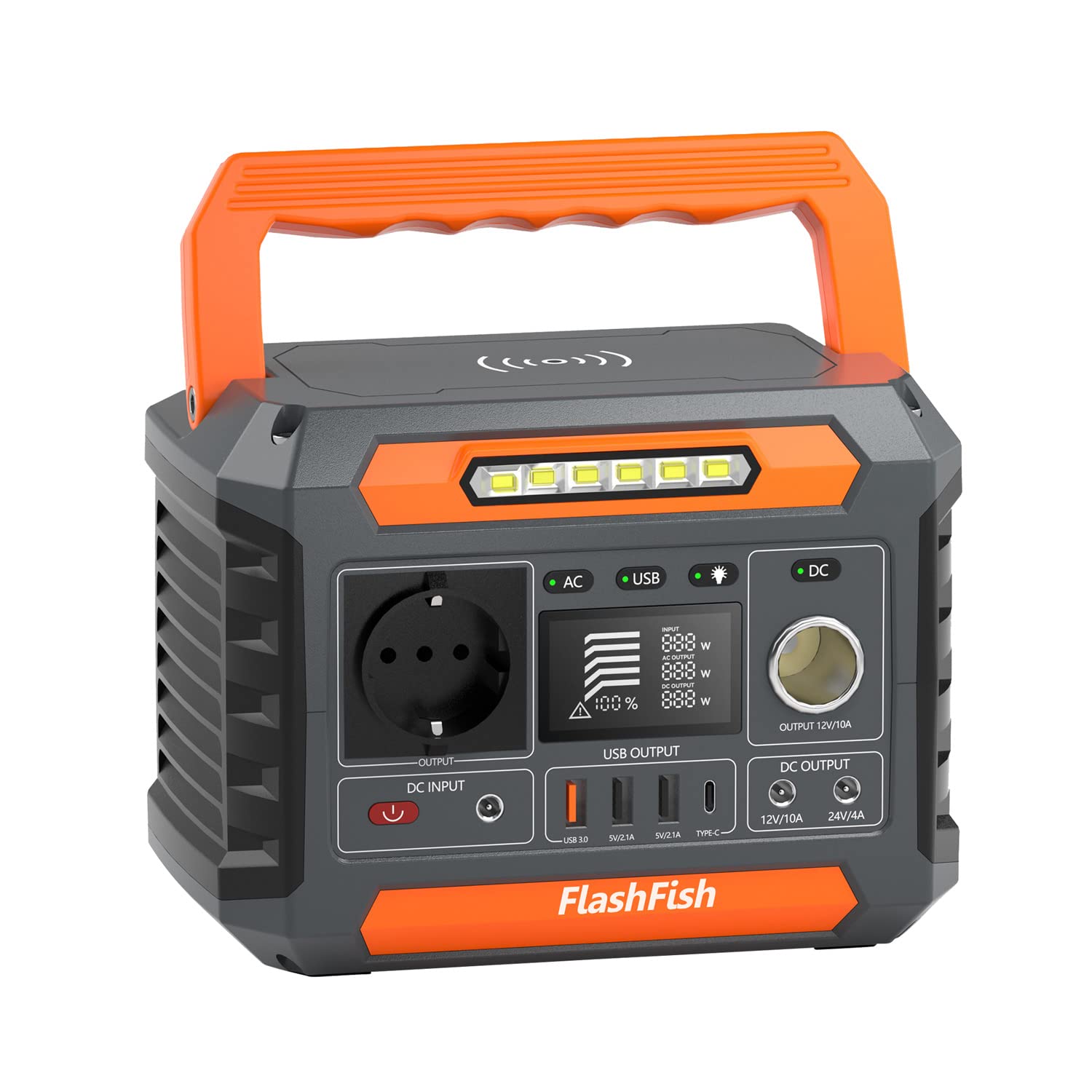
Figure 1.1: FF FLASHFISH P66 Portable Power Station
2. Safety Instructions
Please read and understand all safety instructions before operating the FF FLASHFISH P66 Portable Power Station. Failure to follow these instructions may result in electric shock, fire, or serious injury.
- Do not disassemble: Do not attempt to disassemble, repair, or modify the unit. Incorrect reassembly may cause a risk of fire or electric shock.
- Avoid water: Do not expose the unit to rain or moisture. Keep it away from water, high humidity, and wet environments.
- Temperature control: Operate and store the unit within the recommended temperature range (refer to specifications). Avoid extreme heat or cold.
- Ventilation: Ensure adequate ventilation around the power station during use and charging to prevent overheating. Do not block ventilation openings.
- Proper charging: Use only the provided adapter or approved charging methods (car charger, solar panel) to charge the unit.
- Keep away from children: This product is not a toy. Keep it out of reach of children and pets.
- Avoid dropping: Do not drop, puncture, or subject the unit to severe impacts.
- Disposal: Dispose of the unit according to local regulations. Do not dispose of it in household waste.
3. Package Contents
Upon unpacking your FF FLASHFISH P66 Portable Power Station, please verify that all the following items are included:
- 1x FF FLASHFISH P66 Portable Power Station
- 1x AC Adapter
- 1x Car Charger
- 1x User Manual
If any items are missing or damaged, please contact customer support.
4. Product Diagram
Familiarize yourself with the various ports and controls on your FF FLASHFISH P66 Portable Power Station.

Figure 4.1: Front Panel Overview
- AC Output Port: For connecting devices requiring AC power.
- AC Power Button: Activates/deactivates the AC output.
- LED Display: Shows battery level, input/output status, and warnings.
- USB Output Ports: Includes USB-A and USB-C ports for charging various devices.
- USB Power Button: Activates/deactivates the USB outputs.
- DC Output Ports: For connecting devices requiring DC power.
- DC Power Button: Activates/deactivates the DC outputs.
- DC Input Port: For charging the power station via AC adapter, car charger, or solar panel.
- Wireless Charging Pad: For compatible wireless charging devices.
- LED Light: Integrated flashlight for illumination.
- LED Light Button: Controls the LED light.
5. Setup
Follow these steps to set up your FF FLASHFISH P66 Portable Power Station for first use:
- Unpack: Carefully remove all components from the packaging.
- Inspect: Check the power station and accessories for any visible damage.
- Initial Charge: Before first use, fully charge the power station using the provided AC adapter. Connect the AC adapter to the DC Input Port and plug it into a wall outlet. The LED display will indicate charging status.
- Placement: Place the power station on a stable, flat surface in a well-ventilated area, away from direct sunlight or heat sources.
6. Operating Instructions
6.1. Charging the Power Station
The FF FLASHFISH P66 offers three methods for recharging its internal battery:

Figure 6.1: Multiple Charging Methods
- AC Wall Charger: Connect the provided AC adapter to the DC Input Port and plug it into a standard wall outlet. This is the fastest charging method.
- Car Charger (12V): Use the included car charger to recharge the unit from your vehicle's 12V cigarette lighter socket.
- Solar Panel (Sold Separately): Connect a compatible solar panel (recommended 100W or higher) to the DC Input Port. The power station will automatically begin charging when sufficient sunlight is available.
6.2. Using Output Ports
The P66 provides various output options to power your devices:

Figure 6.2: 8 Versatile Outlets
- AC Output: Press the AC Power Button to activate the AC output. Plug your AC-powered devices (up to 260W continuous, 520W peak) into the AC outlet. Press the button again to turn off.
- DC Output: Press the DC Power Button to activate the DC outputs. Connect your 12V DC devices to the DC ports. Press the button again to turn off.
- USB Output: Press the USB Power Button to activate the USB ports. Connect your USB-powered devices to the USB-A or USB-C ports. Press the button again to turn off.
- Wireless Charging: Place your Qi-compatible device on the wireless charging pad. Ensure the device is centered for optimal charging. The wireless charging function is typically active when the unit is powered on.

Figure 6.3: Powering Devices for Outdoor Use
6.3. LED Display
The integrated LED display provides real-time information about the power station's status:
- Battery Level Indicator: Shows the remaining battery capacity.
- Input Status: Indicates when the unit is being charged.
- AC Output Status: Shows when the AC output is active and the power consumption.
- DC Output Status: Shows when the DC output is active and the power consumption.
6.4. LED Light
The P66 includes an emergency LED flashlight:

Figure 6.4: Emergency Flashlight Function
- Press the LED Light Button once to turn on the light.
- Press again to cycle through different brightness modes or SOS mode (if available).
- Press and hold (or cycle through all modes) to turn off the light.
7. Maintenance
Proper maintenance ensures the longevity and optimal performance of your power station.
- Storage: Store the unit in a cool, dry place, away from direct sunlight and extreme temperatures. If storing for extended periods, charge the unit to 50-80% every 3-6 months to maintain battery health.
- Cleaning: Use a soft, dry cloth to clean the exterior of the power station. Do not use abrasive cleaners or solvents.
- Battery Care: Avoid fully discharging the battery frequently. It is best to recharge before the battery level drops too low.
- Ventilation: Keep the ventilation openings clear of dust and debris.
8. Troubleshooting
If you encounter issues with your FF FLASHFISH P66, refer to the following common problems and solutions:
- Unit not turning on:
- Ensure the power button is pressed firmly.
- Check if the battery is completely depleted. Charge the unit for at least 30 minutes.
- No output from AC/DC/USB ports:
- Ensure the respective AC, DC, or USB power button is activated.
- Check if the connected device's power consumption exceeds the power station's output limit.
- Verify that the cables are securely connected.
- The unit may have entered protection mode due to overload or overheating. Disconnect devices, turn off the unit, and restart after a few minutes.
- Unit not charging:
- Ensure the charging adapter/cable is correctly connected to both the power station and the power source.
- Verify that the power source (wall outlet, car socket, solar panel) is functional.
- For solar charging, ensure the solar panel is in direct sunlight and is of sufficient wattage.
- Check the charging indicator on the LED display.
- Wireless charging not working:
- Ensure your device is Qi-compatible.
- Reposition your device on the charging pad to ensure proper alignment.
- Remove any thick cases from your device that might interfere with wireless charging.
If the problem persists, please contact customer support for further assistance.
9. Specifications
Detailed technical specifications for the FF FLASHFISH P66 Portable Power Station:

Figure 9.1: Product Dimensions
| Feature | Specification |
|---|---|
| Model Name | P66 |
| Brand | FF FLASHFISH |
| Battery Type | Li-ion Cells |
| Battery Capacity | 288.6Wh / 78000mAh |
| AC Continuous Output | 260W |
| AC Peak Output | 520W |
| AC Output Voltage | 230 Volts (AC) |
| Frequency | 50 Hz |
| DC Output Ports | 3 |
| USB Output Ports | 4 (USB-A, USB-C) |
| Wireless Charging | 5W |
| Charging Input | DC 15V/3A (AC Adapter, Car Charger, Solar Panel) |
| Product Dimensions (L x W x H) | 21 cm x 14.6 cm x 15.7 cm |
| Color | Orange |
| Recommended Uses | Camping, Commercial, Residential |
10. Warranty and Support
The FF FLASHFISH P66 Portable Power Station comes with a manufacturer's warranty. Please refer to the warranty card included in your package for specific terms and conditions, including the warranty period and coverage details.
For technical support, troubleshooting assistance, or warranty claims, please contact FF FLASHFISH customer service through the retailer where you purchased the product or visit the official FF FLASHFISH website for contact information.
Please have your model number (P66) and proof of purchase ready when contacting support.

